Your outputs are mediocre because your inputs are bloated, stale or badly ordered. Not because you worded the prompt wrong. Anthropic's own docs say it flatly: "more context isn't automatically better. As token count grows, accuracy and recall degrade, a phenomenon known as context rot" (Claude Platform docs). Context engineering is the fix, and Anthropic defines it as curating "the optimal set of tokens (information) during LLM inference" (Anthropic Engineering).
The numbers are unkind to the maximalist habit. On NoLiMa, 11 of 13 models that all advertise 128K-plus context fell below half their short-context score by 32K tokens (arXiv:2502.05167).
This is a playbook for people who use ChatGPT, Claude, Gemini and Copilot rather than build agent frameworks: which knob to turn, in which product, and what it's worth.
Context engineering is what replaced prompt magic
If your outputs are mediocre, the phrasing of your prompt is rarely the problem. Context engineering is the practice that fixed this: Anthropic defines it as "the set of strategies for curating and maintaining the optimal set of tokens (information) during LLM inference, including all the other information that may land there outside of the prompts", and calls it the natural progression of prompt engineering (Anthropic Engineering). The question moved from "how do I word this?" to "what configuration of context is most likely to generate our model's desired behavior?"
From "how do I word this?" to "what should be in the window?"
Wording still matters at the margins. It just stopped being where the leverage sits. A perfectly worded question against a bloated, half-relevant window loses to a blunt question against a clean one, and the rest of this article is mostly evidence for that claim.
Most of the 212 prompt engineering tools we track optimize the sentence you type. Almost none of them touch the other five things sharing the window with it.
The five inputs you actually control
Every request assembles a window out of parts you can see and change:
- The system instructions, whether that's a custom GPT's instructions field, a Claude Project's description, or a CLAUDE.md file in your repo.
- Memory: whatever the product has saved about you across sessions, usually without showing you the full text.
- Attached documents and their parsing quality, which is the single most underrated variable in the whole stack.
- Retrieved chunks, if the tool does retrieval, plus whatever the retriever decided was relevant.
- Prior turns in the conversation, including every dead end you abandoned twenty messages ago.
- Tool definitions, which cost tokens whether or not any tool gets called.
That's six, and you control all of them from the product UI. No framework, no API key.
So this is an input-side playbook, written for people who use ChatGPT, Claude, Gemini and Copilot rather than build agent systems on top of them. Which knob to turn, in which product, and what the 2026 numbers say it's worth.
AI context window explained: advertised size vs usable size
The number on the spec sheet is a storage limit, not a performance guarantee. A model that accepts a million tokens will happily accept them and then answer worse than it would have with 3,000. Treat the advertised window as the ceiling of a room, not the size of the desk you can work on.
What actually counts against the window
More than you think. Every part of an API request occupies the same budget: the system prompt, every message in the thread including tool results, images and PDFs, the tool definitions themselves, and the model's own output including extended thinking (Claude Platform docs). Cached prefixes still occupy the window too. Prompt caching changes what you pay for those tokens, not whether they count.
So a chat that feels short can be carrying 40,000 tokens of attached PDF, tool schemas and prior reasoning you never see. That's the part the encyclopedia pages leave out.
The 32K cliff nobody puts on the spec sheet
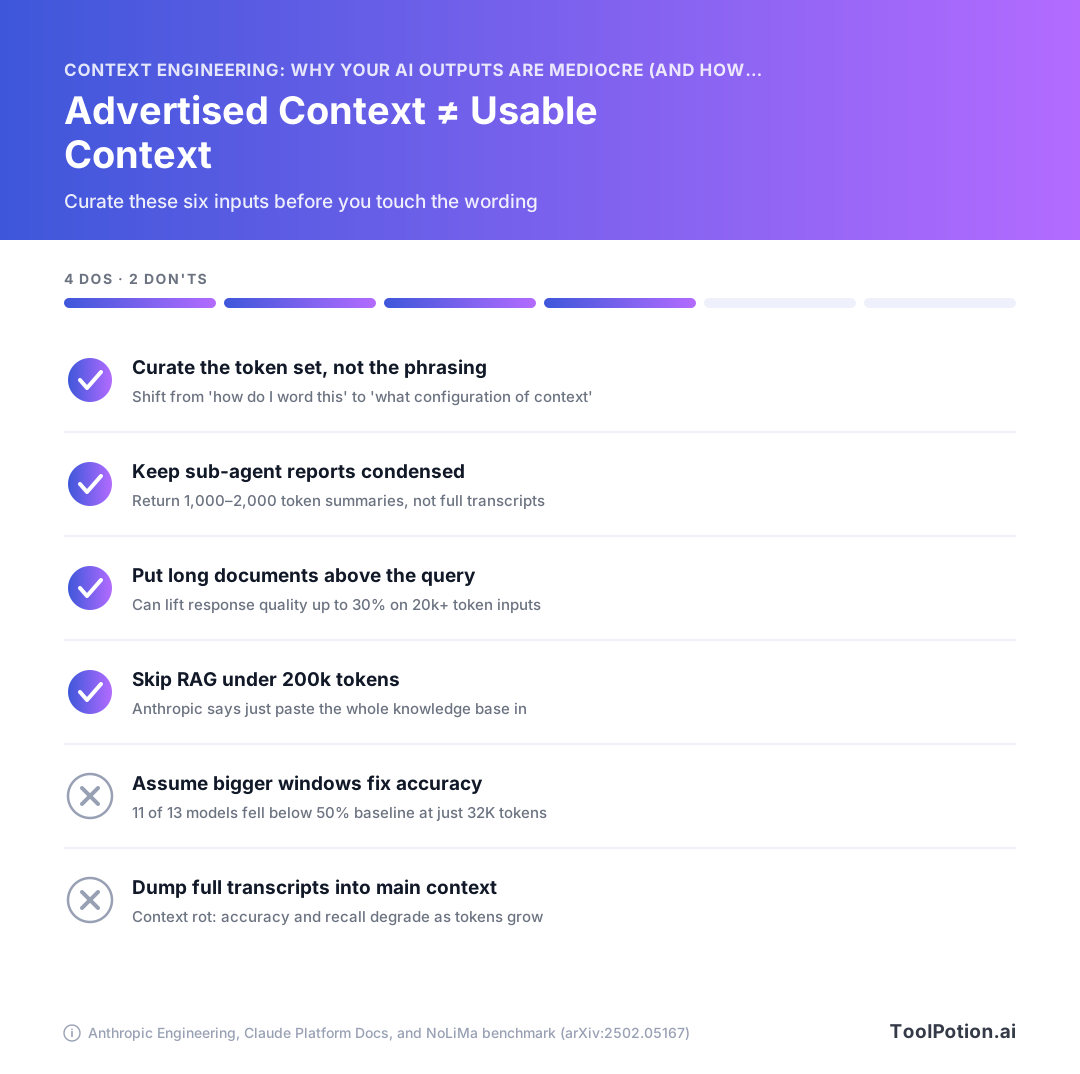
The NoLiMa benchmark stripped literal word overlap between the question and the answer buried in the haystack, then ran 13 models that all claim 128K context or more. Below 1K tokens they did fine. At 32K, 11 of the 13 had fallen below half their own short-context baseline, and Llama 3.1 70B went from 94.3% to 42.7% (NoLiMa, arXiv:2502.05167). That preprint is from February 2025, so it predates every model in the table below. The shape of the finding has held up in newer work, but the specific percentages are aging evidence, not a current scorecard.
What today's windows really are (2026 numbers)
| Model | Context window | Max output | Images/PDF pages per request |
|---|---|---|---|
| Claude Fable 5.1, Opus 5, Sonnet 5 (and Mythos 5.1, Opus 4.8/4.7/4.6, Sonnet 4.6) | 1M tokens, default, standard pricing | 128k | 600 |
| Claude Sonnet 4.5 and older | 200k | — | 100 |
| OpenAI GPT-5.4 | 1,050,000 tokens | 128,000 | — |
Anthropic ships that 1M window with no beta header and no surcharge (Claude Platform docs). OpenAI's is nominally larger and priced differently: go past 272K input tokens on GPT-5.4 and the whole session bills at 2x input and 1.5x output (OpenAI API docs). Bloat is a line item there, not just a quality tax.
If you're comparing capacities across vendors, check the model's own spec page rather than a roundup: windows changed twice in 2026 alone, and stale tables are everywhere. Our directory of 324 AI models is a starting point for finding the right page.
Context rot: why adding more usually makes outputs worse
The degradation has a mechanism, and it isn't mysterious. A transformer has to model n² pairwise relationships across n tokens, so every token you add makes every other token compete a little harder for the model's attention. Anthropic's engineering team calls this a finite attention budget, analogous to human working memory, and says attention gets "stretched thin" as context grows. Their prescription is blunt: find "the smallest possible set of high-signal tokens that maximize the likelihood of some desired outcome."
The attention budget problem
Anthropic's own product docs concede the point rather than spin it. "More context isn't automatically better," the platform documentation says. "As token count grows, accuracy and recall degrade, a phenomenon known as context rot." That's the vendor selling you a 1M-token window telling you not to fill it.
Same question, same answer, 375x the noise
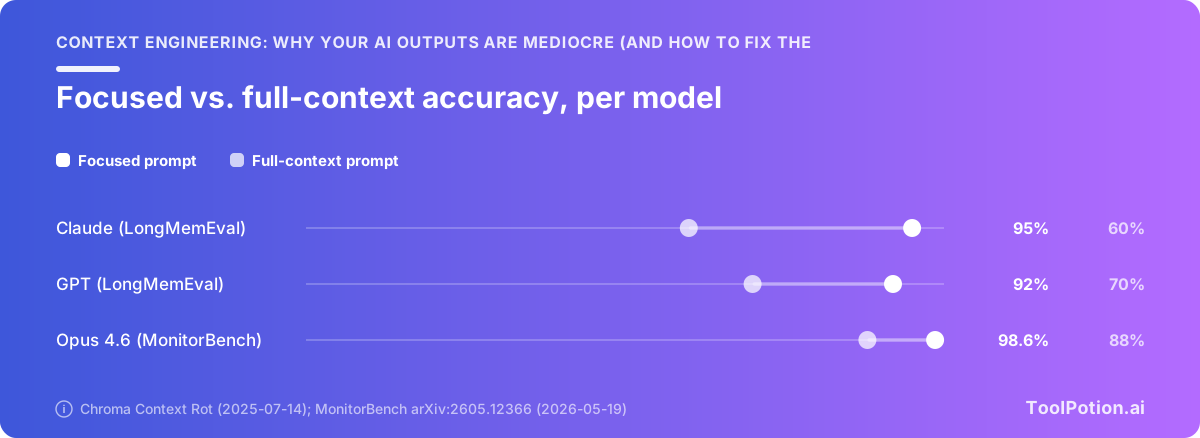
Chroma tested 18 models, including GPT-4.1, Claude 4, Gemini 2.5 and Qwen3, and found reliability drops with longer inputs even on trivial tasks like retrieval and word replication (Chroma). The LongMemEval run is the one to remember. Every model family did significantly better on focused prompts of roughly 300 tokens containing only the relevant turns than on full prompts of about 113k tokens carrying the whole conversation history, with Claude models showing the widest gap. Same question. Same answer sitting in the context both times. The only variable was how much irrelevant material surrounded it.
Chroma also found that models scored better on shuffled haystacks than on logically coherent documents, across all 18. Coherent surrounding text gives the model more plausible-looking places to land. That report went out on 2025-07-14, so it's over a year old and predates the current model generation.
The effect hasn't aged out. On MonitorBench, prepending 800k tokens of benign, irrelevant actions dropped Opus 4.6's recall from 98.6% to 88% (arXiv:2605.12366). Nothing about the task changed. Only the padding.
Where it bites you in normal use
You've already seen this without naming it. The chat that nailed your brief at message 12 and is producing generic filler at message 90, because the brief is now buried under 78 messages of half-abandoned drafts. The NotebookLM notebook where you added 40 sources for thoroughness and started getting vaguer answers than you got at eight. The coding session where the model forgets a constraint you stated an hour ago and confidently rewrites around it.
None of that is the model getting lazy. It's you spending the attention budget on tokens that don't earn their place.
Document preparation: the step almost everyone skips
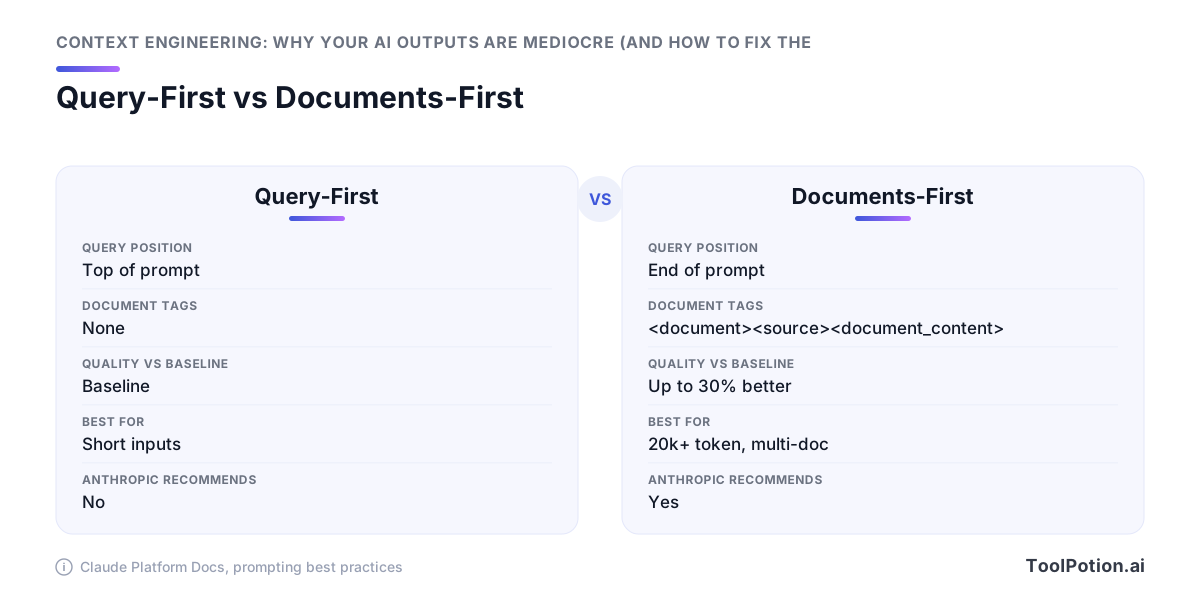
Where you put a document in the prompt changes the answer you get back. For inputs over 20,000 tokens, Anthropic's prompting docs tell you to place longform data at the top, above your query, your instructions and your examples: "queries at the end can improve response quality by up to 30 percent in tests, especially with complex, multidocument inputs" (Claude Platform docs). Most people do the opposite. They type the question, then paste the report underneath it.
Put the long stuff at the top
The same docs give you a scaffold worth copying verbatim: wrap each document in <document> tags with <source> and <document_content> subtags, so the model can tell where one file ends and the next begins (Claude Platform docs). Then ask it to quote the relevant passages before it answers. That one line forces the model to locate evidence in the text instead of reconstructing it from whatever it half-remembers, and it gives you something checkable when the answer looks wrong.
<document>
  <source>Q3-board-deck.pdf</source>
  <document_content>...full text here...</document_content>
</document>
<document>
  <source>renewal-contract-2026.pdf</source>
  <document_content>...full text here...</document_content>
</document>

Before answering, quote the passages you relied on.
Question: which renewal terms conflict with the Q3 revenue plan?
Tag your sources so the model can cite them
One caveat before you standardize on this: the vendors disagree. Anthropic puts long data first; Google's guidance points the other way, telling you to close with your instructions. So a prompt template lifted from a Gemini tutorial and pasted into Claude can underperform without ever looking broken. Run the same document set both ways on whichever model you actually pay for, ten questions each, and keep the order that wins. It's twenty minutes of work against a claimed 30% swing.
Parser choice decides what the model even sees
None of this rescues a mangled extraction. A scanned invoice table that comes out as a single run-on line, a two-column paper interleaved row by row, a footnote spliced mid-sentence: the model reads that garbage faithfully and answers from it. Your extraction step sets the ceiling on accuracy, and everything downstream is capped by it. Treat the parser as a quality decision and test two or three on your ugliest real file before you commit. Our directory lists 217 AI document and PDF tools, and the gap between the good and bad ones shows up in your outputs, not in their marketing pages.
Retrieval hygiene: fewer, better chunks beat more chunks
Before you build a retrieval layer, check whether you need one. Anthropic's own guidance says that if your knowledge base is smaller than 200,000 tokens (about 500 pages), you can just include the whole thing in the prompt with no retrieval at all (Anthropic Engineering). Most internal wikis, product handbooks and policy sets fit under that line.
Do you even need retrieval?
If your corpus fits, skip the vector database. You'll avoid chunking decisions, embedding drift and a whole class of silent failures where the right paragraph never made it into the prompt. Pair that with prompt caching so you're not paying full price for the same 200k tokens on every call.
Above that size, retrieval stops being optional and quality becomes a stack of small fixes that compound.
The three fixes that compound
Anthropic benchmarked them one at a time. Prepending chunk-specific context to each chunk before embedding cut top-20 retrieval failures from 5.7% to 3.7%, roughly a 35% reduction. Adding contextual BM25 hybrid search took failures to 2.9%, a 49% cut. Layering a reranking pass on top brought it to 1.9%, a 67% total reduction (Anthropic Engineering). Each step is unglamorous on its own and the three together roughly triple the improvement of the first.
Trimming tool definitions counts too
Tool schemas are context. If you hand a model forty tool definitions and it needs two, you've paid for thirty-eight distractors. The RAG-MCP work retrieved only the relevant schemas instead of listing all of them and cut prompt tokens by more than half while tool-selection accuracy went from 13.62% to 43.13% (arXiv:2505.03275). That's the same discipline as chunk selection, applied one layer up.
Anthropic's sub-agent pattern extends it again: specialised agents do the digging and return condensed summaries of about 1,000 to 2,000 tokens to a coordinating agent, so the main context never sees the raw search transcripts (Anthropic Engineering). If you're picking components rather than writing them, our directory lists 550 AI agents and a set of retrieval and agent frameworks that implement these patterns out of the box.
Memory features: which knob to turn in each tool
Every consumer AI product now injects things into your context that you didn't type. Saved facts, prior chats, app activity, uploaded project files. You can't do context engineering in a chat app until you know what's already sitting in the window before your first word.
A wrong memory costs more than no memory. It's high-signal-looking text the model treats as fact, and it sits close to your instructions where attention is strongest. Stale job titles, an old client name, a preference you set once for a one-off task: each one quietly biases every answer after it.
ChatGPT: two independent toggles
ChatGPT's memory is two mechanisms, not one. Saved memories are discrete stored facts you can read and delete individually, while chat-history reference pulls from your prior conversations through a separate retrieval path (Embrace The Red). Turning one off leaves the other running. If your outputs still smell like last month's project after you cleared saved memories, the history toggle is the one you missed.
Claude: project knowledge and mid-conversation memory writes
Since the Cowork unification on 25 August 2026, Claude writes memories mid-conversation rather than only at session boundaries, so what you say in chat carries into later sessions (TechCrunch). That means an offhand aside can become durable context.
Project knowledge is the better lever, because it's a corpus you chose. Keep it under Anthropic's 200,000-token rule of thumb (roughly 500 pages) and it can ride along whole with no retrieval layer guessing which chunks matter (Anthropic). Prune it like a reading list, not an archive.
Gemini: three overlapping systems where 'off' isn't 'deleted'
Gemini layers personal context, saved info you wrote yourself, and activity from connected Google apps. Disabling a source stops new writes. It doesn't remove what's already stored, so an audit means visiting each control separately and deleting, not just switching things off.
NotebookLM: the source-limited alternative
NotebookLM caps how many sources a notebook can hold, and the cap works in your favor. It forces the curation the other three let you skip, which is the same discipline Anthropic prescribes: find the smallest set of high-signal tokens that gets the outcome you want (Anthropic). When a question needs eight documents and not eighty, start there.
Pick one tool as your memory-bearing assistant and keep the rest clean. Across the 13,174 AI apps in our directory, the ones that make memory auditable per item are worth more than the ones that promise it remembers everything.
Project-level instructions are reusable context
The cheapest context you'll ever write is the context you write once. Every serious AI tool now has a slot for standing instructions that get injected into every session: AGENTS.md and CLAUDE.md in a repo, Claude Projects, ChatGPT custom instructions, Copilot instruction files. Most people leave those slots empty and then retype the same three paragraphs of background into every new chat.
Why a standing instruction file beats re-explaining
A study across 10 repositories and 124 pull requests measured what a repository-level AGENTS.md file does to an agent's behavior, and the result isn't only about correctness. Median runtime fell 28.64%, from 98.57 seconds to 70.34 seconds, and output tokens dropped 16.58% at comparable completion rates (arXiv:2601.20404). The agent stopped exploring to figure out things you already knew.
That's the argument in a sentence. Good standing context makes the model faster and cheaper, not just more accurate, because most of what an agent burns tokens on is rediscovering your conventions. If you're picking among the 260 AI coding assistants in our directory, whether the tool reads a project instruction file is a better filter than most feature comparisons.
What actually belongs in one
Keep it short enough that you'd read it yourself. Five things earn their place:
- Conventions the code doesn't announce, like which test runner is real and which one is dead.
- Your vocabulary. If "account" and "tenant" mean different things here, say so once.
- The output shape you want back, in the format you want it (a diff, a table, five bullets).
- A short never-do list. Don't touch generated files, don't add dependencies without asking.
- Where the source of truth lives, so the model queries it instead of guessing.
Leave out anything the tool can read for itself. Directory trees, file listings, restated function signatures, a summary of your README. Those are tokens spent duplicating something the agent can fetch in one call, and they compete for attention with the instructions that matter. Rewrite the file when it starts getting ignored, which usually means it got too long.
Context bloat has a price tag
Sloppy context costs money on the invoice, not just quality in the output. Two pricing mechanics make that concrete, and both reward the same discipline: a small, stable, ordered prefix.
The 272K step-function on GPT-5.4
OpenAI's GPT-5.4 takes a 1,050,000-token context window with up to 128,000 output tokens, but prompts above 272K input tokens get "priced at 2x input and 1.5x output for the full session" (OpenAI API docs). Read that carefully. Crossing the line once doesn't cost you a little extra on the overflow. It reprices the whole session, output included, so a single careless paste of a 300K-token dump doubles your input bill for every turn that follows.
You're paying double for the tokens most likely to be degrading your answer anyway.
Caching rewards a stable prefix
The Claude API prices cache reads at 0.1x base input, a 90% discount, while cache writes cost 1.25x on the 5-minute TTL or 2x on the 1-hour TTL (Claude Platform docs). Their worked example: 100k tokens reused ten times runs $1.075 against $5.00 uncached, a 78.5% saving.
That discount only lands if the prefix matches byte for byte. Caching keys on an exact prefix, so if you reorder your documents, swap a timestamp into the system prompt, or shuffle tool definitions between turns, you pay the write price again instead of the read price. The habit that keeps the cache warm is the same one that keeps recall high: put the stable material first in a fixed order, and let only the query change at the end.
A context audit you can run this week
Nothing here needs an API key or an engineering ticket. Every item is a knob you already have.
Six checks before your next long session
- Open a new chat instead of extending yesterday's. Chroma's focused prompts (~300 tokens of relevant turns) beat full 113k-token histories across every model family they tested, with Claude showing the widest gap (Chroma).
- Read your stored memories and delete the stale ones. Saved facts get injected whether or not they help.
- Attach three good documents rather than twelve mediocre ones, and wrap each in
<document>tags with a<source>subtag so the model can tell them apart (Claude docs). - Put the long material above your question. On 20k+ token inputs that ordering is worth up to 30% better responses in Anthropic's tests (Claude docs).
- Write the standing instructions down once. A repo-level AGENTS.md cut median runtime 28.64% and output tokens 16.58% across 124 PRs (arXiv).
- Keep that prefix identical turn to turn. Stable prefixes hit the cache at 0.1x input price (Claude docs).
The one habit that fixes most bad outputs
Before you rewrite the prompt, look at what's already in the window and take something out. Anthropic's own docs say it: "more context isn't automatically better" (Claude docs). Change what you feed the model before you change how you ask it.
Frequently Asked Questions
What is context engineering, and how is it different from prompt engineering?
Anthropic defines context engineering as "the set of strategies for curating and maintaining the optimal set of tokens (information) during LLM inference, including all the other information that may land there outside of the prompts" (Anthropic Engineering). Prompt engineering asks how to word a request. Context engineering asks which configuration of context is most likely to produce the behavior you want, and it covers everything that occupies the window: the system prompt, every message including tool results, images and PDFs, the tool definitions themselves, and the model's own output including extended thinking (Claude Platform docs). Anthropic frames it as the natural progression of prompt engineering rather than a replacement for it.
Does a bigger context window always mean better AI output?
No. Advertised context and usable context are two different numbers: the NoLiMa benchmark tested 13 models that all claim 128K support or more, and at 32K tokens 11 of the 13 scored below half their own short-context baseline, with Llama 3.1 70B falling from 94.3% to 42.7% (arXiv:2502.05167, February 2025). Anthropic's own platform docs put it plainly: "more context isn't automatically better. As token count grows, accuracy and recall degrade" (Claude Platform docs). Filling the window also costs money in steps rather than in a line, since OpenAI bills GPT-5.4 prompts above 272K input tokens at 2x input and 1.5x output for the full session (OpenAI API docs).
What is context rot and how do I avoid it?
Context rot is the degradation of accuracy and recall as the token count in a request grows, and Anthropic names it in its own documentation (Claude Platform docs). Chroma's Context Rot study tested 18 models including GPT-4.1, Claude 4, Gemini 2.5 and Qwen3, and found reliability drops with longer inputs even on trivial retrieval and word-replication tasks; in its LongMemEval test, every model family did better on a focused ~300-token prompt than on the same question buried in ~113k tokens of conversation history, with Claude models showing the widest gap (Chroma, July 2025). Avoid it by pasting only the passages that matter, starting fresh chats for new topics instead of extending old ones, and having specialized agents return condensed 1,000 to 2,000 token summaries to a coordinating agent rather than full transcripts (Anthropic Engineering).
Should I turn off ChatGPT, Claude or Gemini memory?
It depends on the task, because memory injects tokens you didn't choose into a window where everything counts against the total (Claude Platform docs). For routine drafting where the model knowing your role, style and stack saves you retyping it, leave it on. For high-stakes analysis of a specific document, start a clean chat with memory off, since Chroma found every model family answered better from a focused ~300-token prompt than from the same answer surrounded by ~113k tokens of unrelated history (Chroma). Treat memory as a standing prompt you're paying for on every turn, and prune it the way you'd prune a system prompt.
Do I need RAG, or can I just paste my documents into the prompt?
Anthropic's guidance is that retrieval is often unnecessary at small scale: "If your knowledge base is smaller than 200,000 tokens (about 500 pages of material), you can just include the entire knowledge base in the prompt" (Anthropic Engineering, September 2024). Above that, retrieval hygiene compounds in Anthropic's benchmark: prepending chunk-specific context before embedding cut top-20 retrieval failures from 5.7% to 3.7%, adding contextual BM25 hybrid search took it to 2.9%, and a reranking pass took it to 1.9%, a 67% reduction overall. If your corpus fits, pasting is the better default, and prompt caching makes reuse cheap at cache reads priced at 0.1x base input (Claude Platform docs).
Where should I put long documents in a prompt — before or after my question?
For Claude, put the longform data at the top, above your query, instructions and examples. Anthropic's prompting docs give this as a concrete rule for inputs of 20k tokens or more and say "queries at the end can improve response quality by up to 30 percent in tests, especially with complex, multidocument inputs" (Claude Platform docs). The same docs recommend wrapping each document in <document> tags with <source> and <document_content> subtags, and asking the model to quote the relevant passages before it answers. Vendors don't agree on ordering, so a template copied from one provider's cookbook can underperform on another's model, and it's worth running both orderings once on your own task.