A saved prompt is a liability. It lives in one vendor's interface, nobody else can read it, and when the product gets renamed it can vanish. A skill is the same instruction with a trigger, examples and an owner, stored in a folder you control, and that's the version that survives.
The timing isn't academic. Google is retiring Gemini's Gems on personal accounts and converting them to "skills" on a schedule it has set for later in 2026, with users invoking them by typing "/" in a task thread (TechCrunch). A day later OpenAI expanded ChatGPT's plugins with sidebar homes, interactive panels and a Plugin Creator (TechCrunch). Custom GPTs, Gems, plugins, apps and skills are all names for the same instinct: stop retyping instructions.
If you built a few dozen of those assistants, you now have two jobs. Keep what you built, and make it portable enough that the next rename costs you an afternoon instead of a quarter. This guide covers how to do both, with a template, a test routine, a migration checklist and a plain answer to when you shouldn't bother.
Why your saved assistants keep getting renamed
Gems launched in 2024 as task-specific assistants you could build without repeating instructions, and you could share them too. Google's own help page now says Gems will go away on personal accounts and transition automatically to skills (Google Gemini Help). TechCrunch notes the automatic migration means users take no action, and also that skills are summoned with a slash command, which it calls an interface engineers tend to prefer.
Automatic migration sounds safe, and for the text of your instructions it mostly is. Google says supported knowledge files come along too, but its skill uploads take plain-text files, PDFs and images and not Word or Excel files, and its transition page lists sharing and Drive-linked files as arriving in the coming weeks (Gemini Help, upload rules). A migration moves content. It doesn't move the examples you kept in your head, or whoever on your team knew when to use which Gem.
The pattern repeats across vendors. OpenAI's earlier sharing format was the custom GPT, and its current developer docs describe plugins that package skills alongside an MCP server (OpenAI Developers). Anthropic's skills don't even sync between its own products. Per Anthropic's docs, a skill uploaded to claude.ai isn't available in the API, and Claude Code skills are filesystem-based and separate from both (Claude docs). Assume every platform will rename, merge or split what you saved there.
What a skill is, minus the marketing
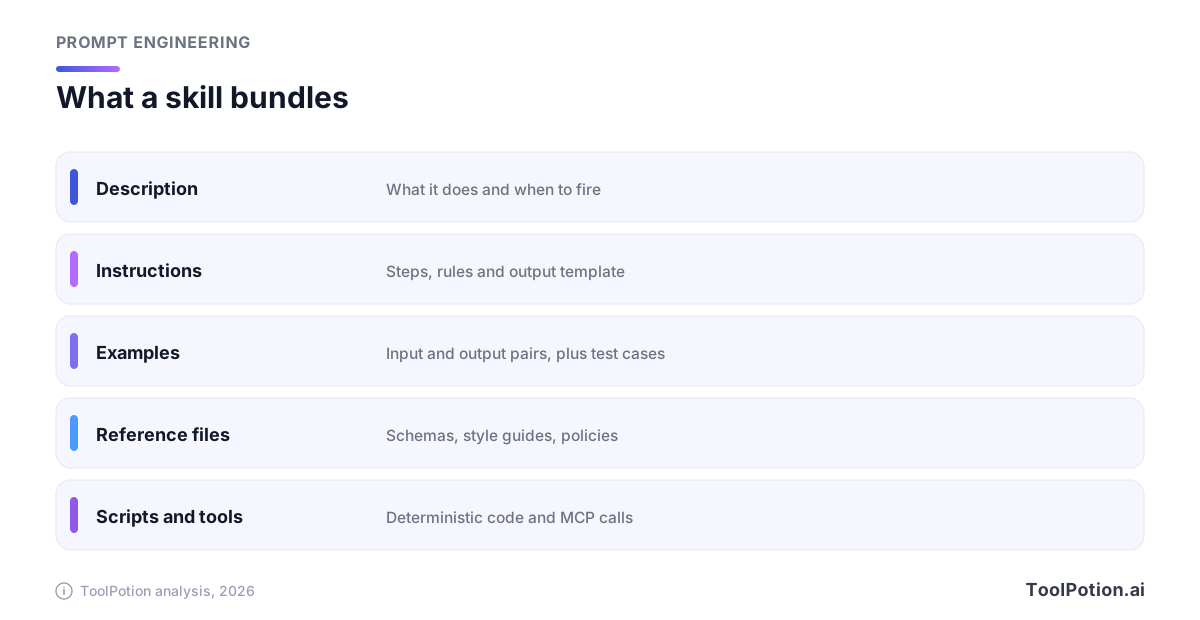
A skill is a folder. In Anthropic's definition it holds instructions, scripts and resources that an agent can discover and load dynamically for a specific task (Anthropic Engineering). The only required file is SKILL.md, which opens with a name and a description and continues with the instructions.
The description does the most work. At startup the assistant loads only each skill's name and description (roughly 100 tokens apiece, per Anthropic), and it matches your request against that text to decide whether to open the rest. A vague description means the skill never fires. A greedy one means it fires on everything. Anthropic's guidance is to say both what the skill does and when to use it, written in the third person.
That's the first thing a saved prompt lacks. A prompt waits for you to paste it. A skill has a trigger, so the assistant can pick it up without being asked. Everything else in a good skill follows from taking the trigger seriously.
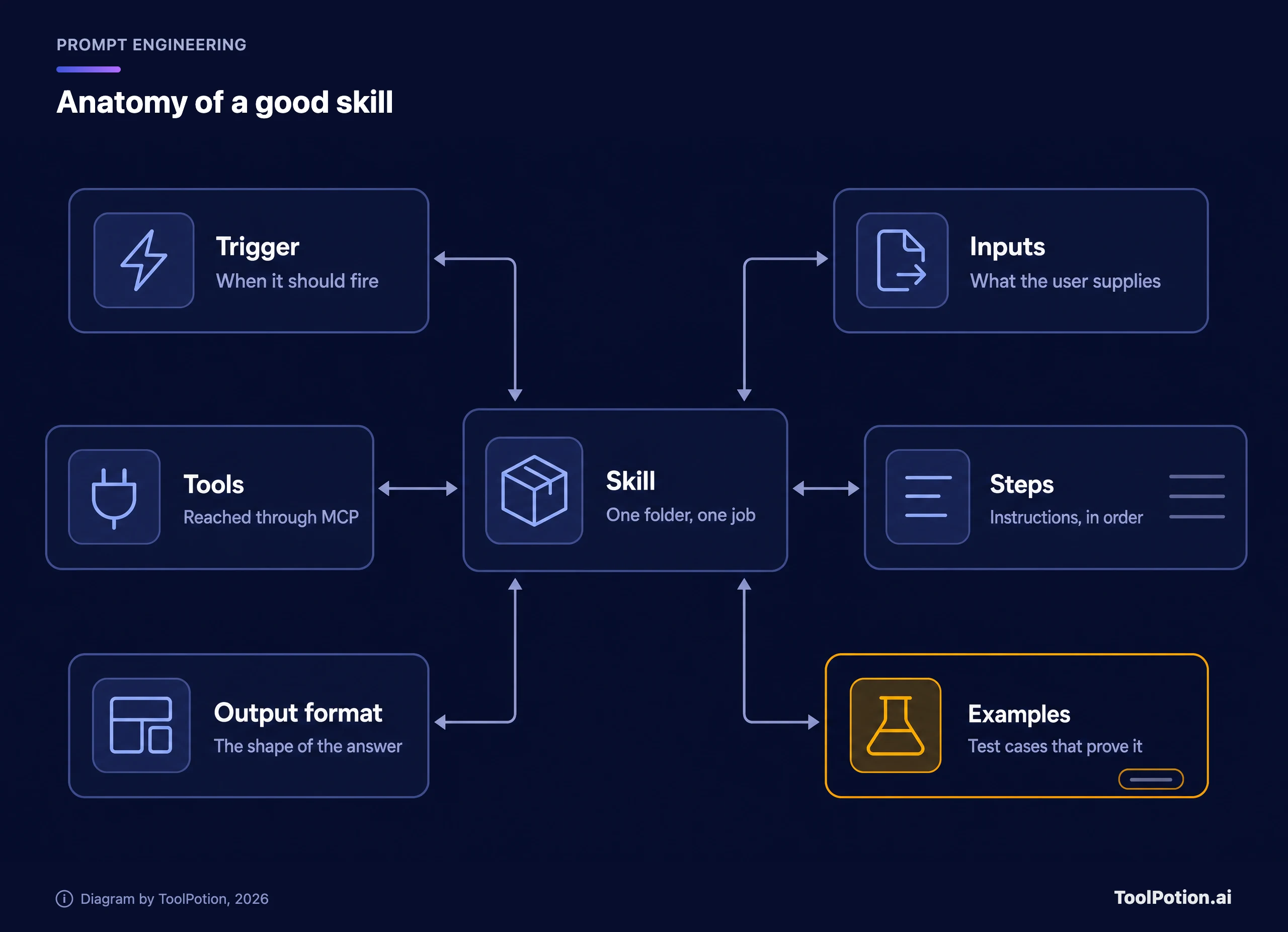
The anatomy has six parts. The trigger says when to fire. Inputs say what the user must supply and what's optional. Steps are the instructions in order. Tools name anything the skill must reach outside the chat to use. Examples show real inputs next to accepted outputs. The output format pins down the shape of the answer, which is what makes results comparable across runs.
Examples deserve the most attention. They do double duty, because the same input and output pairs that teach the assistant what you want also become the test cases that tell you when an edit broke something. Skip them and you've written a prompt in a folder.
Skills are converging on one file format
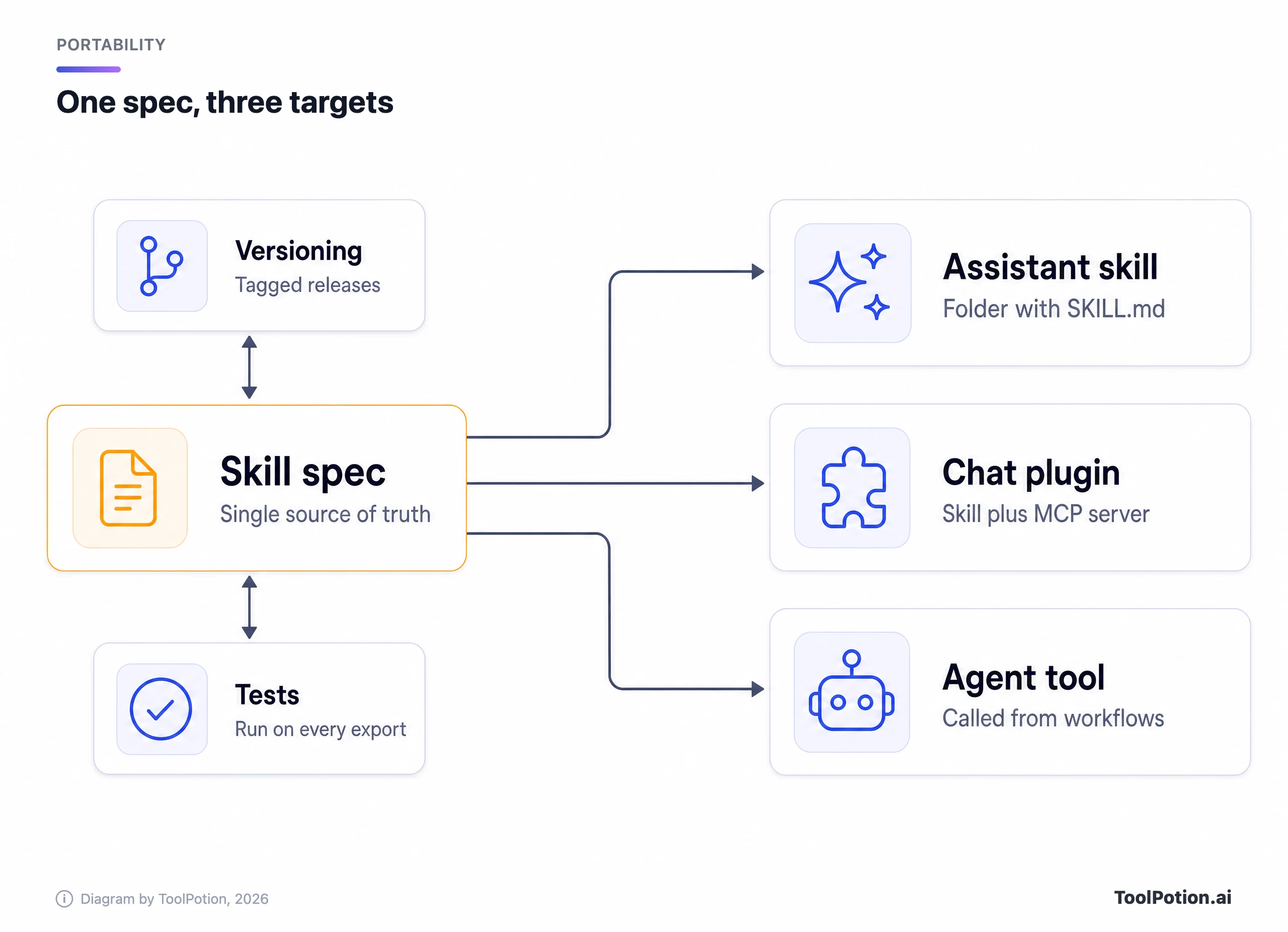
Here's the good news for anyone worried about lock-in. The format is settling. Anthropic published Agent Skills as an open standard for cross-platform portability in 2025, and the public spec lives at agentskills.io. A skill is a directory with a required SKILL.md, optional scripts/, references/ and assets/ folders, a name of up to 64 lowercase letters, numbers and hyphens, and a description of up to 1,024 characters (Agent Skills spec).
OpenAI's documentation says its skills build on that same open standard. Each skill is a directory with a required SKILL.md carrying name and description frontmatter, and you invoke one explicitly with @ in ChatGPT or $ in Codex, or let the model pick it from the description (OpenAI). Google's Gemini CLI docs say its skills are based on the same standard (Gemini CLI docs), and the Gemini app's help pages say you can import skills made on other platforms by uploading their SKILL.md files (Gemini Help). We found no Google statement that the app implements the full open spec, so test an upload before you rely on it.
So the portable core is already three vendors deep. Claude and Claude Code read it, ChatGPT and Codex do by OpenAI's account, and Google Gemini accepts uploads of it. Keep the same folder as your source of truth and re-run your examples after each upload. Gemini's upload rejects binary formats such as .docx and blocks scripts that call external sites (Gemini Help).
Write the skill so it survives the move
Portability is mostly discipline. Four habits cover most of it.
- Keep the source of truth in a plain folder under version control, never only inside a vendor's editor. The vendor copy is a deployment.
- Write instructions that name outcomes and formats, not product features. "Return a table with three columns" ports anywhere. "Use the canvas panel" doesn't.
- Put anything long (a style guide, a schema, a policy) in its own reference file and link it one level deep from
SKILL.md. Anthropic warns that deeper chains get read partially. - Keep it short. Anthropic recommends a body under 500 lines, and the open spec suggests staying under about 5,000 tokens for instructions.
Here is what that looks like for a task most teams repeat, the weekly client update.
---
name: drafting-client-updates
description: Drafts a weekly client status update from raw project notes. Use when the user pastes notes, a ticket export or a standup log and asks for a client-ready update.
metadata:
  owner: ops-team
  version: "1.2"
---

# Drafting client updates

## Inputs
- Required: raw notes for the week
- Optional: client name, tone (default: plain and direct)

## Steps
1. Group items into Done, In progress and Blocked.
2. Drop internal ticket IDs and jargon.
3. Lead with the one thing the client must decide, if any.

## Output
Use the template in references/update-template.md.

## Examples
See examples/ for three accepted drafts.
Notice what's missing: no flattery, no "you are a world-class account manager", no explanation of what a status update is. The assistant already knows. Anthropic's own advice is to challenge every paragraph with the question of whether it justifies its token cost, and to add only context the model doesn't have.
Also notice the metadata block. The open spec defines it as a free-form key-value map, which makes it a sensible home for an owner and a version number. Check that your platform keeps it on import.
Test it like software, because it is
The most useful line in Anthropic's authoring guide is to build evaluations before you write extensive documentation. The loop is short. Run the assistant on representative tasks without the skill and note where it fails. Write three scenarios that expose those gaps. Add just enough instructions to pass them. Then compare against the baseline.
Three is Anthropic's minimum, listed in its pre-share checklist, and it's a floor. Pull five to ten real inputs from your own work and keep the outputs you actually accepted. That folder is your regression suite. After every edit, and after every platform change, run the inputs again and read the diffs. It's cheap, and it's the only thing that catches silent drift.
Test across models too. Anthropic's guide says a skill that works perfectly on its most powerful model may need more detail on its small one, so run it on every model you plan to use. The same holds when you move between vendors. A skill tuned in one assistant isn't tested in another until you've run the examples there.
If you want tooling, Promptfoo runs saved cases against prompts in CI, and PromptLayer tracks prompt versions and runs. Our prompt engineering tools board ranks more. None of them is required. A folder of examples and a checklist gets you most of the way, and our durable prompting playbook covers the patterns that hold up when the underlying model changes.
Where MCP fits
A skill tells the assistant how to do a job. It doesn't give the assistant access to anything. For that you need tools, and the portable way to supply them is the Model Context Protocol, an open standard for connecting AI applications to external systems that its documentation compares to a USB-C port (MCP docs). Claude, ChatGPT, Cursor and VS Code are among the clients it lists. The Model Context Protocol servers repository is a place to see working examples.
OpenAI's plugin docs draw the line cleanly: use the skill for workflow instructions and the server for live data, authorization and controlled actions. If a skill requires an MCP server, it declares the dependency in agents/openai.yaml. Skills imported from a plugin's MCP server during submission become a snapshot in the draft, and ChatGPT and Codex don't fetch them from your server at runtime (OpenAI Developers). The practical consequence is that after you change the skill, you redeploy the server and scan it again before submitting a new plugin version.
Anthropic adds a small authoring rule that saves real debugging time. Refer to MCP tools by fully qualified names, ServerName:tool_name, because a bare name can fail to resolve when several servers are connected.
Shopify shows where this is heading. It exposes a hosted MCP server for server-to-server agents and the proposed WebMCP standard for browser agents, and it just added get, update and complete checkout tools so an agent can read the checkout screen and submit an order with the buyer's authorization instead of scraping pages (TechCrunch). If you run a Shopify store, the tool layer is becoming something the platform ships. Your skill's job is the judgment around it.
OpenAI's own announcements point the same way. ChatGPT now suggests apps mid-conversation, with the company citing 1.2 billion weekly users (TechCrunch), and OpenAI said its plugin update added support for the proposed MCP Events specification, which would let connected-app events start automations (TechCrunch). The more your tools sit behind MCP, the less any one assistant's plugin format matters.
Sharing with a team without creating a second mess
Where a skill lives decides who can use it, and the rules differ by product. In Claude's docs, custom skills in claude.ai belong to the individual user, so each teammate uploads separately and admins can't distribute them centrally. On the API they're workspace-wide. In Claude Code they sit in a personal folder or a project's .claude/skills/ directory, which means they travel with the repository.
The repository answer is the best one for most teams. Put skills in git, review changes like code, tag releases, and let people pull. Copying a zip file between laptops is how you end up with seven versions of the client-update skill and no idea which one is right.
Every shared skill needs a named owner, a version and a changelog line per edit. It also needs a security review. Anthropic's docs say to treat skills like installed software, to audit bundled scripts and to be wary of any skill that fetches external URLs, because fetched content can carry malicious instructions. That applies to skills your colleagues wrote and to ones from public collections such as SkillsMP, which indexes skills from public GitHub repositories.
Use the scorer below on a skill you already have. It's our own checklist, not a standard, and it's blunt on purpose. The trigger, examples, test set and off-platform copy count double because the sections above argue they decide whether a skill can be tested and moved.
A migration checklist for every saved assistant
Do this once per assistant, before the vendor forces the issue. Most of the time goes to finding the original knowledge files.
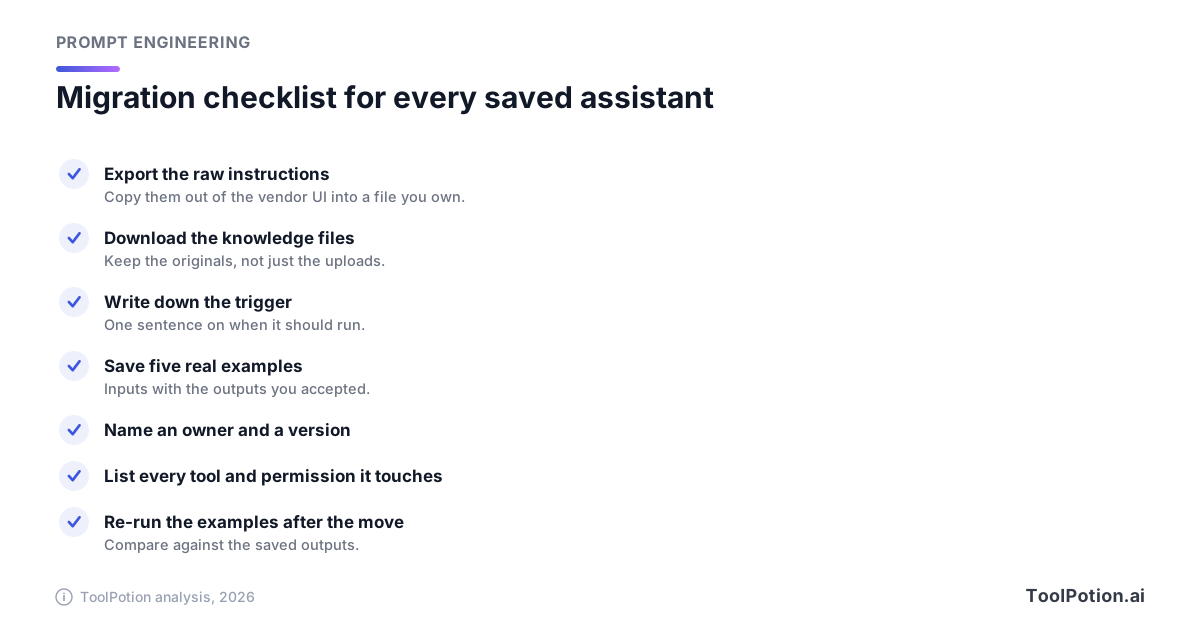
The re-run step matters most and gets skipped most. A converted Gem that reads fine but quietly changed its output format is worse than one that visibly broke, because nobody notices for a month. If the saved outputs don't match, fix the skill, not your expectations.
Write the trigger sentence even for assistants you invoke by hand. The exercise forces you to decide what the thing is for, and some saved assistants turn out to be two jobs wearing one name. Split those.
When not to build a skill
Most prompts shouldn't become skills. A task you'll run twice is a prompt. Packaging it costs more than it saves, and an unmaintained skill that fires at the wrong moment is worse than none, since it clutters the pool the assistant chooses from.
Fixed steps with no judgment are often better as a plain automation. If every run is the same trigger, the same API calls and the same output, a workflow tool such as n8n or Zapier is cheaper and more predictable than asking a model to follow a recipe (our agents versus automation tools guide covers the split). Reach for a skill when the work needs language, judgment or messy inputs.
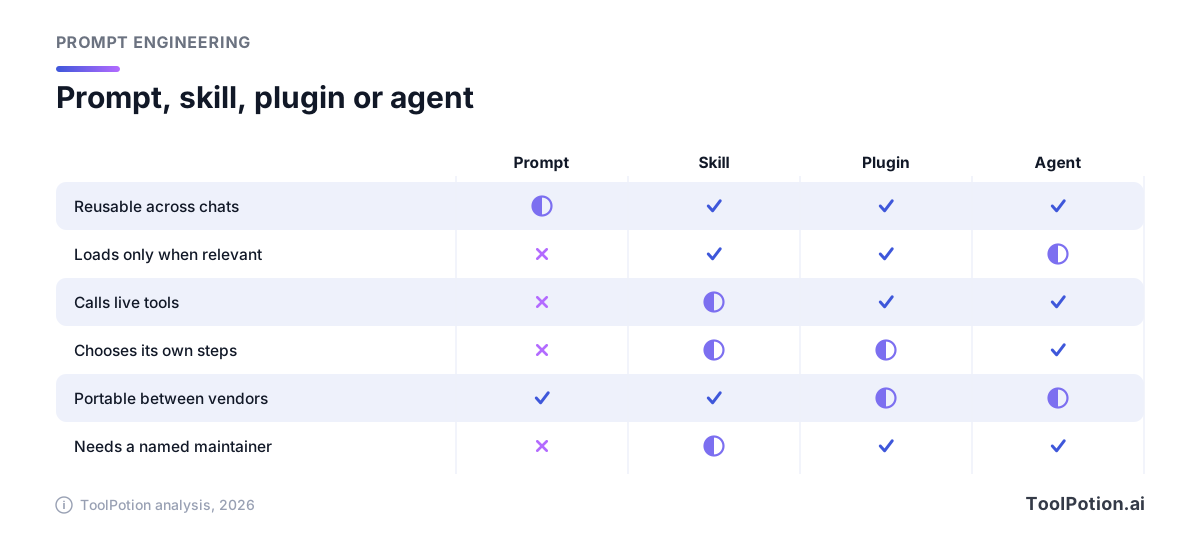
And when the path itself changes with each input, you want an agent, with skills and tools as parts it can pick up. Our top AI agents board ranks the options. The comparison below is our own editorial grouping, not a vendor spec or measured data. A tick means the sections above support it, such as skills loading on a description match or plugins adding a live tool server. A half circle means it depends on the vendor or setup, as with plugin formats that differ per assistant.
If you're still unsure, the tree below sorts most cases in three questions. For wider context on picking tools and habits that hold up, see our practical prompt engineering guide and our board of top AI tools for prompt engineers.
One last data point on timing. OpenAI says it has improved how its plugin directory ranks and recommends plugins (TechCrunch), and its enterprise marketplace launched with more than 30 partners including Adobe, Figma and Salesforce (TechCrunch). A skill that's documented and tested is something you can submit, share or retire on your own schedule. A saved prompt is something you can only hope the vendor keeps.
Frequently asked questions
Are Gems, custom GPTs and skills the same thing?
They overlap but aren't identical. All three save instructions for reuse. Skills add a description-based trigger and, in the open format, scripts and reference files loaded only when needed. Gems and custom GPTs were mostly instructions plus uploaded knowledge in one vendor's editor.
Will my Gems convert to skills without work?
Google says the migration is automatic and requires no action from users, and that supported files transition with the Gem. Your instruction text should carry over. Check that attached files, shared access and any output format you relied on still behave the same by running your saved examples.
Can one skill run in Claude, ChatGPT and Gemini?
The SKILL.md format is an open standard, and both Anthropic's and OpenAI's docs describe it. Google's Gemini app also accepts SKILL.md uploads, with limits on scripts and file types. For any of the three, keep one folder as your source and re-run your examples after each upload.
How long should a skill be?
Short. Anthropic recommends a main file under 500 lines and the open spec suggests keeping instructions under roughly 5,000 tokens. Move long references into separate files that load only when needed.
Do I need MCP to build a skill?
No. A skill with instructions, examples and a template needs no tools at all. Add MCP when the skill must read live data or take actions, and keep the permissions in the server rather than in the instructions.
Who should own a team's skills?
One named person per skill, plus a shared repository. Ownership means answering questions, reviewing edits and rerunning the examples after platform changes. Without it, skills decay at the same rate as the wikis they were meant to replace.