The new Siri that shipped with iOS 27 is a real assistant at last. Apple calls it Siri AI, it reads your messages, mail and screen, it takes actions inside apps, and it runs on a new generation of Apple models that Apple says were built in collaboration with Google's Gemini team (Apple Newsroom). It's also a beta, it sits behind a waitlist, and it doesn't work everywhere.
Most people want four answers: what it does, whether your iPhone qualifies, whether your language and country are covered, and how much Google is inside. This guide takes them in that order, then covers privacy, how Siri AI compares with the chatbot apps already on your phone, and the exact steps to switch it on. Apple's own pages come first. Where reporters add detail, it's labeled as reporting.
One naming note. Apple's materials use "Siri AI" for the new assistant and "Apple Intelligence" for the system underneath. ToolPotion lists the pair on one page as Apple Intelligence and Siri, and that's how most people will meet them.
What the new Siri can do
Apple describes five core abilities in its launch announcement. Siri AI understands personal context across messages, emails and photos. It has onscreen awareness, so it can answer questions about whatever is on your display. It pulls in broad world knowledge from the web. It takes more systemwide app actions. And it keeps conversations going, so you can extend almost any answer with a follow-up.
Apple's own examples are concrete. Ask what a relative suggested doing during a visit, and Siri can search your messages, find a mention of baking a family recipe, pull the instructions from an email, and add the ingredients to Reminders. While looking at a team's website, you can ask it to find the home games and put them on your calendar. In the Camera app, a new Siri mode lets you point at a festival poster and ask for set times, then have Siri create the calendar events.
A few other pieces matter day to day:
- A dedicated Siri app holds your conversations, and Apple says it uses iCloud to sync the history across iPhone, iPad, Mac, Apple Watch and Apple Vision Pro.
- Write with Siri drafts or edits text almost anywhere you type, and in Mail and Messages it can match your usual tone and punctuation with each recipient.
- You can start Siri with "Hey Siri," the side button, or a swipe down from the Dynamic Island.
- Third-party apps already work for actions like texting in WhatsApp or playing a book in Audible, and Apple says Notability and Tripsy support is coming soon.
- Apple says you can build complex Shortcuts automations just by describing what you want.
Does it hold up? Tech journalist David Pogue ran 125 requests in a public write-up. By his count, 112 worked fully, 3 worked partly and 10 failed. The misses include paying with Venmo, where Siri replied that Venmo hasn't added support yet, and answering Health-data questions. That's one tester's list, not a lab benchmark, but it shows where the gaps are.
Which iPhones get which features
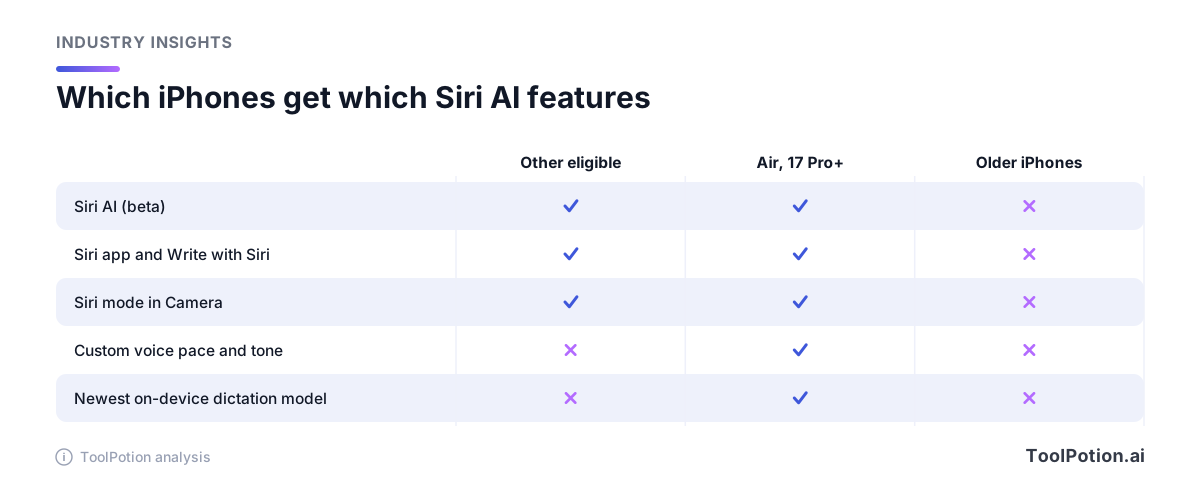
Siri AI needs an Apple Intelligence iPhone. Per Apple Support, that means iPhone 15 Pro and later, iPhone 16 models or later, and iPhone Air. Apple's iOS 27 page lists far older phones as able to install iOS 27, including the standard iPhone 15 and 15 Plus, so a phone can run the update and still not get the new Siri.
Within the supported group, the top tier gets a few extras. Customizing the expressiveness and pace of Siri's voice, and more advanced dictation, come from Apple's most powerful on-device model. Apple's footnote says that model is available on iPhone Air, iPhone 17 Pro and 17 Pro Max, iPhone 18 Pro and 18 Pro Max, and iPhone Duo (Apple Newsroom). Everything else in the list works on the wider set.
Storage is the other gate. Apple says Apple Intelligence can take up to 14 GB on the iPhone 17 Pro models and iPhone Air, and up to 8 GB on other eligible iPhones (Apple Support). Free that space before you update. Your device language and Siri language also have to match, and if you change Siri's language, Apple Intelligence may be unavailable until the new language finishes downloading.
Languages, regions and the waitlist
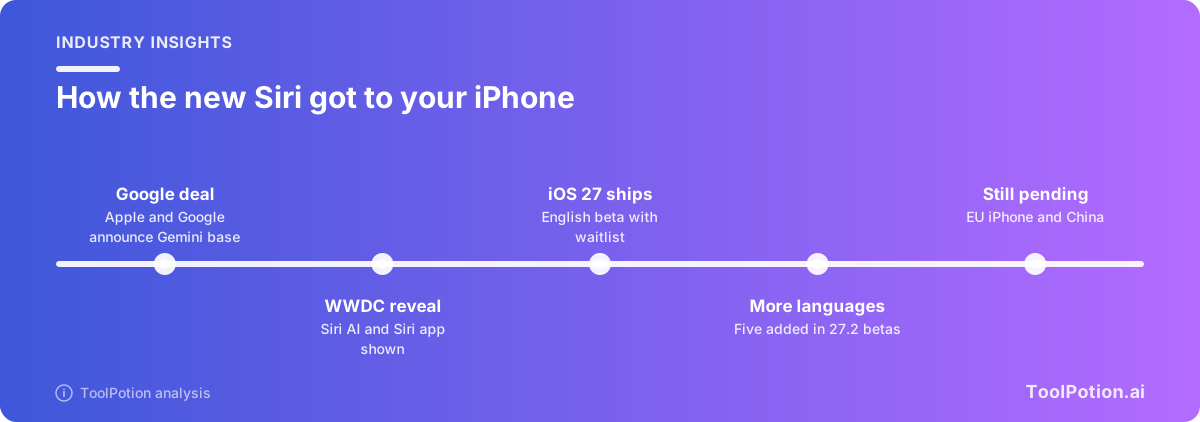
At launch, Siri AI works in English only. Apple's launch release said French, Japanese, Korean, Portuguese and Spanish are coming the month after launch, and 9to5Mac reported that all five appeared in the first iOS 27.2 developer beta. That is a beta, not a public release. Apple Support still says Siri AI is "currently available in English," so treat the other five as coming, and check Settings on your own phone before assuming your language is live.
Regional limits are the bigger story. Apple says Siri AI isn't available in the EU on iOS, iPadOS or watchOS for now, and that it is "working hard to find a path forward" that preserves privacy and security (Apple Newsroom). It is available in the EU on Mac and Apple Vision Pro in English. In mainland China, Siri AI and the other new Apple Intelligence features aren't available while Apple works through regulatory requirements. Apple hasn't said why the EU gap exists beyond that statement, so treat any explanation you read as speculation.
Even in a supported place, you may wait. Apple uses a waitlist, and Apple Support says wait times vary (Apple Support). The small tool below checks the three conditions together.
Apple also says server-backed features, including Siri AI, have daily usage limits, and that expanded access "will be available for a fee in the future" (Apple Support). Apple hasn't published the limits or a price. Plan on the free tier being enough for casual use and unknown for heavy use.
What Apple says about Google and Gemini
Start with Apple's own words. The Newsroom launch release says the new capabilities run on "the next generation of Apple Foundation Models, custom-built in collaboration with Google and its Gemini models" (Apple Newsroom).
That wording follows a joint statement from the two companies. It says the next generation of Apple Foundation Models "will be based on Google's Gemini models and cloud technology," and that Apple Intelligence "will continue to run on Apple devices and Private Cloud Compute" (Google and Apple joint statement).
Apple's technical pages add where the models run. Its research post lists five: two on device, two on Private Cloud Compute servers, and a fifth, AFM 3 Cloud Pro, that Apple says it extended to "NVIDIA GPUs in Google Cloud." Apple's security blog adds that the heaviest tasks, such as complex reasoning, run on Google Cloud systems, with the core Private Cloud Compute requirements unchanged. The other four are optimized for Apple silicon.
How much of each model is Gemini is where Apple stops talking. Neither post spells it out. Macworld's analysis concludes that four of the five are custom versions of Gemini running on Apple silicon, and 9to5Mac's explainer relays that reading along with a Craig Federighi quote that the on-device models were "refined using outputs from Gemini frontier models." Treat that as outside interpretation. Apple hasn't confirmed it.
On what Siri AI isn't, 9to5Mac's reading is that it isn't the Gemini app or a rebadged Google assistant, that it doesn't use Google's web search or knowledge graph, and that Apple retrained the models with its own data and guardrails.
How Siri AI handles your data
Apple's privacy claim has three parts. Personal context lookups, such as searching your Spotlight index and the App Toolbox, work entirely on your device, per the launch release. Requests that need a bigger model go to Private Cloud Compute, where Apple says your personal data is "not stored nor made accessible to Apple or anyone else," and that outside experts can verify the promise. And Apple calls Siri "the world's most private digital assistant," which is a marketing claim, not a measurement.
The open question is the largest model. Apple's security blog says Private Cloud Compute now reaches Google Cloud hardware, with requirements it lists as stateless computation, no privileged runtime access and verifiable transparency, plus a verifiable ledger of that hardware. 9to5Mac's writer adds a fair caveat: this setup is new, so you're trusting an implementation that outsiders have had less time to audit.
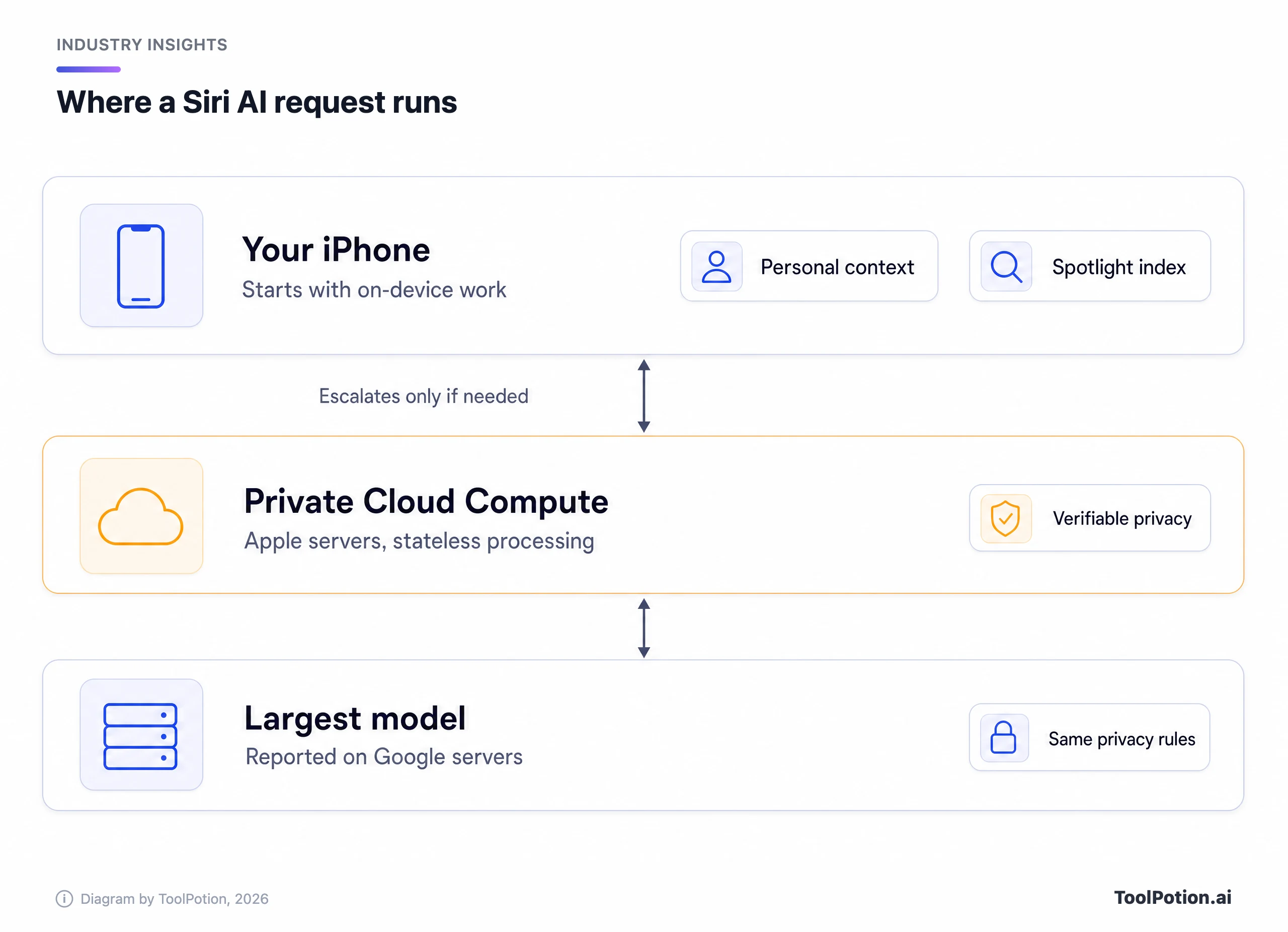
Two practical points. Conversation history in the Siri app syncs through iCloud, so it's tied to your Apple Account and your iCloud settings. And anything you type or say to a Siri AI request is a request to a server-backed service whenever it needs one, so the usual advice holds: don't dictate secrets you wouldn't put in any assistant.
Siri AI versus the chatbot apps on your iPhone
Siri AI wins on access. It can see your messages, mail, photos and screen, and it can act inside apps. A chatbot app like ChatGPT, Claude, the Google Gemini app or Perplexity only knows what you paste in or share. For "what time is my dinner and what's the address," that's a big difference.
The chatbots tend to win on raw reasoning, long documents and personality. 9to5Mac's own writer concedes that if you need the most powerful tool, ChatGPT, Claude or Gemini may serve you better, then argues Siri's restraint is a feature because it doesn't pretend to be human (9to5Mac). That's an opinion, but it fits Federighi's stated view that Siri is "an integral, conversational tool" and not a separate place to chit-chat (9to5Mac).
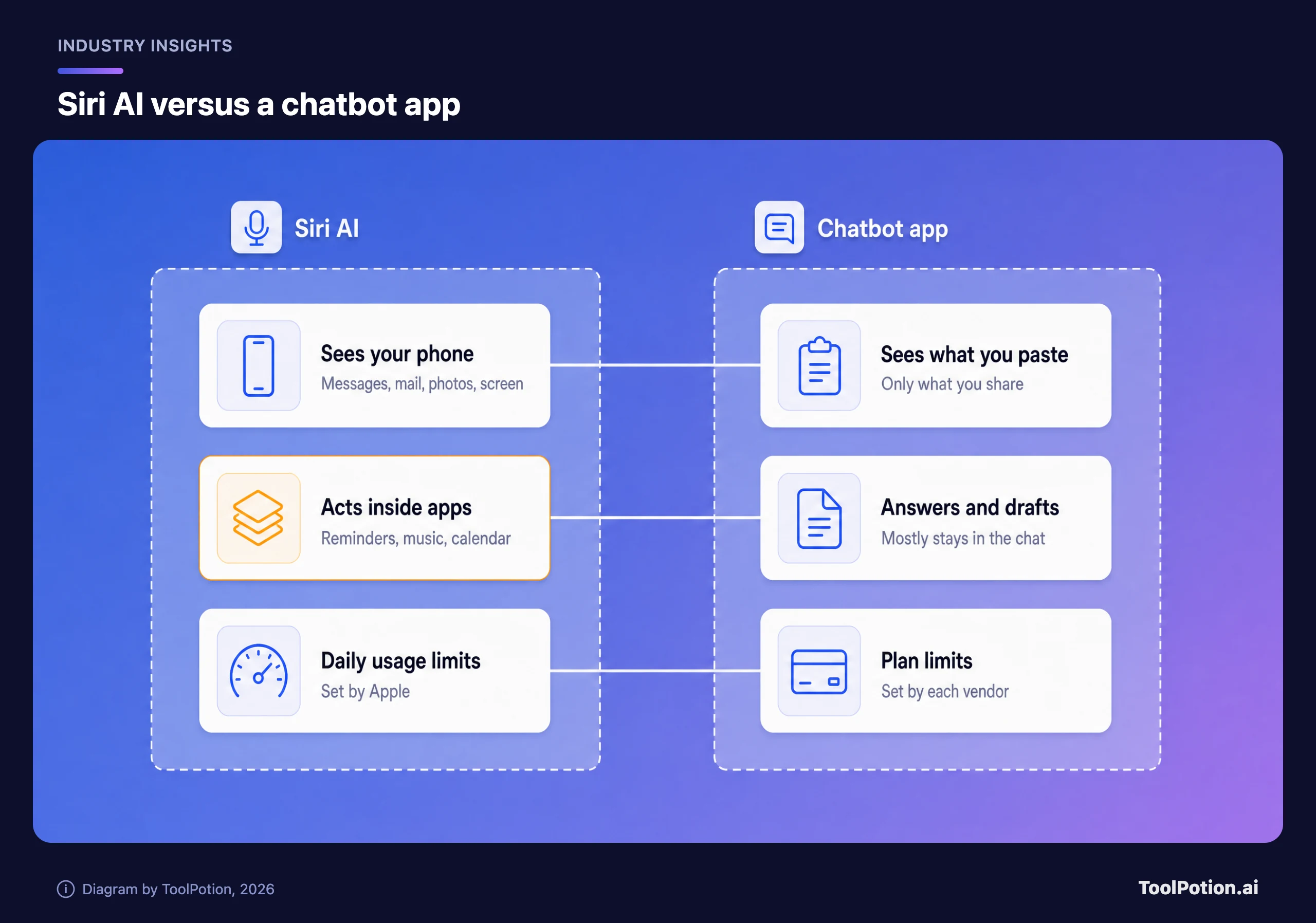
You don't have to choose. Apple Support lists a ChatGPT extension inside Apple Intelligence, available only where ChatGPT is available (Apple Support). ChatGPT is the only chatbot Apple names there. Earlier in 2026, before launch, Bloomberg's Mark Gurman reported that Apple planned to let apps like Claude plug into Siri (relayed by 9to5Mac). That was reporting. Apple Support's pages don't list any other chatbot, so check each app's release notes. If you want to compare the standalone options, our ranking of the best AI mobile apps, the ChatGPT alternatives guide and the ToolRank board for AI mobile apps are a good start. Google's voice-first option is Gemini Live.
How to turn it on and what to try first
Apple's steps are short (Apple Support).
- Update to iOS 27 and make sure your device language and Siri language are the same supported language.
- Open Settings, tap Siri, and tap Try Siri AI (Beta). If Siri is off, tap Turn On Siri first.
- Follow the prompts to pick a voice, complete voice enrollment and review your privacy settings. That joins the waitlist.
- Wait for the download to start on its own once your turn comes. Plug the phone in on Wi-Fi if you can, since the download is large.
Once it's live, skip the party tricks and test the things old Siri couldn't do. These five prompts show you quickly whether it's worth your habit:
- Ask what people are waiting on you for, and see whether it finds items across Mail, Messages and Reminders.
- Open a long web page and ask for the three points that matter, using onscreen awareness.
- Point the Camera app's Siri mode at a receipt or a poster and ask it to act on what it sees.
- Select a rough paragraph in Notes or Mail and use Write with Siri to tighten it.
- Ask a follow-up to its first answer and see whether the thread holds.
If three of the five work, keep it as your default for phone tasks. For research and long drafting, keep a chatbot from our AI mobile apps board next to it, and read the Apple Intelligence and Siri listing for the current feature list.
Frequently asked questions
Is Siri AI the same as Gemini?
No. Apple says its new models were built in collaboration with Google and its Gemini models, but it presents Siri AI as its own assistant running on Apple Foundation Models (Apple Newsroom, joint statement).
Which iPhones can run Siri AI?
Apple Support lists iPhone 15 Pro and later, iPhone 16 models or later, and iPhone Air. The standard iPhone 15 and older phones can install iOS 27 but don't get the new Siri (Apple Support).
Is Siri AI free?
Apple says server-backed features have daily usage limits and that expanded access will cost money in the future. It hasn't published prices or the limits.
When will Siri AI reach the EU and other languages?
Apple hasn't given a date for the EU on iPhone. It said French, Japanese, Korean, Portuguese and Spanish would follow English the month after launch, and they appear in a beta so far. Mainland China is excluded for now.
Does Google see my Siri requests?
Apple says Private Cloud Compute doesn't make your data accessible to Apple or anyone else. Apple's security blog says its most demanding tasks run on Google Cloud hardware under the same Private Cloud Compute requirements, which outside researchers can examine over time.