An AI recorder is only as private as the least informed person in the room. The device's own settings matter, but the bigger risk sits with the people who never agreed to be captured. If you wear one, you carry the disclosure job, and in much of the United States and Europe the law agrees.
That tension got louder in 2026. A former Plaud executive, Peter Mo, raised $26 million for Ambi, an app that can listen in the background all day and surface suggestions mid-meeting (TechCrunch). Its CEO told the outlet that disclosure is unsolved: "We, as an industry, haven't solved this problem." This guide covers what these tools capture, where the audio goes, what the vendors say in their own privacy pages, the consent rules in plain terms, and a checklist you can finish before you buy.
One note on scope. Everything here is general information, not legal advice. Recording law varies by place and by situation, and a lawyer is the right call for anything high stakes.
What always-on capture changes
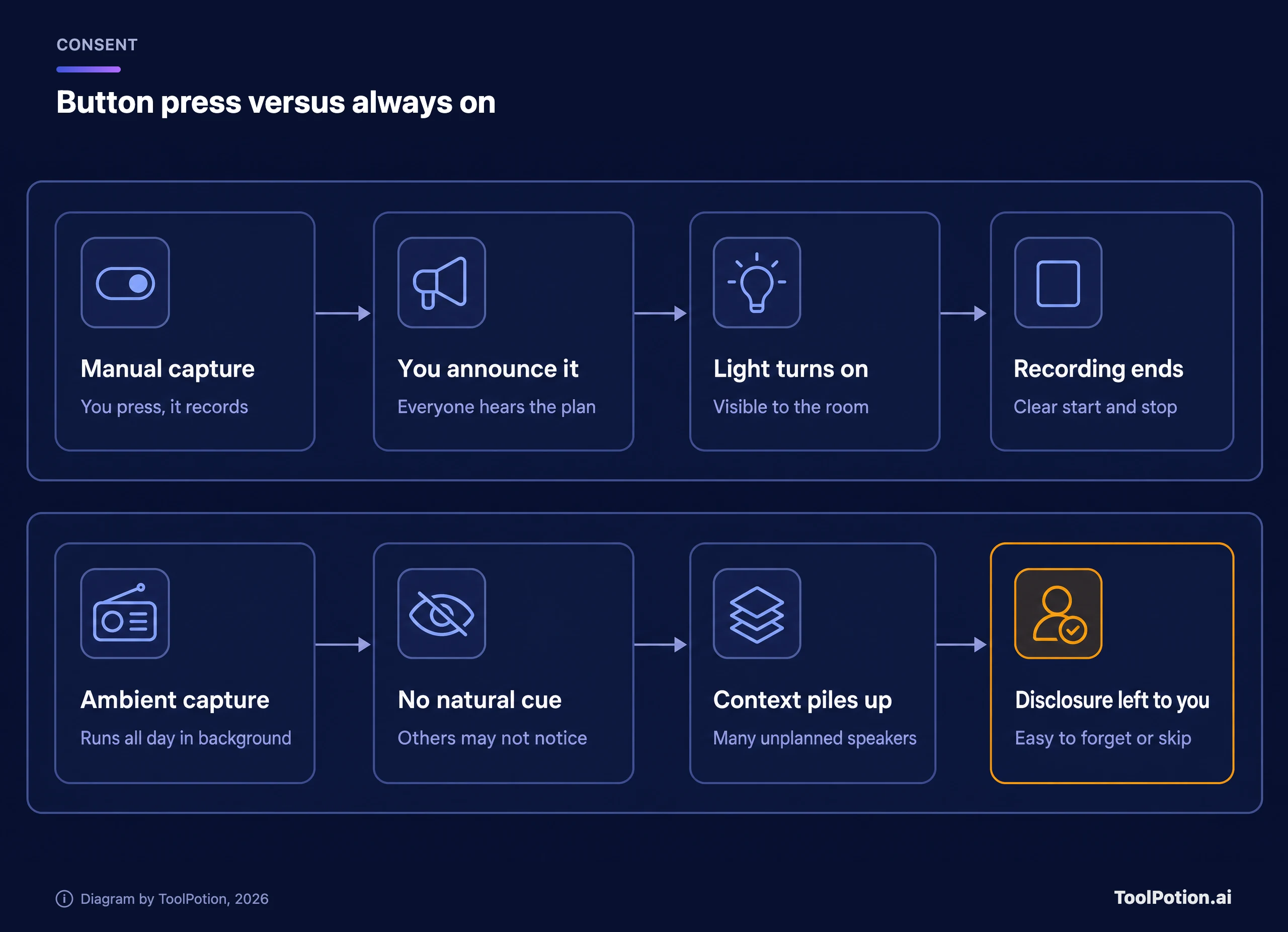
A meeting recorder used to be a deliberate act. You opened an app, announced it, and hit record. Wearables and ambient apps flip that. The pitch is context: the more the assistant hears, the better it can remind you, summarize your day and answer questions about last Tuesday.
TechCrunch put the catch bluntly. It noted growing concern about AI devices that don't have enough indicators to show they're capturing people nearby, and said some meeting notetakers have already been sued over recording conversations without consent. Ambi's CEO says its ambient mode is off by default and can be switched off at any time, and that the company doesn't store recordings of users, though it didn't say what encryption it uses. He said users have to tell others about ambient capture, and TechCrunch noted the onus stays on them.
That last point is the whole privacy question in one sentence. A button-press recorder gives everyone nearby a natural cue. An always-on one removes the cue and leaves a human to remember a courtesy.
The category also shifts fast. Limitless said it was acquired by Meta, stopped selling its Pendant and ended recording in its desktop and web apps, while promising support for existing Pendant owners throughout 2026. If you own hardware from a startup, ask what happens to your recordings if it gets bought, because the privacy policy you agreed to can change with the owner.
Limitless gives a fair example of doing the exit well. Its notice says users can export or delete their data at any time, that continuing customers move to the free Unlimited plan, and that in regions where service ended (the EU and UK among them), accounts and associated information are permanently deleted after a download window. Not every company that stops selling hardware will be that tidy, so export what you value and delete what you don't.
Where your audio goes after you press record
Most of these products follow the same chain. A device or app records. A phone app syncs it. Servers store it. A speech model turns it into text, and a language model turns the text into a summary. Each hop is a place where a copy can sit, and each vendor decides how long it stays.
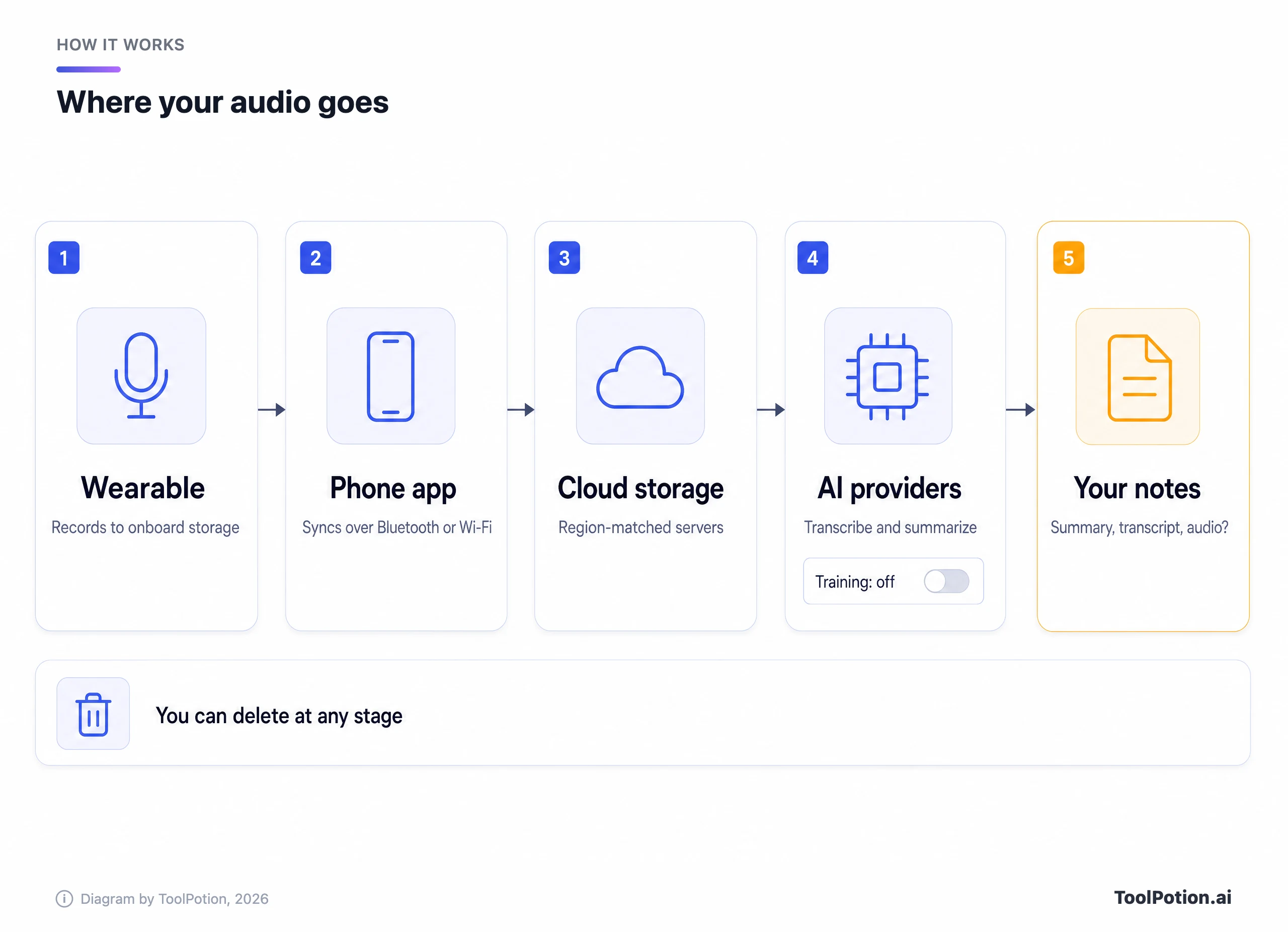
Plaud's policy is a useful reference because it spells the chain out. It says your content can include audio files, and that a cloud sync feature stores recordings, transcripts and summaries in your private cloud. Its desktop app can start recording automatically when it detects a supported meeting app running, and Plaud says that detection happens on your device and doesn't analyze meeting content. Servers sit in the United States, Germany, Japan and Singapore, and your data is stored in the region matching your location (Plaud privacy policy).
Plaud also says it shares content with the large language model providers it uses only to perform the task you asked for, under contracts that bar training and limit retention. And it says it will never train on your content without explicit consent. You can delete individual files, unbind and reset a device to clear its data, or delete your whole account. On the hardware side, the Plaud NotePin product page lists 64 GB of local storage (Plaud NotePin page).
That's a reasonably complete disclosure, and it's the standard to measure others against. A vendor that can't tell you where audio is stored, how long it's kept and whether it trains models hasn't earned a place on your lapel.
What the vendors say in their own policies
Policies are marketing and law at once, so read them as promises, not guarantees. Here is what five of them say. Sort the table by any column.
A few patterns show up once you line the policies up. Nobody promises to protect the bystander, only the account holder. Training promises differ in whether they're opt-in or opt-out, and that single word changes what happens to your data if you never open settings. And storing raw audio is a choice, not a technical requirement, since Granola proves a product can work from the transcript alone.
Omi stands out for openness. Its policy, effective in 2026, says conversation audio may be stored in encrypted form for playback and transcript quality, in Google Cloud Storage where used, and that deleting a conversation removes the transcript and any stored audio tied to it. It routes text, not raw audio, to OpenAI, runs speech-to-text on its own infrastructure and states that it doesn't train on your recordings without explicit permission. Omi also says the code is open source and can be run locally, and its site lists the pendant at $129 against a normal $179 (Omi privacy policy).
Granola takes the opposite design stance. You start it manually, it adds no bot to your call, and it says it doesn't store meeting audio, only the transcript and your notes (on mobile it uses temporarily cached audio to transcribe after the meeting). It names Deepgram and Assembly for transcription and OpenAI and Anthropic for summaries, and says those providers aren't allowed to train on your data. Granola itself trains on anonymized data unless you opt out in settings, and enterprise accounts have that turned off by default (Granola security page). It's a notepad, not a wearable, but it shows a retention choice other tools could copy.
Fireflies sits closer to the enterprise end. Its policy says it captures meeting audio and visual files when enabled, and that service providers may derive voice characteristics to tell speakers apart, which some US states treat as biometric data. It says it doesn't use personal information for AI model training, imposes a zero-data-retention policy on vendors handling meeting content, and deletes account data within 30 days of closure. Participants who attended a recorded meeting are told to ask the host for deletion (Fireflies privacy policy).
Bee is harder to pin down. Its site says a single press starts and stops capture and that an LED glows green while it's capturing. Ownership matters here. Amazon confirmed to TechCrunch in 2025 that it was acquiring Bee, though the deal hadn't closed at that point. Today the Bee site's footer reads "©2026 Amazon.com, Inc. or its affiliates," and its "Privacy Notice" link opens Amazon.com's general privacy notice rather than a Bee-specific one. That notice says Amazon uses personal information to develop and deploy its generative AI models (Bee). It describes itself as covering Amazon products, services and devices that reference it, so read it for what it governs. The pages don't say how it applies to Bee recordings specifically.
Recording law in plain terms
In the United States two layers apply. Federal law sets a floor, and each state decides whether to stack more on top.
The federal wiretap statute makes it unlawful to intercept a communication, with an exception for a person who is a party to it or where one party has given prior consent. The exception falls away if the recording is made to commit a crime or a tort (18 U.S.C. 2511, as summarized in RCFP's guide). In practice that means one-party consent. If you're in the conversation, you can record it federally. If you're not, you generally can't.
Many states add their own rule, and some require everyone's consent, but the lists differ by source. The Digital Media Law Project (DMLP) names California, Connecticut, Florida, Illinois, Maryland, Massachusetts, Montana, New Hampshire, Pennsylvania and Washington. Its text says "eleven" states but lists ten, so it's best read as an approximate count (DMLP). The Reporters Committee for Freedom of the Press (RCFP) counts about 11 states that primarily require all-party consent: California, Delaware, Florida, Illinois, Maryland, Massachusetts, Michigan (at least for recordings by someone outside the conversation), Montana, New Hampshire, Pennsylvania and Washington (RCFP guide introduction). The two lists share nine states. They split on Connecticut, which RCFP says requires all-party consent for phone calls (to avoid civil liability) but only one party for in-person talk, and on Delaware and Michigan, where RCFP says state laws conflict or courts disagree, so it advises getting consent. RCFP also puts Nevada in that phone-calls-only group, adds Missouri and Oregon for in-person conversations, and says Hawaii and Maine require all-party consent in particularly private places. Illinois needs a footnote: DMLP says its earlier statute was held unconstitutional in 2014, while RCFP's Illinois page (updated 2020) describes the current law as requiring all parties' consent for private conversations. DMLP also says Massachusetts bans secret recordings rather than requiring explicit consent. When a call crosses state lines, DMLP advises playing it safe and getting everyone's consent. Statutes get amended and courts reinterpret them, so treat any list as a pointer to check with a lawyer or the statute itself, not a verdict.
Two details trip people up. First, the rules cover in-person conversations as well as phone calls, so a pin on your shirt at a table counts. Second, the words "public" and "private" do real work. A talk at a crowded conference hall carries a weaker expectation of privacy than a whispered chat in a hallway, but you can't assume a courtroom will see it your way after the fact.
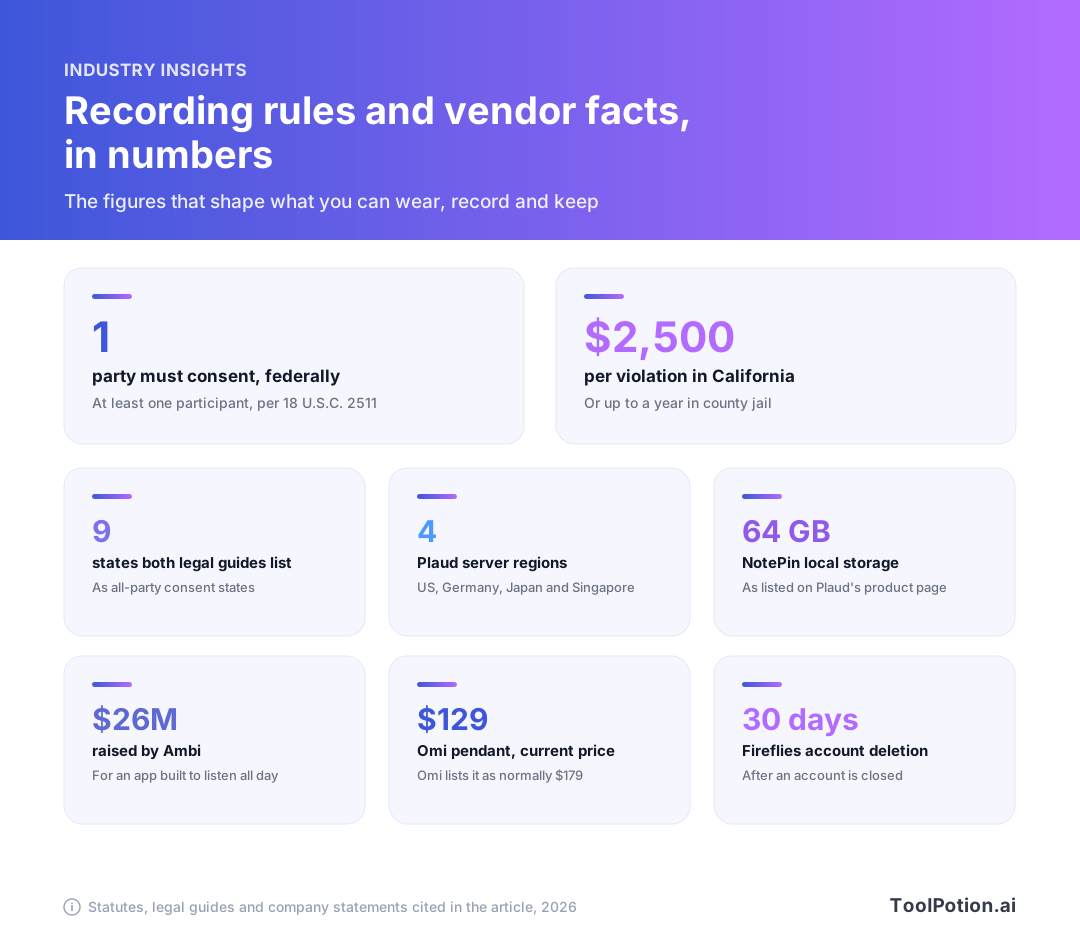
California shows how sharp the consent rule gets. Its penal code covers intentionally recording a confidential communication without all parties' consent, whether the conversation happens in person or over a device. The penalty is up to $2,500 per violation or up to a year in county jail, or both (repeat offenses carry higher fines). The statute defines a confidential communication as one where a party reasonably wants it confined to those present, and it excludes settings where people would reasonably expect to be overheard or recorded (California Penal Code 632). That reasonableness test is why a wearable worn in a quiet one-on-one is riskier than one running at a public conference.
Remember that an always-on device doesn't know which state a person is in. Say you wear a pin in Texas, a one-party state, and chat with a colleague who's dialed in from California. You may have just recorded someone under the stricter rule. That is why the safe habit is the simple one: tell everyone, every time.
The decision tree is general information, not legal advice, and a rule of thumb at that. It can't tell you what a court would decide, and it ignores contracts, workplace policies and special settings like hospitals, schools and courtrooms, which often have their own bans.
The EU starts from different ground
Europe doesn't use the one-party versus all-party split. The GDPR treats a voice recording as personal data, and anyone processing it needs a lawful basis. Article 6 lists six, including consent and legitimate interests, where the latter yields when the individual's rights and freedoms outweigh the organization's interest (GDPR Article 6).
There's an escape hatch for private life. The regulation doesn't apply to processing by a natural person in the course of a purely personal or household activity (GDPR Article 2). A family recording at the kitchen table probably qualifies. A wearable running through a workday at a company almost certainly doesn't, because the activity is professional and the company or you become a data controller with duties to inform people and respect their rights.
Vendors know this. Plaud's policy names a privacy representative for the EU and UK, lists safeguards for transfers such as the standard contractual clauses, and points users to their local data protection authority. That helps with the vendor's obligations. It doesn't discharge yours as the person pointing a microphone at colleagues.
Meeting and workplace etiquette
The law sets a minimum. Etiquette decides whether people keep talking to you. The reliable standard is to behave as if consent were required everywhere, because in some places it is.
Plaud's homepage carries a disclaimer worth borrowing: before you record, take a moment to let others know and get their okay. Say it at the start of the meeting, put it in the calendar invite, and repeat it when someone new joins. With notetaking apps that join video calls, the visible participant is a helpful cue. With a pin, you have to supply the cue yourself.
A short script works better than a legal disclaimer. Try something like: "I use an AI recorder for notes and I'll share the summary afterward. Is that okay with everyone?" Then wait for answers. Silence isn't consent, and a nod from one person doesn't cover the other five.
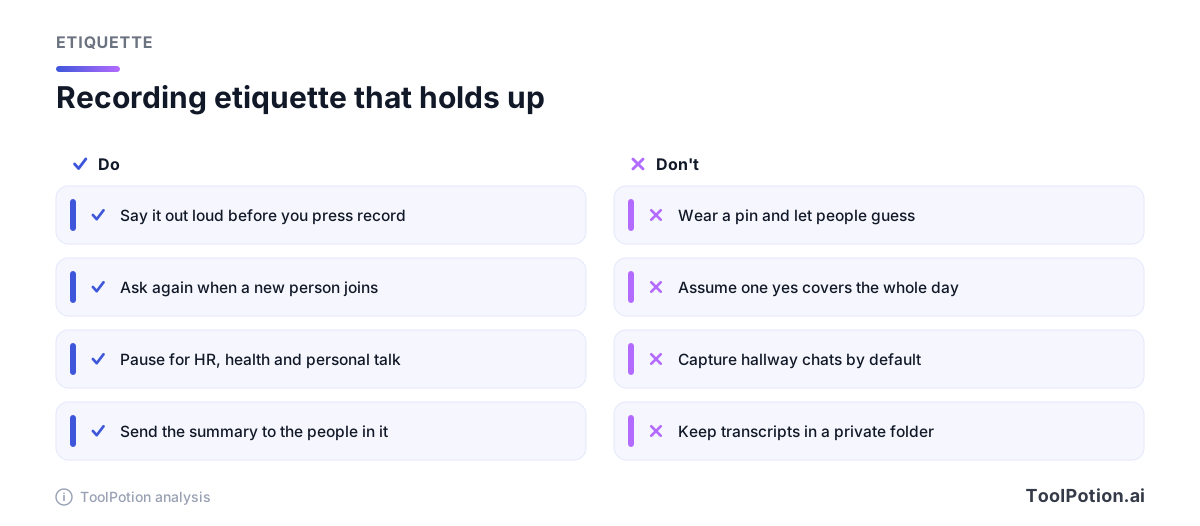
Some rooms should stay off the record by default. Performance reviews, HR conversations, medical and legal talk, and anything involving a person's health or finances all belong there unless every party asks otherwise. And if your employer provides the device or the account, find out who can read your transcripts, since a workspace admin may see more than you assume.
- Offer to share the summary with everyone who was in the room, and delete the audio once the notes are checked.
- If someone says no, stop. Don't argue about the law.
- Keep ambient mode for solo thinking, commutes and your own voice memos, not for open-plan offices.
- At social events and on dates, people aren't expecting a transcript, so the default answer is no.
Features that help, and ones to treat with suspicion
Look for controls that make the right behavior easy. A visible indicator is first. Bee's page says its LED is green while capturing and off otherwise. An indicator only helps if bystanders can see it, so size and placement matter as much as the claim.
Auto-delete and retention controls come next. Granola's decision to keep only transcripts shrinks what can leak. Omi lets you delete a conversation and its stored audio. Plaud lets you delete files or reset a device. What you want is the ability to keep the summary and dump the audio.
On-device processing is the strongest privacy feature and the hardest to verify. Omi says you can run its software locally and keep transcription on your phone on the free plan. Granola transcribes in real time on macOS and Windows. Treat any broader "private" or "secure" claim as unproven until the vendor says where processing happens.
Be wary of anything that makes capture harder to notice, auto-starts without a cue, or buries disclosure settings. Plaud's desktop auto-record can start when a meeting app runs, which is convenient, but it also means you should check your settings before your next call. And where a vendor offers speaker identification, remember it stores voice characteristics, which Fireflies itself flags as potentially biometric under some state laws.
If you want to compare options, our boards of AI meeting assistants, meeting-notes tools and AI privacy tools rank what's in the directory. Rank doesn't measure privacy, so read the policy even for the top result. Our guide to which AI tools you can trust with your data walks through that policy-reading step, and the post on setting up AI meeting notes properly covers the workflow side.
One more habit pays off. After a few weeks, audit what you've stored. Transcripts pile up quietly, and every one of them is a document someone could request, subpoena or leak. Delete what you no longer need, because the safest transcript is one that no longer exists.
A checklist before you buy or wear one
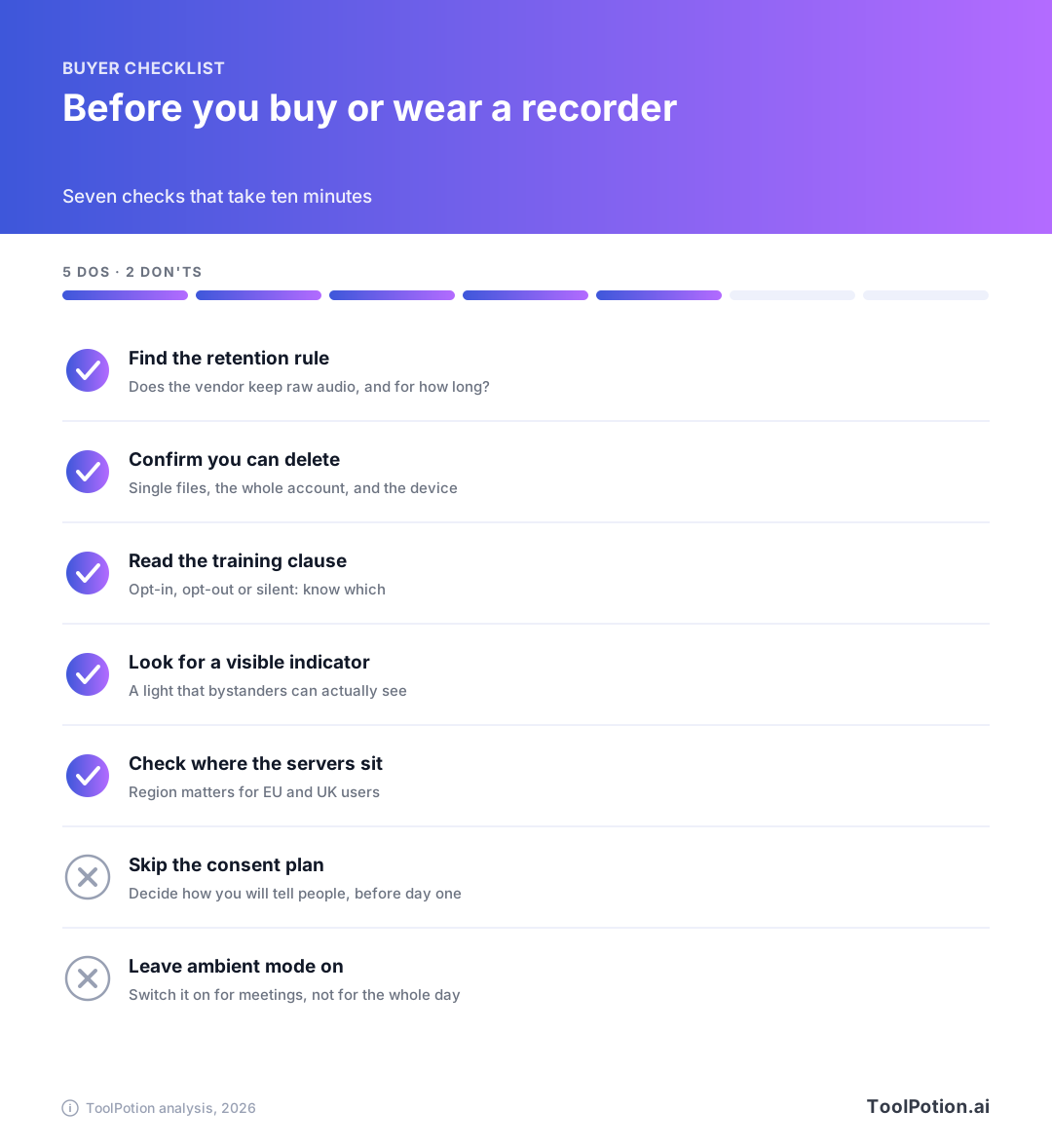
Ten minutes of reading saves a lot of awkward apologies. Start with the vendor's privacy page and answer these before you pay.
- Does the vendor store raw audio, and can you turn that off or delete it?
- Does it train models on your data, and is that opt-in or opt-out?
- Where do the servers sit, and which AI providers see your content?
- What happens to your recordings if the company is sold or shuts down?
- Is there an indicator light that people nearby can actually see?
- Can capture be started only by a button or a calendar event, not by default?
- What will you say to people, and where will you say it?
If you work with clients, add one more: check your contracts and your company's policy. Many NDAs and employment agreements restrict recording regardless of what state law allows. For bot-free options that don't join your calls, look at Bluedot or Spellar, and for call-joining assistants compare Otter.ai and MeetGeek. Each has its own policy, so run the same checklist. Our roundups of top AI meeting assistants and AI transcription tools are a place to start shortlisting, and the transcription board shows the wider field.
Frequently asked questions
Is it legal to wear an AI recorder at work?
It depends on where you are, who you record and what your employer allows. Federal US law lets a participant record with one party's consent, but several states require everyone's, and many workplaces ban recording by policy. In the EU, workplace recording usually needs a lawful basis and notice to the people recorded.
Do I have to tell people I'm recording?
In all-party consent states you do, and across state lines the safest course is to tell everyone. Even where the law doesn't force you, telling people is standard etiquette and is what Plaud's own homepage asks of its users.
Do AI recorders keep my audio?
It depends on the product. Granola says it doesn't store meeting audio. Omi says it may store audio in encrypted form and deletes it along with a conversation. Plaud syncs recordings to your private cloud and lets you delete them. Check each vendor's retention section and your own deletion options.
Can AI recorder companies train on my recordings?
The vendors covered here make specific promises. Plaud, Omi and Fireflies say they don't train on your content without permission or at all, and Granola says it trains on anonymized data with an opt-out. Those are the companies' own statements, so confirm the current text before you rely on them.
Is a personal recording of my own thoughts covered by the same rules?
Recording yourself is generally the simplest case, since no other person's conversation is captured. The rules start to matter the moment someone else's voice is in the audio, so keep ambient mode off around other people.