Good AI image prompts read like a brief to a photographer, not a list of keywords. Every major vendor's own documentation says some version of this in 2026: describe what can be seen, put the main idea first, and fix one thing at a time.
The details differ more than people expect. Midjourney tells you to keep prompts short and simple. Ideogram wants focused full sentences. OpenAI's prompting guide asks for a fixed order and a list of things that must not change. A prompt that works in one tool can underperform in another, so it pays to know which dialect you're writing.
This guide pulls the advice straight from those vendor docs, then turns it into a working method. You'll get the parts of a prompt, what changes per model, how to handle exclusions, eight before-and-after rewrites, and a checklist you can score yourself against.
The parts of a good image prompt
Midjourney's prompt basics page lists the areas worth being clear about: subject, medium, environment, lighting, color, mood and composition (Midjourney docs). Black Forest Labs, the company behind FLUX, suggests a similar order for its newest model: image type and medium, subject, setting, light, then framing and detail. It calls the order "a habit, not a rule," and says to put first whatever matters most (Black Forest Labs).
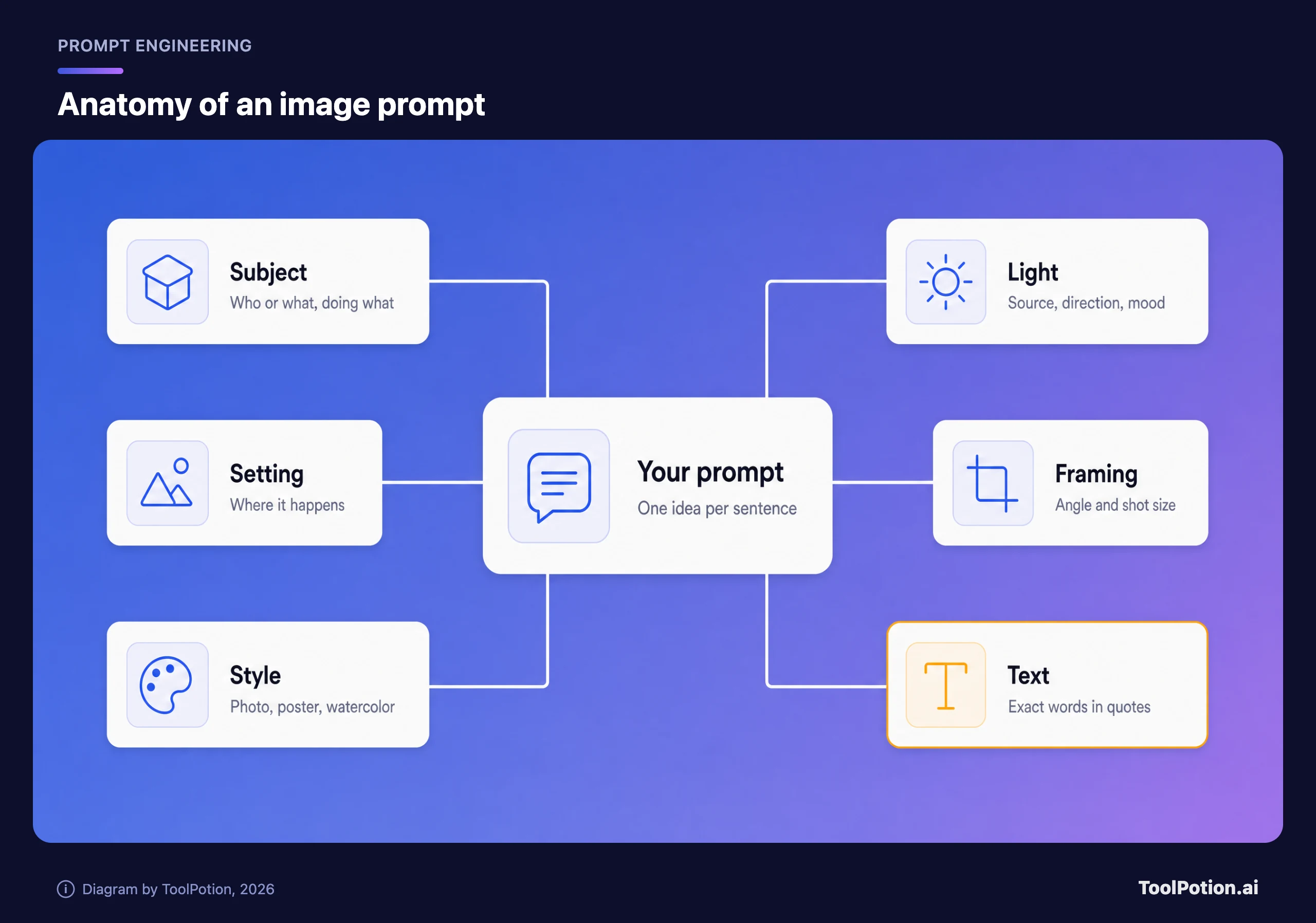
Ideogram goes furthest. Its guide recommends a one-sentence image summary, then main subject details, pose or action, secondary elements, setting, lighting, framing and finish. Its advice for the first part is blunt: "If you write only one sentence, make it this one" (Ideogram).
Here's what each part buys you.
- Subject is the thing the image is about. Give it a visible detail or an action, because "a dog" leaves the model to choose everything else.
- The setting is where the subject sits and what surrounds it. Plain words beat clever ones.
- Style names the medium: photograph, gouache illustration, poster, 3D render. Pick the specific one. Ideogram's iteration guide says to name "abstract impasto" or "pop art" instead of a general style.
- Light is easiest to control when you name its source, direction and quality. BFL's guide lists exactly those four.
- Framing covers the shot size and the camera angle. Say "close-up" or "from ground level" instead of hoping.
- Text goes in quotation marks, which gets its own section below.
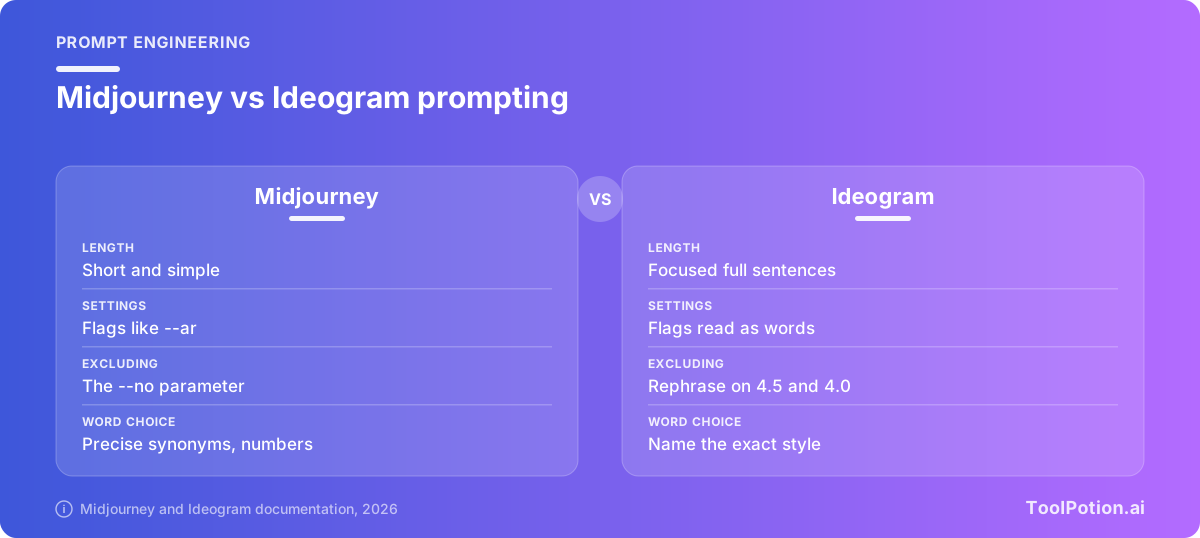
Aspect ratio is the part people forget, and it is the one that moves around the most. Midjourney takes --ar 2:3 at the end of the prompt. Ideogram reads that flag as ordinary words, so you set the ratio in the app settings. FLUX 3 Image has an aspect_ratio field and defaults to square when there are no reference images, so a non-square request needs it set by hand (BFL).
One idea, five dialects
The same sentence of intent gets written differently depending on where it's going. This is where most failed prompts come from. People carry habits from one tool into another.
Midjourney: short, with flags at the end
Midjourney's docs say "short and simple prompts typically generate the best images" and warn that long lists of instructions can confuse the process. It also suggests exact numbers ("three cats" instead of "cats") and precise synonyms. Settings are parameters like --ar, --chaos and --no, and they always go after the prompt text (parameter list). Reference images join the prompt as Image Prompts or Style References. The current release is Midjourney V8.2, and a community styles reference is a handy source of vocabulary.
ChatGPT and GPT Image: ordered, labeled, editable
OpenAI's current image prompting guide says to name the subject and the intended use, such as a product photo, an ad or a diagram. For complex requests it suggests organizing the prompt as scene, subject, details and constraints, using labeled sections. It also says to describe visible details like materials, lighting and medium, and to give each reference image a number and a role (OpenAI image prompting guide). The guide covers the GPT Image 2.5 models, Flare for speed and Sunburst for quality. You reach OpenAI's image models through ChatGPT or the API (the directory has a page for the earlier GPT Image 2). The API's image generation guide covers multi-turn editing through the Responses API.
Gemini: scenes in sentences
Google's docs call its native image generation Nano Banana, and the Gemini API page gives reusable templates. The photorealistic one reads "A photorealistic [type of shot] of a [subject description] in a [setting description]," and the page says "the more specific you are, the more control you have" (Google AI for Developers). It names multi-turn conversation as the recommended way to iterate, and it accepts up to 14 reference images, with limits that vary by model. You can try it in the Gemini app or through Nano Banana.
Ideogram: sentences, quotes, no hidden syntax
Ideogram says plainly that weights like ::1 and flags like --ar are read as ordinary words. It wants full sentences, the main idea first, and quoted text near the start (Ideogram prompting basics). On Ideogram 3.0 it suggests keeping plain-language prompts under about 150 words. Ideogram 4.5 accepts up to 10,000 characters (see the Ideogram 4 page), though the docs say focused prompts are still easier to control.
FLUX: specific, not necessarily long
BFL's guidance for FLUX 3 Image is to start with one sentence and add detail after you see results. It says to skip quality tags such as "masterpiece" and cut any sentence that doesn't describe something visible. "Strong prompts are specific, not necessarily long." The lab itself is profiled at Black Forest Labs.
Say what you want, not what you don't
Negative instructions are where the docs agree most. Midjourney's prompt basics say: if you mention a party with "no cake," a cake might still appear. Ideogram's problem-fixing page says image models "don't handle 'no', 'without' or 'not' well," and tells you to describe what you'd see if the thing weren't there (Ideogram). BFL says FLUX 3 Image has no negative_prompt field and offers the example "an empty promenade" instead of "no crowds."
Some tools still give you an exclusion control. Midjourney has the --no parameter, which takes a comma-separated list such as --no fruit, apple, pear (Midjourney docs). Ideogram has a negative prompt setting on 3.0, but on 4.5 and 4.0 rephrasing is the only option. Treat these as a second line. Write the positive version first.
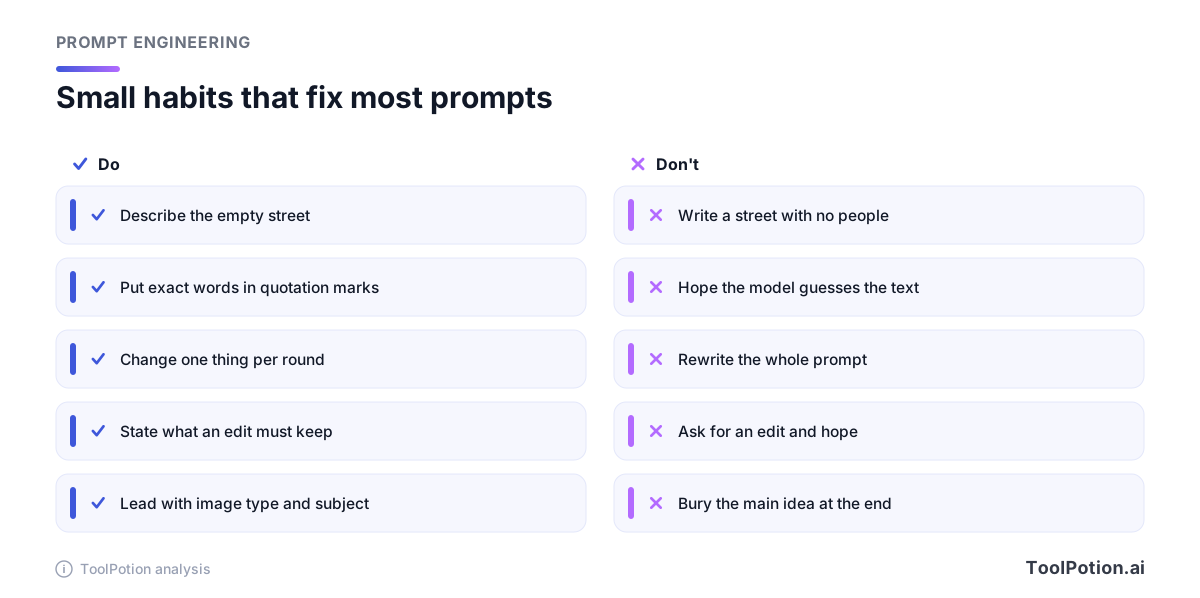
Describing the absence takes a moment of thought. "A beach with no umbrellas" becomes "an open stretch of sand with waves and footprints." The model now has something to draw instead of an object to avoid.
Text inside the image
Rendered text is the part of image generation that improved most, and it still fails often enough to deserve a method. Ideogram's text guide says "anything inside quotation marks is text to render," suggests naming the text early, and warns that extra words and busy backgrounds raise the odds of typos. It also notes you can't pick a font by name. Describe the weight and mood instead, like bold sans-serif or thin rounded (Ideogram).
OpenAI's prompting guide adds two habits. Spell tricky brand names letter by letter, and compare medium or high quality for small text and dense information. Even so, OpenAI's image generation guide says its model "can still struggle with precise text placement and clarity." Keep headlines short and fix long copy in a design tool afterward.
Eight prompts, before and after
These are written as text, and none of them promises a particular result. The right column says what each edit is meant to do, based on the vendor advice above.
| Before | After | What the change is meant to do |
|---|---|---|
| I'd like a picture of a whole bunch of sunflowers in a field, please make them really tall and yellow, and paint it like an oil painting | Oil painting of tall yellow sunflowers in a field | Cuts the instructions down to a short phrase that names the medium and the subject, in line with Midjourney's advice to keep prompts short. |
| A dog in a park | Photo of a golden retriever mid-leap catching a red frisbee on a wide lawn, low morning sun from the left, shot from ground level | Adds action, setting, light direction and angle so the model isn't choosing them. |
| A street with no people | An empty street at dawn, wet pavement, shuttered shop fronts | Replaces the exclusion with a positive description of the scene. |
| A poster for my bakery that says good bread | Poster for a neighborhood bakery. The headline "Good Bread" in bold sans-serif at the top, a loaf on a wooden board below, warm window light | Quotes the exact words, names them early and describes the lettering instead of a font. |
| Mountain lake at sunrise | Mountain lake at sunrise, mist on the water --ar 21:9 | Midjourney only. Moves the shape into the parameter. In FLUX 3 Image you'd set the aspect_ratio field instead. |
| Make it nicer | Change only the sky to a clear sunset. Keep the building, the people, the framing and the street colors the same. | States the one change and the things to preserve, as OpenAI's prompting guide advises for edits. |
| Pretty fantasy art of a lighthouse | Gouache illustration of a lighthouse on a cliff, flat shapes, muted teal and ochre palette | Swaps a vague label for a named medium and a palette. |
| Photo of a water bottle | Studio product photograph of a matte green steel water bottle on a pale wooden shelf, soft window light from the right, shot straight on at eye level | Follows the shape of Google's product-shot template: a surface, a light direction and an angle. |
None of the "after" prompts is long. The longest is about 30 words. Most of the gain comes from naming a medium, a light source or a framing choice, not from piling on adjectives. BFL specifically says generic quality words like "highly detailed" add little beyond a concrete description.
Iterate like you're debugging
Treat the first image as a draft. Ideogram's refine guide calls it exactly that and says small, deliberate changes get you closer than starting over. Its core rule is to change a single word or phrase per round so you can see what each change did, and to fix the seed and switch Magic Prompt off if you need the comparison to be clean (Ideogram). OpenAI's prompting guide lands in the same place: pass the previous output back in, request one change, and repeat the details to preserve.
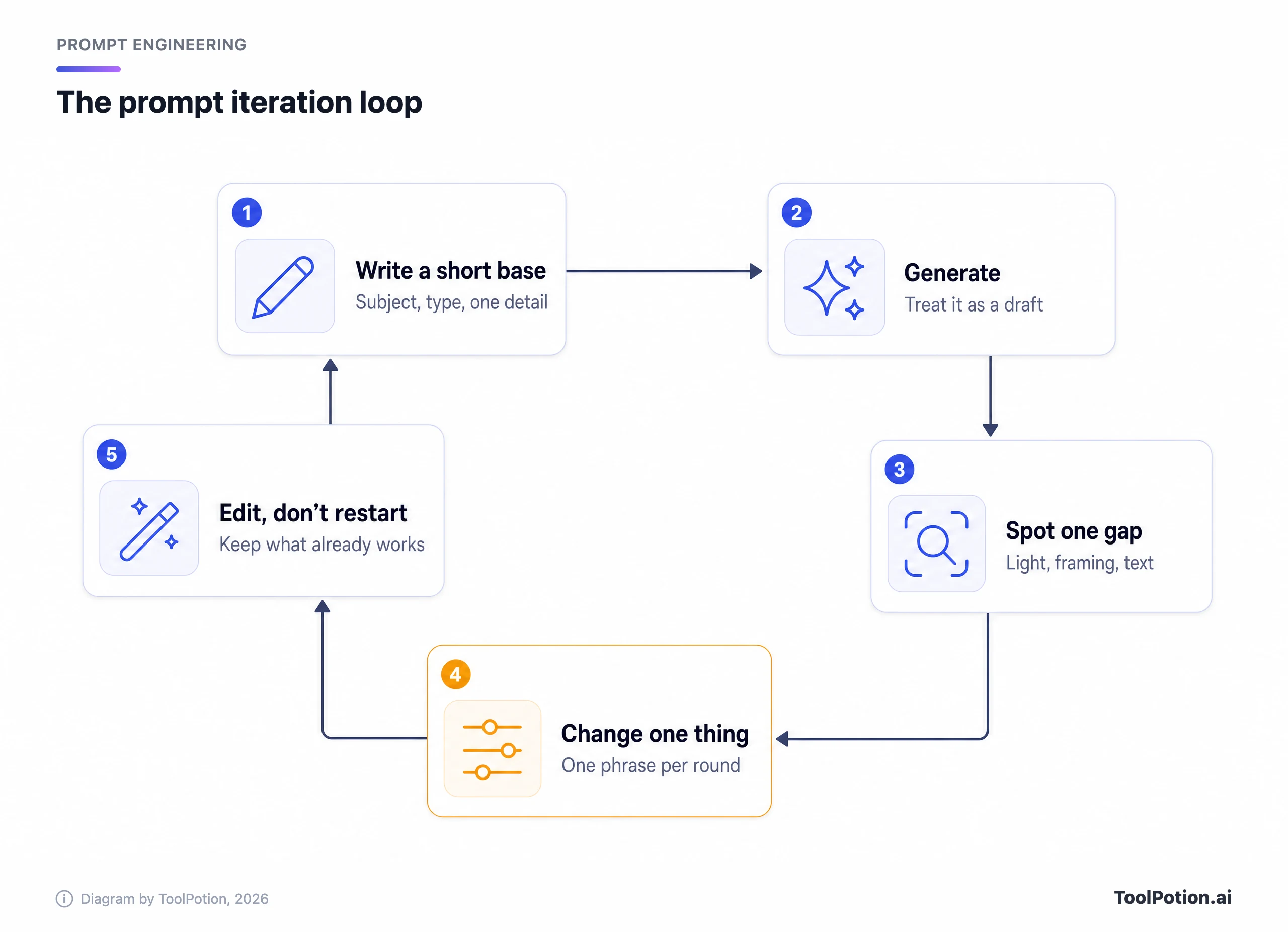
Once you like most of an image, stop regenerating and edit it. Gemini's docs recommend multi-turn conversation for this, and OpenAI's guide describes the Responses API for editable, conversational flows. For edits, say what must stay put and repeat that list each turn. OpenAI says to restate critical constraints if the result drifts.
Resolution is part of the loop too. BFL suggests iterating at a low resolution and moving to 2k or 4k only when you need more detail.
Score your prompt before you generate
The checklist below turns the advice above into a ten-point score. It's a ToolPotion rubric built from the vendor guides, not a vendor metric, so treat the verdicts as a nudge.
Which tool for which job
Start with the job, not the leaderboard. If the image needs readable words, Ideogram's docs spend the most time on it. If you want to keep talking to the model and tweak an image across turns, the conversational tools fit: ChatGPT and Gemini both document multi-turn editing. If you want a distinct look from a short prompt and don't mind flags, Midjourney's approach suits that. If you want precise layout control, BFL documents layout prompts with bounding boxes for FLUX 3 Image.
For a ranked view, the ToolRank board for AI image generators ranks the tools, and the category hub groups them. Our comparison of AI image generators and the broader roundup go deeper on output quality and pricing. If you write many prompts, the prompt engineering tools board and our practical prompt engineering guide are the next stops.
Frequently asked questions
How long should an AI image prompt be?
It depends on the tool. Midjourney recommends short and simple. Ideogram suggests under about 150 words on 3.0. BFL says start with one sentence and add detail after reviewing results. A good default is one or two sentences, then one addition per round.
Do negative prompts work?
Sometimes, and only where the tool offers them. Midjourney has --no, and Ideogram 3.0 has a negative prompt setting. Ideogram and BFL both say to describe what you want instead, and FLUX 3 Image has no negative prompt field.
Can I reuse one prompt across tools?
The plain-language core carries over. The flags don't. A --ar 16:9 flag means something in Midjourney and is read as words in Ideogram, so move settings into the right place for each tool.
How do I get text to appear correctly in an image?
Put the exact words in quotation marks, name them early, keep them short, and keep the background simple. If a word comes out wrong, regenerate, shorten it, or fix it with an editing tool.
Should I use a prompt generator?
They can help you remember the parts. Tools like the Midjourney Prompt Generator assemble a prompt from options, but check the output against the vendor's advice, since some are built for older versions.