If part of your next interview is run or scored by software, the best prep is knowing which of three formats you're facing and what the employer has to tell you first. Then you practice that format out loud, a few times, before the real one.
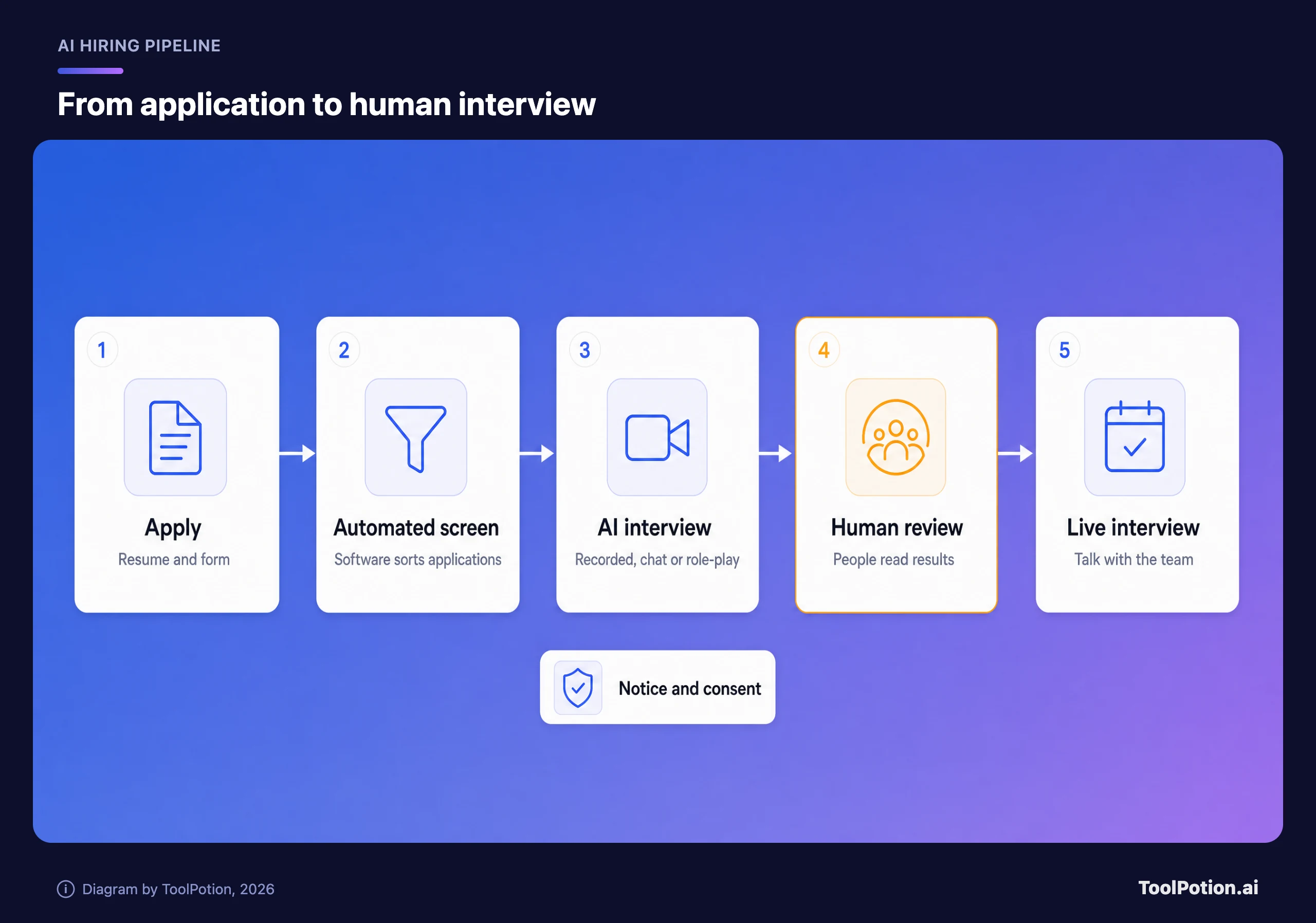
Consider the news. The Verge reports, citing the Wall Street Journal, that McKinsey will ask some entry-level candidates to hold a 10-minute conversation with an AI simulation of a client (The Verge). The AI won't score them. Humans in the room will assess how they handle it. The tool is being tested this year with undergrads seeking business-analyst jobs in some North American offices, and the WSJ says hundreds may use it. It's one firm, but it points at where hiring is heading in 2026.
The three formats you'll most likely meet
The oldest is the one-way recorded video interview. You get a link, read or hear a question, and record an answer on a timer with nobody watching live. Vendors such as HireVue built their business on it, and HireVue's candidate FAQ says these are typically a first step, with top candidates moving on to person-to-person interviews (HireVue).
Next is the AI chat or voice screener. A bot asks about your experience, your availability and a few role questions, then writes up the answers for a recruiter. It feels like a phone screen with a very patient stranger.
The newest is the AI-run case or role-play, which is what McKinsey is testing. You talk to a simulated client, customer or manager while people watch how you handle it. If you want a taste of the format, a tool like AI Case Interview Prep offers voice-powered mock consulting interviews.
What the software says it's measuring
Vendors describe their assessments in job terms. HireVue's FAQ says its assessments evaluate job-related skills and competencies such as communication and problem-solving, and that scoring looks at the whole response, not isolated keywords. It also says the assessments never look at age, race or gender, and that recordings aren't used to identify you (HireVue). Those are vendor claims. Treat them as a description of intent, not a guarantee.
What does that mean for you? Answer the question that was asked, with a real example, in plain spoken language. Question types on that FAQ include situational judgment, scenario simulations and past-behavior prompts, so have a story ready for each. HireVue says its video assessments usually have five to eight questions, give you several minutes for each and take under 30 minutes in all. Short answers that land one clear point usually beat long ones that wander, and whatever limit the screen shows wins.
Your rights, where they exist
The rules depend on where the job is. Two are worth knowing, and neither is a blanket national right.
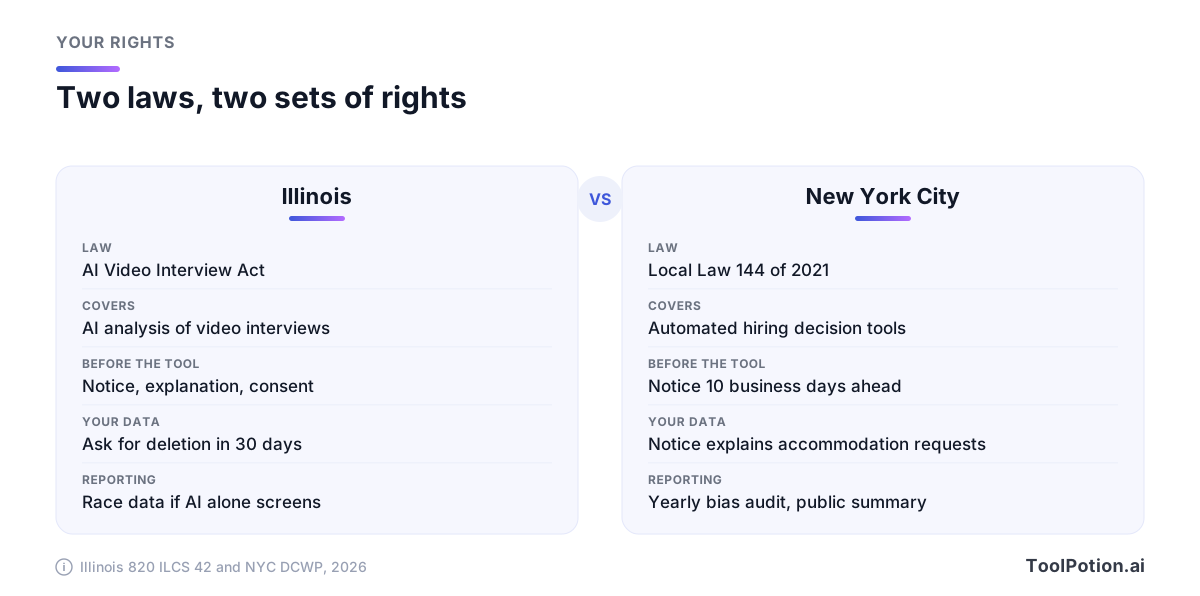
Illinois's Artificial Intelligence Video Interview Act (820 ILCS 42) has been in force since 2020. For Illinois-based jobs, an employer that asks you to record a video interview and uses AI to analyze it must, before you record, tell you that AI may be used to consider your fitness for the position, explain how the AI works and what general types of characteristics it uses, and get your consent. It can't use AI on applicants who haven't consented. Your video can only be shared with people whose expertise or technology is necessary to evaluate you. If you ask, the employer must delete your interviews within 30 days and tell anyone else who received copies to delete them too, backups included. If an employer relies solely on AI to choose who gets an in-person interview, it must also report applicants' race and ethnicity data to the state each year (Illinois General Assembly).
New York City's Local Law 144 covers automated employment decision tools. Employers can't use one unless it has had a bias audit within a year of use, information about the audit is public, and candidates have received the required notices (NYC DCWP). The city's FAQ says the notice must go out 10 business days before the tool is used and must include instructions for requesting a reasonable accommodation under other laws (NYC DCWP FAQ).
Outside those places, you may have no specific notice rule, but you can still ask. Ask what's recorded, who sees it, how long it's kept and whether there's a human alternative. HireVue's own FAQ says you can request accommodations from the hiring team and that deletion requests go to the employer, since the employer controls the data.
Can you use AI during the interview?
Only if the employer says so. Anthropic's candidate guidance is a clear example. For live interviews it says "This is all you" with no AI assistance unless the company indicates otherwise, and it asks for take-home assessments to be done without Claude unless stated. Preparing is different: the same page encourages using Claude to practice your answers beforehand (Anthropic).
Tools that feed you answers in real time exist, and some of them show up in our directory, for example Interview Sidekick. Whether using one is allowed is your employer's call, not the tool's. A hidden helper in a proctored or recorded session can cost you the offer, and it isn't what a role-play is trying to measure anyway. Use AI before the session, for practice. If the instructions are silent, send the recruiter a one-line question.
A prep routine for one week
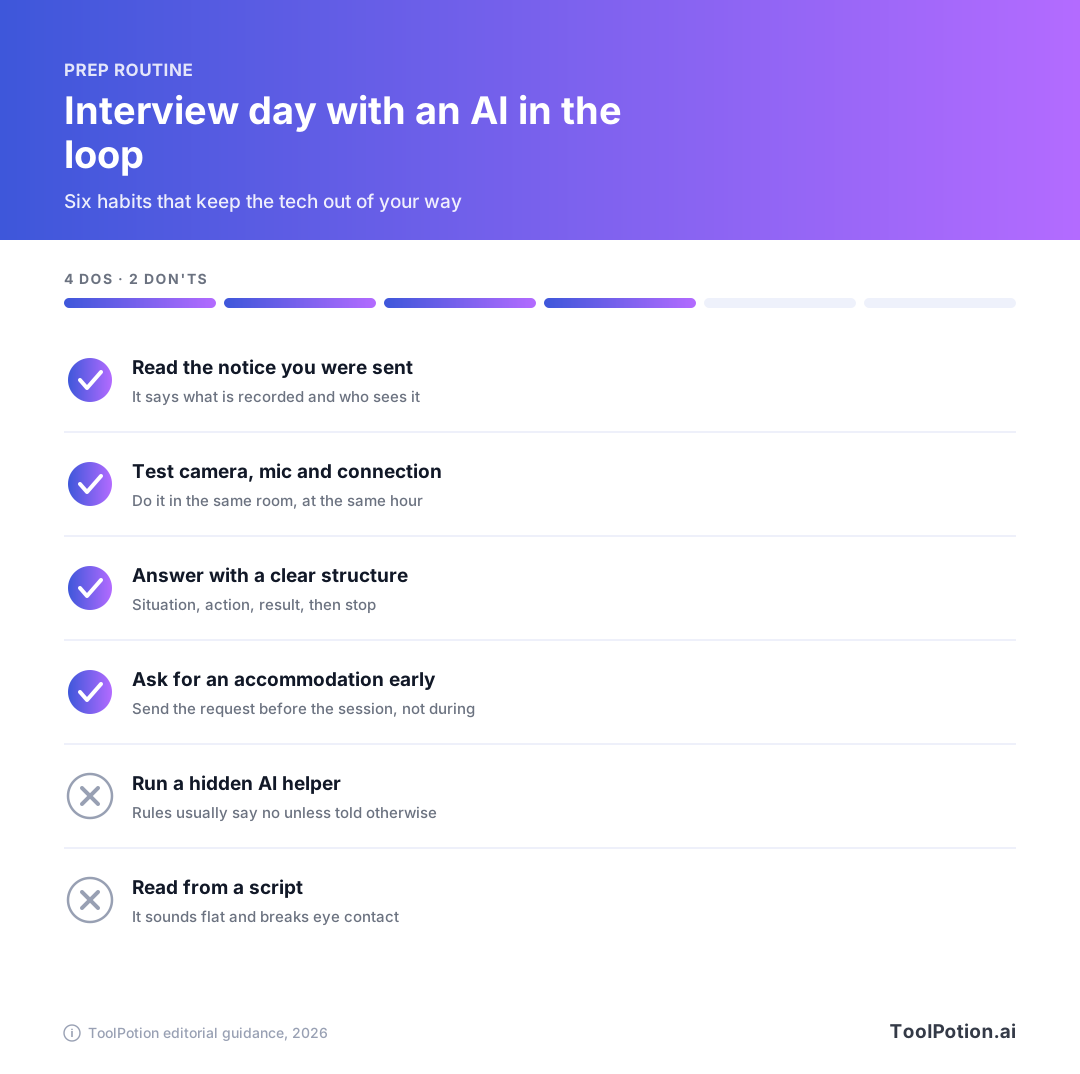
Start by reading every message from the employer, including the notice. It tells you the format, the time limit and whether retakes are allowed. Then work through the routine below.
- Write down five stories from past work. Each gets a situation, what you did and what happened.
- Run two or three timed mock sessions with an AI interviewer. InterviewPal, Remasto and Lemmi all offer mock interviews, and the Top 50 AI Interview Prep board lists more.
- Listen to your recordings. Cut filler words and stop when the answer is done, since most one-way questions come with a timer.
- Test your camera, mic and connection in the room you'll use, at the hour you'll use it. HireVue's FAQ suggests a well-lit, comfortable space and a charged device.
- Have your resume match your stories. If it needs a tune-up, Resume Worded is one option, and our guide to AI tools for job seekers covers more.
Don't memorize scripts. Reading sounds flat on video, and a role-play client will take you off script in one sentence. Know your stories, not your lines. When you're done practicing, score yourself below.
If you're curious what employers are buying, our board of tools for conducting AI interviews shows the other side of the screen. The wider career coaching and job search board is a good place to find more prep help. Neither tells you which tool your employer picked, so the notice you received is still the best clue.
Frequently asked questions
Will an AI decide whether I get the job?
Usually not alone. HireVue's FAQ says hiring decisions are made by people, and McKinsey's pilot has humans assessing candidates. Still, a screen can decide who gets seen, so treat it seriously.
Can I ask for a human interview instead?
You can ask. Whether the employer agrees depends on the company and the law where the job sits. If you have a disability, request an accommodation before the session.
Is my video recording kept?
It depends on the employer's settings. HireVue says it purges data when the employer's retention period ends. In Illinois you can ask for deletion, and the employer has 30 days to act.
Do I need to look at the camera the whole time?
Not constantly. HireVue's FAQ calls it natural to watch your own video feed, and suggests placing that window near the top center of your screen so it looks like you're facing the camera. A steady, natural pace matters more than perfect eye contact.