AI phishing works because the old tells are gone. The typos and the stranger's voice have been replaced by fluent email, cloned voices and, in the worst cases, video calls full of familiar faces. The good news for a small business is that the controls that stop the expensive versions are mostly free: confirm any payment change by calling a number you already have, make two people release money, and move logins to passkeys.
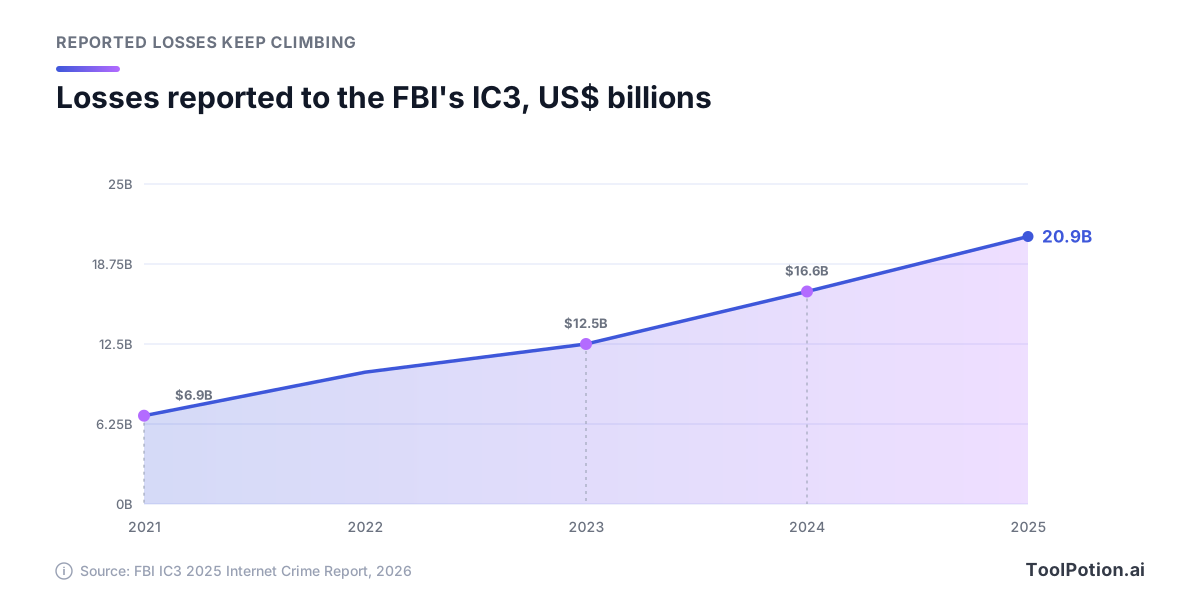
The stakes keep rising. The FBI's Internet Crime Complaint Center (IC3) logged 1,008,597 complaints and $20.877 billion in reported losses for 2025, a 26% jump in losses on the year before, and business email compromise (BEC) alone took $3.05 billion (FBI IC3 2025 report). The same report counts 22,364 complaints that referenced AI, carrying $893 million in losses.
This year's industry data points the same way. Microsoft says 93% of the voice phishing attacks in its data kept the victim on the line long enough to start the con (Microsoft Digital Defense Report 2026), and Verizon found that voice and text lures get a 40% higher median click rate than email in phishing simulations (Verizon 2026 DBIR). What follows is for owners and finance or office leads at 5-100 person companies with no security team.
What the 2026 numbers say about AI scams
Reported cybercrime losses have tripled in four years, before you even get to AI. The IC3 figures below are what victims told the FBI, so the real total is higher.
Read the AI figures carefully, because they cut against the hype. IC3 tags a complaint as AI-related when the victim's report mentions AI. By that measure, BEC with an AI reference came to 135 complaints and about $30 million in 2025. That's roughly 1% of the $3.05 billion lost to BEC overall. The AI-tagged money sits mostly in investment fraud.
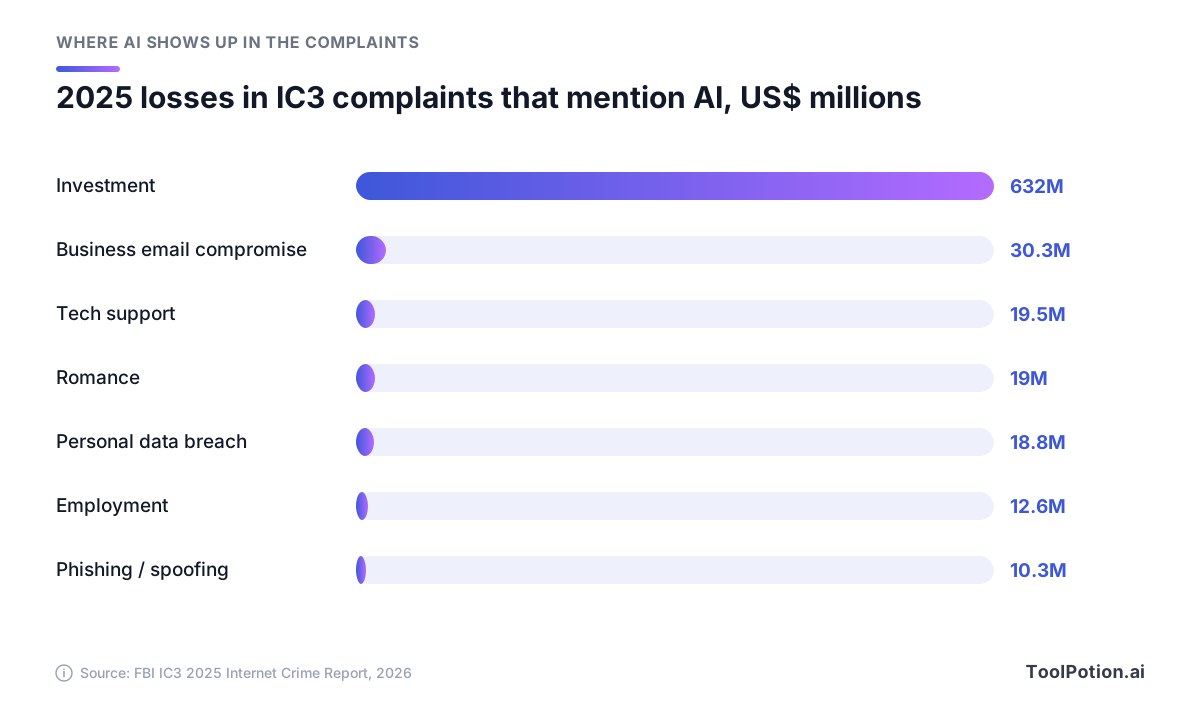
Two readings hold at once. The FBI suggests the AI count understates reality: investment complaints with a reported AI link lost more than $632 million while all investment scams lost over $8 billion, which the bureau says shows many victims don't realize AI is involved. Yet business losses still flow through the oldest request there is: pay this new account, today.
That's the position this guide takes. AI changes how believable a request looks. It doesn't change what the request asks you to do. Protect the payment, the login and the hiring decision, and you're covered whether or not the attacker used AI.
Six scams that now look professional
None of these is new. Each got cheaper or more convincing in the last two years, and each has a documented case behind it.
Fluent phishing at scale
IC3 says chat generators can quickly write official-sounding emails that mimic a company's CEO and carry phishing links or wire instructions, using the same kind of assistant your staff use, such as ChatGPT. Volume is the bigger shift. Microsoft counted more than 46 million business email impersonation attacks and over 145 million QR-code phishing attacks in the past 12 months. Kits now ship with AI built in: the Kali365 service, flagged by the FBI earlier this year, sells AI-generated lures alongside tools that hijack Microsoft 365 accounts (FBI IC3).
Voice clones from seconds of audio
Back in 2024, OpenAI said its Voice Engine could produce natural-sounding speech closely resembling a speaker from a single 15-second sample, and it recommended phasing out voice-based authentication for bank accounts (OpenAI). Commercial cloning is easy to reach. When Consumer Reports assessed six voice-cloning products in 2025, four of them, including ElevenLabs, only asked researchers to tick a box confirming they had the right to clone the voice. (Our AI voice generator roundup covers the legitimate uses.)
The phone is where this lands. IC3 recorded over $5 million in 2025 losses to distress scams that clone a relative's voice. Inside companies, it's a call or voicemail from 'the CEO' on WhatsApp. LastPass disclosed one in 2024: an employee got calls, texts and a voicemail with an audio deepfake of the chief executive, and reported it because it came outside normal channels with heavy urgency.
Deepfake video calls
Every finance team should know the Arup case. In 2024 an employee in the engineering firm's Hong Kong office got a message about a secret transaction, then joined a video call with people who looked and sounded like the CFO and colleagues. All were fakes. The employee sent HK$200 million, about US$25.6 million, across 15 transactions (CNN). Arup said none of its internal systems were compromised, so the loss came from persuading a person, not from breaking in.
Others have tried the same play. Scammers impersonated WPP's chief executive Mark Read in 2024 using a voice clone and YouTube footage in a Microsoft Teams meeting, and failed. Last year, security firm Huntress described a Zoom call where deepfakes of a company's own leaders talked an employee into installing a fake extension that carried malware. The scam has a shape, and each stage offers a checkpoint where a small team can break it.
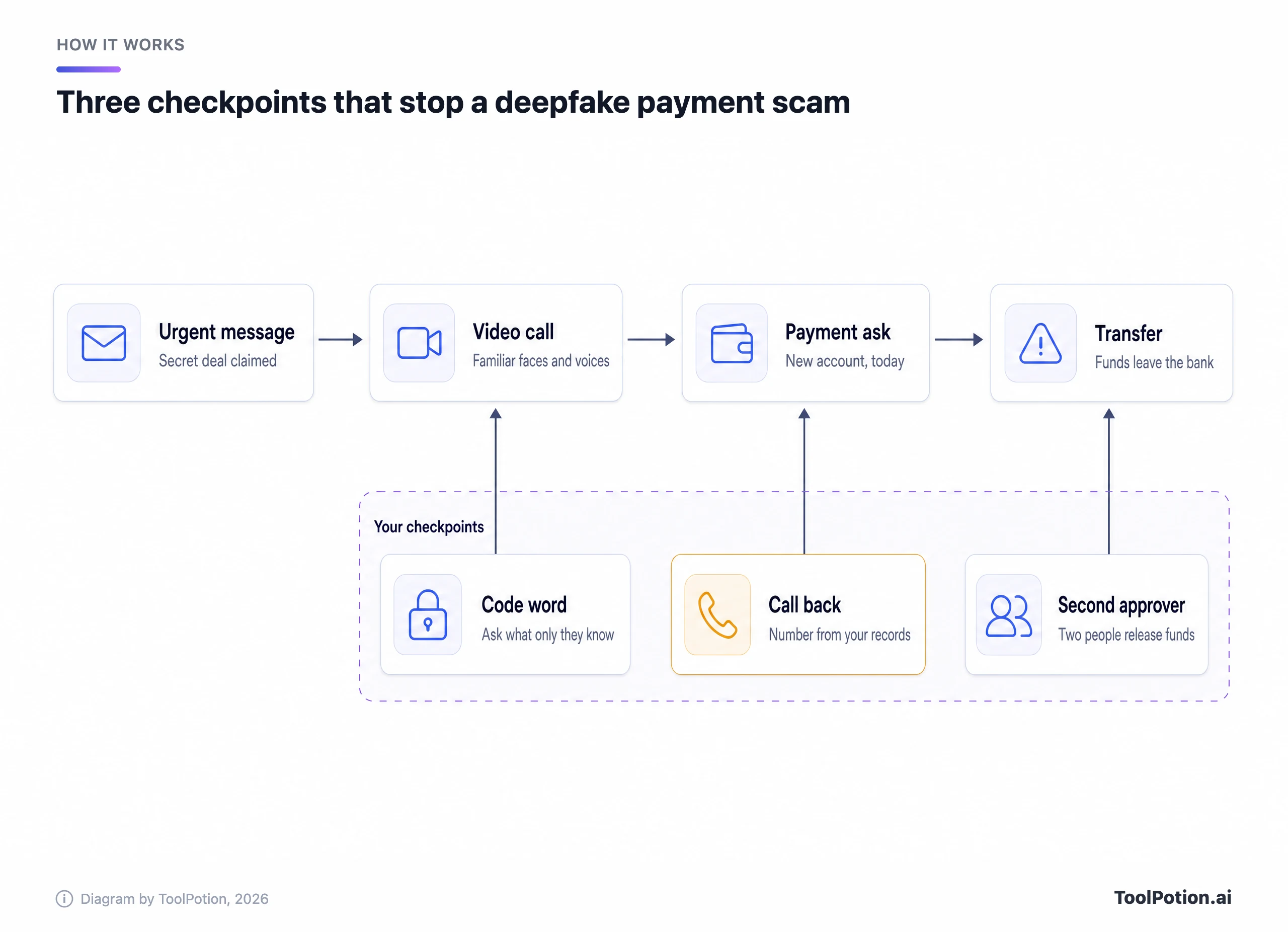
None of the three checkpoints asks anyone to spot a fake. They work even when the video is perfect, and that's why they belong at the top of your list.
Fake vendor and invoice changes
This is still the big one: $3.05 billion across 24,768 BEC complaints in 2025. The usual version is a message, often from a real vendor's mailbox that has been taken over, saying the bank details have changed. Because the email is real, it can pass the usual technical checks. What catches it is a person confirming the change on a known number.
Fake candidates and fake recruiters
Hiring has become a way in. The FBI warns that North Korean IT workers disguise their identities, often with the help of U.S.-based facilitators, to land remote jobs, sometimes with one person passing the interview and another doing the work (FBI IC3). The 2025 IC3 report describes interviews where lip movements don't match the audio, with the goal usually network access rather than money. The reverse scam hits job seekers who think they've been hired: IC3's employment fraud category lost $363 million in 2025, up from $70 million two years earlier.
Kits that get around your MFA
Text-message codes and authenticator prompts don't stop the newer phishing kits. Tycoon2FA, disrupted by Microsoft and law enforcement this year, captured passwords and one-time codes in real time, and Microsoft says that by mid-2025 it accounted for about 62% of the phishing attempts it blocked. Kali365 gets people to type a device code on a genuine Microsoft page, handing over tokens that need no password or MFA. Consent phishing gets a user to approve a malicious app, and the FBI warns that a password change doesn't revoke it (FBI IC3).
The free controls that stop most of the money
Rank the defenses by what they stop per dollar and the top three cost nothing. They're rules, written down and followed every time, and they work whether a request arrives as an email, a cloned voice or a face on a screen.
- Confirm every bank-detail change or new payee by calling a number you already hold, from the vendor file, the contract or the staff directory. Never use the number in the message or the caller ID.
- Require two people to release any payment above a threshold you set, and have the second person check that the call-back happened.
- Agree a code word or challenge question for money requests among finance staff and leaders, and keep it out of email and chat.
The call-back is the strongest because it moves the conversation onto a channel the attacker doesn't control. The FBI's advice on AI voice scams is the same: hang up, look up the organization's number yourself and call it directly (FBI IC3). Add a rule of no same-day bank-detail changes and every 'the deal closes in an hour' script loses its pressure.
Two-person approval catches what one rushed person misses. At Arup, one employee moved the money in 15 transfers. A second approver who had to confirm the call-back would have meant fooling two people, twice. Ask your bank whether its business platform supports dual control on wires and ACH. If you're automating payables, see our guide to AI in finance and accounting.
The code word sounds quaint until you see it work. In 2024 a Ferrari executive got a call from someone imitating CEO Benedetto Vigna's southern Italian accent. He asked for the title of a book Vigna had recommended to him days earlier, and the call ended abruptly (Fortune). The FBI recommends a secret word for families for the same reason. For a team, pick a phrase that never appears in writing.
One more free rule: treat any request on an unusual channel as unverified. The LastPass fake stood out partly because 'the CEO' showed up on WhatsApp, and WPP's chief warned staff that an account with his photo doesn't prove it's him. Write down which channels your company uses for money and access. The whole routine fits on one page you can pin next to whoever pays the bills.
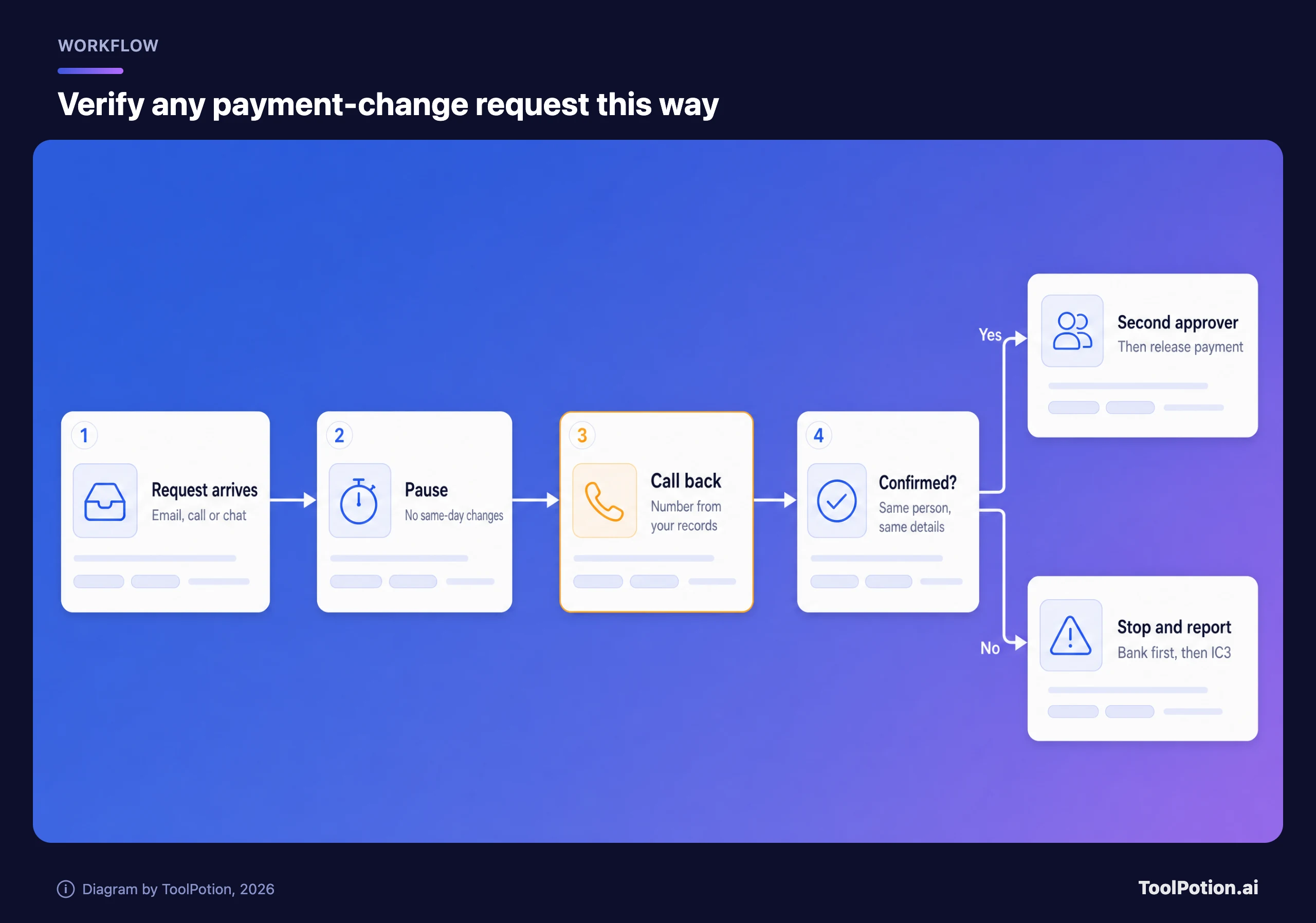
The amber step is the one that matters. Everything around it exists to make sure the call-back happens before money moves. When a message lands and you're unsure, the three questions below cover the requests that cost money: payments, codes and installs.
Most paths end in the same place. Verify on a channel you already trust, then act.
Technical controls worth paying for
Process stops the payment. Technology stops the account takeover that often comes first, when a scammer reads a real mailbox for weeks and then sends a perfectly timed invoice from it. Here's the order that gives a small team the most protection for the least money.
Passkeys first, then close the side doors
CISA calls phishing-resistant MFA the gold standard and says the only widely available form is FIDO/WebAuthn, the standard behind passkeys and hardware security keys (CISA). SMS codes are open to phishing and SIM swaps, and one-time codes can be phished. Start with anyone who has admin rights or can move money, then everyone's email. Microsoft's 2026 report names phishing-resistant MFA and passkeys among the best safeguards against attacks.
Passkeys don't close every door, which is why the Kali365 and consent-phishing warnings matter. For Microsoft 365, the FBI recommends a conditional access policy that blocks device-code sign-in except where there's a real business need. Microsoft's documentation says users can, by default, consent to apps reading their mailbox, and recommends allowing consent only for apps from verified publishers. On another identity provider, such as Okta, look for the same two controls. (Our AI data privacy framework covers the related question of which AI tools may see company data.)
Email authentication: what Gmail and Outlook now expect
SPF, DKIM and DMARC let receiving servers check that mail claiming to be from your domain came from you. Gmail requires every sender to set up SPF or DKIM, and senders of 5,000 or more messages a day need all three with an aligned From address (Google). Outlook applied similar rules to high-volume senders (more than 5,000 a day) in 2025, requiring SPF and DKIM to pass and DMARC at least at p=none, or the mail is rejected (Microsoft).
Most small businesses send far fewer than 5,000 emails a day, so why bother? Because DMARC at quarantine or reject stops criminals sending mail as your exact domain to any receiver that enforces it. It does nothing against a lookalike domain one letter off, or an attacker inside a real vendor's mailbox. Start at p=none, read the reports for a couple of weeks, fix legitimate senders such as your invoicing tool, then tighten.
A password manager for everyone
Reused passwords turn one phished login into five. Bitwarden's Teams plan is $4 per user per month, billed annually. 1Password charges $8.99 per user per month for Business, or $24.95 a month for a Teams Starter Pack covering 10 people. For a 10-person office that's roughly $25 to $90 a month.
Mail filtering and drills
On Microsoft 365, Defender for Office 365 Plan 1 costs $2 per user per month and covers email, Teams, SharePoint and OneDrive, including malicious links, QR codes and zero-day attachments. Business Premium, at $22 per user per month for up to 300 users, already includes Defender for Office 365. Specialist platforms such as Abnormal AI, Proofpoint and Mimecast sit on top. Abnormal sells behavioral detection aimed at BEC and vendor email compromise, publishes no prices and says 30% of the Fortune 500 use it, so expect enterprise quotes. Get them after the free controls are in place.
Run a scam drill twice a year, and don't make it email-only. Verizon's data shows voice and text lures outperform email in simulations, and pretexting, where an attacker builds a believable story before asking, reached 6% of all breaches in its 2026 data. A five-minute surprise call from 'the bank' to your bookkeeper teaches more than an hour of slides. Here's how the options compare.
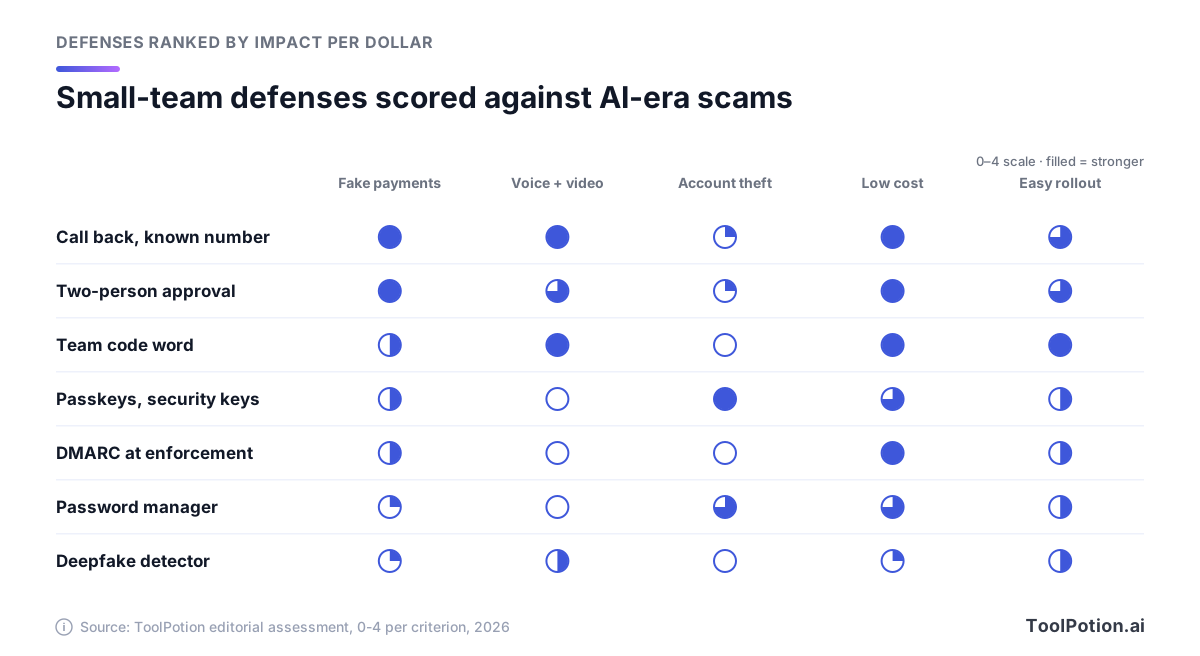
The scores are our editorial judgment, not a benchmark. The cheapest controls in the top two rows are also the ones that stop fake payments and fake voices. Passkeys own the account-theft column. Deepfake detectors trail almost everywhere, and the next section explains why.
What deepfake detection can and can't do
Detection vendors quote impressive numbers. Pindrop says it detects audio deepfakes in about two seconds and cites 99% accuracy against known engines. Sensity cites 98% on public datasets. Resemble AI, one of the voice-cloning products Consumer Reports assessed in 2025, now leads its homepage with detection and claims 99.5% for audio. Notice the qualifiers: known engines, public datasets.
Real-world fakes are harder. The Deepfake-Eval-2024 benchmark, built from deepfakes circulating on social media, found that leading open-source detectors lost about half their accuracy (measured as AUC) compared with older academic test sets: 50% for video, 48% for audio and 45% for images (arXiv). Commercial detectors did better but still fell short of trained forensic analysts. People do worse. In a 2025 study by biometrics vendor iProov, only 0.1% of 2,000 participants correctly sorted every real and fake item.
The FBI's visual tips are still worth knowing: ask a candidate to wave a hand in front of their face, and watch for distorted hands or odd lag. Use them as tripwires. Generators improve faster than checklists do.
The more promising direction checks the device instead of the pixels. Google began rolling out fake call detection on Android this year, starting with Pixel phones: when a contact calls, the phone checks with that contact's real device, and if it isn't making a call, you get a warning to hang up. It only works when both people use Google's Phone app (and Google's contacts and messaging apps) on Android 12 or later, so treat it as a bonus, not a control. Nobody has to judge how real the voice sounds.
So who should buy a detector? Contact centers that authenticate callers by voice, firms hiring remote staff at volume, and companies whose executives live on video. Reality Defender has a free developer tier with 50 audio or image scans a month plus products for calls and video meetings, and the free Hive AI Detector extension checks images, video, text and audio. For a 20-person firm these are a second layer. If a detector says a call is real, you still call back. Our AI cybersecurity tools board tracks the wider category.
Hiring is now an attack surface
A fake hire with a laptop and an admin login can do more damage than a fake invoice. The FBI's guidance for spotting North Korean IT workers translates well to any remote hire:
- Insist on video with the background visible, and ask the candidate to wave a hand in front of their face, which can make AI-generated video glitch.
- Verify past employment and education directly with the employers and schools.
- Cross-check photos, names and contact details against social profiles and portfolio sites.
- Ship equipment only to the address on the person's ID.
- Watch for a switch after the offer, since the FBI has seen one person interview and another do the job.
For roles with admin access, identity verification services such as Nametag check documents and biometrics at hiring, onboarding and help-desk resets, and it markets itself directly against North Korean IT workers. If you use AI screening from our recruiting tools board, add an identity check on top.
Your brand can be borrowed the other way too, by fake employers who 'hire' job seekers and then take their money. Put one line on your careers page saying which email domain you recruit from and that you never charge candidates or ask them to buy equipment.
A 30-day defense plan
Thirty days is enough for a small team to close most of the gaps above. Order matters. Money rules come first because they're free and they guard the biggest losses, then accounts, then the email domain, then people.
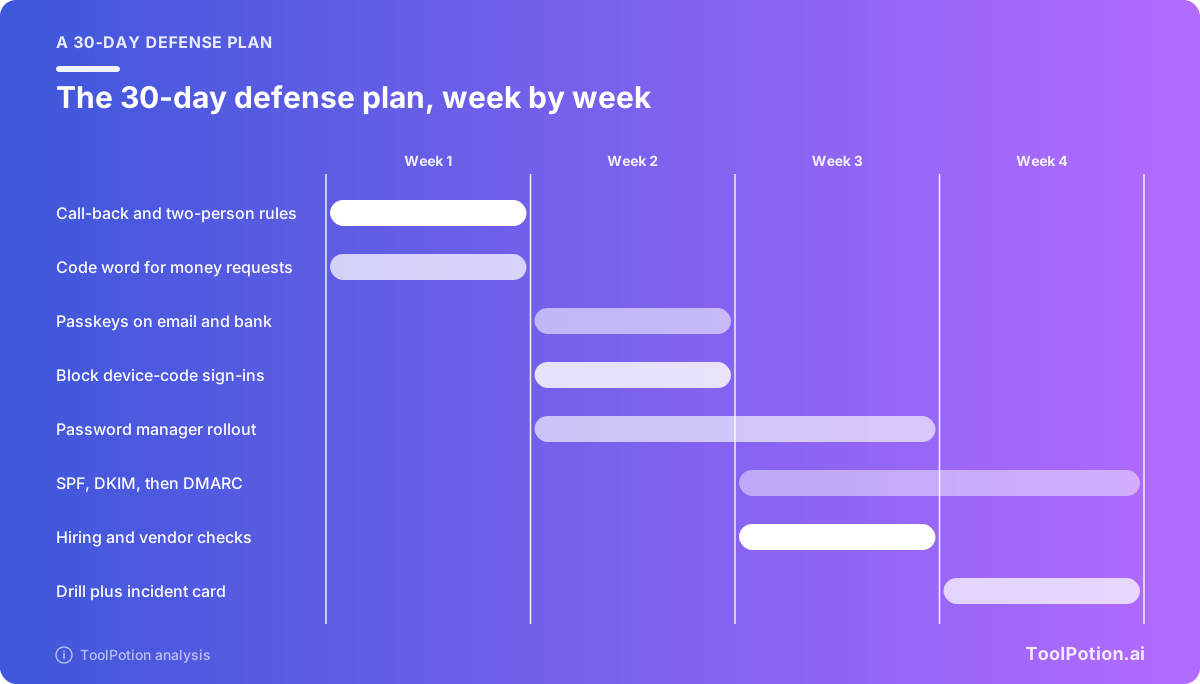
Week 1: money rules
Write the call-back and two-person rules on one page, set the approval threshold, and build one list of every vendor's bank details and phone number from your own records. Agree a code word in person with whoever can move money. Then ask your bank what dual control it supports, which number reaches its fraud team after hours and how it recalls a wire. IC3 notes that banks' recovery policies vary, so learn yours now.
Week 2: accounts
Turn on passkeys or security keys for admins, finance staff and the bank login, then everyone's email, and remove text-message fallbacks for admins. Block device-code sign-in and limit app consent. Start the password manager with the finance team.
Week 3: domain, hiring and suppliers
Publish SPF and DKIM, add DMARC at p=none and start reading the reports. Write the hiring checks into your recruiting steps and add the careers-page note. Ask your top five suppliers how they'll confirm a bank-detail change with you, and tell them how you'll confirm yours.
Week 4: people
Run the drill: a call to the bookkeeper from 'the CEO' asking for an urgent transfer, plus a text-message lure to everyone. Debrief without blame. Move DMARC to quarantine once legitimate senders pass, and tape the first-hour checklist below near whoever pays the bills. Then score your setup, and again in six months.
If you scored under 7, start with the first two boxes. They're the ones that guard the money directly.
The first hour after money goes out
If a payment went to a scammer, the clock matters more than the paperwork. IC3's Recovery Asset Team works with banks to freeze stolen funds, and in 2025 it froze $679 million of the $1.16 billion it went after, a 58% success rate. Work through these steps in order.
- Call your bank's fraud line and ask it to recall the payment, along with any indemnification documents it needs.
- File a complaint at ic3.gov with the full transaction details (amount, date, both banks, account numbers, references), whatever the amount.
- Lock the compromised mailbox: reset the password, sign out every session and remove unknown app permissions, since a password change alone won't revoke an app's access.
- Warn the vendor or customer whose identity was used, on a number from your records, and stop other payments to the new account.
- Keep the evidence: emails with full headers, call logs and chat messages.
- Report it to local police, and tell your cyber insurer if you have one.
- Ignore anyone offering to recover the money for a fee. The FTC warned this year that recovery scammers pose as government agencies and law firms, and that legitimate organizations never ask for money to help you get a refund.
IC3's own case files show what fast reporting buys. A city government office in Oregon got a $6 million wire recalled because the receiving account had already been frozen after an earlier report. Home buyers who wired more than $449,000 after fake emails from their attorneys found the full amount still on hold once IC3 contacted the receiving bank.
Frequently asked questions
Can email filters catch AI-written phishing?
Partly. Defender for Office 365 checks links, QR codes and attachments, none of which depends on how fluent the email is. A message from a real but compromised vendor account is harder, since it passes authentication checks. That's what the call-back rule is for.
How much audio does someone need to clone a voice?
Very little. OpenAI said 15 seconds was enough for its Voice Engine. If your leaders speak on podcasts, webinars or social video, assume their voices can be cloned and rely on call-backs and code words instead of recognition.
Is text-message two-factor still better than nothing?
Yes, as a stopgap. CISA lists SMS and voice codes as vulnerable to phishing and SIM swaps, and kits like Tycoon2FA captured one-time codes in real time. Move admins and finance staff to passkeys first.
What makes a good team code word?
Short, never written in email or chat, and shared in person with the people who move money. Change it when someone leaves. A question about something recent and private, like the Ferrari book, works too.
Will the bank refund a payment we authorized?
Don't assume so. IC3 notes that financial institutions have varying policies on recovering funds. Ask your bank now what it does for fraudulent transfers, and check whether your cyber insurance covers social engineering losses.