An AI usage policy works when it's short enough to remember and generous enough that nobody needs a workaround. In practice that means two pages, at least one approved company AI account for everyone, and most of the words spent on which data can go where. Ban personal accounts for company data and leave AI itself allowed.
The workaround problem is measurable. Netskope's 2026 Cloud and Threat Report, built from usage data across its customers, found that 47% of generative AI users still reach for personal AI apps at work, and the average organization logs 223 incidents a month of people sending sensitive data to AI apps (Netskope). In a 2025 survey by KPMG and the University of Melbourne, half of US workers said they use AI tools at work without knowing whether it's allowed (KPMG).
Two things make this year the time to fix it. In the EU, national authorities began enforcing the AI Act's AI literacy duty in 2026, and the Commission says it covers companies whose staff simply use tools like ChatGPT to write or translate. And AI tools no longer just answer questions. They connect to mailboxes and shared drives and act on what they find, which a policy written for chatbots doesn't cover. Below you'll find the template and the reasoning behind each rule, with two interactive tools for adapting it.
Bans and 20-page policies fail for the same reason
Both assume people read the rules before they open a browser tab. They don't. A ban removes the approved route and leaves the unapproved one wide open. A 20-page policy drafted by a law firm technically permits plenty, but nobody can work out what applies in the minute before they paste a contract into a chatbot.
The KPMG survey of 1,019 US workers shows what that gap looks like day to day.
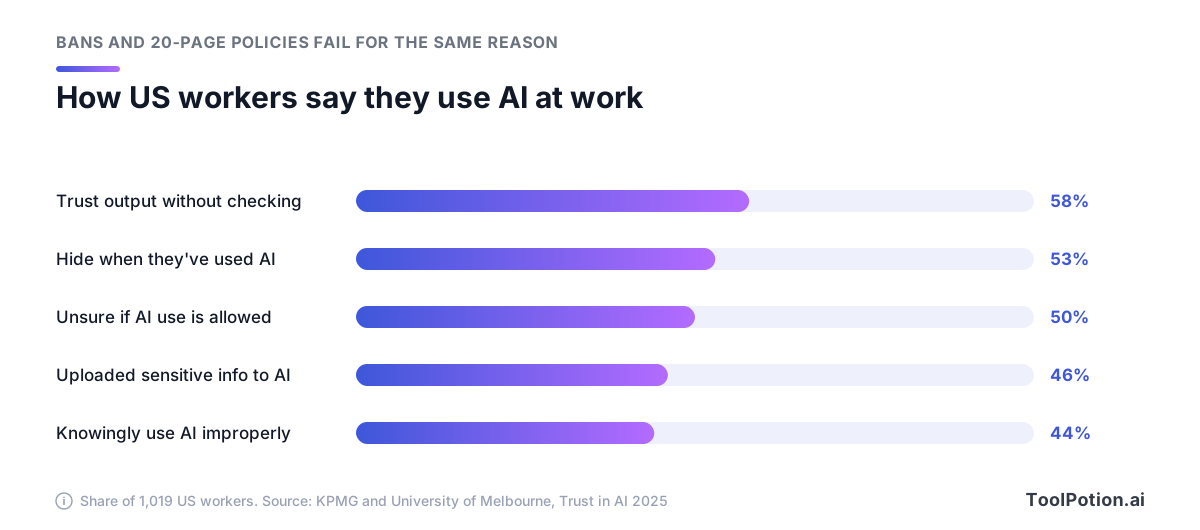
These are ordinary people trying to get work done. Almost half said they'd uploaded sensitive company information or intellectual property to public AI platforms, and 53% said they avoid disclosing when they've used AI. Secrecy is the predictable response to rules that are unclear or hostile, and it's the worst outcome for a manager, because you can't fix what nobody admits to.
What works is short, specific and tiered. A followable policy fits on two pages. It names account types and data classes instead of asking people to "use AI responsibly". And it has a middle tier between yes and no, so staff aren't choosing between full permission and a ban.
You don't have to invent the structure. NIST's Generative AI Profile, the companion to its AI Risk Management Framework, lists 12 risks that generative AI creates or makes worse, and under its Govern function recommends that organizations "establish transparent acceptable use policies for GAI" (action GV-1.4-002) (NIST AI 600-1). A small company meets four of those risks every week: confabulation (NIST's term for hallucination), data privacy, information security and intellectual property. The template below is built around them.
Sort every tool into three tiers
The tool list is the part people will consult, so it goes first. Use three tiers and name the account, not the brand. "ChatGPT" is not a tier. "Our ChatGPT Business workspace, signed in through company SSO" is.
| Tier | What belongs here | Typical entries |
|---|---|---|
| Approved | General-purpose AI on a company-managed account, open to everyone | Company ChatGPT workspace, Copilot Chat on a work account, Gemini in Workspace, a Claude Team organization |
| Limited | Tools cleared for one named use or team | Meeting notetakers for internal calls, coding assistants for engineering, writing assistants for marketing copy, agents with connectors |
| Not allowed | Personal accounts for company data, and tools that demand full documents for little return | Personal AI accounts for company data, and AI text detectors |
Keep the not-allowed tier short and reasoned. Netskope found that 90% of organizations actively block at least one generative AI app, and the average blocks 10. The most-blocked was the AI detector ZeroGPT, restricted by 45% of organizations. Security teams see it as high risk because detectors often require users to submit full text or source code. That's a good test for any tool: what does it need you to hand over, and what do you get back?
The limited tier is where the judgment sits. A meeting notetaker such as Otter.ai or Fireflies.ai is fine in an internal stand-up and a problem on a call with a customer who hasn't agreed to be recorded. A coding assistant like GitHub Copilot or Claude Code belongs on company repositories under a company plan, not on a contractor's personal subscription. A writing assistant like Grammarly can be cleared for marketing copy without being cleared for HR letters. Write the condition next to the tool, in one line.
If you haven't picked the approved assistant yet, our ChatGPT alternatives guide and the live AI chatbots board compare the main options.
What a company plan changes, and what it doesn't
The approved tier rests on one claim: company plans treat your data differently from personal ones. For Microsoft Copilot Chat, Google Gemini, Claude and ChatGPT that holds up, though the details differ. This is what each vendor's own documentation says.
| Tool | Company plan | Personal account |
|---|---|---|
| ChatGPT | Business, Enterprise and Edu data isn't used for training by default. Business admins control retention. SSO available. | Free, Go, Plus and Pro content trains models unless the user turns off "Improve the model for everyone" |
| Microsoft Copilot Chat | Enterprise data protection at no extra cost on work accounts. Prompts aren't used to train foundation models and are logged for audit. | Enterprise data protection applies to work sessions, shown by a green shield. Check Microsoft's terms before any personal-account use. |
| Gemini | Workspace content isn't human-reviewed or used for training outside your domain without permission. Existing access controls apply. | Google says a subset of chats are read by human reviewers and asks users not to enter confidential information |
| Claude | Team: no model training on your content by default, SSO, admin controls for connectors. Enterprise adds audit logs and custom retention. | Free, Pro and Max users choose whether chats train models, with five-year retention if they opt in |
Sources for the table: OpenAI's enterprise privacy page and data controls FAQ, Microsoft's Copilot Chat privacy documentation, Google's Workspace privacy hub and Gemini Apps privacy hub, and Anthropic's pricing page and consumer terms update.
Three details are easy to miss. Microsoft has renamed Microsoft 365 Copilot to Microsoft Copilot and Microsoft 365 Copilot Chat to Microsoft Copilot Chat, so an older policy may name products that no longer go by those names. Copilot Chat's web searches go to Bing under separate terms, with user and tenant identifiers stripped. And OpenAI says that, by default, it doesn't train on data its business products access from connected apps.
Now the limits. None of these controls stop someone pasting a client list into a personal account on their phone. They don't check outputs for errors, and they don't settle who owns what the tool produces. Enterprise terms protect data that lands in the right place. Getting it there is the policy's job.
Netskope tracked what happens when companies provide that place, across a year of data.
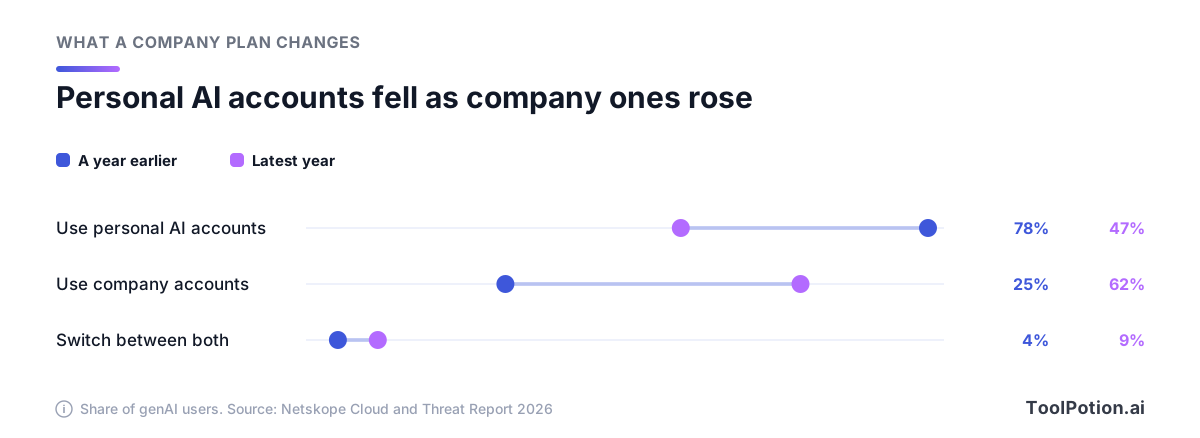
Personal-account use fell from 78% to 47% of generative AI users while company-managed accounts climbed from 25% to 62%. The share switching between both grew from 4% to 9%, which Netskope reads as company tools still missing some of the convenience or features people want. The lesson for a small company is blunt: buy or switch on one managed tool before you write a single prohibition, and keep it good enough that people don't drift back. If you already pay for Microsoft 365 or Google Workspace, check what your plan includes before buying anything new.
Data rules by classification
If people remember one section, make it this one. The tool list tells them where to work. The data rules tell them what to leave out, and they apply inside approved tools too.
Start from what leaks. In Netskope's data, the three kinds of content most involved in policy violations with generative AI apps were source code, regulated data and intellectual property.
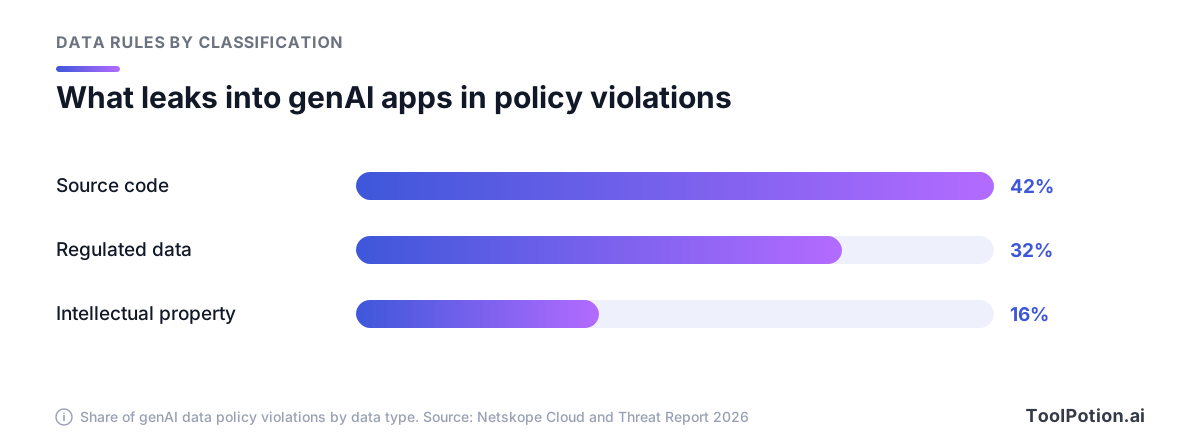
Source code leads at 42%, usually pasted in for debugging or refactoring help. Regulated data such as personal and financial information follows at 32%, then intellectual property like contracts and internal research at 16%. Netskope also found that half of organizations have no enforceable data protection policy for generative AI apps, so in those companies much of it may go unseen.
Use four classes plus one hard rule. Most companies already have labels like these for email or file sharing, so reuse them if they exist.
- Public information, such as your website and published docs, can go into any AI tool.
- Internal material like process docs and meeting notes stays in approved tools, and in limited tools only for their named use.
- Confidential work covers source code, contracts, financials and client files. It goes only into approved company tools, and only for people who could see it anyway.
- Restricted data never goes into a general AI tool. That covers personal data about customers or staff, including health and payment details.
- Passwords and API keys go into no AI tool at all, approved or not. Netskope notes they often hide inside code samples and config files, so tell engineers to scrub before they paste.
The restricted class has one exception worth writing down: a system bought for that data, approved by name, with a signed data processing agreement. An HR platform with AI features can be fine for employee records. A general chat assistant isn't, however good its enterprise terms.
Mapped against the three tiers, the classes look like this.
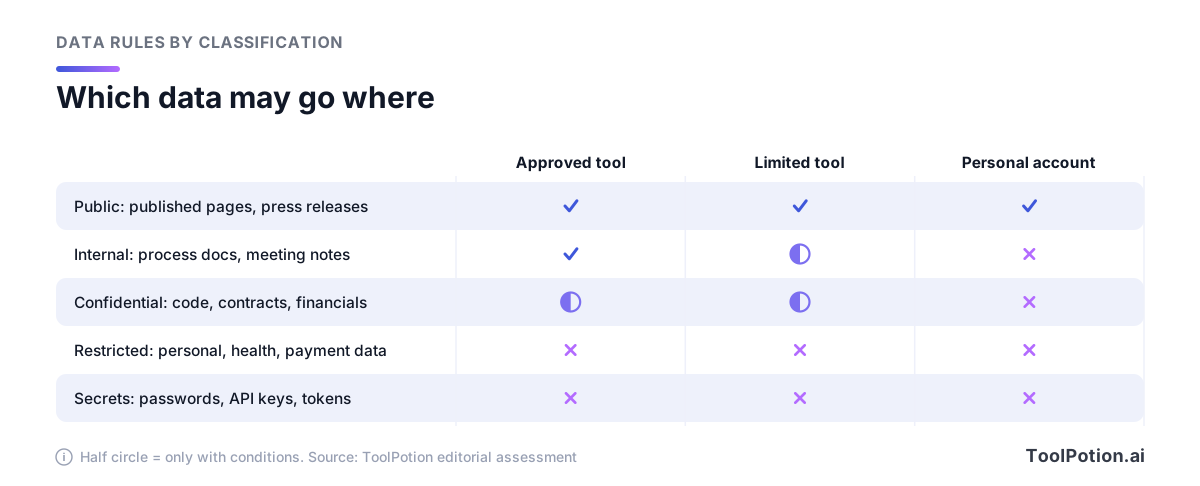
The half circles are conditions, and they're where your examples go. Write one per class: a stack trace into the company coding assistant is fine, the customer's database export isn't. People remember examples long after they've forgotten definitions. For vetting a new tool against these classes, our privacy framework for AI tools goes further, and the AI privacy tools board covers products built to redact or contain sensitive data.
Review, disclosure and who owns the output
Every AI output needs a named human owner, and the policy can say so in one line: whoever sends or publishes AI-assisted work is accountable for it. NIST defines confabulation as "confidently stated but erroneous or false content" and lists over-reliance and automation bias among the risks of how people work with these systems. KPMG found 58% of US workers rely on AI to complete work without properly evaluating the outcomes, so the risk is already in your inbox.
Make the review rule proportionate. An internal summary needs a read-through. Numbers, quotes, citations, legal statements and code headed for production need checking against a source or a test. Say exactly that. A blanket demand for "human review" of everything is a rule people quietly stop following.
Disclosure to customers and readers
Some disclosure now has legal force. Under Article 50 of the EU AI Act, which applies from 2026, deployers must label deepfakes and AI-generated or manipulated text published to inform the public on matters of public interest, unless the text has gone through human review or editorial control (European Commission). For most small companies the working rule is simpler. Tell people when they're dealing with an AI system or AI-made media in a context where they'd expect to know, and never let AI write reviews or testimonials.
Internal disclosure matters as much. If more than half of workers already avoid disclosing their AI use, a policy that punishes disclosure will drive the number higher. Ask people to mention AI help when it changes how a reader should check the work, and leave it there.
IP and confidentiality
Ownership is the first trap. The US Copyright Office concluded that AI outputs can be protected by copyright "only where a human author has determined sufficient expressive elements", and that prompts alone don't qualify (US Copyright Office). If you need to own something, like a logo or core brand copy, keep a human author and save the drafts.
Other people's confidentiality is the second. Client contracts and NDAs sometimes restrict where their material may go, and a vendor's promise not to train on your data doesn't change what you agreed with your client. The policy should tell staff to check the contract before a client's files go into any AI tool.
Agents, connectors and meeting bots need their own rules
A chatbot sees what you paste into it. An agent connected to your email or CRM can read far more, and it can act: send, delete, book, buy. Most policies written for chatbots skip this, and it's where the newest risk sits.
Netskope describes the Model Context Protocol (MCP) as quickly becoming the preferred way to connect AI agents to company systems, and says AI browsers and MCP-connected tools need governance and monitoring of their own. The core problem is indirect prompt injection: instructions hidden in a web page or email that the agent reads and then follows. In the map below, the attack gets in through the bottom-left corner.
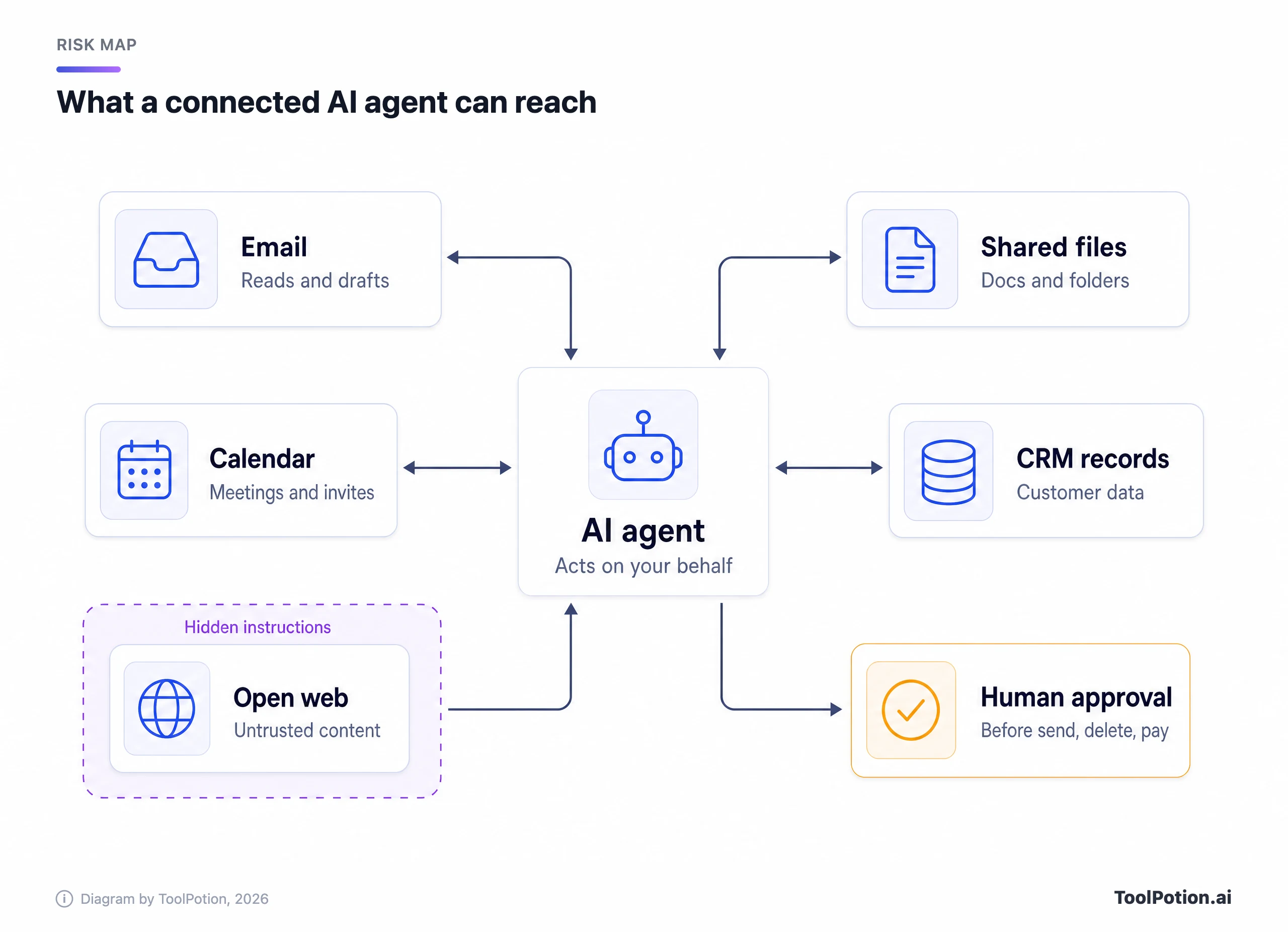
Anthropic published unusually concrete numbers when it piloted Claude for Chrome, its browser agent, last year. Across 123 test cases, deliberate prompt injection attacks succeeded 23.6% of the time without its safety mitigations and 11.2% with them. In one example from before the fixes, an email claiming that emails needed deleting "for security reasons" led the agent to delete a user's emails without confirmation (Anthropic). A vendor publishing its own failure rate is useful precisely because the number isn't zero.
So the rules for agents are about permissions, not prompt wording.
- An admin approves each connector before anyone switches it on, with the least access that does the job (read-only calendar access beats a full mailbox).
- A human confirms before an agent sends, deletes, pays for, publishes or shares anything outside the company.
- Agents that can reach confidential data don't browse the open web unattended.
- Someone keeps a list of which agents hold which connections and reviews it with the tool list.
Check what your approved tool gives admins before you need it. Claude's Team plan, for instance, includes admin controls for remote and local connectors. Agent builders such as Microsoft Copilot Studio exist to create new agents, and the approval rule covers those too. Our write-up of lessons from teams running AI agents in production covers the operational side.
Meeting notetakers
AI notetakers are agents too. They join calls, record everyone on them and send the audio to a vendor, including the voices of people who never chose the tool. The fix is cheap: announce the bot at the start, let anyone ask for it to be switched off, get consent from external participants, and set a retention period for recordings. The AI meeting assistants board is a useful place to compare which products give admins those controls.
A two-page template you can copy
This is the skeleton. Each row is one short section of the finished policy, with a sample clause to edit. Cut any row that doesn't apply, and keep the result to two pages.
| Section | Sample clause |
|---|---|
| 1. Purpose and scope | This policy covers everyone who uses AI on the company's behalf, contractors included. The goal is safe use of AI, not less of it. |
| 2. Approved tools | Approved: [tool, account type]. Limited: [tool, named use]. Not allowed: personal AI accounts for company data. |
| 3. Data rules | Public: any tool. Internal: approved tools. Confidential: approved tools, need-to-know. Restricted data and credentials: never. |
| 4. Accounts | Company data goes only into company accounts. AI accounts are removed on a person's last day. |
| 5. Human review | Whoever sends, publishes or ships AI-assisted work owns it. Check numbers and quotes against a source. |
| 6. Disclosure | Tell customers when they're dealing with an AI system where they'd expect to know. No AI-written reviews or testimonials. |
| 7. IP and confidentiality | Check client contracts before using their material. Keep human drafts of work we need to own. |
| 8. Agents and connectors | Admin approval per connector, least access, human confirmation before anything is sent, deleted, paid or published. |
| 9. Training | Everyone completes a short session at onboarding and once a year. We keep a record. |
| 10. Reporting mistakes | Report within 24 hours to [owner]. Reports are no-blame. Hiding a mistake is the breach. |
| 11. Owner and review | Owner: [name]. Tool list reviewed quarterly, the whole policy twice a year or when a vendor changes its terms. |
To tailor it, answer the questions in the builder below. It adds clauses for EU exposure, regulated data, notetakers, agents, published content and coding assistants, and copies the outline as plain text for your document editor.
One answer changes the outline more than the rest: the default tool. Choose "Not chosen yet" and the approved tier turns into a deadline, because a policy without an approved account is a ban by another name.
Roll it out in a month, then keep it current
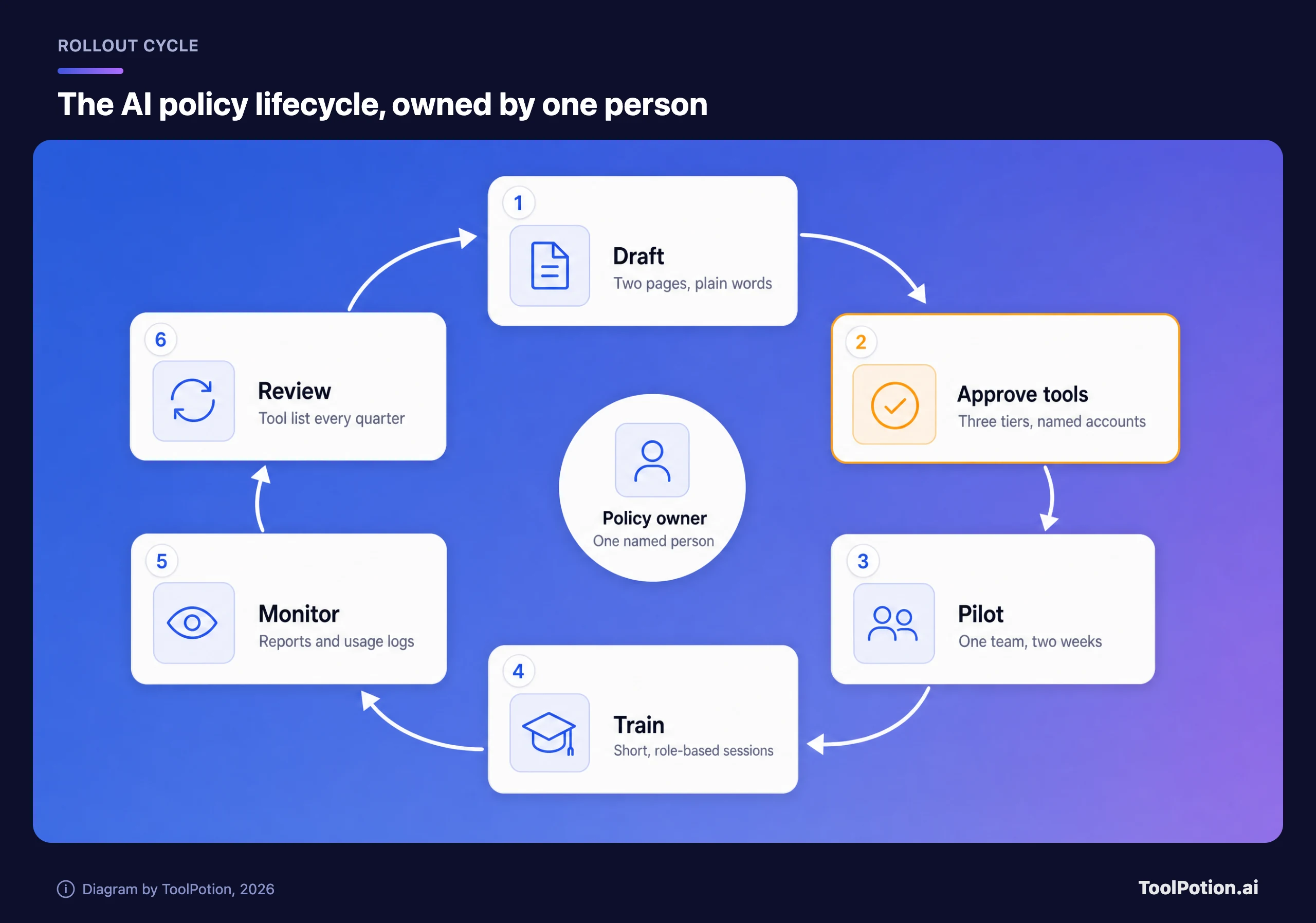
Four weeks is enough for a company of a few hundred people or fewer. In week one the owner drafts the two pages and confirms the approved tool is set up with company sign-in. In week two one team pilots it and logs every question the policy didn't answer. Week three fixes those gaps and runs training. In week four the policy goes where people will see it, such as the onboarding checklist.
The cycle below is the whole process, with one person at the centre. That person matters more than any single clause.
Training has a legal hook for many companies. Article 4 of the EU AI Act has required providers and deployers of AI systems to take measures to support their staff's AI literacy since early 2025, and national market surveillance authorities began supervising and enforcing it this year. The Digital Omnibus amended Article 4 in 2026: AI literacy remains an obligation, but no specific or "sufficient" level is mandated. The Commission says no certificate is needed and suggests keeping internal records. It also answers the question most small firms ask. If employees use ChatGPT to write advertising copy or translate text, the duty applies, and staff should be told about specific risks such as hallucination (European Commission).
Keep the sessions short and tied to roles: which tools are approved, what data never goes in, how to check output and how to report a mistake. Thirty minutes people remember beats a day they don't.
Reporting mistakes needs its own line in the policy, because the default is silence. Ask for a report within a day when someone pastes restricted data into the wrong place, when an AI error reaches a customer, or when an agent does something nobody asked for. Make it no-blame. Those reports are how you learn which rules don't work.
Then review on a schedule. Vendors change names and terms faster than most policies get reread. Anthropic changed its consumer terms last year so that Free, Pro and Max users choose whether their chats train its models, with five-year retention for those who opt in, while its commercial plans were left out of the change. A quarterly look at the tool list catches changes like that. Score your current policy against the checklist below before the first review.
The approved account is worth three points and the rest one or two, so a policy under six points should go back to the first item. Every other rule depends on people having an approved place to do the work.
Frequently asked questions
Does a small company need a written AI usage policy?
Yes, as soon as anyone uses AI with company data, which in most firms is already happening. One page is a fine start. Without it, staff are guessing about what's allowed.
Should we ban ChatGPT at work?
Ban personal ChatGPT accounts for company data and give people a company workspace instead. A personal user can switch training off, but the company still gets no control over retention and no way to cut access when someone leaves. A blanket ban mostly moves the use onto phones you can't see.
Is Microsoft Copilot Chat safe for company data?
Signed in with a work account, it carries Microsoft's enterprise data protection and prompts aren't used to train foundation models. Prompts and responses are also logged for audit and eDiscovery, which is worth telling staff. Restricted data still stays out under your own rules.
Does the EU AI Act require AI training for employees?
Article 4 requires providers and deployers to take measures for their staff's AI literacy, and it covers ordinary business use of chat assistants. There's no set format or certificate. A short session scaled to how people use AI, plus a record of who attended, is a sensible minimum.
Who should own the AI policy?
One named person, usually whoever already runs IT or operations, with a business-side manager reviewing the tool list. Get legal input on restricted data and customer contracts, but the owner should be able to explain every rule without a lawyer in the room.