The AI is the easy part of an AI knowledge base. Answers go wrong because the documents underneath are stale, duplicated or shared with the wrong people, so fix your 50 most-used documents and your sharing settings before you buy anything.
That matters now because you may already own one. Atlassian switches AI on by default for every app on its Standard, Premium and Enterprise cloud plans, Rovo included, until an admin switches it off (Atlassian). ChatGPT Business enables apps by default (OpenAI Help Center). Claude Team and Enterprise ship an “Ask Your Org” search project that's on by default and only waits for an owner to finish setup (Claude Help Center). Staff may soon be asking an AI about your files before anyone has checked what it will find.
This guide is for team leads, ops and IT people at companies of roughly 10 to 500. It covers how the answers get assembled, three ways to build with verified 2026 prices, what makes answers wrong, and a 30-day rollout.
How an AI answer gets built from company knowledge
Strip away the branding and every product here does the same job in four moves. It checks who is asking. It searches only the documents that person can already open. It hands the best-matching passages to a language model, which writes a reply from them. Then it links each part of the reply to the passage it came from, so the reader can check.
The technical name is retrieval-augmented generation, or RAG. The model hasn't memorized your wiki. It reads a few retrieved passages at the moment someone asks, much like a new hire skimming three pages before replying in Slack. An answer can only be as current and correct as the passages it was handed, and a clever model can't rescue a wrong page.
Permissions are the step teams underestimate. Microsoft's documentation says Microsoft Copilot “only surfaces organizational data to which individual users have at least view permissions,” and it tells admins to use SharePoint's permission model so the right people have the right access (Microsoft Learn). Read that the other way round. The AI won't show a file to someone who can't open it. It will surface every file they can open, including a pay-review spreadsheet somebody shared company-wide years ago and forgot. (Microsoft has renamed Microsoft 365 Copilot to Microsoft Copilot, though some licenses may show the old name during the transition.)
The diagram traces one question through those steps. The amber box is the one that decides what the AI is allowed to read.
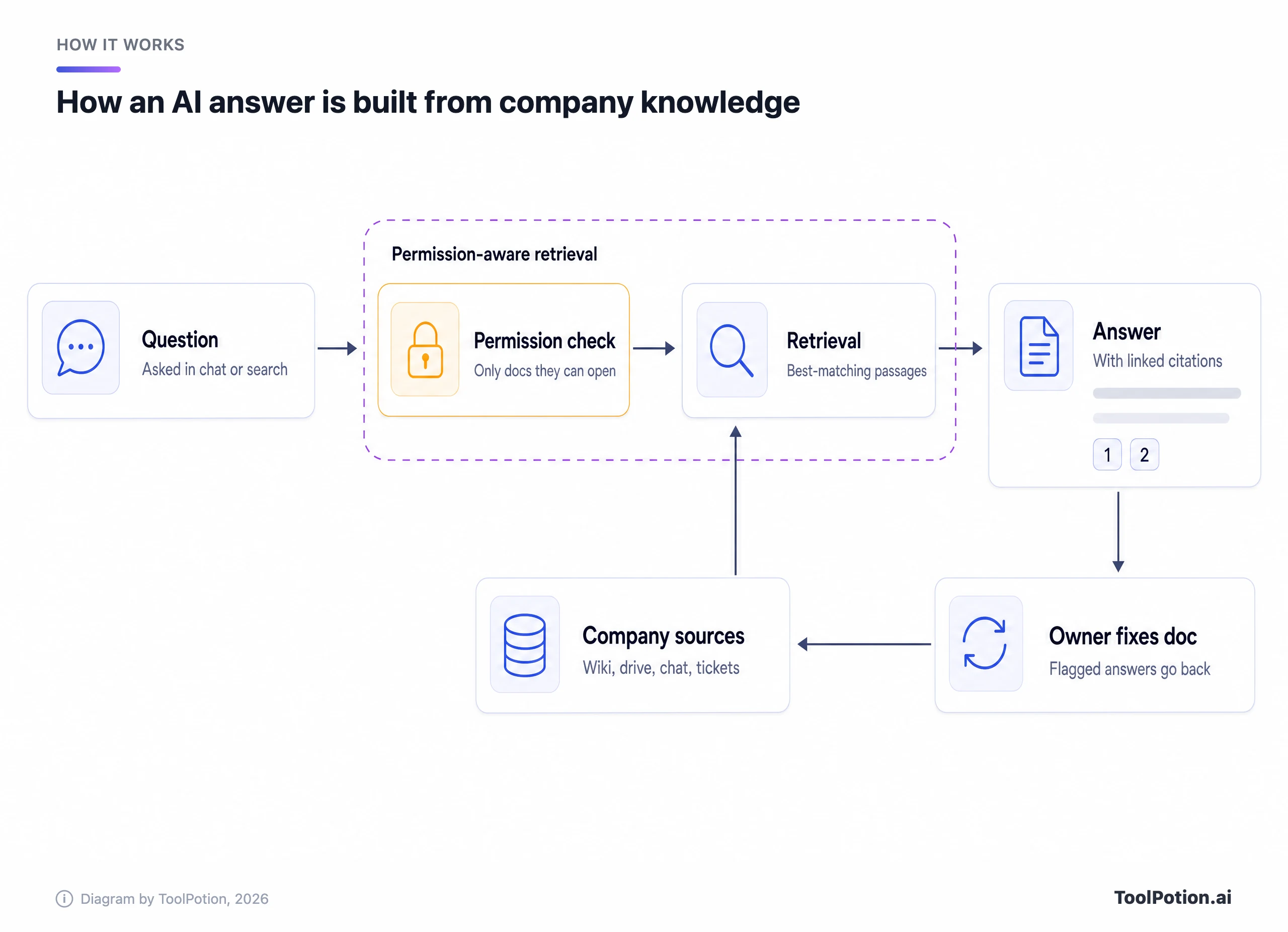
Look at the loop along the bottom. When someone flags a bad answer, it should go to whoever owns the source document, because fixing the page fixes every future answer that cites it. Correcting the reply in chat fixes one conversation.
Under the hood there are two designs, and they fail differently. Index-based tools copy your content and its permission settings into their own index ahead of time. Microsoft's Semantic Index, Rovo, Glean and Gemini Enterprise work this way, which is fast but means the copy can lag behind the source. Live-call tools search your apps when the question arrives. Claude's enterprise search makes MCP calls to connected services and says nothing from them is indexed on Anthropic's side.
One line in Anthropic's help page matters for IT. Each person normally connects with their own credentials, so results match their own access. A custom connector set up with a shared API key works differently: everyone who uses it sees whatever that one credential can see.
Three build paths, matched to how your knowledge is spread
The model inside barely matters for this job. Notion lets Enterprise Search users choose between OpenAI's GPT, Anthropic's Claude and Google's Gemini, for instance. What separates products is where they look and how well they track your permissions, so the right choice follows from where your knowledge already lives.
There are three realistic ways to build. A team assistant is a shared project or notebook for one team with a bounded set of documents, and it can be live in an afternoon. AI in your wiki means switching on the assistant your wiki vendor already ships. An answer layer indexes many tools behind one search box, and it earns its cost only when knowledge is scattered across lots of systems.
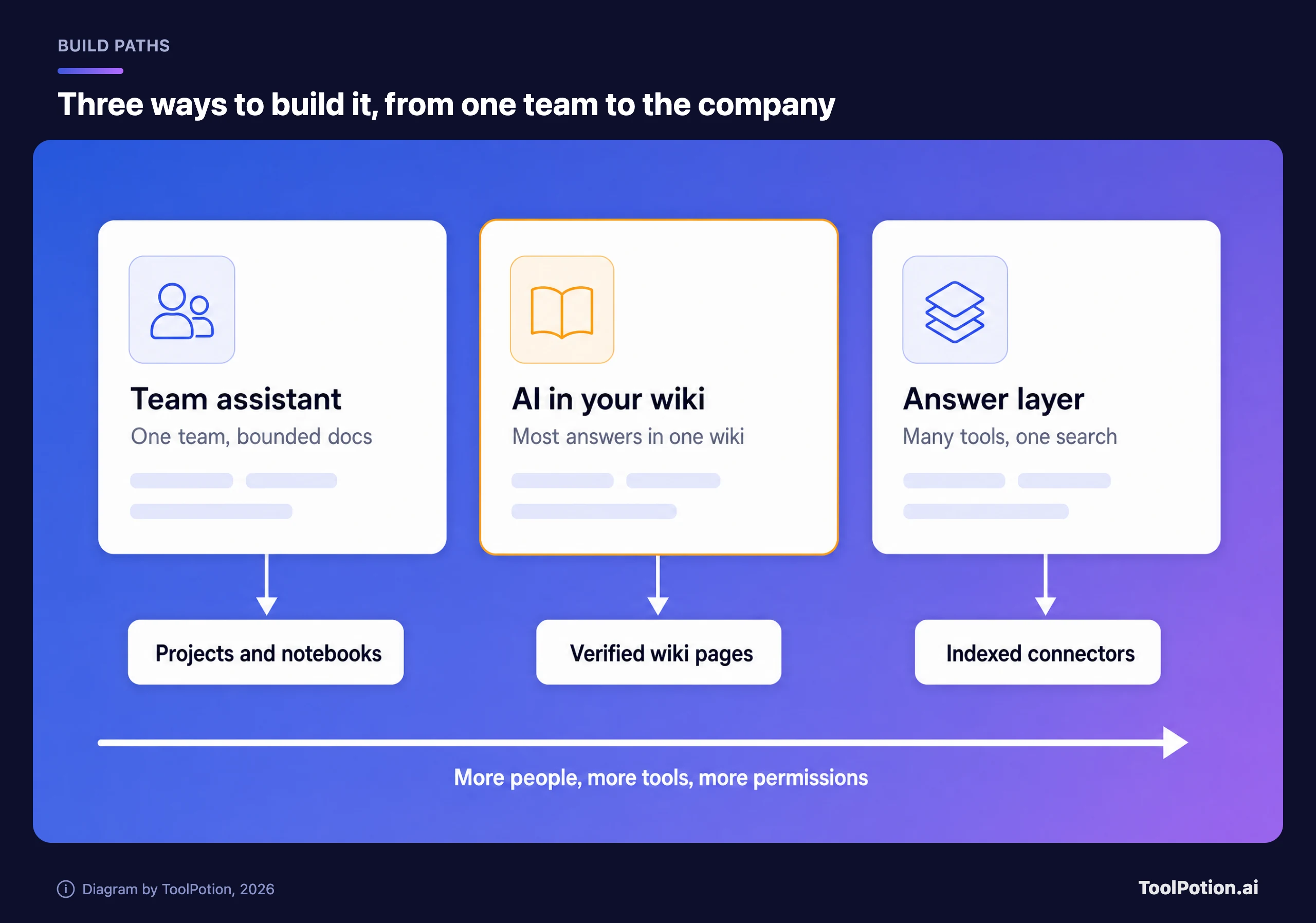
Left to right, each path covers more people and more tools, and inherits more permission settings somebody has to have checked. The amber middle card is the sensible default for most companies of 10 to 500 people. If you already pay for a wiki, its AI is the cheapest route to cited answers, and the money saved can go into cleaning pages.
Not sure which describes you? The tree below asks at most two questions.
If you land on “Buy an answer layer,” read the section on why answers go wrong before you sign anything. The bigger the index, the more forgotten sharing settings it will dig up.
Path one: turn on the AI in the wiki you already have
Wiki vendors have something the other paths lack: features for keeping pages current, and several now show that status inside the AI's answers.
Notion puts its AI on the Business plan, at $20 per member a month billed yearly or $24 monthly. Free and Plus get only a trial (Notion pricing). Business includes Enterprise Search across Notion and connected tools such as Slack, Microsoft Teams and GitHub, with more in beta. Its most useful feature here is small. You can add a verified badge to up-to-date pages, and Notion says the badge “appears in search results and AI citations,” so readers see whether a source has been checked.
Confluence is cheaper per seat because Rovo comes bundled. Standard lists at $5.42 per user a month and Premium at $10.44, with Rovo allowances of 25 credits per user a month on Standard, 70 on Premium and 150 on Enterprise (Atlassian). Atlassian's usage docs add that credits pool across the organization and don't roll over, and that extra usage billing starts later this year, on by default at $10 per 1,000 credits unless an admin caps it. Budget for that before the pilot gets popular.
The smaller wiki tools sell upkeep harder. Slite Basic costs $10 per user a month billed yearly and answers from Slite docs only, capped at 30 questions a seat each month. Pro, at $20, adds search across connected tools and doc fact-checking with suggested fixes (Slite). Tettra Scaling is $8 per user a month billed yearly, with a 10-user minimum, plus stale-page and unowned-content reports (Tettra). Guru doesn't publish prices, but its package lists verification workflows and permission-aware answers with citations.
| Plan | Price per user a month | What the AI answers from | Watch for |
|---|---|---|---|
| Notion Business | $20 yearly, $24 monthly | Notion plus connected apps | No AI below Business beyond a trial |
| Confluence Standard | $5.42 | Atlassian apps plus connected tools | 25 Rovo credits a user |
| Confluence Premium | $10.44 | Same, bigger allowance | 70 Rovo credits a user |
| Slite Basic | $10 yearly | Slite docs only | 30 questions a seat a month |
| Slite Pro | $20 yearly | Slite plus connected tools | 50 credits a seat a month |
| Tettra Scaling | $8 yearly | Tettra pages, in-app and in Slack | 10-user minimum |
| Guru | Quoted by sales | Guru plus 100+ integrations | No public price |
Choose among these on upkeep features, not on the model. A verified badge or a stale-page report is what keeps answers right six months after launch, when the pages have drifted. And if your wiki is a graveyard of half-finished pages, switching on its AI just gives the graveyard a voice.
Path two: a shared assistant for one team
Sometimes the knowledge problem belongs to one team: support's 40 macros, say, or the sales playbook. A shared assistant project handles a bounded pile like that in an afternoon, with no wiki migration.
ChatGPT Business costs $25 per user a month, or $20 on an annual plan, with a two-seat minimum (OpenAI Help Center). Its Company Knowledge plugin answers from connected sources, and OpenAI says a member can retrieve only what they're already allowed to access there. Mind the admin gap, though. Apps are on by default in Business, while role-based control over individual apps is an Enterprise and Edu feature.
Claude Team runs $20 per standard seat a month billed annually, or $25 monthly, for teams of 2 to 150 (Claude pricing). Projects can be public to the whole organization or private to invited members, with Can view and Can edit roles. When a project's files approach the context limit, Anthropic says Claude switches to retrieval on its own and can hold up to ten times more.
Google renamed NotebookLM to Gemini Notebook this year, and Google says more than 30 million people and over 600,000 organizations use it. Its sharing model is the thing to understand before uploading anything. A viewer “has read-only access to all the source documents and notes” in a shared notebook, and Chat View, which hides those materials, “does not completely revoke a viewer's underlying access” (Google).
That gives one rule for this whole path. Never put a document into a shared project or notebook that you wouldn't hand, unredacted, to every person it's shared with.
The scorecard compares these assistants with the wiki tools and Microsoft Copilot on five things that decide whether answers stay right. Start with the last column.
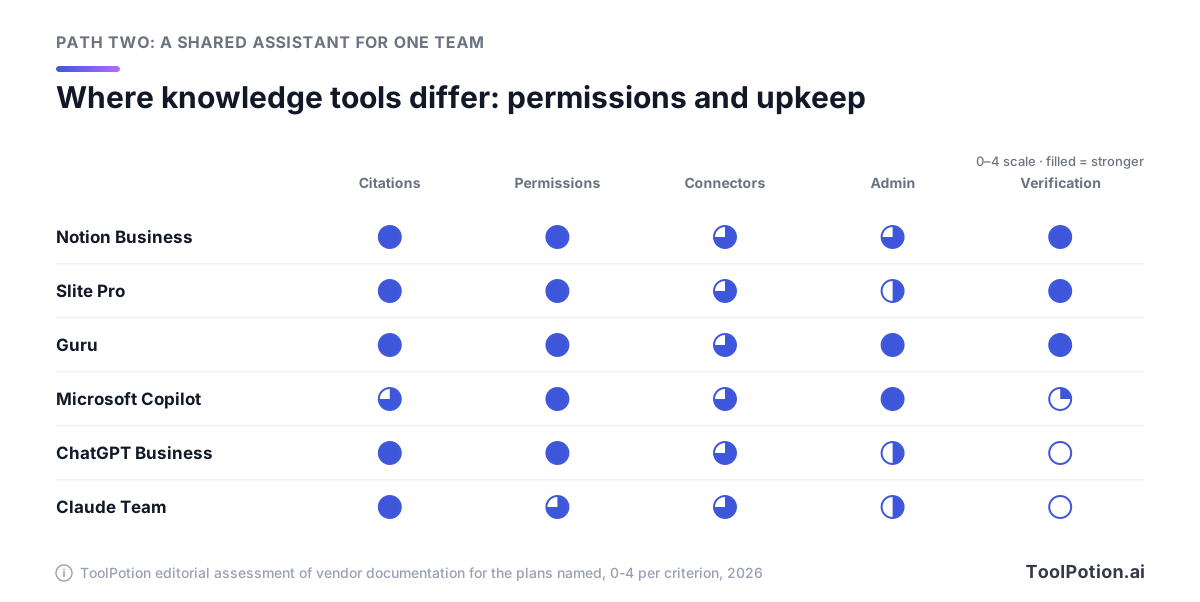
Every tool cites its sources and respects source permissions, with Claude marked down a notch for shared-credential connectors. The split is upkeep. ChatGPT Business and Claude Team have no feature for marking a document verified or flagging it stale, so freshness depends entirely on whoever owns the files. That's fine for a support team with one owner and a few dozen documents. It doesn't scale to a whole company.
Path three: an answer layer across all your tools
When the answer to a routine question might sit in Confluence, a Google Drive folder, a Slack thread or a Jira ticket, a wiki's AI sees only part of it. Answer layers index everything and enforce each source's permissions in results. Glean says it offers more than 250 connectors and that “users only see what they are allowed to access.” It doesn't publish prices.
Google's old Agentspace pages now redirect to Gemini Enterprise. Its Business edition starts at $21 per seat a month, needs no IT setup, connects to Microsoft 365, Google Workspace, HubSpot and Jira, and pools 25 GiB of storage and indexing per seat. Standard and Plus start at $30 (Google Cloud).
Microsoft 365 Copilot Business is an add-on to a Microsoft 365 Business plan at $21 per user a month paid yearly. Existing customers who sign up before the end of 2026 get a promotional $18 for the first year (Microsoft). Microsoft describes the no-cost Copilot Chat that comes with eligible plans as web-grounded, so check which Copilot your staff are using before you assume answers come from SharePoint.
Put the entry seat prices side by side and the spread across all three paths turns out narrow.
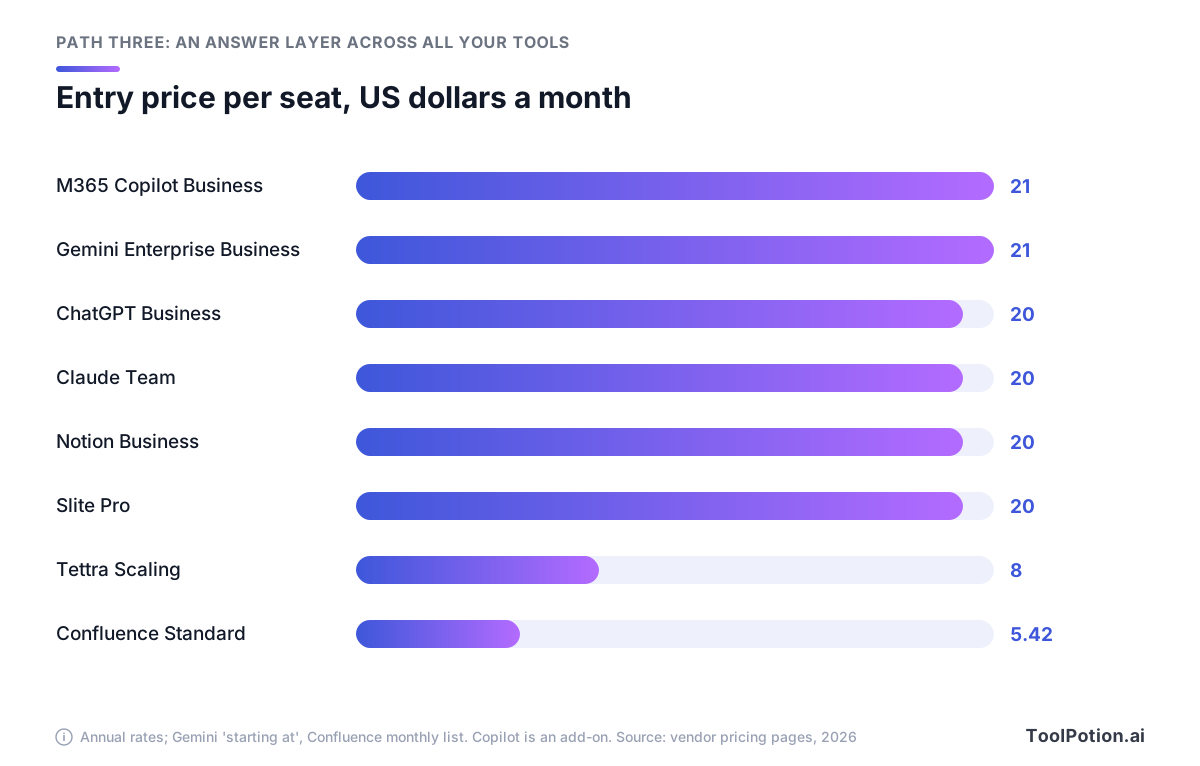
Six of the eight plans sit at $20 or $21 a seat. Tettra is $8, and Confluence Standard is $5.42 with Rovo credits included. A 50-person company at $20 a seat pays $1,000 a month, or $12,000 a year, and that's the predictable part. The variable cost is the people time to clean documents, audit sharing and review answers, and it's the same whichever vendor you pick.
Both the Gemini Enterprise and Copilot business editions stop at 300 seats, so a 400-person company is pricing bigger tiers (Gemini Enterprise Standard has no seat cap). Under about 50 people with one wiki, skip this path. You'd pay to index tools where little of value lives, and you'd inherit every sharing mistake in them.
For a wider field than the products named here, the live AI knowledge management board ranks the category by ToolRank score, and our roundup of AI knowledge management tools reviews the leaders in more depth.
Top 10 AI knowledge management tools
- # 1Top PickNotionAI AppNotion is an AI workspace that combines docs, wikis, projects, and databases with custom AI agents, cross-app search, and automation. It is built for individuals and teams who want to run their work from one place.90ToolRankElite
- # 2Runner UpConfluenceAI AppConfluence is a collaborative workspace designed for teams to create, share, and manage knowledge efficiently. With AI capabilities, it helps draft, summarize, and find information quickly, enhancing productivity and project acceleration.72ToolRankStrong
- # 3Third PlaceGlean – Work AIPlatformGlean is an enterprise Work AI platform that connects knowledge, systems, and context. It enables users to find, create, and automate tasks across various business applications, offering secure, permission-aware access and reducing token waste for more efficient AI deployment.66ToolRankStrong


- 4RovoAI AppRovo is Atlassian's GenAI product that empowers teams to leverage organizational knowledge through Rovo Search, Rovo Chat, and specialized Rovo Agents, enhancing decision-making and workflow efficiency.59ToolRankSolid
- 5AnythingLLMGitHub RepoAnythingLLM empowers users to own their intelligence rather than rent it. This tool provides everything necessary for a robust local-first agent experience, enhancing productivity and autonomy in various tasks.58ToolRankSolid
- 6Mintlify - Intelligent Knowledge PlatformAI AppMintlify is an AI-native knowledge platform designed to help teams create and maintain world-class documentation. It integrates AI throughout the documentation lifecycle, from writing and editing to user understanding, ensuring content is accessible to both humans and LLMs. The platform aims to reduce documentation debt and enhance user experience.55ToolRankSolid
- 7AnythingLLMAI AppAnythingLLM is a free, private AI assistant that runs entirely on your own device. It lets you chat with documents, transcribe meetings, and build AI agents locally with no accounts, API keys, or token limits.55ToolRankSolid
- 8IBM Watson DiscoveryPlatformIBM Watson Discovery is an AI-powered platform that enhances productivity by automating information discovery using advanced NLP and intelligent document processing.54ToolRankSolid
- 9Snowflake CoWork | Enterprise Intelligence AgentAI AgentSnowflake CoWork is an enterprise intelligence agent designed for knowledge workers, offering governed analysis, automation, and action in one place. It empowers businesses with secure and scalable data infrastructure.54ToolRankSolid
- 10ServiceNowPlatformServiceNow offers an AI platform designed to streamline enterprise workflows, enhancing productivity for both customers and employees. It provides a unified solution for digital business transformation across various sectors.53ToolRankSolid






How ToolRank works
ToolRank is ToolPotion’s proprietary ranking engine.
It continuously evaluates hundreds of signals across the open web — real traffic and popularity, audience and community strength, authority and longevity, adoption and engagement — processing millions of data points to place every tool where it has earned to be.
Every AI type is measured by its own tailored model: what proves traction for a SaaS app is not what proves it for an open-source framework or a creator channel. Missing a platform never counts against a tool — ToolRank judges the evidence that exists.
No paid placement. No self-reported numbers.
Why AI answers go wrong
When a pilot disappoints, look at the sources before you blame the model. The failures are predictable, and most of them trace back to content.
Stale pages come first. A model can't tell an old travel policy from the current one unless the page says which is current, and if both are retrievable it may cite the wrong one in a perfectly confident tone. Duplicates make it worse, because two versions of the same policy can produce an answer that blends them and cites both.
Oversharing is the one that ends up in an incident report. Microsoft built a SharePoint control, Restricted Content Discovery, for organizations that “need time to review SharePoint sites, validate permissions, and implement governance controls” before Copilot makes content broadly discoverable. Microsoft calls it temporary, it doesn't change anyone's permissions, and on sites with more than 500,000 items an update can take over a week. If the vendor ships a stopgap for overshared files, assume you have some.
Missing ownership turns small errors into permanent ones. If nobody owns the page an answer cites, a flagged mistake has nowhere to go.
Sync lag catches teams out after launch. Notion says its AI connectors can take up to 36 hours to ingest a connected app, new content up to 3 hours to appear, and the integration generally reaches back one year from setup (Notion Help). Google's Gemini Enterprise docs say an incremental sync picks up added and updated content but not identity data or deletions, which wait for a full or identity sync. So a document you deleted or locked down this morning can stay answerable for a while. Atlassian says Rovo listens for permission changes and updates its index, and that's the behavior to ask every vendor about.
The last failure is deliberate. OWASP's Top 10 for LLM applications describes an attacker editing a document that a RAG system draws on, so planted instructions change what the AI tells the next person who asks. Anyone with edit rights to a source can steer answers, so keep edit rights narrower than read rights.
A 30-day rollout that starts with your top 50 documents
Thirty days is enough for an honest pilot if the first two weeks go to documents rather than software. Fifty is a working number, not a magic one, and it's small enough to finish in a fortnight.
In the plan below, cleanup starts on day one and the AI doesn't touch a source until week 3.
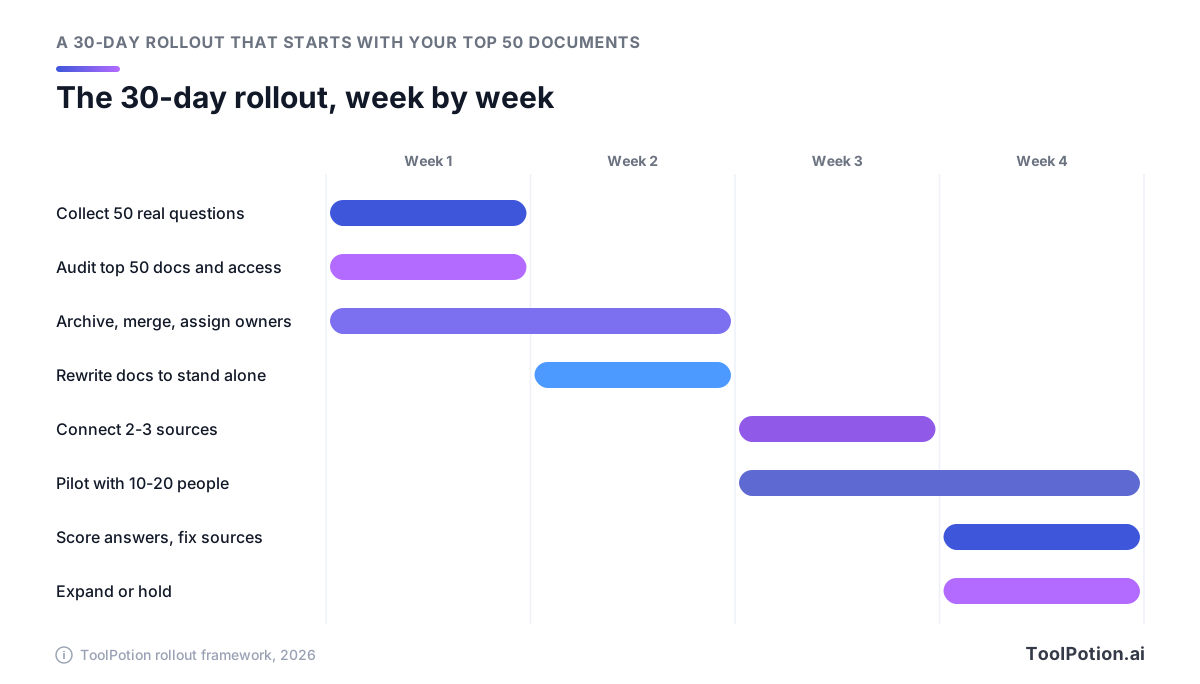
Week 1: collect real questions, then find what answers them
Pull 50 questions people asked recently from Slack channels, help-desk tickets and new-hire check-ins. Keep their wording, typos included, because that's how they'll ask the AI. For each question, find the document that should answer it. That list is your top 50.
For each document, note who owns it and when someone last checked it. Then audit who can see it. On the drives and wikis you plan to connect, hunt for “anyone with the link” sharing and for organization-wide access on HR, finance or legal folders. Spaces owned by people who've left the company belong on the same list.
Week 2: clean the 50 documents
Archive or delete duplicates so each question has one current answer, and point superseded pages at their replacement. Give every page a named owner and a review date. Then rewrite for retrieval. The AI reads passages, not whole pages, so a paragraph that says “the limit is now $50” means nothing once it's cut loose from its heading. Name the policy, team, region and year inside the passage. Anthropic advises clear, descriptive filenames for Claude projects, and titles work the same way.
Run each of the 50 documents through this card before it goes anywhere near a connector.
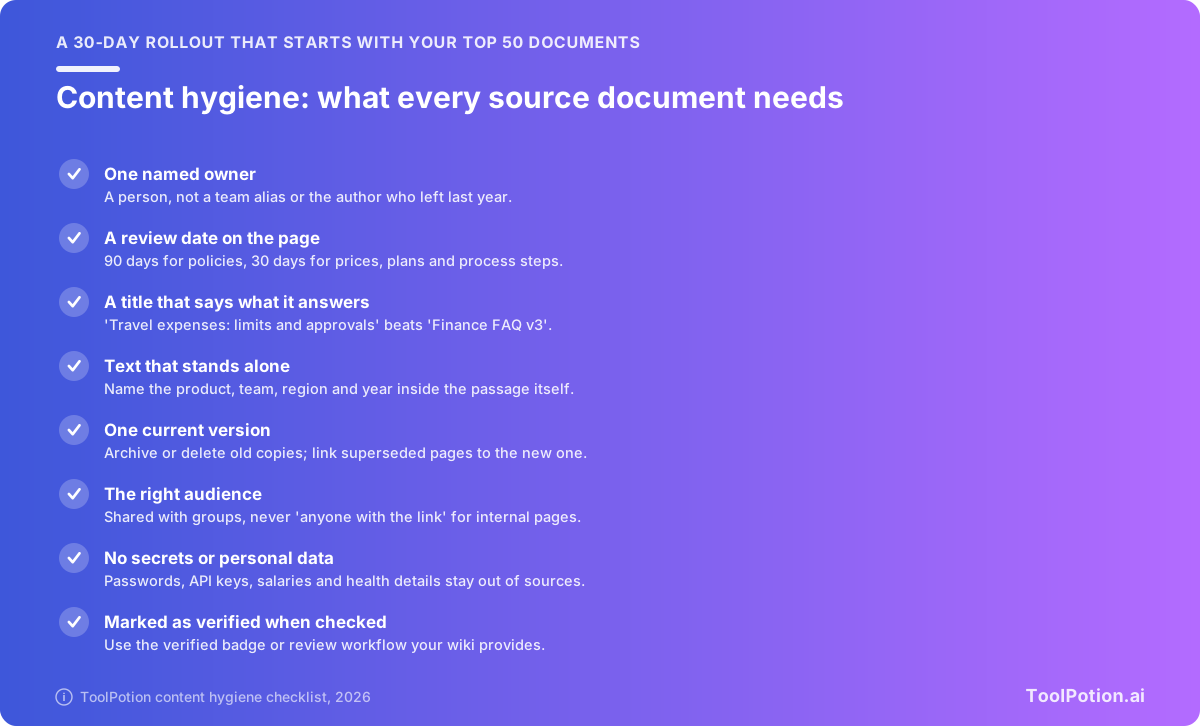
The last item depends on your tool. Notion and Slite have verification built in, and Tettra reports stale and unowned pages. In a ChatGPT or Claude project, a review date in the file name or first line is the workable substitute.
Weeks 3 and 4: connect, pilot and score
Connect two or three sources, not everything. Leave HR, finance and legal spaces out of the first pass even if their permissions look right. Pick 10 to 20 pilot users from different teams and have them use the AI for real work (our first-week plan for AI at work helps newcomers). Run your 50 questions at the end of week 3 and again in week 4, and score them like this:
- Grade every answer right, partly right or wrong.
- Open the citations. A right answer that cites an outdated page is a failure waiting to happen.
- Count the questions it couldn't answer. A high no-answer rate often points to a missing document, not a weak tool.
- Send every wrong answer to the owner of the cited page and track how many get fixed within a week.
- Expand only when results clear a bar you set in advance, such as 45 good answers out of 50.
Before you connect anything, score where you stand. The two-point items are the gaps that produce the worst answers.
Below 6 points, keep cleaning. Connecting now would surface stale and overshared files faster than people can correct them. From 6 you can pilot with a small group, and from 10 your sources are in good enough shape to expand in stages.
Governance that keeps answers right
A good rollout gets you to launch day. Keeping answers right after that takes a few dull habits.
Every source needs one named owner, a person rather than a team alias. When someone leaves, their pages get reassigned on the same offboarding checklist that takes back their laptop. Pages with no owner should drop out of the AI's sources until someone claims them.
Set review dates by how fast the content changes. Ninety days suits policies. Prices, plan details and process steps need a look every 30 days. A page past its date gets checked or archived, and in a tool with verification, it gets re-verified or loses the badge.
Share with groups, not individuals, so access follows role changes. Review sharing before you connect a source, which is what Atlassian tells Rovo customers to do for every third-party app. And prefer connectors where each person signs in with their own account, because a shared credential gives everyone the same view.
Some material should never sit anywhere the AI can reach, however tight the permissions look:
- Passwords, API keys and other credentials.
- Salary, health and individual HR case details.
- Customer personal data beyond what a team needs to serve that customer.
- Legally privileged material, including anything under a litigation hold.
- Unreviewed drafts that read like policy.
Check what each vendor does with your data. OpenAI says it doesn't train on ChatGPT Business workspace data by default, Claude Team lists no model training on your content by default, and Microsoft says data accessed through Microsoft Graph isn't used to train foundation models. Retention differs more: Notion lists 30-day retention with its LLM providers on lower plans and zero retention on Enterprise. Our privacy framework for AI tools covers the questions to ask.
Then keep the feedback loop running. Give people a quick way to flag a wrong answer, route the flag to the page owner, and review the flags monthly. The loop in the first diagram only works if someone closes it.
Frequently asked questions
Do we need a new tool, or is our wiki's AI enough?
Start with the wiki's AI and its connectors. Add an answer layer only when your pilot's no-answer questions turn out to live in tools the wiki can't reach.
Can the AI show someone a document they shouldn't see?
Not one they can't already open, on the products covered here. The risk is files they can open but shouldn't, such as a folder shared company-wide by mistake, plus anything reachable through a shared-credential connector.
How much does an AI knowledge base cost for a 50-person team?
At list prices, about $1,000 a month on any of the $20 plans: Notion Business, Slite Pro, ChatGPT Business or Claude Team, all on annual billing. Confluence Standard comes to $271 a month with its Rovo allowance, and Tettra Scaling to $400. Budget people time for cleanup on top.
Is NotebookLM still available?
Yes, under a new name. Google renamed it Gemini Notebook this year and says it remains a standalone product. The old notebooklm.google address now redirects to notebook.google, and Gemini Enterprise's Business edition bundles Gemini Notebook for enterprise.
Should we build our own RAG system instead?
For most companies of 10 to 500 people, no. Off-the-shelf tools already handle permission sync and citations, which are the hard parts. Building makes sense when answers need to live inside your own product or draw on data no vendor connects to, and the vector databases and retrieval board is a place to start.