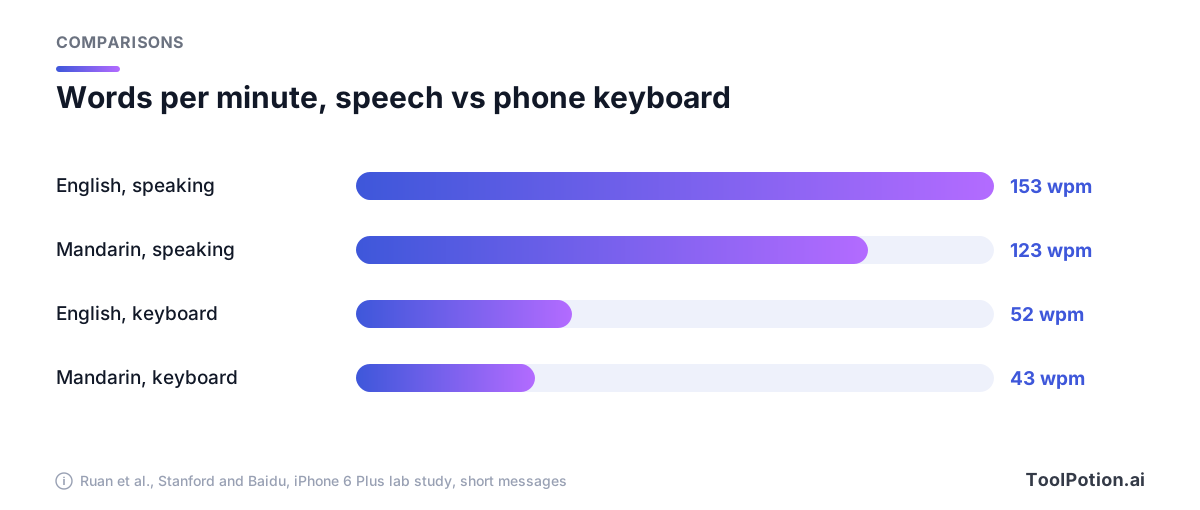
In a 2016 lab study at Stanford and Baidu, people dictating short messages to an iPhone 6 Plus managed 153 words per minute in English. The same people on the phone's keyboard managed 52. In Mandarin it was 123 against 43 (Ruan et al.). Speech also made fewer mistakes along the way, though it left slightly more of them in the final text: 1.30% of words wrong against 0.79% for typing.
That was a decade-old recognizer under ideal conditions, and it already tripled typing speed. So nobody needs convincing that talking is faster. The decision in front of you is narrower and more expensive: do you pay $8 to $15 a month for an AI dictation app, or use the microphone key your computer already has?
Our view, after reading the pricing pages, privacy policies and docs of the main contenders: most people should start free and stay free until they can name the specific thing the free tool does badly. The paid apps do offer something the built-in tools don't. It's just narrower than their marketing.
The free tier keeps getting better, and the news says so
Nvidia released Nemotron 3.5 Transcribe, a free, open-weight model that transcribes audio in up to 40 languages, handles recordings up to an hour long and tells up to eight speakers apart (TechCrunch). It's a developer tool, not a dictation app, and TechCrunch notes one drawback that matters here: it works on recorded audio, not livestreams. You can't press a key and talk into it.
But it's the same pattern we've seen all year. Strong speech models keep landing as free downloads, and the apps that wrap them (several of which are free, like Spokenly and the free tier of Superwhisper) get a better engine without paying for it. What separates a paid app from a free one is less the engine than the editing around it, and we'll get to that.
Apple's own stack moved too. MacStories timed a command-line tool built on Apple's on-device SpeechAnalyzer and SpeechTranscriber against MacWhisper's Large V3 Turbo model on a 34-minute video. Apple's API finished 2.2 times faster, 45 seconds against 1 minute 41, with no noticeable difference in transcription quality (MacStories). That tested file transcription, not the Dictation key, so treat it as evidence about the engine and not about the experience. Apple's current Mac guide adds that with Apple Intelligence in macOS 27, Dictation uses an on-device model to improve spelling, punctuation and capitalization, but only in English, only on Macs with an M3 or later and at least 12GB of unified memory (Apple).
We couldn't find an independent word-error-rate test of the built-in keys themselves, Apple's, Microsoft's or Google's. That gap matters, and it's why the accuracy section below leans on a vendor's numbers with a warning label.
Where your audio goes
This is the clearest difference between the options, and it's printed in each vendor's own documentation.
Windows voice typing (Win+H) uses online speech recognition powered by Azure Speech services, so it needs an internet connection (Microsoft). Apple says you can check Keyboard settings to see whether general Dictation is processed on your device rather than sent to Siri servers, and the same page notes that if you opt in to sharing audio recordings, Apple may review a sample. One Windows feature changes the picture: on Copilot+ PCs, Microsoft's Fluid dictation uses on-device small language models to fix grammar, punctuation and filler words as you speak, in English, and it's on by default. Google's Gboard help page covers commands and languages but, on the page we read, doesn't say where the audio is processed. We won't guess.
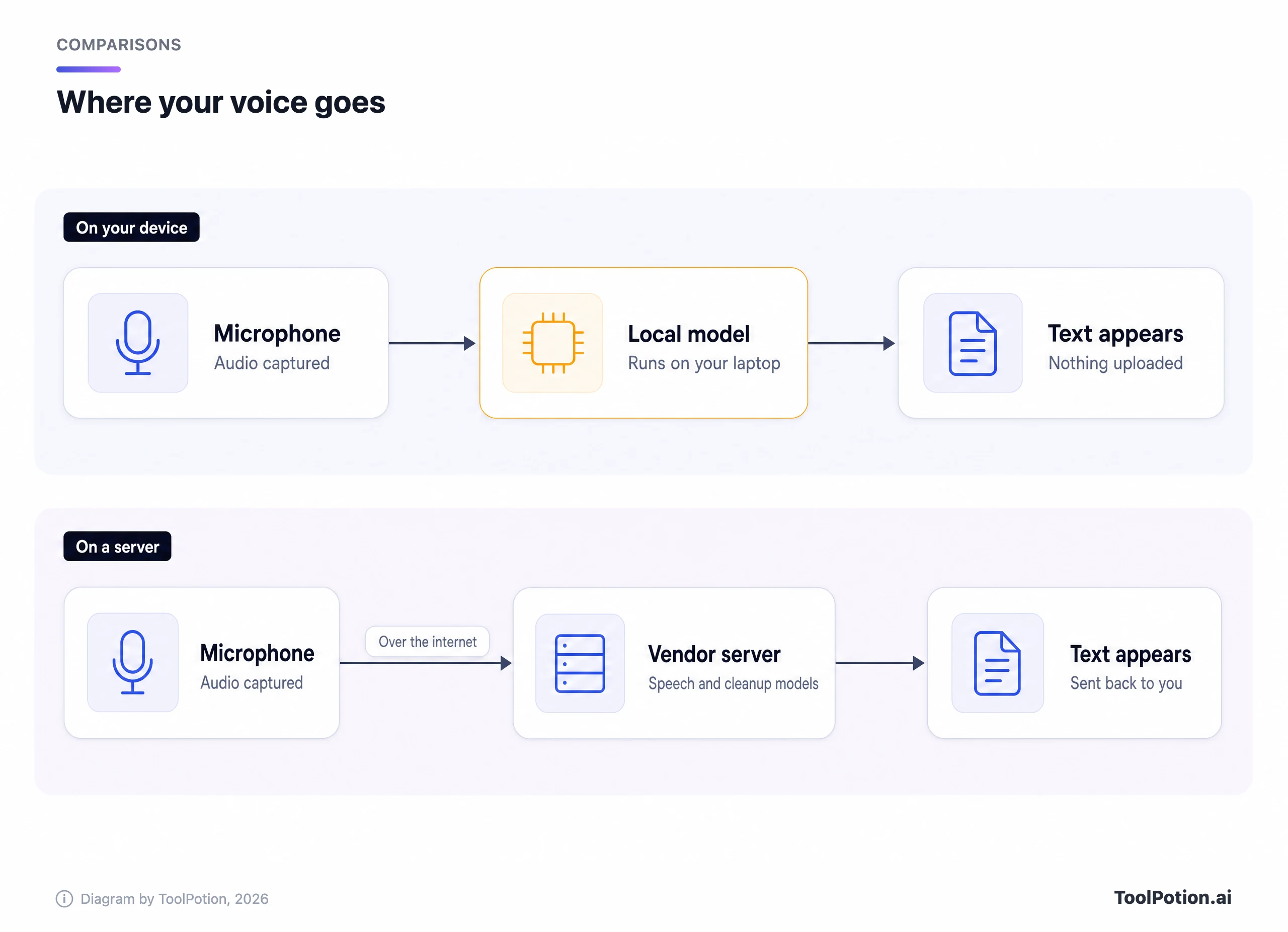
Among the paid apps the answers differ in kind. Superwhisper says its local models run entirely on your device, and "your audio and transcripts never leave your device". Choose a cloud model and the audio goes to its servers, where it's "processed in memory and are not stored after the request completes", or to a third-party provider under that provider's own terms. It also says your data isn't used to train models (Superwhisper privacy policy).
Wispr Flow is cloud-first. Its privacy page says audio is sent over TLS to its servers, transcribed, then deleted unless you turn on cloud storage. Two settings deserve a look before you start. "Improve the model for everyone" lets Wispr use your audio, transcripts and edits for training. The page says training is off by default and locked on Growth and Enterprise plans, and doesn't state the default for individual plans. And "Context awareness" reads limited text from the app you're dictating into so names come out right (Wispr Flow).
If audio privacy decides this for you, our piece on local versus cloud AI covers the general trade, and the one on always-listening recorders covers the legal side of recording other people.
What a subscription adds is the editing
Raw dictation is a transcript. You say "um, so the thing is, we should, actually, let's move the deadline to Friday" and you get that, filler included. The paid apps run a second pass that turns it into what you meant to write.
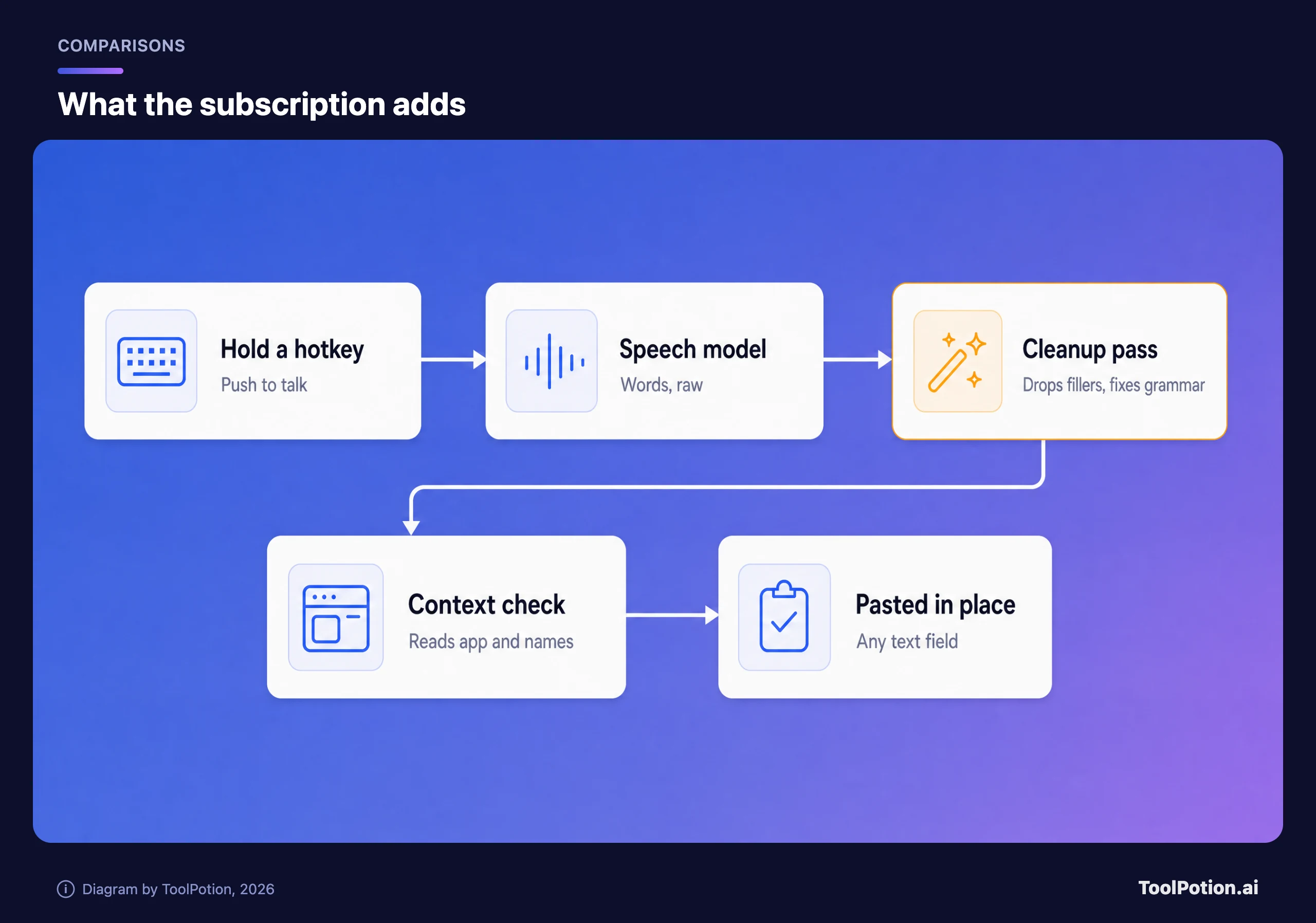
Wispr Flow's pitch is exactly this: speech in any app with AI commands and auto-edits, a dictionary and snippets, and a model that learns your names and jargon. Superwhisper's equivalent sits in its Pro tier: AI-powered modes such as Super and Mail, context awareness and realtime transcription, none of which the free plan has (Superwhisper plans). Aqua Voice charges for custom instructions and a personal dictionary on Pro, and voice commands and a realtime mode on its Max plan (Aqua).
The built-in tools mostly stop at the first box. Apple Dictation inserts punctuation and understands "new line" and "new paragraph". Gboard accepts "period", "comma" and "new paragraph" and lets you replace a word by pressing it and speaking the new one. Windows has "stop listening" style commands. Apple and Gboard stop there. The exception is Fluid dictation on Copilot+ PCs, which does drop filler words and fix grammar, so a free tool now covers part of what the paid apps charge for. What none of the built-in tools documents is a rewrite of a rambling sentence, or a dictionary of your own names.
You can see the gap in what free-tool users say. One Hacker News user running the free open-source app Handy wrote that "you can't have it clean up your grammar mistakes, it just records your words exactly as is. But for that it's great" (Hacker News). Replying to a recommendation of MacWhisper in the same thread, another wrote "My only complaint is that the on-device models don’t handle punctuation commands on their own" (Hacker News).
Accuracy: the only head-to-head is run by a rival
Superwhisper publishes a benchmark of 16 speech models across 8 datasets, including earnings calls full of company names, spontaneous speech and meetings. It lists Wispr Flow with its cleanup pass switched off so the output can be scored against a word-for-word reference. On the blended results Superwhisper's own cloud model, S1 Voice, had a 6.6% word error rate and Wispr Flow's raw output 8.7% (Superwhisper benchmarks). On how many custom-vocabulary terms were recognized correctly, Wispr scored 62.5% against 83.3% for Superwhisper and about 91% for ElevenLabs Scribe v2 and OpenAI's GPT Transcribe.
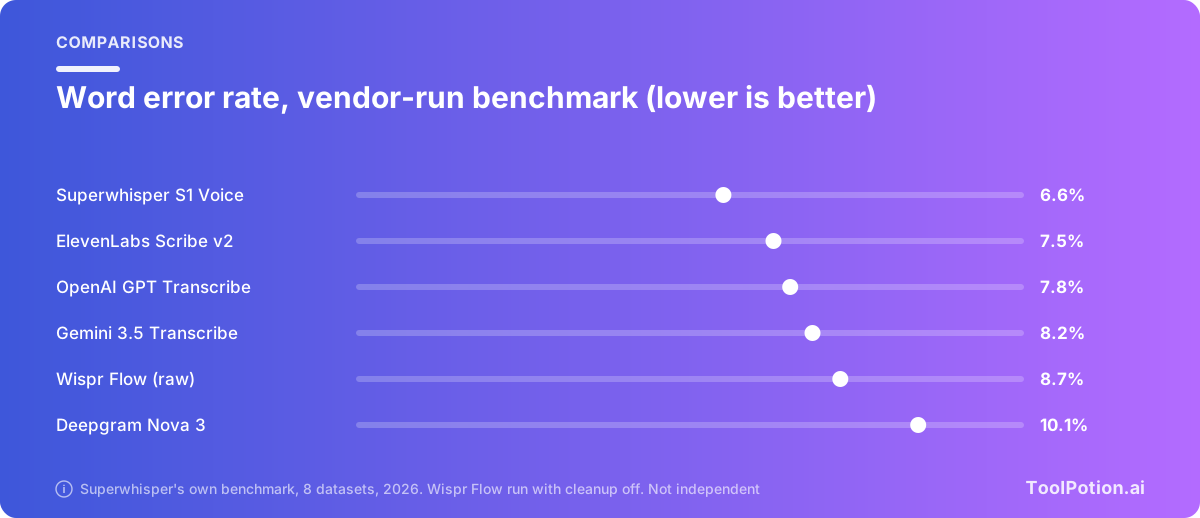
Read that table with the right amount of salt. Superwhisper built it, chose the datasets, and ran a competitor's product as a black box with a feature disabled. The page also publishes rows where others beat it, which is to its credit, and it says the code and clip-level output are in a benchmark repository. We haven't audited that repository. The page also doesn't say which version of Wispr's model it ran. Wispr has also announced its own speech model, Canto, so the Wispr row may not describe what ships today. What the numbers support is modest: the top five cloud models sit within about two points of word error rate of each other, and the built-in tools aren't in the table at all.
Users don't all agree with the benchmark's order. One Hacker News commenter, replying to Wispr's Canto announcement, wrote "I switched from Superwhisper->WisprFlow->Spokenly->Fieldwork and found WisprFlow the least accurate of the 4" (Hacker News). That's one person's experience, not a test, and Wispr's announcement quotes its own benchmark. Accents, microphones and vocabulary differ, so a personal test beats any table.
What each one costs, and how it's billed
Prices below come from the vendors' own pages. Wispr Flow's Pro is $12 per user per month on annual billing, $15 if you pay monthly, and its free plan limits desktop use to 2,000 words a week (Wispr Flow). Superwhisper's Pro is $8.49 monthly, $84.99 a year or $249.99 once, and one license covers every Mac, Windows PC and phone you own. Aqua's Pro is $10 a month billed annually, with 1,000 free words to try. MacWhisper's Pro is a one-time €64 (MacWhisper).
| App | Free tier | Paid, and how it's billed | Where audio goes |
|---|---|---|---|
| Apple Dictation, Win+H, Gboard | Free, built in | None | Apple: check settings. Windows: Azure (Fluid dictation is on-device). Gboard: not stated |
| Superwhisper | Unlimited, local Whisper models, no AI cleanup | $8.49 monthly, $84.99 yearly, $249.99 once | Local or cloud, your choice |
| Wispr Flow | 2,000 words a week on desktop | $15 monthly, or $12 a month billed yearly | Cloud |
| Aqua Voice | 1,000 words | $10 a month billed yearly | Aqua's servers; Privacy Mode limits stored transcripts |
| MacWhisper | Free version | €64 once | Local or cloud models |
Wispr is a subscription with a hard weekly cap on the free plan, so a heavy user hits the ceiling fast and then decides under pressure. Superwhisper's free plan has no cap at all, but also no cleanup. The lifetime option, $249.99, is about three years of the annual plan, and, with MacWhisper's one-time fee, one of only two options here that stop billing. We'd call that the best price structure for someone who knows they'll dictate for years. Students and non-profits get 40% off Superwhisper if they ask before buying.
Our picks, by what you do all day
Start with the built-in key for a week. It costs nothing, it works in every text field, and you'll learn whether the habit sticks. Whether the habit sticks is a bad thing to find out while on an annual plan.
If you dictate emails, notes and Slack messages and the raw text is fine, stay free. Superwhisper Free gives you local models with unlimited dictation, MacWhisper has a free version that runs local models too, and Windows users who want something private can look at Whisperstream, which does local recognition.
Pay when cleanup is the point. If you're talking long drafts, prompts for an AI model or client emails and you're editing out ums and restarts by hand, a subscription is easier to justify. We'd try Wispr Flow's free plan first, since the 2,000 words a week is enough to judge its cleanup on your own voice. Then look at Superwhisper Pro or the lifetime license if you want local models and one license across your devices. The Willow Voice and Aqua pages are worth a look if you want other options.
We'd skip paying if you only dictate in short bursts, if your Mac is an M3 with 12GB or more and you're on macOS 27 (Apple's on-device spelling and punctuation fixes may be enough), if you're on a Copilot+ PC with Fluid dictation, or if the audio can't leave your machine and you don't need rewriting. We'd also skip any app you haven't tested with your own jargon for a day.
If you're after recordings of meetings rather than your own voice, that's a different tool category. Our AI meeting notes guide and the top AI transcription tools post cover it, and the ToolRank board for transcription tools shows where each one sits.
Frequently asked questions
Is Wispr Flow worth paying for?
If you dictate for hours a week and edit out filler by hand, probably. At $12 a month billed annually it's a small cost against that time. If you dictate a few messages a day, the free plan's 2,000 words a week may cover you, and the built-in tools will too.
Is Superwhisper better than Wispr Flow?
They suit different people. Superwhisper runs local models and has a free tier without caps, plus a lifetime license. Wispr Flow is cloud-based and strong at cleanup. The only published head-to-head we found is Superwhisper's own, so we'd weigh it accordingly.
Is Apple Dictation or Windows voice typing private?
Windows voice typing uses online speech recognition powered by Azure Speech services, per Microsoft, and needs an internet connection. Apple says some Dictation is processed on the device and tells you to check Keyboard settings to see whether yours is.
Do these apps work in every app?
Wispr Flow says it works in any app on Mac, Windows, iPhone and Android. Superwhisper lists Slack, Gmail and any other site or app. Built-in tools work wherever a text field accepts system input, though behavior varies.
Can I run dictation completely offline?
Yes. Superwhisper's local Whisper models and MacWhisper do. Windows voice typing needs the internet. Test offline mode with your Wi-Fi off before trusting it.
Next step: pick one free option, dictate everything for five working days, and write down how many words per week you actually use. If that's above Wispr's 2,000, you've found your plan.