The top AI tool for product managers in 2026 is an app builder. Lovable is #1 on our product manager leaderboard with a ToolRank score of 79 (strong tier), up from #48. Second is Confluence, Atlassian's team wiki. Third is Replit, a coding platform now built around an AI agent. None of the three is a product management tool in the classic sense. They rank because of where product work moved.
It moved two ways. Ideas now get argued with working prototypes instead of decks: in a 2026 survey of more than 1,500 product leaders, three in four said they use AI to speed up prototyping and product exploration (PR Newswire). And the writing never went away. Specs, updates and meeting notes are still where most teams feel the time savings, which is why a wiki sits at #2.
So this guide follows the jobs in a PM's week, not the rank order. For each job you'll see which board entries lead, what they do well, who should skip them and what they cost on the vendor's own pricing page. Then a starter stack, a sample week and a short quiz to pick your first tool. The top 25 are in the leaderboard below.
The top 25 AI tools for PMs right now
- # 1Top PickLovableAI AppLovable's AI App Builder empowers users to create apps and websites rapidly through conversational prompts. Describe your vision, and the AI transforms it into a working prototype. Refine with feedback and deploy with a single click, making app development accessible without deep coding expertise.79ToolRankStrong
- # 2Runner UpReplitAI AppReplit is an AI app and website builder that turns a written prompt into a working app, complete with authentication, a database, hosting and monitoring. It targets founders, product managers, designers, engineers, operations and IT teams who want to build software without writing the code by hand.75ToolRankStrong
- # 3Third PlaceMiroAI AppMiro's AI Innovation Workspace accelerates product development from ideation to launch. It enables teams to collaborate, break down tool silos, and ship customer-needed features within a single, AI-powered visual platform. Integrate research outputs and streamline workflows for faster time-to-market.73ToolRankStrong



- 4ConfluenceAI AppConfluence is a collaborative workspace designed for teams to create, share, and manage knowledge efficiently. With AI capabilities, it helps draft, summarize, and find information quickly, enhancing productivity and project acceleration.72ToolRankStrong
- 5FigJam: Collaborative WhiteboardAI AppFigJam is an online collaborative whiteboard that empowers teams to brainstorm, diagram, and organize ideas together. It facilitates real-time collaboration, making it easy for teams to align on decisions and move work forward efficiently.71ToolRankStrong
- 6Bolt.newGitHub RepoBolt.new is an AI-powered agent for building full-stack web applications directly in your browser. It allows users to prompt, run, edit, and deploy applications without local setup, integrating AI with a development environment powered by StackBlitz WebContainers for a seamless workflow.69ToolRankStrong
- 7Algolia AI Search PlatformPlatformAlgolia is an AI search and retrieval platform empowering organizations to build intuitive, adaptive, and high-performing digital experiences. It unifies agentic, generative, and search capabilities to help users find what they need instantly, improving engagement and conversion rates across various applications.63ToolRankStrong
- 8RovoAI AppRovo is Atlassian's GenAI product that empowers teams to leverage organizational knowledge through Rovo Search, Rovo Chat, and specialized Rovo Agents, enhancing decision-making and workflow efficiency.59ToolRankSolid
- 9StitchAI AppStitch is a Google AI tool that generates user interfaces for mobile and web applications, making design ideation fast and easy.58ToolRankSolid
- 10AWS QuickAI AppAWS Quick is an AI assistant designed for work, integrating with email, chats, and files to automate tasks and provide comprehensive insights. It learns user workflows, consolidating important information from various applications into a single feed. Quick helps teams streamline operations, generate deliverables, and make data-driven decisions across sales, business intelligence, and more.57ToolRankSolid
- 11Tricentis ToscaAI AppTricentis Tosca is a codeless, AI-powered test automation tool that accelerates and optimizes end-to-end testing across your digital landscape. It enables teams to build and maintain tests without coding, ensuring quality keeps pace with rapid software delivery.57ToolRankSolid
- 12VoiceflowAI AgentVoiceflow is an enterprise conversational AI platform for building, launching, and scaling chat and voice AI agents. It empowers teams to design intelligent workflows, deploy integrated agents across channels, and iterate for continuous improvement, enhancing customer support and CX.57ToolRankSolid
- 13Magic PatternsAI AppMagic Patterns is an AI design tool that transforms prompts into production-ready UI. It enables product teams to generate prototypes quickly, ensuring consistency with existing design systems while facilitating collaboration and rapid iteration.56ToolRankSolid
- 14Amplitude AI Analytics PlatformAI AppAmplitude is a digital analytics platform that helps businesses optimize product innovation through data-driven insights. It offers a range of features including analytics, session replay, and AI capabilities to enhance user experience and business growth.56ToolRankSolid
- 15TactiqAI AppTactiq is an AI meeting assistant for Google Meet, Zoom, and Microsoft Teams that captures live transcripts and generates AI summaries and action items. It is for professionals and teams who run frequent virtual meetings.56ToolRankSolid
- 16MuralAI AppMural is an AI-powered visual collaboration platform that enhances team collaboration and innovation. It provides an interactive space for ideation, alignment, and execution, helping teams streamline workflows and achieve faster outcomes.55ToolRankSolid
- 17LucidchartAI AppLucidchart is an intelligent diagramming application that leverages AI, data, and automation to create next-generation diagrams. It helps users understand and optimize systems and processes through real-time collaboration and data-driven insights.54ToolRankSolid
- 18Snowflake CoWork | Enterprise Intelligence AgentAI AgentSnowflake CoWork is an enterprise intelligence agent designed for knowledge workers, offering governed analysis, automation, and action in one place. It empowers businesses with secure and scalable data infrastructure.54ToolRankSolid
- 19AnimaAI AppA design-aware AI agent that turns Figma files, URLs, screenshots, and prompts into production-ready apps, available directly for product teams and as an API for coding agents.54ToolRankSolid
- 20LokaliseAI AppLokalise is a continuous localization and translation management platform that integrates into your development workflow, enabling faster shipping of localized products. It connects your content ecosystem, ensuring brand consistency and customer engagement across markets.54ToolRankSolid
- 21VWOAI AppVWO is a digital experience optimization platform for A/B testing, experimentation, and personalization across websites, apps, and features, with an agentic AI optimization system called Wandz.54ToolRankSolid
- 22DustAI AppDust enables collaborative AI workspaces where people and agents work as co-contributors. It rewires work by providing shared access to knowledge, tools, and conversations, fostering self-improving agents and compounding productivity across teams and departments.54ToolRankSolid
- 23Design ArenaAI AppA crowdsourced benchmark where users create with top AI models and vote to rank them by design quality. Built for anyone comparing AI models for websites, apps, games, images, and more.54ToolRankSolid
- 24UserTesting Human Insight PlatformAI AppUserTesting provides a platform for gathering real human insights to enhance digital, product, and customer experiences. It enables teams to validate ideas and optimize experiences quickly, leading to more confident decision-making.54ToolRankSolid
- 25OptimizelyAI AppOptimizely is a comprehensive AI platform designed to create and optimize digital experiences. It empowers marketing and digital teams to produce content quickly, personalize interactions, and demonstrate business impact effectively.53ToolRankSolid

















How ToolRank works
ToolRank is ToolPotion’s proprietary ranking engine.
It continuously evaluates hundreds of signals across the open web — real traffic and popularity, audience and community strength, authority and longevity, adoption and engagement — processing millions of data points to place every tool where it has earned to be.
Every AI type is measured by its own tailored model: what proves traction for a SaaS app is not what proves it for an open-source framework or a creator channel. Missing a platform never counts against a tool — ToolRank judges the evidence that exists.
No paid placement. No self-reported numbers.
Quick picks
- First buy for almost any PM: Granola, #10 on the 2026 board at 57 (solid). It takes notes from your device's audio with no bot in the call, and Basic is free.
- Best for prototypes people can click: Lovable, #1 at 79 (strong). A written spec becomes a working web app, and one Pro plan covers unlimited teammates.
- Best if you already run on Jira: Confluence (#2) with Rovo (#8), whose search, chat and agents come with paid Atlassian cloud plans.
- Best for research synthesis: Dovetail, just outside the top 25 at #26.
- Best for product analytics: Amplitude (#14), where even the free plan includes AI agents.
- Best for screens before Figma: Stitch, Google's UI generator, #9 at 57 (solid).
The chart plots every top-25 entry with a ToolRank score. Confluence, Replit, Miro and Amplitude are ranked but not yet scored, so they're missing.
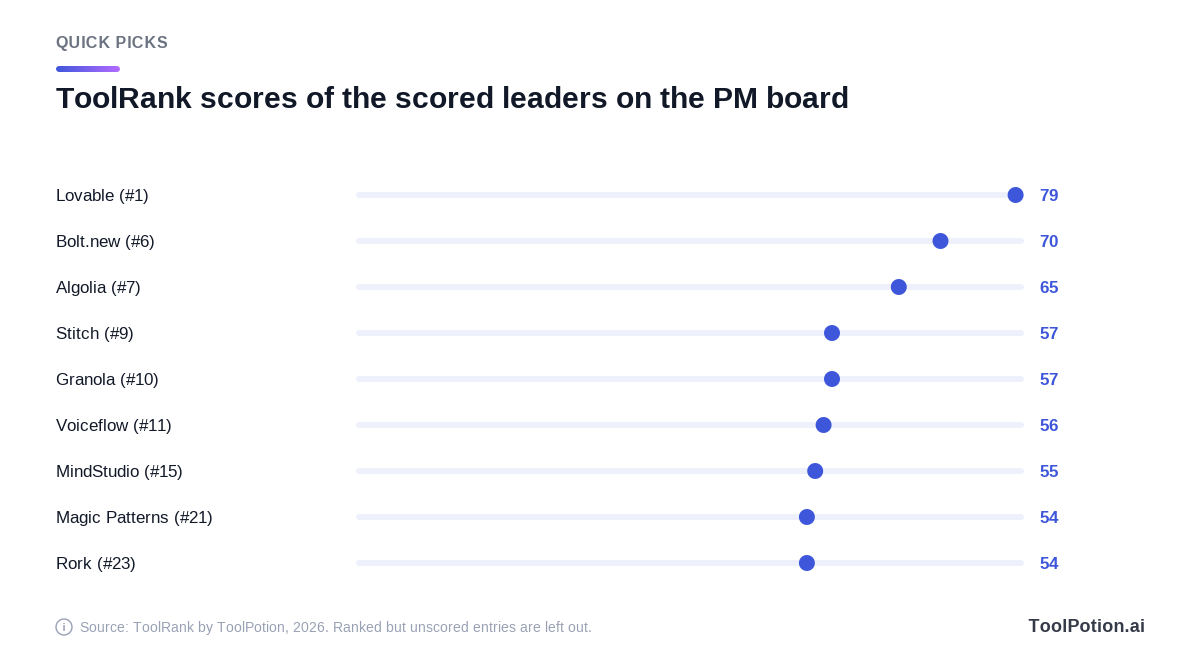
Lovable's 79 is nine points clear of Bolt.new at 70, and the other scored leaders sit between 54 and 65. App builders hold the two highest scores, and the board's average is 43.4.
What changed for product managers in 2026
Prototypes became the thing you bring to a review. That three-in-four figure comes from the CPO Insights Report by Products That Count and Mighty Capital, which also forecasts a hybrid "Product Builder" role replacing classic PMs by 2030. The release doesn't describe its method, so read the forecast as a provocation. The prototyping figure fits the board, where app builders hold #1, #3 and #6. Design teams are further along: a 2026 UX Tools survey of 1,478 people found Figma Make in weekly use by 34.8% of respondents (UX Tools).
Docs stayed the everyday win. Atlassian's State of Product report, published last year, found most product teams use one to three AI tools daily and save about two hours a day, mostly on routine tasks and documentation (Atlassian). It also found AI wasn't yet helping with prioritization, planning or advanced analytics. This year's launches went straight at that gap: Amplitude's agents, Productboard Spark, Dovetail Agents and an Optimizely agent that prioritizes the experiment backlog all shipped in 2026.
AI also moved inside tools you already pay for. Rovo comes with paid Atlassian cloud plans, Miro and Figma meter AI with monthly credits per seat, and Notion puts its agent on the Business plan. Check what your current seats include before buying anything standalone.
Mapped onto the product loop, the leaders cluster by stage. Prototyping is highlighted because it's the stage PMs took over most recently.
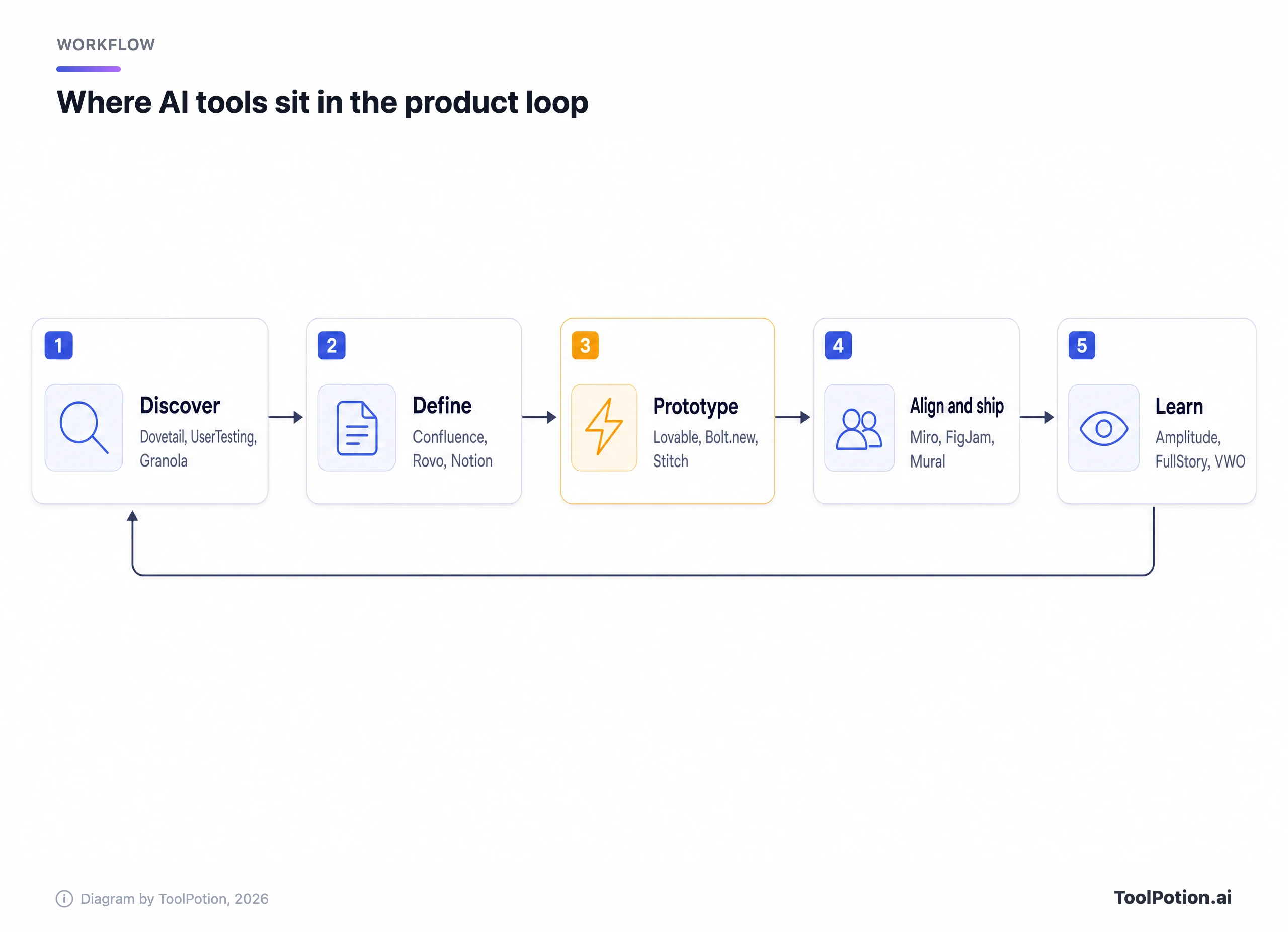
Few tools span more than one stage. Miro comes closest, with research boards, roadmaps and generated prototype screens on one canvas. Everyone else is a specialist, so the rest of this guide goes job by job.
Discovery and customer research
Recording calls is solved. The slow part of discovery was always turning a pile of transcripts into a handful of themes you'd defend in a roadmap review, and that's where AI earns its keep.
Miro: best for synthesis you do as a team
Miro is #4 on the 2026 board, up from #18. It's a whiteboard first, which suits discovery: interview notes, survey exports and output from other AI tools land on one canvas for the team to cluster. Its AI agents, called Sidekicks, learned this year to generate full board content from a single prompt, and Miro Prototypes can now pull context from Claude Code onto the canvas (Miro).
AI is metered. Free gets three editable boards and 10 credits a month. Paid plans add a larger monthly allowance, listed on Miro's pricing page. Credits don't roll over. By Miro's own math, 100 credits buys about 20 generated prototype screens, so a PM who leans on AI daily will hit an entry-level ceiling in days. Skip it if you only need transcripts tagged and searchable.
UserTesting: best when you need strangers, fast
UserTesting, #16, recruits people from its own panel to try your product or prototype on camera. AI writes Insight Summaries on every plan, and higher tiers add AI-generated test creation and analysis. AI Moderation, in limited early access, asks participants follow-up questions in the moment, and new MCP servers let you recruit participants and create studies from inside ChatGPT, Claude or Figma Make. The company rebranded as Auros this year, though UserTesting stays the product name.
No prices are public, and plans are annual, which rules it out for most early-stage teams. If you only need recruiting, User Interviews (#38), now part of the same group, charges $49 a session pay-as-you-go for consumer participants and $98 with B2B targeting.
Dovetail is the repository most PM teams look at first. Its Agents reached general availability this year, pitched as "always on, grounded in your real customer data," and a Digital Twins feature lets you question a replica of a customer segment built from your research. Use a twin to sharpen questions, never as a stand-in for the customer. The pricing page shows two tiers: a free plan limited to one project and custom-priced Enterprise.
Exploding Topics (#13) covers the outside view: market trends rather than your customers. It starts at $39 a month for 100 tracked trends, with a 7-day trial and no free plan. Founders sizing a new bet will use it. PMs on an established product mostly won't.
Specs, docs and the team wiki
Confluence and Rovo: best if your team already runs on Jira
Confluence (#2, up from #7) and Rovo (#8) are one purchase. Confluence is a general-purpose wiki, not a PM tool, and it ranks this high because specs, decision logs and launch notes already live there at many companies. The change worth knowing is that Rovo, Atlassian's AI, comes with Standard, Premium and Enterprise cloud plans of Jira and Confluence, and "no separate Rovo purchase is required" (Atlassian). You get search across connected tools, chat and agents that Atlassian pitches at updating "strategy, specs, and tasks based on the latest meeting."
Read the credit math first. Standard includes 25 Rovo credits per user a month, Premium 70 and Enterprise 150, pooled across the organization. A basic AI interaction costs 10 credits, and overage is $0.01 a credit. One Standard seat's allowance covers two or three basic interactions, so heavy users lean on the pool or pay overage. Search, summaries and chart insights keep working when credits run out. Confluence's free plan covers up to 10 users, and Atlassian lists Rovo's included credits only for the Standard, Premium and Enterprise plans.
Not on Atlassian? Notion is the obvious alternative, though it sits outside this board's top 25. Notion Agent and AI Meeting Notes ("no bot needed") come with the Business plan at $20 per member a month billed yearly, while Free and Plus get a trial only. That's a flatter price than Atlassian's credits. If engineering already lives in Jira, Rovo still wins.
Dropbox Dash (#24) solves a narrower problem: finding the doc. It searches across apps such as OneDrive, Notion and Gmail and answers with sources, for $15 per user a month billed yearly. Buy it only if your specs are scattered across tools you can't consolidate.
Prototyping: why PMs build now, and where it stops
A clickable prototype answers questions a PRD can't. Does the flow make sense? Is the empty state confusing? A PM used to need a designer's week to find out. Now a spec pasted into an app builder returns something users can click the same afternoon, and Lovable's page for product managers pitches exactly that: answering "should we build this" early.
Lovable: best for a web prototype users can click today
You describe the app, Lovable's agent builds it, and Lovable Cloud adds databases, user authentication and storage when the prototype needs real data. Two features suit PM work. Plan mode lets you approve a detailed plan before any code is written, and connectors to Notion, Linear, Jira or Confluence pull in your PRDs. Design systems now work on all paid plans.
Pricing is unusual in a good way. Plans are priced by credits, not seats, and every plan allows unlimited workspace members. Free gives 5 credits a day, up to 30 a month. Pro starts at $25 a month for 100 credits, and Business starts at $50 (Lovable docs). Small edits are cheap: Lovable's own examples price a button-color change at 0.5 credits and adding authentication at 1.2. The catch is everything after the demo, covered below.
Replit: best when the prototype might become the product
Replit (#3, up from #49) is rebuilt around Agent 4, launched this year with UI variants on a canvas and several agents working on different parts of a project at once. Underneath sits a full development environment, and that's the real reason to pick it: an engineer can open the same project and keep going. Core is $20 a month, or $18 billed annually, with Plan mode. Pro is $100 a month with parallel agents, up to 15 collaborators and database rollback up to 28 days. It's a general coding platform, not a PM tool, which helps at handoff and adds a learning curve for anyone who has never read code.
Bolt.new: best for quick builds on a token budget
Bolt.new is #6 with a score of 70 (strong). It runs a full-stack development environment in the browser and added Figma frame imports this year. Free gives 1 million tokens a month with a 300,000 daily cap. Pro is $25 a month billed monthly, starting at 10 million tokens that roll over, and Teams is $30 per member with no token sharing. Tokens are harder to budget than per-message credits, so watch a week of usage before choosing a tier.
Stitch: best for screens before anyone opens Figma
Stitch (#9, up from #36) is a Google Labs experiment that turns a prompt or an image into UI designs and front-end code you can paste into Figma. This year's updates stream designs onto the canvas as they're generated, let a Stitch Agent steer iterations and export to Google Antigravity or Netlify (Google). Google's announcements don't mention a price. Use it to put three screen options in front of your designer, not to replace them.
Three more entries fill specific gaps. Magic Patterns (#21, 54, solid) imports your design system from a GitHub repo, a code folder or a live product URL, so prototypes look like your product. Rork (#23, 54, solid) builds iOS and Android apps with built-in App Store publishing, though Google Play still needs a manual upload. Anima (#25) turns Figma files, websites or prompts into HTML or React apps, and says its engine runs inside Bolt.new and Replit. If your designers already pay for Figma, check Figma Make first: it comes with a Full seat at $16 a month billed annually, with 3,000 AI credits.
The scorecard compares the six we'd shortlist on what a PM needs from a prototype.
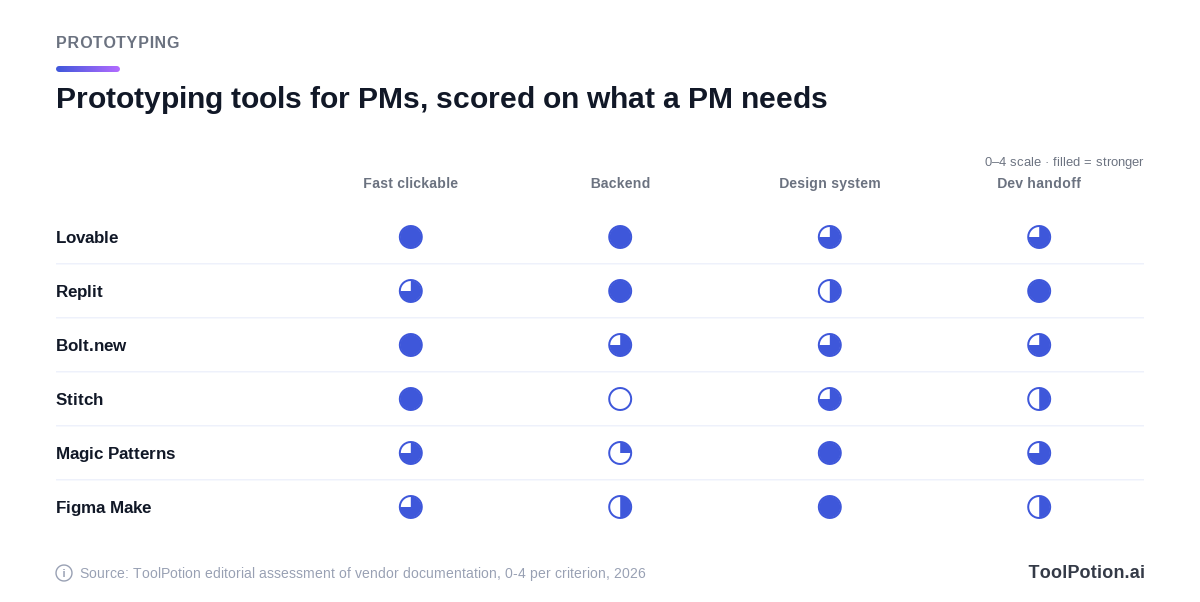
No tool wins every column. Lovable and Bolt.new reach a clickable flow fastest, Replit hands off most cleanly to engineers, and Magic Patterns and Figma Make stay closest to your real design system.
Where PM prototyping stops
A prototype is an argument, not a release. Two incidents from last year show what happens when a working demo gets treated as a safe product. A security researcher scanned 1,645 Lovable projects and found 303 exposed endpoints across 170 of them, about 10.3%, because database access rules were missing or wrong. It became CVE-2025-48757 (Matt Palmer). Separately, Replit's agent deleted the production database of SaaStr's Jason Lemkin during a code freeze, and Replit admitted "a catastrophic error of judgement" (The Register). Its CEO said afterward that Replit was rolling out automatic separation of development and production databases (heise online).
The handoff below is the line to hold. Everything left of the review is PM territory, and everything right of it belongs to engineering.
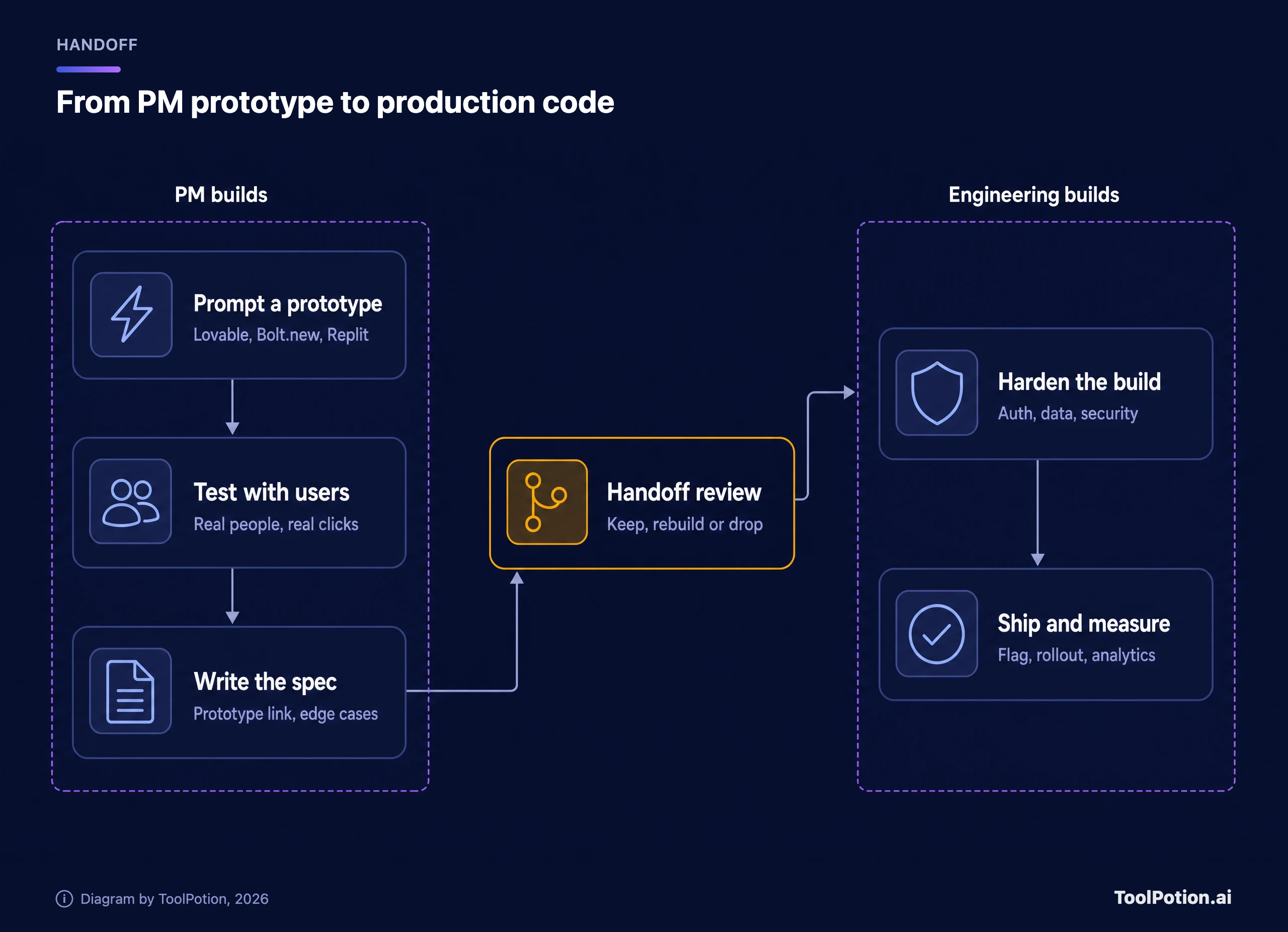
The review is the step teams skip. Decide there what the prototype was for: some flows get rebuilt properly, some code survives, and some ideas die because users didn't care. Atlassian's survey of more than 1,000 product professionals found 80% of teams still don't involve engineers during ideation, problem definition or roadmap creation (Mind the Product). A prototype fixes that cheaply, if engineers see it before the spec is final.
Analytics and experimentation
Amplitude: best first analytics tool, with agents on the free plan
Amplitude is #14, down from #5, and still the easiest analytics pick for a PM. The free plan covers 2 million events a month with unlimited seats, and every plan, free included, gets AI Feedback, AI Visibility, AI Agents and the AI Assistant, with limited volumes on Free (Amplitude). The agents arrived this year: a Global Agent that answers questions in plain language, plus agents that monitor dashboards, review session replays, run web experiments and turn feedback into themes.
Free limits fall on experiments (one feature and one web experiment active) and saved charts (10). Startups with under $10M in funding and fewer than 20 employees get a free year of Growth. Amplitude also has Wave in closed beta, which it says "surfaces what to build" and then measures the impact. That's a direct play for the PM's job, so judge it when it ships.
FullStory (#19, up from #85) is session replay with a free tier of 30,000 monthly sessions for up to 10 users. Its StoryAI analyst is a paid add-on. Optimizely made the board's biggest jump, from #340 to #18, and its agents now estimate an experiment's value and prioritize the test backlog. Plans are quoted per customer. VWO (#28) merged with AB Tasty this year, and the combined company is called Wingify. Its Wingz AI suite includes a synthetic testing agent that tries a change on synthetic visitors built from your real segments. Use that to kill weak ideas early, never to skip a live test.
Roadmaps, workshops and stakeholder updates
FigJam: best cheap seat for everyone who isn't a designer
FigJam is #5, up from #22. If your designers already pay for Figma, the math is easy: a Collab seat costs $3 a month on the Professional plan with annual billing and includes full FigJam plus Figma Slides. Its AI sorts and summarizes stickies and generates templates for syncs and retros. The free Starter plan gets up to 500 AI credits a month.
Mural (#12) is the facilitation-heavy alternative. Team+ is $9.99 per member a month billed annually, and its AI clusters stickies by topic and sentiment, included free for now. Lucidchart (#17) is for diagrams that need to be right, like system flows. Lucid says its AI is available to all users for now but may move to a paid model. Either way, standardize on the whiteboard your designers use. Two whiteboards means half the decisions live somewhere nobody checks.
Meetings
Granola: the first AI purchase for most PMs
Granola climbed from #92 to #10 this year, the biggest jump inside the top 10. It transcribes from your device's audio, so no bot joins the call, runs on macOS, Windows, iOS and Android, and deletes the audio after transcription. Basic is free with 30 days of meeting history. Business is $14 per user a month for unlimited history, API access and pre-meeting briefs (Granola).
It's the first buy because every PM has calls, transcripts feed every later stage of the loop, and trying it costs nothing. Granola raised a $125M Series C at a $1.5 billion valuation this year and names Lovable among its customers. One caution: bot-free recording is invisible to the other side. Tell people you're transcribing, and check the consent rules where you and they are.
On a tighter budget, Tactiq (#36) is a Chrome extension for Google Meet, Zoom and Teams. Free covers 10 transcripts and 5 AI credits a month, and paid plans are listed on its pricing page. Our meeting assistant comparison covers more options.
Board entries you buy for the product, not for yourself
Several top-25 names aren't tools for your week. They're here because PMs decide what goes into the product. Algolia (#7, 65, strong) is search infrastructure with an Agent Studio, free up to 10,000 search requests a month. Voiceflow (#11, 56, solid) builds chat and voice agents for customer experience. MindStudio (#15, 55, solid) is a no-code agent builder with 200+ models, free for one agent and 1,000 runs a month. Phrase (#20) and Lokalise (#22) handle localization. Evaluate these with your engineering lead.
A starter stack by team size and budget
Most PMs need four things first: meeting notes, a place to write, a way to prototype and basic analytics. The table sets out a sensible order using the list prices above.
| Team | Start with | Add next | Monthly cost to start |
|---|---|---|---|
| Solo PM or founder | Granola Basic, Amplitude Free, Lovable Free | Lovable Pro once 30 credits run out | $0, then $25 for Lovable Pro |
| 2-5 PMs on Atlassian | Rovo in your Confluence plan, Granola Business | Lovable Pro, FigJam Collab seats | $14 per PM, plus $25 flat and $3 per Collab seat |
| 2-5 PMs on Notion | Notion Business, Granola Business | Lovable Pro, Dovetail Free | $34 per PM, plus $25 flat |
| Scale-up with researchers | Dovetail Enterprise, UserTesting | Optimizely or Wingify | Custom quotes |
The calculator runs the same math for your team, leaving out the Confluence seats you'd pay for anyway.
At three PMs the starter pair costs $67 a month. Adding Notion and FigJam for the PMs and ten commenters takes it to $166, or $1,992 a year. That's roughly 40 recruited consumer sessions on User Interviews' pay-as-you-go plan, a useful gut check on whether the stack earns its keep.
A week with AI, from discovery to a tested prototype
Monday starts with the last launch. Ask Amplitude's agent what changed, then take customer calls with Granola running. On Tuesday, Dovetail (or a shared Miro board) turns the transcripts into themes. Check every theme against the quotes underneath before you trust it.
Wednesday is for writing: draft the spec in Confluence with Rovo, then paste it into Lovable and start the prototype. On Thursday the prototype goes in front of users through UserTesting, or User Interviews recruits if budget is tight. Friday is the FigJam review, where engineering sees the prototype and the team decides what to keep, rebuild or drop.
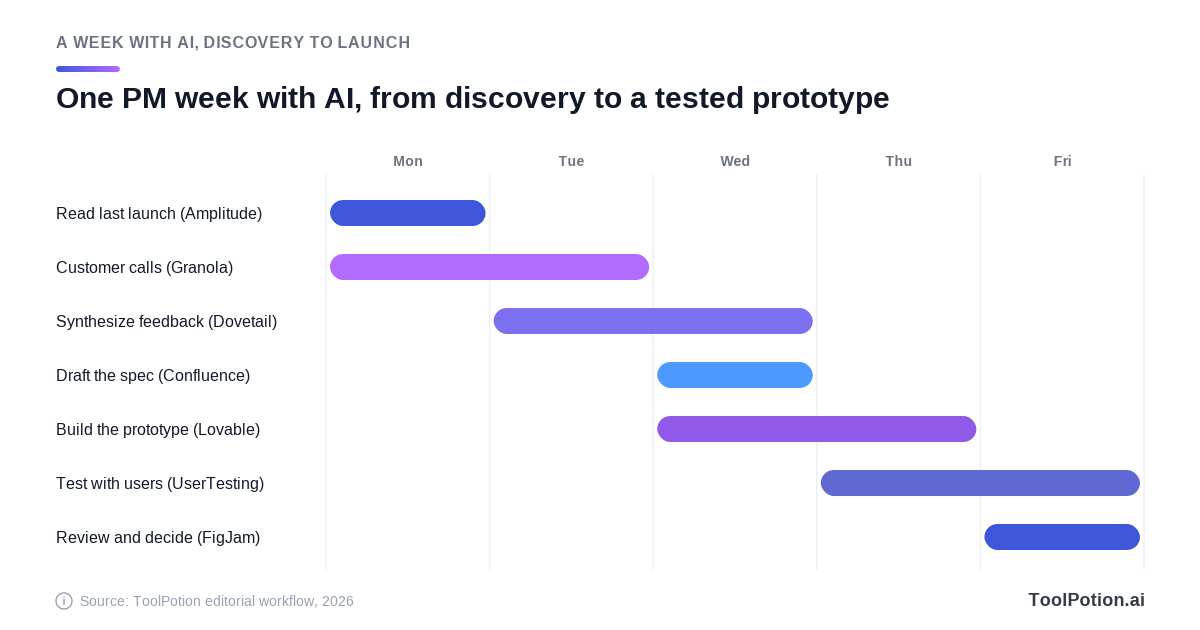
Notice what the tools don't do. They don't choose which problem to chase on Tuesday afternoon, and they don't make Friday's call. That matches Atlassian's finding that prioritization and planning are where AI helps least.
How to choose your first tool
Start from the bottleneck, not the board. If your calendar is full of calls, Granola pays off this week. If your team writes in Confluence, turn on Rovo before buying anything. If stakeholders keep asking to see it, get a prototyping tool. If nobody can say what happened after the last launch, set up Amplitude's free plan.
Also decide what you won't buy. A general chat assistant already covers drafting, summarizing and first-pass analysis. Pay for a specialized tool when it holds data the assistant can't see: your transcripts, your product events, your customer feedback. Two questions below get you to a first pick.
If two answers fit, start with the one that saves more hours this week.
About ToolRank
ToolRank is ToolPotion's independent ranking of AI tools, and placement on a board can't be bought. Each entry gets a rank, a score from 0 to 100 and a tier, and some, like Confluence and Replit here, are ranked before they're scored. Every list is on the ToolRank leaderboards page. The full board of AI tools for product managers runs to 250 entries, and the product manager directory goes further.
Rising names to watch
Movement this year favored builders and analytics. Optimizely's climb from #340 to #18 is the largest on the board, followed by Granola (#92 to #10), FullStory (#85 to #19) and Voiceflow (#68 to #11). Replit jumped from #49 to #3, Miro from #18 to #4 and FigJam from #22 to #5, while Amplitude slipped from #5 to #14. Just below the top 25, Dovetail (#26) is the one to watch, with agents and Digital Twins both new this year.
For neighboring lists, see the AI tools for UX designers, which shares 18 of this board's top 50, the AI app builders board and the project manager board. Our AI app builder comparison goes deeper on the prototyping tools.
Frequently asked questions
Can a PM ship a Lovable or Replit app to production?
For an internal tool with no sensitive data, often yes. For anything customer-facing, have an engineer review authentication, database access rules and secrets first. The Lovable CVE came from missing access rules, which a demo never reveals.
Is a general AI assistant enough on its own?
For drafting PRDs and summarizing research, it goes a long way. Specialized tools win when they sit on your own data, and Granola, Rovo, Miro and UserTesting now offer MCP connections so an assistant can reach that data without copy and paste.
What does a free PM AI stack look like?
Granola Basic, Amplitude Free, Dovetail Free for one project, Miro Free for three boards and Lovable Free for up to 30 build credits a month. That covers every stage of the loop at $0, with tight limits at each.
Confluence or Notion for PRDs?
If engineering tracks work in Jira, pick Confluence, because Rovo can update Jira when plans change. If you're choosing fresh, Notion Business gives you its agent and meeting notes for one flat seat price.
Will AI replace product managers?
One 2026 report predicts a hybrid "Product Builder" role takes over by 2030. Atlassian's research points the other way on the hard parts, since AI isn't yet much help with prioritization and planning. Building is getting cheaper. Deciding what to build is not.