The top of the 2026 freelancer board shows where independent workers spend first. Framer, a website builder, is #1. Taskade AI Business App Builder is #2 after climbing from #71, and Durable, an all-in-one site and booking platform for small businesses, is #3 with a ToolRank score of 60 (strong tier), the highest of any scored entry in the top 25. Before AI drafts a single deliverable, freelancers use it to get found and look established.
This guide follows a freelancer's week rather than the ranking order: winning work, delivering it, running the business side and staying visible. Many of the leaders weren't made for freelancers at all. A browser, a CRM built for sales teams and two coding agents made the top 25 because solo workers borrowed them, and we say which is which. Prices come from each vendor's own pricing page, with monthly and yearly billing kept apart, because a "$10 a month" plan billed yearly is $120 up front.
The full Top 250 AI Tools for Freelancers board ranks 419 tools, and the leaderboard below shows the top 25. Below it come quick picks, reviews of the leaders that matter, the client-side rules, starter stacks at three budgets and a sample week.
The top 25 AI tools for freelancers right now
- # 1Top PickCardboardAI AppCardboard is an agentic AI video editor available in your browser and on Mac. It allows users to describe their desired edits, and the AI automatically cuts, captions, reframes, and composes videos. The platform supports refining edits through chat requests or direct timeline interaction, making video creation accessible and efficient for various projects.57ToolRankSolid
- # 2Runner UpChuangkit — Online Design & PrintingAI AppChuangkit is an online design and printing platform offering a vast library of templates for various scenarios. Users can quickly generate and edit designs for business cards, posters, invitations, and social media graphics. It provides millions of commercial-use assets and daily template updates, simplifying the design process for individuals and businesses alike.56ToolRankSolid
- # 3Third PlaceNovoresumeAI AppNovorésumé offers a free AI-powered resume builder that helps job seekers create professional resumes quickly and easily. With customizable templates and ATS-friendly designs, users can enhance their job applications without any hidden fees.54ToolRankSolid



- 4B12 AI Website BuilderAI AppB12 is an AI website builder that allows users to generate professional websites, stores, or web apps in minutes. Describe your idea, and the AI will create a site you can launch for free. It offers tools designed to help businesses grow online with an intuitive editing experience.54ToolRankSolid
- 5QoderAI AppQoder is an agentic coding platform for real software development, offering an autonomous IDE, a terminal CLI, always-on AI employees, and cloud agents, with code completion, test generation, and support for major IDEs.54ToolRankSolid
- 6BeamJobsAI AppBeamJobs offers AI-powered tools to create job-winning resumes and cover letters. These tools help format for ATS, enhance content, and increase your chances of landing interviews in 2026.53ToolRankSolid
- 7Aragon AIAI AppAragon AI provides professional AI-generated headshots in minutes, saving time and money. Designed by AI researchers, it offers high-quality images suitable for various professional uses, ensuring user satisfaction with a full refund policy if needed.53ToolRankSolid
- 8HoneyBookAI AppHoneyBook is an AI-powered CRM platform designed for small businesses to manage proposals, contracts, invoices, payments, and projects. It helps streamline client interactions and automate workflows, enhancing productivity and client relationships.53ToolRankSolid
- 9Glif - Creative Agent PlatformAI AppGlif is a creative agent platform that consolidates various AI-powered tools into a single chat interface. Generate images, videos, music, and more with an AI trained on expert creative knowledge, streamlining your entire content creation workflow from concept to final asset.53ToolRankSolid
- 10Outlier AIAI AppOutlier AI is a platform, operated by Scale AI, that pays subject-matter experts to train and improve AI models through tasks like writing prompts, creating rubrics, and rating responses. It is aimed at freelancers with domain expertise.53ToolRankSolid
- 11FlyFinAI AppFlyFin is an AI-powered tax service designed for freelancers, self-employed individuals, and business owners. It simplifies tax filing by automating deductions and collaborating with expert CPAs to ensure accurate federal and state tax returns. Trusted by over 250,000 users, FlyFin offers a faster, more affordable alternative to traditional tax services.52ToolRankSolid
- 12MachineTranslation.comAI AppInstantly translate text and documents using 22 AI models simultaneously. This tool cuts translation risks by comparing outputs from multiple sources, providing one trusted result. Join over 1 million users for free, with no sign-up required, to achieve highly accurate, AI-verified translations.52ToolRankSolid
- 13WirestockAI AppWirestock offers freelance opportunities for creators to earn money by producing AI training data. Contribute your photography, design, and video skills to leading AI companies. Join a global community of over 700,000 creators and get paid monthly for your work.52ToolRankSolid
- 14AtriaAI AppAtria is an AI-powered ad workflow platform for performance marketers that researches, ideates, and creates high-performing Meta and TikTok ads using creative analytics, competitor analysis, and AI-generated creative.52ToolRankSolid
- 15YesChat.aiAI AppYesChat.ai is an all-in-one AI platform offering advanced chat, music, video, and image generation. It utilizes cutting-edge models like GPT-4o and Claude 3.5 Sonnet to deliver fast, accurate results for content creation, coding, and general inquiries, accessible via browser with a free trial.52ToolRankSolid
- 16DiaGitHub RepoDia is a text-to-speech (TTS) model designed to generate ultra-realistic dialogue in a single pass. Developed by nari-labs, it focuses on creating natural and lifelike speech synthesis, making it ideal for applications requiring high-quality voice output.52ToolRankSolid
- 17JimdoAI AppJimdo is an all-in-one website builder designed for small businesses. It offers tools for creating websites, online stores, bookings, and more, enabling users to manage their business efficiently without hassle.52ToolRankSolid
- 18BraintrustAI AppBraintrust is an AI-powered talent network offering a vetted marketplace, AI recruiting tools, and workflow automation for enterprises. Trusted by over 1,000 companies globally, it provides a comprehensive solution for hiring, assessing, and managing talent efficiently.52ToolRankSolid
- 19PDF ExpertAI AppPDF Expert is a versatile PDF editor and reader for Mac, iPhone, and iPad. It offers advanced editing, annotation, and conversion tools, making it easy to manage PDFs efficiently across Apple devices.51ToolRankSolid
- 20AnythingAI AppAn AI agent that turns plain-language descriptions into real, code-based mobile and web apps, sites, tools, and products, with 100+ built-in integrations and one-click publishing.51ToolRankSolid
- 21CodeGPT AI Coding AssistantAI AgentCodeGPT is an AI coding assistant that integrates with VS Code and JetBrains, offering code generation, refactoring, and debugging. It supports multiple AI models via your own API keys, providing full data control and cost transparency for developers and teams.51ToolRankSolid
- 22ShortwaveAI AppShortwave is an AI-powered email assistant designed to save you hours daily. It helps organize, write, search, and schedule emails using simple prompts. Integrate with your favorite tools to automate workflows directly from your inbox, transforming your email management experience.51ToolRankSolid
- 23ResumeBuilder.comAI AppResumeBuilder.com offers a free online resume builder with over 30 customizable templates. Create, edit, and download professional resumes from any device, anytime. Features include AI suggestions, expert tips, and ATS-friendly designs to help users land more interviews and job offers.51ToolRankSolid
- 24Luminar NeoAI AppLuminar Neo is a powerful photo editing software for PC and Mac, designed to enhance creativity and deliver professional results. With AI-driven tools, it simplifies the editing process, allowing users to transform their photos effortlessly.51ToolRankSolid
- 25MagaiAI AppMagai offers an all-in-one AI platform, consolidating over 50 AI models into a single interface. Professionals can seamlessly switch between models mid-conversation, reuse custom instructions across different AI engines, and collaborate with teams, all while bypassing rate limits and enjoying unlimited content generation.51ToolRankSolid
















How ToolRank works
ToolRank is ToolPotion’s proprietary ranking engine.
It continuously evaluates hundreds of signals across the open web — real traffic and popularity, audience and community strength, authority and longevity, adoption and engagement — processing millions of data points to place every tool where it has earned to be.
Every AI type is measured by its own tailored model: what proves traction for a SaaS app is not what proves it for an open-source framework or a creator channel. Missing a platform never counts against a tool — ToolRank judges the evidence that exists.
No paid placement. No self-reported numbers.
Quick picks
- Best portfolio site for designers: Framer, #1 on the 2026 board, with full design control and a Basic plan from $10 a month on yearly billing.
- Best all-in-one for non-designers: Durable, #3 with a 60 (strong), which puts a site, online booking and a CRM behind one login.
- Best for proposals, contracts and getting paid: HoneyBook, #10, if you work from the US, UK, Canada or Australia.
- Best free pick: Granola, #6 at 57 (solid), which takes meeting notes without sending a bot into your client's call.
- Best for freelance developers: Kilo, #8 at 56, an open-source coding agent that passes model costs through with no markup.
- Best client toolkit outside HoneyBook's countries: B12 AI Website Builder, #12 at 54, with client intake, contracts and payments on one plan.
Ranks and scores tell slightly different stories. Several leaders, Framer, Taskade and HoneyBook among them, are ranked but not yet scored, so the chart plots only the scored entries.
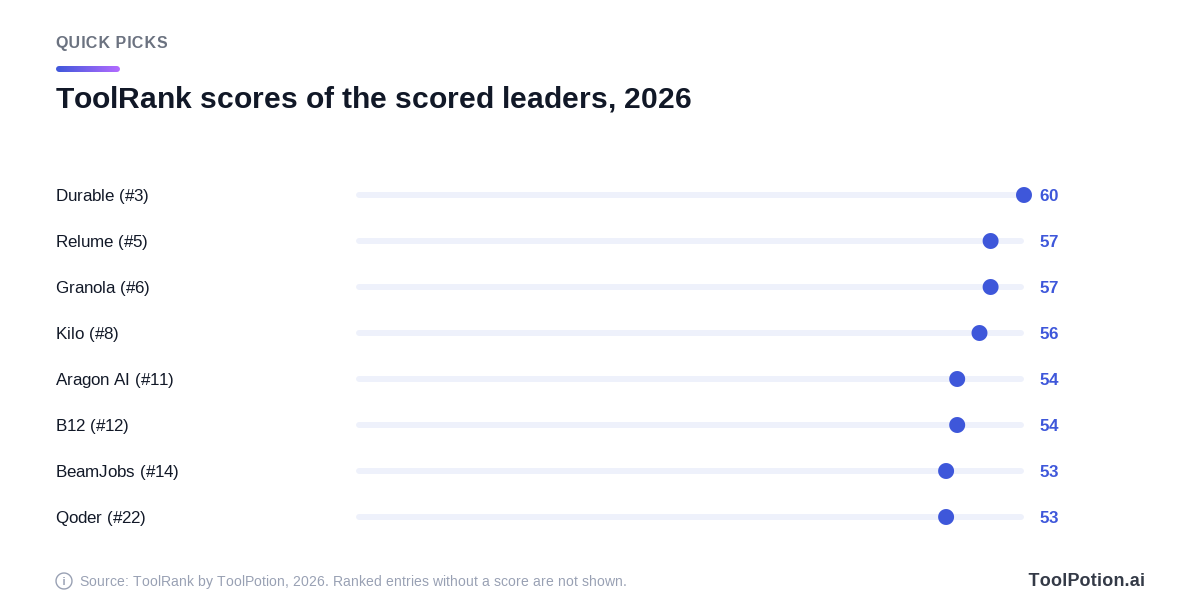
The spread is tight. Only seven points separate Durable at 60 from Qoder at 53, and every scored entry in the top 25 sits in the strong or solid tier. No single product owns freelance work, so your trade should decide more than the rank does.
What changed for freelancers in 2026
Business software now talks to your assistant. HoneyBook released an MCP connector this year that lets Claude read your "pipeline, projects, invoices, contracts and client messages" and build a proposal, invoice or contract from your own templates (HoneyBook). A ChatGPT app followed, and HoneyBook says anything the AI builds stays a draft until you review and approve it. Look for that draft-first rule in any AI tool that touches money or clients.
Site builders grew agents. Framer shipped Skills in 2026, which lets you save instructions about your design system and point its AI agent at them with @pages, @components and @styles (Framer). Relume now goes from a written brief to a sitemap, wireframes and a publishable marketing site. Durable sells something newer still: its paid plans include GEO, optimization for answers in AI search, alongside classic SEO (Durable).
No-code app building reached solo workers too. Taskade launched Genesis last year and says more than 150,000 apps have been built with it (Taskade). Earlier this year it added TSK-1, a system layer that coordinates models, memory, agents and workflows behind those apps. Its jump from #71 to #2 is the largest climb on this board.
And the rules arrived. The EU AI Act's transparency rules come into effect in 2026, and certain AI-generated content must be clearly labelled, including "text published with the purpose to inform the public on matters of public interest" (European Commission). If you write or design for European clients, that's now part of the brief.
Those changes reach every stage of the freelance client loop, and the diagram maps the kind of tool that helps at each step.
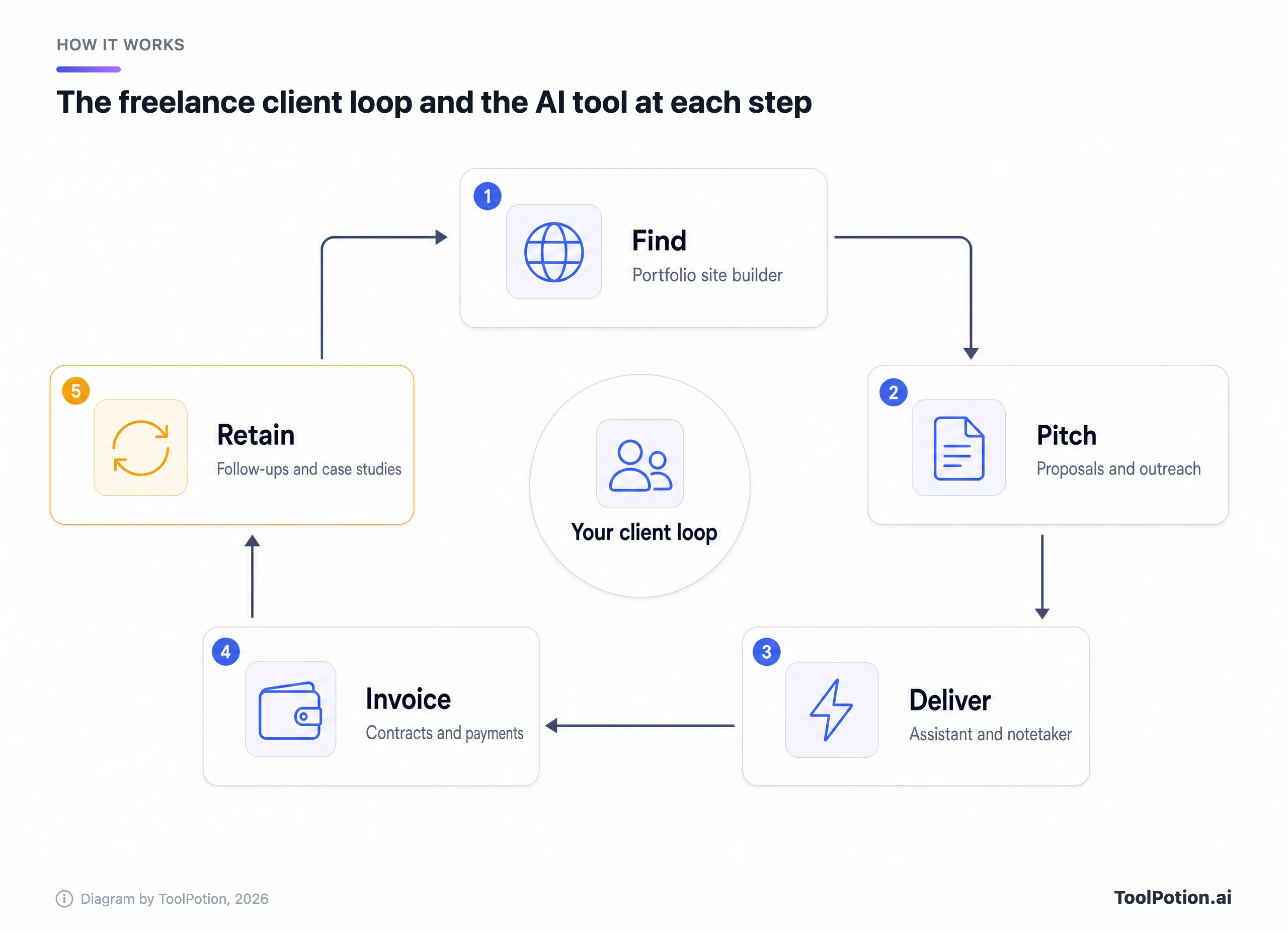
Most freelancers buy tools for finding and delivering, then run invoicing and follow-ups from email and memory. That's the wrong way round. A repeat client needs no pitch, and the retain step is where a CRM reminder or a follow-up template pays for itself.
Winning work: sites, pitches and first impressions
Framer: best for designers whose site is the pitch
Framer is #1 on the 2026 board, up from #11, and is ranked without a score so far. It's a visual website builder with a CMS, animations and an AI agent, and its own pricing FAQ says the Basic plan "caters to students, freelancers" and small studios (Framer).
On yearly billing, Basic is $10 a month with 1,000 AI credits, 30 pages and a complimentary custom domain. Pro is $30 with 150 pages, staging and redirects. The free plan gives you 500 AI credits on a Framer subdomain, but Framer calls it ideal for non-commercial use, so budget for Basic once the site sells your services. The catch is that Framer rewards design skill. A copywriter or virtual assistant who wants a credible page by Friday will get there faster with Durable.
Durable: best for non-designers who also take bookings
Durable is #3 with a 60 (strong), up from #50. It builds a site from a prompt, then adds what a service business needs behind it: booking synced to your calendar, a CRM, built-in payment processing and AI agents that write blog posts and reply to leads.
The free plan runs on a durable.site subdomain with a CRM capped at 10 customers. Launch costs $25 a month, or $22 on yearly billing, and adds your own domain, unlimited bookings and AI replies to up to 20 leads. Grow is $49, or $41 yearly (Durable). The pricing page doesn't list invoicing, so confirm it covers your billing before you drop another tool. Durable is built for every kind of small business, from landscapers to consultants, which is why a designer's portfolio will look more distinctive in Framer.
Relume: best for web designers who build sites for clients
Relume is #5 at 57 (solid) after rising from #36, and it's more a production tool than a portfolio builder. Give it a brief and it produces the sitemap, wireframes and a marketing site. You can export to Figma, Webflow or React, or publish on Relume's own hosting, which is still in beta. For a freelance web designer, that turns the sitemap-and-wireframe phase of a project into a draft you can present at the first review.
The free Build plan covers roughly one full website a month on a relume.live subdomain. Pro starts at $14 a month, hosting on a custom domain starts at $12 per project per month, and component export plans start at $18 (Relume). Those are "from" prices that scale with usage, so build the client's hosting into your quote.
The other site builders on the board
Five more website builders sit in the top 25, and four of them are general small-business tools rather than freelancer products. Hostinger Website Builder (#4) bundles an AI writer, a logo maker and an SEO assistant with a 14-day free trial, and its advertised prices are tied to long upfront terms that renew higher, so read the renewal line. Wegic AI Website Builder (#15, 53) and CodeDesign.ai Website Builder (#19, 53) generate sites from a prompt, while Jimdo (#21) is an all-in-one builder for small businesses. B12 (#12) is the exception, thanks to its client tools, covered in the business section. If a site is all you need, the Top 100 AI Website Builders board compares them in depth.
Instantly: best for B2B freelancers who sell by cold email
Instantly is #7, up from #57, and unscored. It's an outreach platform with unlimited sending accounts and email warmup, plus a B2B lead database and an AI sales agent on its bundle plans. The outreach-only Growth plan costs $47 a month for 5,000 emails and 1,000 uploaded contacts.
It suits a developer, consultant or copywriter who sells to companies. It's the wrong tool if your clients are consumers, and it won't replace referrals. Cold email law also varies by country, so check yours before the first campaign.
Headshots and CVs for the pitch
Aragon AI (#11, 54) generates professional headshots. Packages are one-time purchases starting at $35 for 40 headshots, shown during a 20%-off promotion, and the refund applies only if you haven't downloaded the photos. Two resume builders also rank, Novoresume at #9 and BeamJobs at #14 with a 53, which matters if you bid on contract roles that still ask for a CV. Novoresume's free plan stops at a one-page resume.
Delivering the work
Delivery tools depend on your trade, and the board is thinner here than you'd expect. None of the big chat assistants is in the top 25. Most freelancers already pay for one, so treat a general assistant such as Claude as the baseline. Claude Pro is $20 a month, or $17 a month on annual billing (Anthropic). Use the board's tools for the jobs a chat window does badly.
Granola: best for anyone whose work starts on a call
Granola is #6 with a 57 (solid), up from #61. It's an AI notepad that transcribes from your computer's audio, so no bot joins the call, and it captures notes, actions and follow-ups while you talk. It runs on macOS, Windows, iOS and Android. For consultants and designers, the discovery call is where scope gets set, and a reliable record of it is worth more than any proposal template.
The free Basic plan includes AI notes with limited history. Business costs $14 per user per month and adds unlimited history and integrations with Notion, HubSpot, Zapier and Attio (Granola). Audio is deleted after transcription, and you can opt out of model training. Bot-free capture has a flip side: the other person sees nothing join, so tell them you're taking AI notes. Our guide to setting up AI meeting notes goes further.
Kilo and Qoder: best for freelance developers
Two coding agents made the top 25. Kilo (#8, 56) is open source and runs as an extension for VS Code and JetBrains or in the terminal. It routes to more than 500 models across 60+ providers at provider rates with no markup, or you bring your own keys from Anthropic, OpenAI, Google and others (Kilo). The extension is free. You pay for the models you use, or buy a Kilo Pass from $19 a month for bundled credits.
Qoder (#22, 53) is an agentic IDE that also ships as a JetBrains plugin, a CLI and a mobile app for approving agent actions away from your desk. Pro costs $20 a month for 2,000 credits, and new accounts get a two-week Pro trial. Pick Kilo if you want control over models and costs, Qoder if you'd rather pay one predictable subscription. Either way the client is paying for code that works, so every review and every test is still yours.
Tools for specific trades
The other delivery tools are narrow. Glif - Creative Agent Platform (#23, 52) is a chat-based creative agent that picks the model for each image, video or audio job, and its pricing page lists full commercial rights. Luminar Neo (#20, down from #8) is a photo editor with more than 24 AI tools and a perpetual desktop license option. MachineTranslation.com (#16, 53) runs your text through 22 AI models at once and shows where they agree, with a human translator on call for high-stakes copy. For a freelance translator, that's a useful first draft and a dangerous final one.
Running the business
Admin is where freelancers lose unbilled hours, and it's the part of the board with the most software made for them.
HoneyBook: best for the proposal-to-payment flow
HoneyBook is #10, up from #31, and not yet scored. It's a client management system for small businesses, with proposals, contracts, invoices, payments and a client portal in one flow. Starter is $29 a month billed yearly. Essentials adds the scheduler, automations and QuickBooks Online sync for $49 a month billed yearly (shown as 25% off $59), and Premium is $109, shown 25% off $129 (HoneyBook). Every plan starts with a 30-day free trial and no card.
There are two catches. Card payments cost from 2.7% plus 10 cents, about $135 on a $5,000 invoice, and bank transfers cost 1.5%. And HoneyBook is only available in the US, UK, Canada and Australia. Inside those countries it's the default answer for the business side of freelancing, more so now that its Claude and ChatGPT connectors can draft an invoice or contract from your own templates. The invoicing board lists alternatives.
B12: the client toolkit for everyone else
B12 (#12, 54) pairs an AI-built site with the client side. Its Website plan is $24 a month. The $78-a-month plan above it adds client intake, email marketing, a contact manager, contracts with e-signature and payments, and new users pay $1 for the first seven days (B12). That's more than HoneyBook's entry plan, but the website is included.
General tools that freelancers borrow
The other admin leaders weren't built for freelancers, which is fine as long as you know it. Attio (#18) is an AI-native CRM for revenue teams. Its free plan covers up to three seats, enough for a capable solo CRM at no cost, and Plus is $44 per user per month, or $35 on annual billing. Taskade is a team workspace and app builder. Pro is $10 a month billed annually ($120 a year), and custom domains for client-facing apps start on Business at $25 a month billed annually.
SaneBox (#25, 52) filters unimportant email out of your inbox and reminds you to follow up. Snack, for one account, is $9.49 a month or $65 a year. Dia (#24, 52) is an AI browser from The Browser Company, which Atlassian agreed to acquire last year. The browser is free, and paid plans add chat with context from your work apps and, on the top tier, a daily Morning Brief plus reports and decks. It's macOS-only for now, so check current plan prices before relying on it for client work.
For US freelancers, FlyFin (#13) pairs AI deduction-finding with a CPA who reviews every deduction, plus a quarterly tax estimator and federal and state filing. It shows prices in its app, not on its site. No tax tool replaces a qualified accountant when your situation is unusual.
The chart below places the leaders on one axis: how much of the product assumes you run a solo service business.
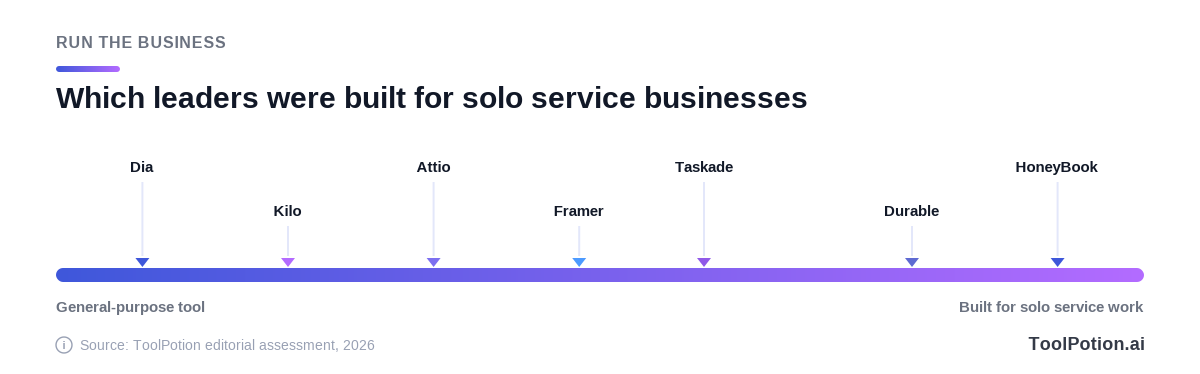
Tools on the left reward setup time, because you build the freelance workflow yourself. Tools on the right ship with it and charge for the convenience. A solo designer can run a business on Attio's free plan plus an invoicing app, while HoneyBook ships that workflow ready-made.
Clients, contracts and AI
Most client worries about AI come down to four questions: is the work yours, who owns it, where does their information go, and what are they paying for? Settle all four before work starts. The diagram splits them into what you tell the client and what you protect, with both ending in the contract.
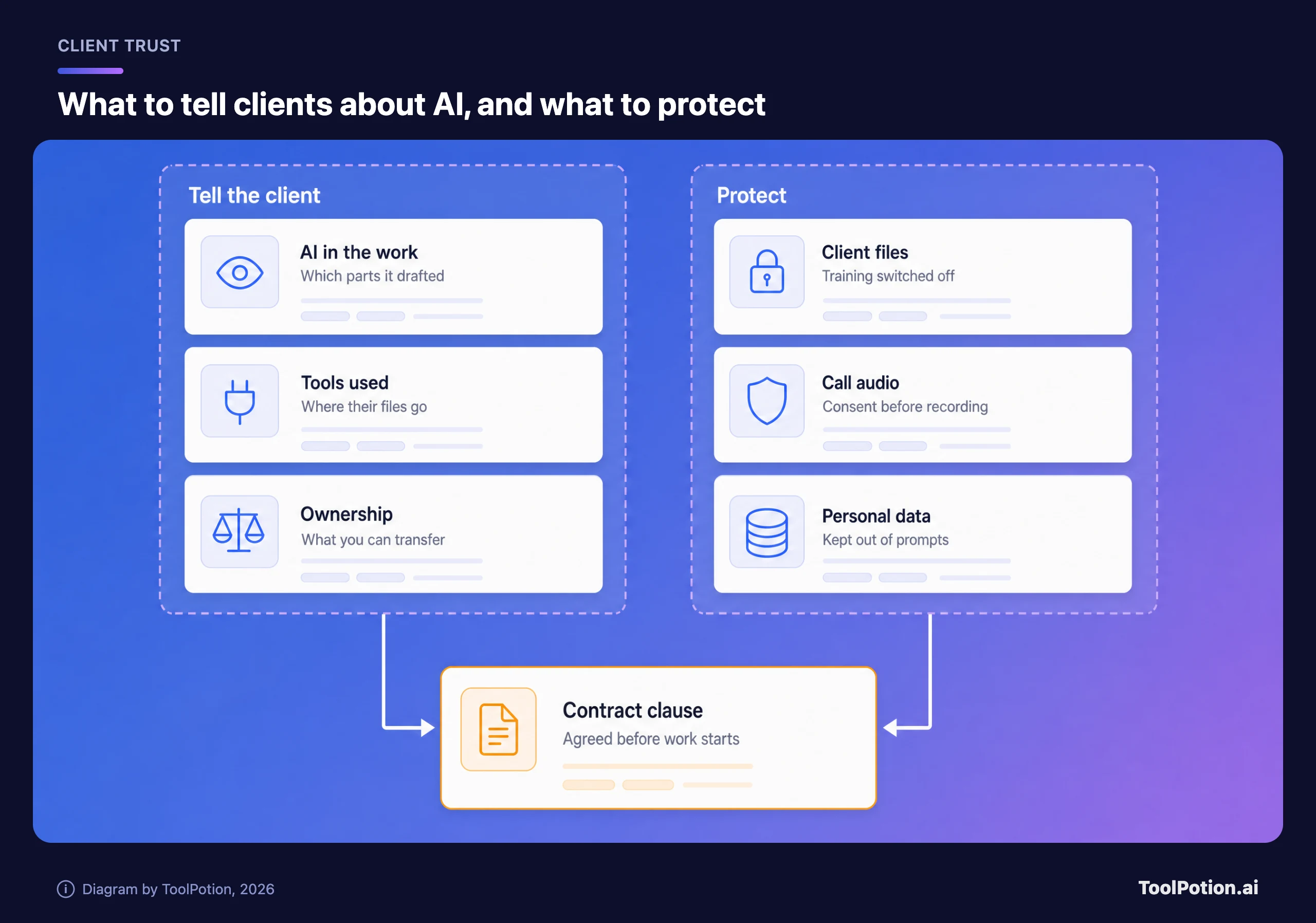
Put the answers in writing, in the proposal or the contract, and you won't be negotiating them in the middle of a project.
Disclosure and ownership
Disclosure is easiest as one line in your proposal template saying where AI helps (research, first drafts, code suggestions) and where it doesn't. For text published to inform the public in the EU, labelling is becoming a legal duty, as noted above.
Ownership is harder. The U.S. Copyright Office concluded in 2025 that AI outputs can be protected "only where a human author has determined sufficient expressive elements", that "the mere provision of prompts" isn't enough, and that AI-assisted material inside a larger human-made work can still be protected (U.S. Copyright Office). If your contract promises the client exclusive ownership of everything you deliver, a raw AI output may carry no copyright to transfer. Editing, selecting and arranging the output yourself strengthens the client's position, and the contract should say what was AI-assisted. This isn't legal advice, so have a lawyer read the IP clause on any large contract. Our guide to AI for legal work goes deeper.
Confidentiality
Client files are the bigger risk. Consumer AI plans may train on your chats unless you switch that off. Anthropic, for example, lets Free, Pro and Max users choose whether their chats train new models, keeps the data for five years if they allow it, and excludes its commercial plans from the change (Anthropic). Granola lets you opt out of training on any plan. Check the setting before you paste anything under NDA, and if the NDA bars third-party tools, treat every AI service as a third party.
Five habits cover most of this.
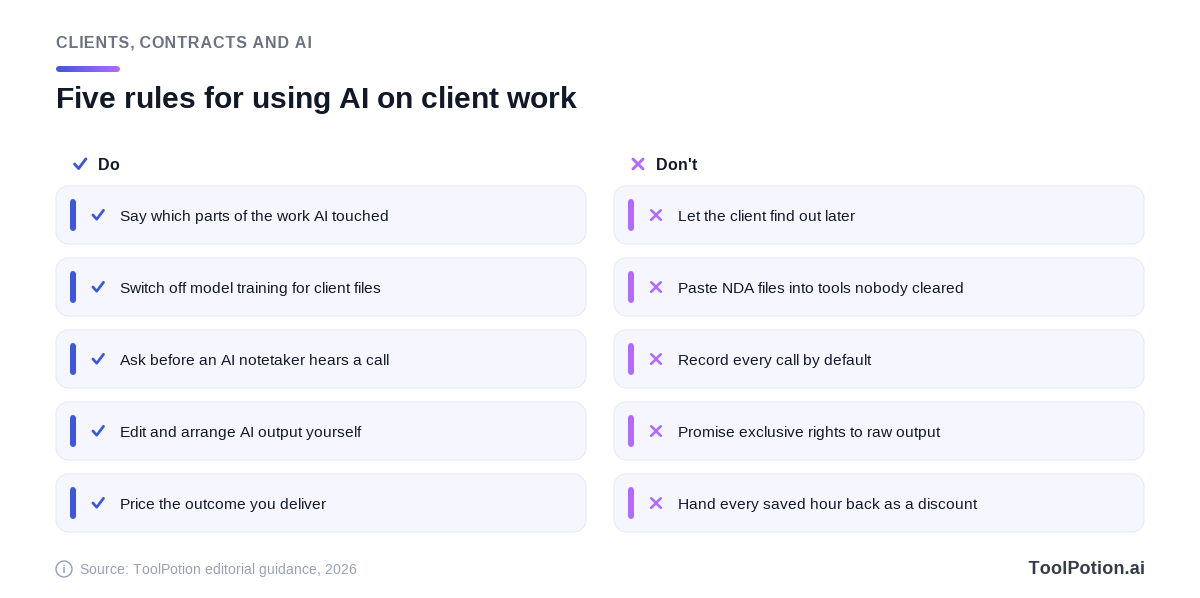
The last pair decides whether AI raises your income or cuts it.
Pricing when AI makes you faster
If you bill by the hour, every hour AI saves is an hour you stop charging for. A logo that took ten hours and now takes six earns 40% less at the same rate, and the client gets the same logo. Project or value pricing fixes that: quote the outcome, keep the fee and spend the freed hours on another client or on better work.
The calculator shows the gap with your own numbers. Set your rate, your billable hours before AI and the share of time it saves.
At the defaults ($60 an hour, 80 hours, 30% saved), hourly billing gives away $1,440 a month. Clients aren't owed that money, but they are owed honesty. If one asks why the fee didn't fall, the answer is that they pay for the result and your judgment, and neither got cheaper.
A lean starter stack by budget
You don't need all 25 tools. Here's what each budget buys, using plans checked on vendor pricing pages, with yearly-billed prices marked.
| Job | Free | Under $50 a month | Around $150 a month |
|---|---|---|---|
| Website | Durable Free (subdomain) | Framer Basic, $10 (yearly) | Framer Basic, $10 (yearly) |
| Clients and invoices | Attio Free (CRM only) | HoneyBook Starter, $29 (yearly) | HoneyBook Essentials, $49 (yearly, on sale from $59) |
| Calls | Granola Basic | Granola Basic, $0 | Granola Business, $14 |
| Assistant | Claude Free | Claude Free, $0 | Claude Pro, $20 |
| Leads | Referrals | Referrals | Instantly Growth, $47 |
| Monthly total | $0 | $39 | $140 ($150 at list price) |
Outside HoneyBook's four countries, swap in B12's $78 plan with client tools and drop Framer, since B12 includes the site. Developers should trade Instantly for Kilo's pay-as-you-go usage or Qoder Pro at $20. The free column has a ceiling, too. Durable's free CRM stops at 10 customers and Granola's free history is limited, so expect to upgrade once work is steady.
A one-week workflow
Tools only pay off when they land in a routine. Here's one way to spread them across a week, with delivery protected in the middle.
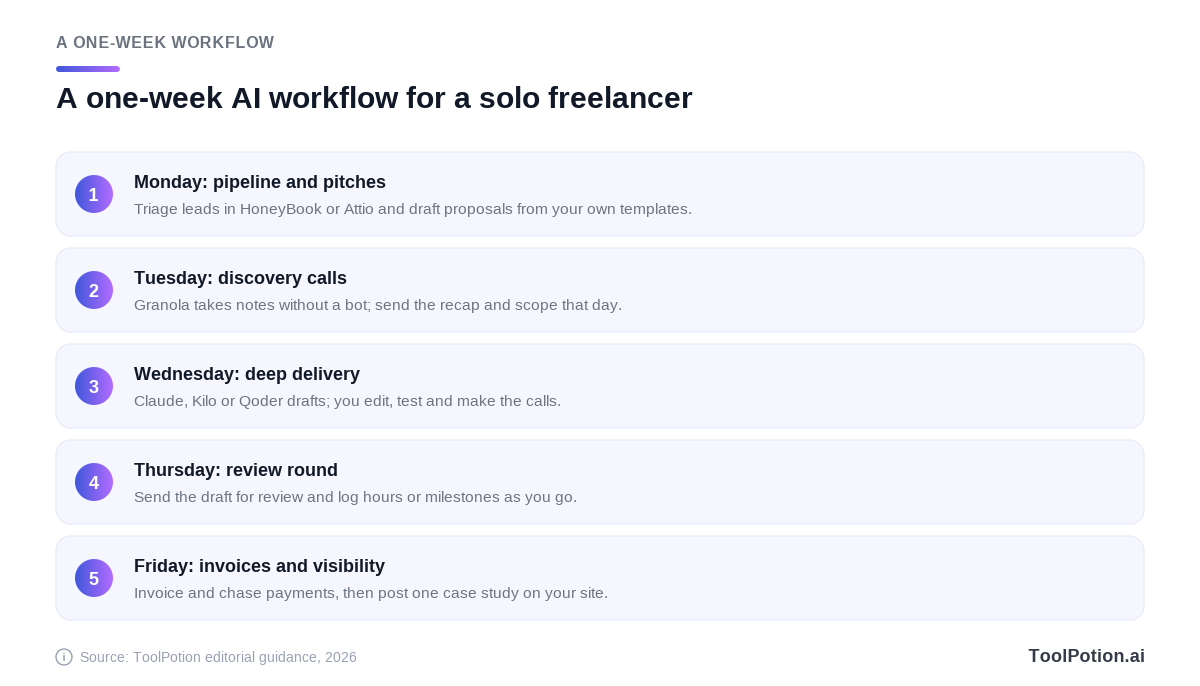
The order matters more than the tools. Calls early in the week leave time to scope properly, and Friday invoicing keeps cash moving even in a heavy delivery week. For visibility, one case study a week keeps a portfolio from going stale, and Durable's Launch plan includes an agent that writes up to 10 blog posts a month if you'd rather not write them yourself.
How to choose
Start with the step in the client loop that costs you most, not with the top of the leaderboard. A designer with a full pipeline and messy invoicing should buy HoneyBook before a new site. A developer with no leads gets more from Instantly than from any coding agent.
If two answers fit, buy the cheaper one and run it through a month of real client work. Most of these tools have a free plan or a trial, so a wrong pick costs a few hours rather than a year's subscription.
About ToolRank
ToolRank is ToolPotion's independent ranking of AI tools, and placement can't be bought. Every entry gets a rank, and scored entries also get a 0-100 score and a tier; a few leaders on this board are ranked before they're scored. Browse every list on the ToolRank leaderboards, or go back to the full freelancer ranking.
Rising and newer names to watch
The biggest movers are all near the top. Taskade climbed from #71 to #2, Granola from #61 to #6, Instantly from #57 to #7, Durable from #50 to #3 and Relume from #36 to #5. More than half the top 25 (15 entries, Kilo, Qoder and B12 among them) has no previous rank on this board. Luminar Neo fell furthest, from #8 to #20.
One group stands out for a different reason: platforms that pay freelancers to work on AI. Wirestock (#17) matches photographers, designers and videographers with paid creative projects, which its listing ties to AI training data, and pays monthly. Just below the top 25, Outlier AI (#28), operated by Scale AI, pays experts to write prompts, build grading rubrics and rate model answers. For some freelancers, AI is a client as well as a tool.
If your practice is turning into a company, the Top 250 AI Tools for Entrepreneurs is the next list to read, and the freelancer directory goes well past the top 250.
Frequently asked questions
What's the best free AI setup for a freelancer?
Granola Basic for calls and Attio's free CRM, which allows up to three seats and 50,000 records, plus a free site on Durable or Relume. That covers the client loop for nothing until you outgrow the limits.
Do I have to tell clients I use AI?
There's no single rule. The client's contract, the platform you were hired through and local law can all apply, and in the EU the AI Act's labelling rules cover some AI-generated public-interest text. Put one line in your proposal template so it's said once, in writing.
Can I transfer copyright in AI-assisted work to a client?
For the parts you wrote, designed or meaningfully arranged, generally yes under the Copyright Office's 2025 view. For raw output from prompts alone, there may be nothing to transfer. Keep your drafts and edit history as a record of your contribution.
Should I lower my prices now that AI makes me faster?
Not automatically. Charge for the outcome. If a client insists on hourly billing, raise the rate to reflect what an hour now produces, or move them to a fixed fee at the next renewal.
Does HoneyBook work outside the US?
It's available in the US, UK, Canada and Australia only. Elsewhere, B12's $78 plan covers contracts, intake and payments with a website included, or you can pair a CRM like Attio with a separate invoicing app.