AI browsers in 2026 are good at one job and promising at a second. They read, summarize and compare across your open tabs well enough to use every day, and their agent modes can now fill in forms, build a shopping cart or book a slot on sites where you're logged in. They also finish only a minority of real tasks, they're slow, and no vendor claims to have solved prompt injection, the attack that turns a web page into instructions for your agent.
The category changed shape this year. OpenAI shut down its ChatGPT Atlas browser and moved the agent into the ChatGPT desktop app. Microsoft retired Copilot Mode in Edge. Google put an agent called auto browse inside Chrome, Perplexity's Comet reached all four major platforms, and Anthropic made Claude in Chrome generally available with actions it judges safe approved automatically. A federal appeals court, meanwhile, decided that when Comet shops on Amazon, the shopper is the one accessing Amazon's computers.
If you're deciding whether to use one at work, or whether to let your team, two things matter: which tasks it finishes, and what a malicious page can make it do. This guide works through both from vendor documentation and published research, then gives you a setup, a task checker, a browser picker and a team rule.
The AI browser market shrank into the browsers you already use
Agent features moved this year into Chrome, Edge and the chat apps people already pay for. ChatGPT Atlas lasted less than a year. It launched on Mac last year, never reached Windows, and OpenAI retired it this year. Its features went three ways: a ChatGPT extension for Chrome that answers questions about the page you're on, a built-in browser in the ChatGPT desktop app that can log into sites and download files, and a cloud browser on OpenAI's servers where the agent works through tasks remotely (TechCrunch).
Microsoft made a similar call. It retired Copilot Mode in Edge, and the agent feature formerly called Copilot Actions is now Browse with Copilot, which needs a Microsoft 365 Premium subscription and works only on Edge desktop in the US (Microsoft Edge Blog). The free side of Microsoft Copilot in Edge kept the useful reading features, including answers that draw on several open tabs at once.
Google Gemini in Chrome grew instead. The side panel that summarizes pages and compares tabs spread this year to India, Canada and New Zealand, then to Latin America, Africa and the Middle East. The agent is a paid extra. Auto browse comes with Google AI Pro at $19.99 a month or Google AI Ultra from $99.99 a month (Google AI plans), and for now it works only in the US, on desktop and Android.
Perplexity made Comet free last year and added iOS this year, so it now runs on Windows, Mac, Android and iPhone, and a Comet Enterprise edition brought admin controls. Dia, from The Browser Company, which Atlassian agreed to buy last year, is a Mac browser built around answers from your tabs and work apps. The browser is free and its AI plans cost $20 or $100 a month (Dia pricing). Opera Neon became free to download this year, with its built-in agents on a $19.90 monthly plan. Brave Leo is testing an agent that runs only in a separate profile. Newcomers keep arriving too, such as Polar, from a former Comet engineer.
Anthropic's Claude in Chrome is an extension rather than a browser, but it does the same job. It's included in every paid Claude plan, and since its general release it approves actions on its own by default, with a classifier checking each one against your request (Anthropic).
| Product | Agent feature | Platforms | What you need for the agent |
|---|---|---|---|
| Chrome with Gemini | Auto browse | Windows, Mac, Chromebook Plus, Android | Google AI Pro ($19.99/mo) or Ultra, in the US |
| Edge with Copilot | Browse with Copilot | Edge desktop | Microsoft 365 Premium ($19.99/mo), in the US |
| ChatGPT desktop app | Built-in browser plus cloud browser | Mac and Windows app | A ChatGPT account (limits vary by plan) |
| Perplexity Comet | Comet Assistant | Windows, Mac, Android, iOS | Free with usage limits (Background Assistant launched on Max) |
| Claude in Chrome | Extension agent | Chrome desktop only | Any paid Claude plan |
| Opera Neon | Built-in agents | Windows, Mac | $19.90/mo plan (free plan if you bring your own agent) |
| Dia | Answers across tabs (no site agent listed) | Mac (Windows listed as coming) | Free browser, AI from $20/mo |
Read the right-hand column first. The agent, the part that acts for you, is the part that costs money, has regional limits and carries the risk. The reading half is free almost everywhere.
What happens when you hand an agent a task
Every agent mode runs the same loop. It looks at the page, decides on one step, takes it, checks what changed and goes round again until the task is done or it reaches a step it's been told to hand back to you.
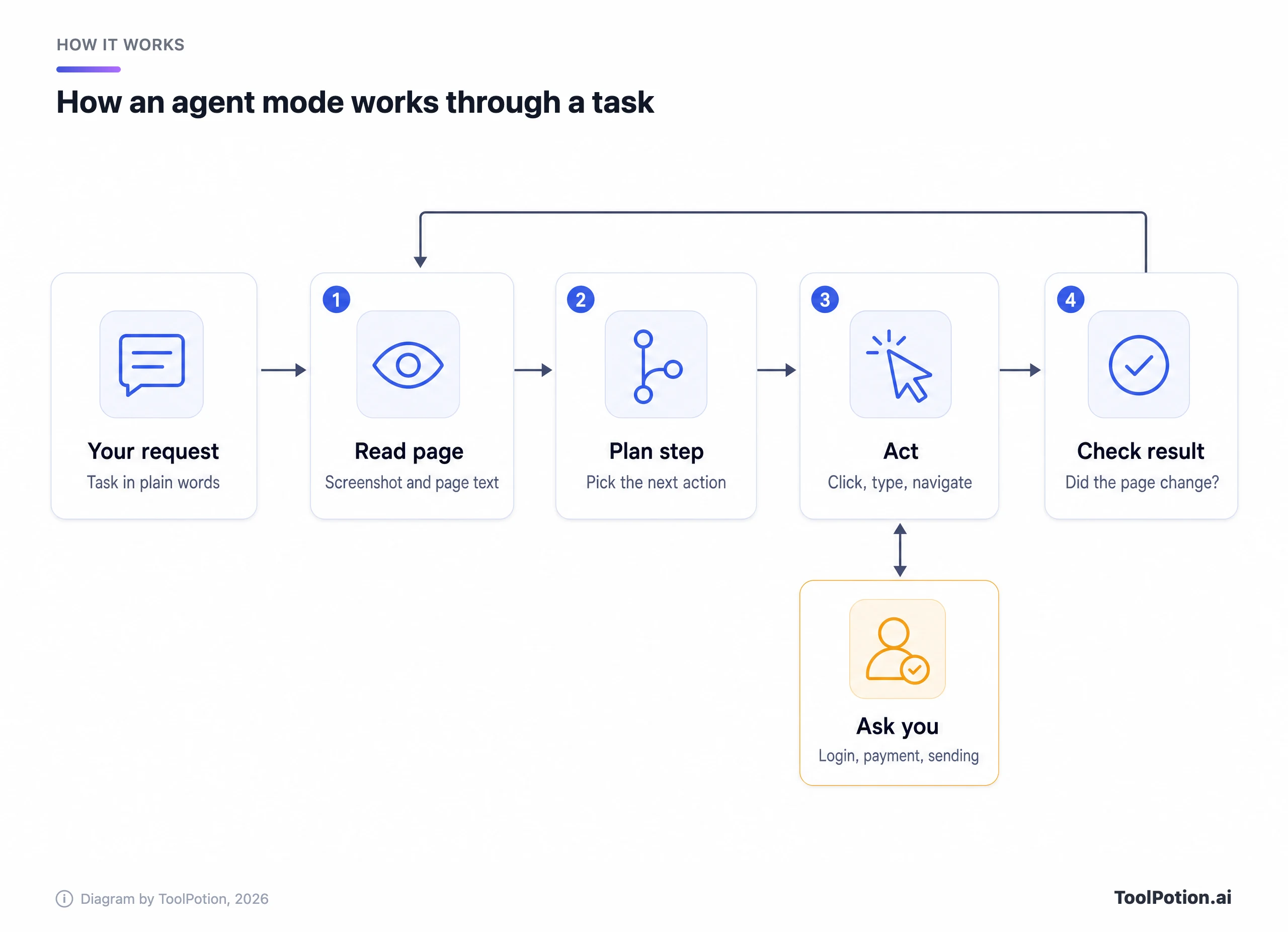
What the model sees is close to what you see. Microsoft's Browse with Copilot takes screenshots as it works, keeps them with your conversation for up to 30 days, marks the tab it controls with a cursor icon and lets you take over at any point (Microsoft Support). In the Amazon case, the appeals court accepted Perplexity's account that Comet's assistant runs on the user's device and that Perplexity's own servers don't talk to Amazon directly (a point Amazon now disputes for the iPhone app).
The ask-you step matters most, and every vendor draws that line somewhere else. Google says Chrome's auto browse pauses before purchases and social posts. Edge asks before purchases, bookings, sending email and deleting calendar events, and its agent can't use saved passwords, autofill or wallet data at all. Claude in Chrome used to ask before every action by default. Now it decides which actions are safe, and you have to switch manual approval back on in settings if you want a prompt each time.
Jobs agent modes handle well today
Reading is where these browsers earn their keep. Ask the side panel to compare three pricing pages you have open or pull the cancellation terms out of a long policy page, and you'll have an answer in seconds, at no extra cost in Chrome and Edge. If that's all you need, an answer engine may be enough, and our AI search engines comparison covers the options.
The agent side suits chores with a clear finish line. Google's early testers used auto browse to schedule appointments, fill in tedious forms, collect tax documents, get quotes from plumbers and electricians and file expense reports, TechCrunch reported. Google's Android demos book parking from the details on an event ticket and change a pet-food order. Multi-site research fits too. An agent that opens ten vendor pages and fills a comparison table saves real time, and a mistake costs a re-check rather than a refund.
All of these share three traits. The task is narrow, the result is easy to verify and a mistake is cheap. Polar says most of its users run it only for automation and keep another browser for everyday browsing. That's a sensible pattern for anyone trying an agent for the first time.
Where agentic browsing still fails
Success rates on live websites are still low. ClawBench, a benchmark from a 28-author research team, ran 153 everyday tasks such as purchases, appointment bookings and job applications across 144 real platforms, with an interception layer that stopped anything from going through for real. The best of eight frontier models, Claude Sonnet 4.6, completed 33.3% of them (ClawBench). The tasks demand things like filling in many detailed form fields correctly.
Speed and judgment come next. A TechCrunch reviewer who used Atlas and Comet called them a slight efficiency gain, with most of the time spent watching the agent slowly click around a website. Wired's test of Chrome's auto browse was harsher. Asked for two symphony seats on an aisle and outside the orchestra section, it found two $185 seats that were on an aisle and outside the orchestra section but sat in different rows. A request to check campgrounds ran for 15 minutes, checked one, and told the reviewer to look up the rest himself.
Logins and payments are deliberate stop points. Chrome asks before it uses your Password Manager, and Edge for Business forces a pause at password and card fields, so you're still needed at the keyboard. Chrome also caps how many auto browse actions you get per day, and Google hasn't published the number.
Some sites don't want agents at all. eBay changed its user agreement to bar orders placed without human review, The Register reported. When Amazon blocked Meta's Muse agent, users saw a pop-up saying continued access by an unauthorized AI agent violates its Conditions of Use (more on Amazon below). The longer-term fix is a proper door for agents. Cloudflare lets agents sign their requests so websites can recognize them, and the proposed WebMCP standard, which Chrome is trialing, lets a site expose its forms and functions to agents directly. Expedia, Booking.com, Shopify, Etsy, Instacart and Target are among the brands involved in Chrome's early trial.
Until that spreads, expect agents to break on sites that change their layout or block them. If you need dependable automation on a fixed set of sites, a scripted tool from the Browser & Web Automation board or an open-source framework such as Browser Use is often the better fit, and our explainer on AI agents vs automation tools covers that trade-off.
Prompt injection is the problem nobody has solved
An agent reads web pages to do its job, and a language model can't reliably separate the text it's reading from the instructions it's following. So anyone who can put words in front of your agent can try to give it orders: the author of a web page, a product review, a forum comment or an email in your inbox.
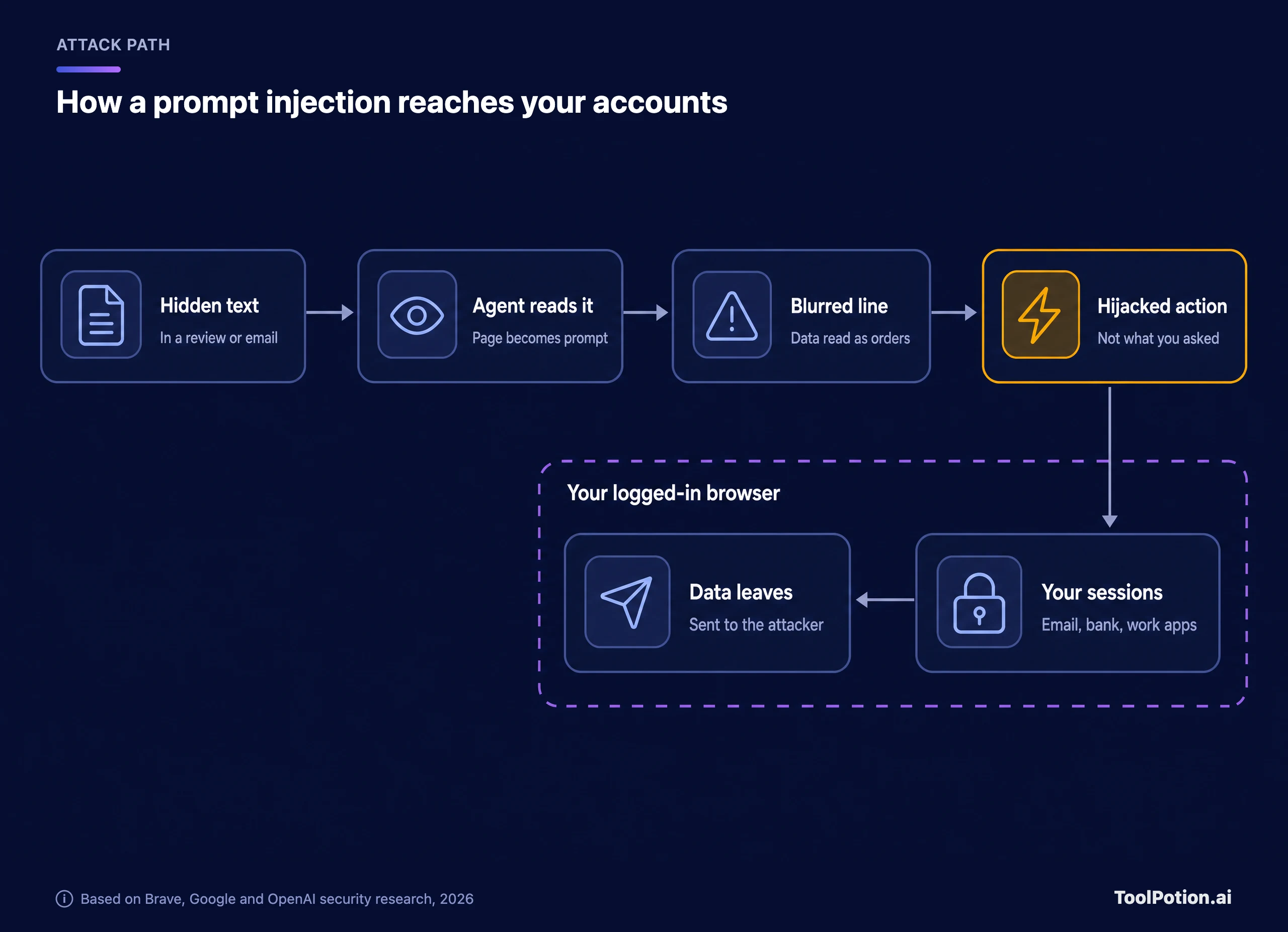
The bottom row is what makes this serious. The agent works inside your logged-in sessions, so a hijacked agent acts in your email, bank or company apps as you. Brave's researchers got Comet to follow instructions hidden as faint light-blue text on a yellow background inside a screenshot, and showed that another AI browser, Fellou, sent a page's text to its model just by visiting it, letting visible instructions on the page override the user's request. Brave called indirect prompt injection “a systemic challenge facing the entire category of AI-powered browsers” (Brave).
Other teams found the same thing. Trail of Bits audited Comet before launch and built four working exploits, including one dressed up as a fake CAPTCHA, all aimed at copying the user's Gmail to an attacker's server. OpenAI described an attack in which hidden text in an email made its agent send a resignation message instead of drafting an out-of-office reply.
Vendors say their defenses work, and Anthropic has published before-and-after numbers from its own tests.
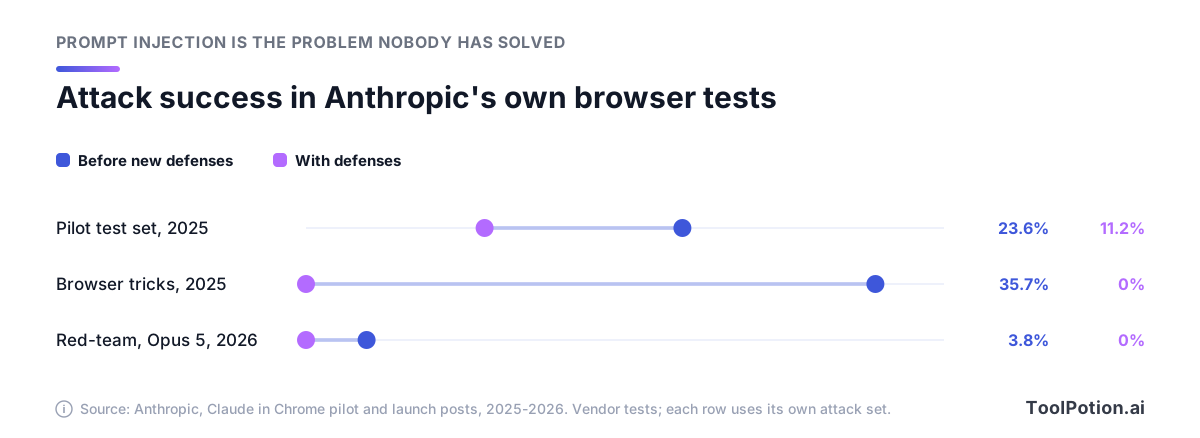
Those are Anthropic's tests on attacks Anthropic chose. With every safeguard on, it reports no successful attacks on three of its newest models and 0.3% on a fourth, and it still calls prompt injection “a moving target”. Independent results look worse, though they test different, open-source agents. Researchers from NTU, ST Engineering, IBM Research and UIUC ran 3,168 attack attempts against Browser Use and NanoBrowser running GPT-5 and Gemini models. Indirect injections succeeded 41.67% to 68.16% of the time, and no setup they tested was free of failures (CSO Online). Lasso Security got past Perplexity's open-source injection detector, BrowseSafe, in 36% of attempts with tricks as simple as Base32 encoding.
The companies building these agents are frank about the ceiling. OpenAI wrote that prompt injection, like scams and social engineering, is “unlikely to ever be fully ‘solved’”, and the UK's National Cyber Security Centre has said it may never be totally mitigated (TechCrunch). Gartner went further last year and told clients that CISOs must block all AI browsers for the foreseeable future.
What vendors do instead is stack layers. Google runs a second model, the User Alignment Critic, that sees only a description of each planned action and never the raw page, and it can veto actions that don't match your goal. Chrome also limits which sites the agent may read or type into for a given task and asks before it goes to banking or medical sites (Google). Microsoft blocks high-risk sites and keeps its agent away from saved passwords and payment details. Anthropic scans page content for attacks and checks each action against your request, and Brave walls its agent off in a separate profile. Nobody promises zero.
Amazon v. Perplexity: who is responsible for the agent's clicks
The legal fight over agentic shopping is between Amazon and Perplexity, and it isn't finished. Here's where it stands.
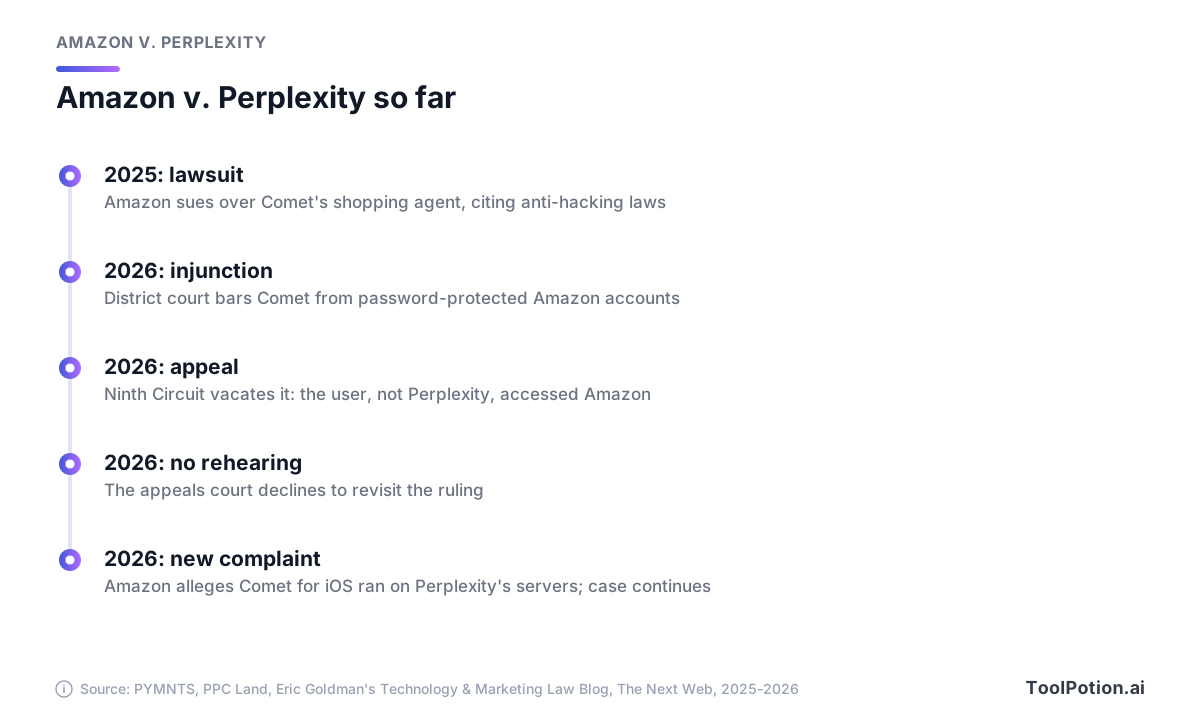
Amazon sued last year, arguing that Comet reached customer accounts without permission and disguised itself as an ordinary Chrome browser after Amazon tried to block it. A district judge agreed earlier this year and barred Comet from password-protected Amazon accounts. The Ninth Circuit then vacated that order. It held that the agent is “a tool, not a person” under the statute, so the shopper directing it is the one accessing Amazon, and Amazon was unlikely to win under the anti-hacking laws it relied on (Technology & Marketing Law Blog). The appeals court later declined to rehear the case.
Amazon has since filed an amended complaint alleging that Comet's iPhone app copied customers' Amazon session cookies to Perplexity's cloud servers, so that “no user device touches Amazon's servers”, while Perplexity told the appeals court the opposite. The filing also quotes a letter from Perplexity's counsel saying that, “as a measure of good-faith,” Perplexity had temporarily disabled the assistant feature on Amazon.com in Comet for iOS (The Next Web). These are Amazon's allegations. Perplexity has framed the dispute as a question of shoppers' freedom to use the software they choose on sites they're allowed to visit.
For users, the ruling cuts both ways. It treats you as the party accessing a site, which means the site's terms still bind you, and the court noted that Amazon can enforce its terms against its own customers. The opinion is also limited to these facts, so it doesn't give agents a general pass. If agentic shopping is the goal, many tools on our AI shopping assistants board are built for stores to run themselves, which sidesteps the question.
A safe setup you can apply today
None of this means you should avoid AI browsers. It means you should set one up the way a security team would, before the first task.
- Give the agent its own browser profile. Brave builds this in. In Chrome, Edge or Comet, create a separate profile with only the logins the agent needs, and keep your bank, main email and password manager out of it.
- Start logged out. OpenAI's advice for its own agent was to use logged-out mode where possible. Sign in only when a task needs it.
- Keep approvals on. In Claude in Chrome, switch manual approval back on for anything beyond reading, and read every confirmation before you click it.
- Write narrow tasks. OpenAI warned against telling the agent to take whatever action is needed. Name the site, the goal and where it should stop.
- Keep it away from money, inbox-driven actions and admin consoles. At its pilot launch, Anthropic told testers to avoid sites with financial, legal, medical or other sensitive information.
- Watch the first runs end to end, then clean up. Edge keeps agent screenshots with your conversation for up to 30 days, so delete that history after private tasks.
The short version fits on one card.
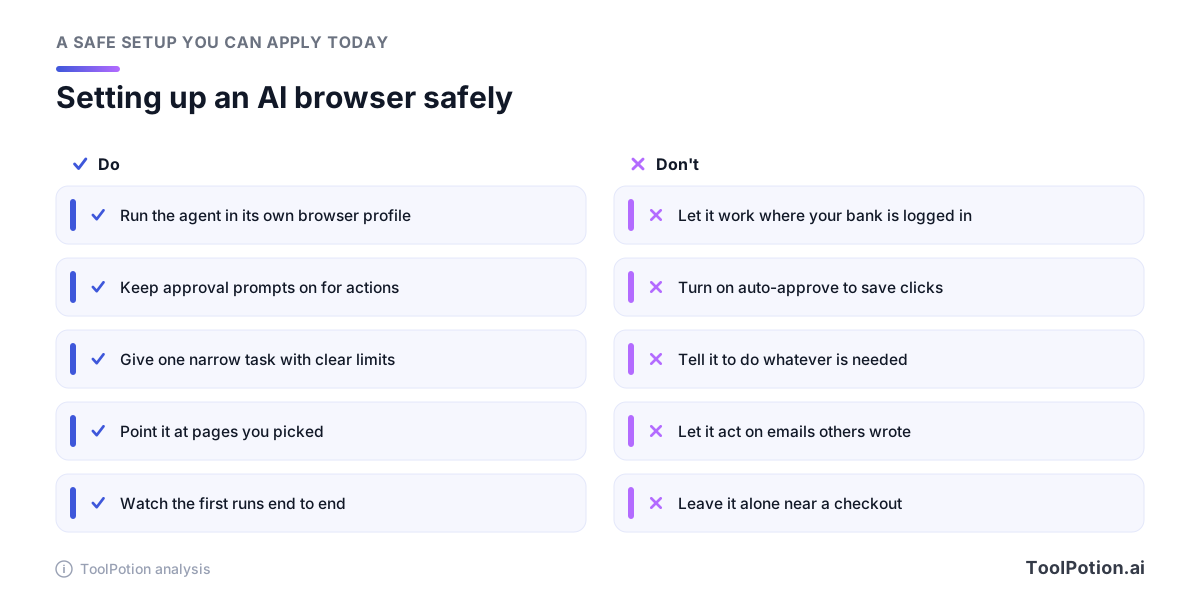
The right-hand column lists the shortcuts people take after a few runs go well. The published attacks above all relied on an agent that was logged in to something worth stealing, so the profile rule does most of the work.
For a specific task, use the checker below. It asks six questions, and a single high-risk answer is enough to keep that step in your hands.
Most research and comparison jobs come out green or amber. Anything that pays, sends or reads your inbox while logged in to work accounts comes out red, and that's deliberate: let the agent gather and draft, then make the final click yourself.
Which browser fits, and a rule for teams
For individuals, the choice mostly follows what you already pay for. If you only want answers, don't pay for an agent, because Gemini in Chrome and Copilot in Edge summarize pages and compare tabs on their free tiers. If you want an agent, Google AI Pro and Microsoft 365 Premium both cost $19.99 a month, and each puts one inside a browser you probably use already. Comet is the way to try an agent without a subscription, as long as it gets its own profile. The tree below covers the common cases.
One of those answers needs a warning. Claude in Chrome's automatic approvals are convenient for research and the wrong default anywhere near money or email.
For teams, the rule is simpler than the market: reading is allowed everywhere, agent actions run only in a managed edition, and only on sites you've approved. The controls exist. Chrome's auto browse is off by default for managed Workspace users, and admins can switch it on with policies that allow or block specific URLs (Chrome Enterprise Help). Edge for Business has a limited preview, licensed through Microsoft 365 Copilot, in which IT chooses the sites Copilot may act on and Purview data rules keep applying. It isn't offered in the EEA. Comet Enterprise can lock the assistant to read-only or to approved domains, and Claude's Enterprise plan lets admins limit Claude in Chrome to approved domains.
That last line is a narrower version of Gartner's advice that most teams can live with. Review the allowlist whenever a vendor changes its defaults, which in 2026 has meant every few months. For lessons from teams running agents at work, see AI agents in production, and the Top 250 AI Agents board tracks the wider field.
Frequently asked questions
Is ChatGPT Atlas still available?
No. OpenAI shut Atlas down this year, less than a year after its Mac launch. If you used it, the agent now lives in the ChatGPT desktop app for Mac and Windows, and a ChatGPT extension covers page questions inside Chrome.
Is Perplexity Comet free?
Yes, with usage limits. Perplexity made Comet free to download last year, and it now runs on Windows, Mac, Android and iOS. The Background Assistant, which runs several tasks at once while you do something else, launched as a feature of the top Max plan.
Can an AI browser buy something without asking me?
The mainstream ones are built to ask first. Chrome and Edge pause before purchases, and Edge's agent can't use saved payment details at all. Claude in Chrome approves actions its classifier judges safe without asking, so switch manual approval on if you want a prompt before each step.
Is it legal to let an AI agent shop on Amazon for me?
The Ninth Circuit found Amazon unlikely to win its federal and California anti-hacking claims against Perplexity, because the user directing the agent is the one accessing the site. That doesn't override Amazon's Conditions of Use, which Amazon says bar unauthorized agents, and the lawsuit is still open. Where a site's terms forbid agents, using one is a contract risk that falls on you.
Should my company block AI browsers?
Block the unmanaged ones on company devices. Then allow managed editions (Chrome under Workspace policies, Edge for Business, Comet Enterprise or Claude's Enterprise plan) for reading, and approve agent actions site by site.
Do AI browsers see my passwords?
Vendors say the model doesn't. Google says its models aren't exposed to Password Manager or saved card data, and Microsoft's Browse with Copilot can't reach saved passwords, autofill or wallet data. The agent still acts inside your logged-in sessions, which is why a separate profile matters more than where your passwords are stored.