ToolPotion
AI Advisor
Submit a Tool (Free)

Binqo for Mac

AI AppsProductivityFree · macOS

Binqo for Mac integrates Mielo, a dot-matrix character, into your Mac's notch to provide quick access to music, files, focus timers, weather, and clipboard management. It offers spoken answers and meeting note-taking capabilities, enhancing productivity and interaction with your macOS device. Free for macOS 14 or later, it supports both Apple silicon and Intel Macs.

Visit Website
Share
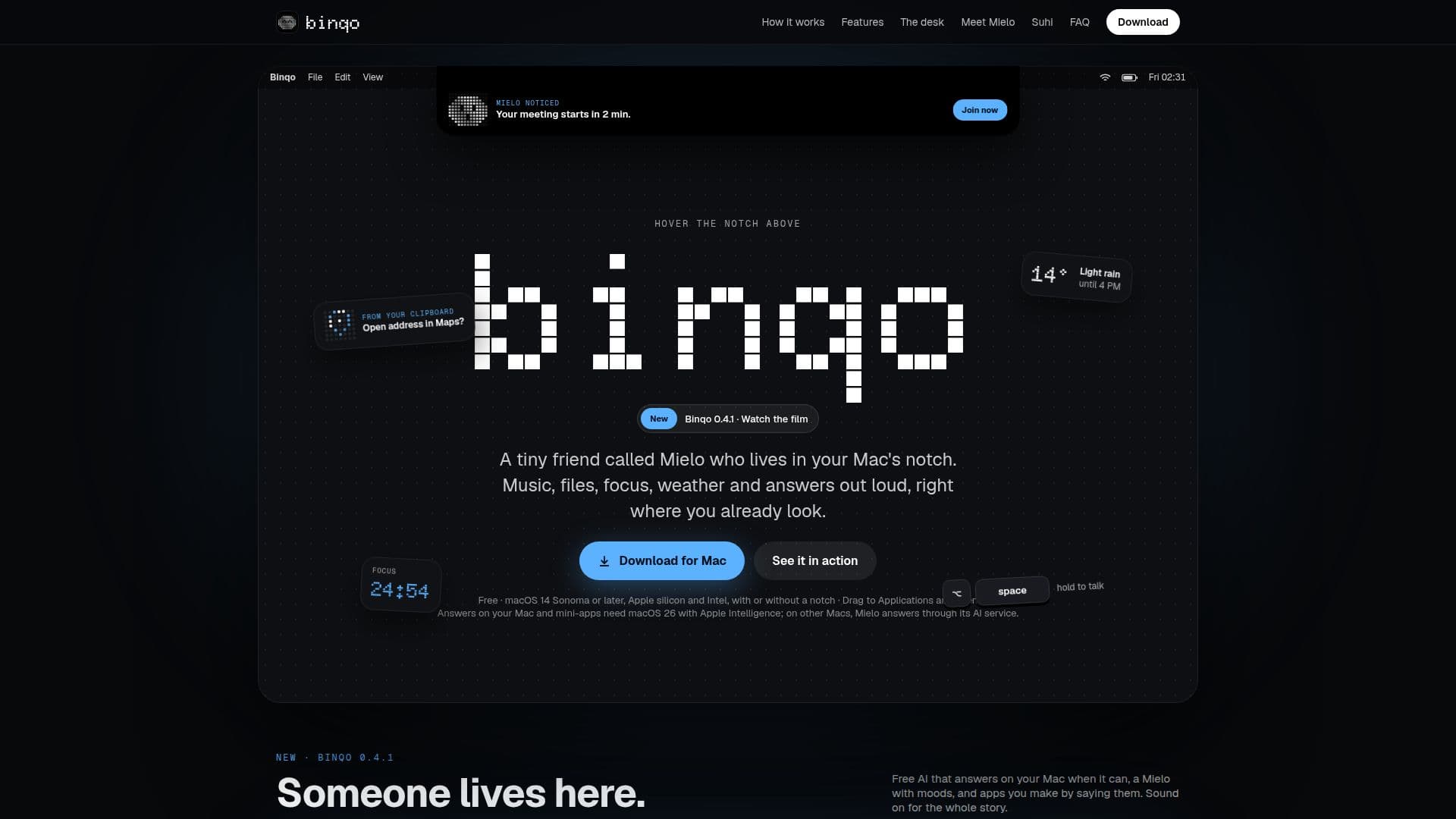
Binqo for Mac screenshot

Binqo for Mac introduces Mielo, a unique character made of glowing dots, designed to live in your Mac's notch or a simulated notch on other Macs. Mielo acts as a tiny friend, offering quick access to various functionalities right where you already look. This free application for macOS 14 Sonoma or later supports both Apple silicon and Intel processors, providing a consistent experience across different Mac models.

Read More

The core functionality revolves around Mielo's ability to display and interact with essential information. Users can see what's currently playing on Spotify or Apple Music, view their next meeting with a countdown, manage files, set focus timers, check the weather, and access clipboard history. Mielo also provides spoken answers to questions, activated by holding Option + Space, making interactions hands-free and intuitive.

Privacy is a key design principle for Binqo. Clipboard history is kept in memory and never saved, and password manager-marked items are skipped. Speech-to-text conversion uses Apple's on-device recognition whenever possible, ensuring audio never leaves your Mac. Meeting audio is also processed locally and never saved or sent. For general questions, Mielo can answer on-device for Macs with Apple Intelligence (macOS 26) or route them through Binqo's AI service (Groq) for other Macs, with strict privacy controls over what data is sent.

Binqo also offers an optional app window, referred to as "the desk," for more extensive interactions, such as taking meeting notes. Mielo can listen, transcribe meetings on your Mac, and summarize discussions, decisions, and action items. The audio never leaves your device, and transcripts are stored locally. The application updates itself automatically, ensuring users always have the latest features and security enhancements. Binqo aims to keep its free tier generous, with voice services being the primary cost consideration, managed to avoid paywalls.

  • CategoryProductivity
  • Pricing ModelFree
  • DeploymentCloud
  • PlatformsmacOS

  • Mielo character in Mac's notch

  • Music playback control (Spotify, Apple Music)

  • Meeting schedule and countdown display

  • Focus timer with visual cues

  • Weather forecasts based on approximate location

  • Clipboard history management

  • Spoken answers to questions (Hold Option + Space)

  • Meeting note-taking and summarization

  • On-device speech recognition (Apple's)

  • Local storage of notes and transcripts

  • Automatic updates

  • Supports macOS 14 Sonoma or later

  • Compatible with Apple silicon and Intel Macs

  • Optional desktop app window for notes and meetings

  • Private by design: local data processing

  1. Download and Open: Download Binqo.dmg, drag it to Applications, and open it.

  2. Point at the Notch: Move your cursor to the top of the screen to make the notch grow and Mielo appear.

  3. Ask Mielo: Hold Option + Space from any app, ask your question out loud, and Mielo will answer.

  4. Access Features: Hover over the notch to see now playing music, today's plan, your shelf, or a focus timer.

  5. Take Meeting Notes: Start Mielo in a meeting to transcribe discussions and generate summaries.

  6. Manage Files: Drop files onto the notch for quick access or AirDrop them.

  • Quick Information Access
  • Meeting Productivity
  • Focus and Concentration
  • Clipboard Management
  • Personal Assistant
  • Digital Workspace Enhancement

Binqo for Mac Reviews

Loading...

Popular AI Tools Like Binqo for Mac

NotchNook Pro transforms your MacBook's notch into a versatile Dynamic Island, offering features like music controls with lyrics, a calendar, and a file tray with AirDrop. It also…

Productivity
View Tool

Transforms your MacBook's notch into a versatile Dynamic Island, offering features like music controls with lyrics, a calendar, and a file tray with AirDrop. It also…NotchNook Pro transforms your MacBook's notch into a versatile Dynamic Island, offering features like music controls with lyrics, a calendar, and a file tray with AirDrop. It also…

Productivity
See the Top 250 AI Apps

Notchware

AI Apps

Notchware transforms your MacBook notch into a dynamic display for music controls, battery status, and AI agent alerts. Designed for macOS 14.6+, it offers a free version with…

Productivity
View Tool

AI Apps

Transforms your MacBook notch into a dynamic display for music controls, battery status, and AI agent alerts. Designed for macOS 14.6+, it offers a free version with…Notchware transforms your MacBook notch into a dynamic display for music controls, battery status, and AI agent alerts. Designed for macOS 14.6+, it offers a free version with…

Productivity
See the Top 250 AI Apps

Halo

AI Apps

Halo is a Dynamic Island for macOS that enhances your Mac experience by providing notifications, dictation, AI agent status, and monitor control. It works on both notched and…

Workflow AutomationRetail & Consumer Goods
View Tool

AI Apps

Dynamic Island for macOS that enhances your Mac experience by providing notifications, dictation, AI agent status, and monitor control. It works on both notched and…Halo is a Dynamic Island for macOS that enhances your Mac experience by providing notifications, dictation, AI agent status, and monitor control. It works on both notched and…

Workflow AutomationRetail & Consumer Goods
See the Top 250 AI Apps

Quotchi

AI Apps

Quotchi is a Mac menu bar companion that monitors Claude Code, Codex, and optional Gemini app usage limits. It provides gentle alerts, reset times, and insights into which AI…

Productivity

Ranked #202 in Productivity

View Tool

AI Apps

Mac menu bar companion that monitors Claude Code, Codex, and optional Gemini app usage limits. It provides gentle alerts, reset times, and insights into which AI…Quotchi is a Mac menu bar companion that monitors Claude Code, Codex, and optional Gemini app usage limits. It provides gentle alerts, reset times, and insights into which AI…

Productivity
Ranked #202 in Productivity

Crowny

AI Apps

Crowny transforms your MacBook's notch into a command center, integrating music, timers, calendar, reminders, and AI agents like Claude Code, Codex, and Grok. It offers a one-time…

Productivity
View Tool

AI Apps

Transforms your MacBook's notch into a command center, integrating music, timers, calendar, reminders, and AI agents like Claude Code, Codex, and Grok. It offers a one-time…Crowny transforms your MacBook's notch into a command center, integrating music, timers, calendar, reminders, and AI agents like Claude Code, Codex, and Grok. It offers a one-time…

Productivity
See the Top 250 AI Apps

PeakFlow

AI Apps

PeakFlow is a productivity suite for Mac and Windows, offering five essential tools to enhance focus and efficiency. It includes a window dimmer, clipboard manager, meeting…

Productivity
View Tool

AI Apps

Productivity suite for Mac and Windows, offering five essential tools to enhance focus and efficiency. It includes a window dimmer, clipboard manager, meeting…PeakFlow is a productivity suite for Mac and Windows, offering five essential tools to enhance focus and efficiency. It includes a window dimmer, clipboard manager, meeting…

Productivity
See the Top 250 AI Apps

sideOS

AI Apps

sideOS is an AI assistant that integrates into your MacBook's notch, allowing you to control applications and perform tasks through voice commands. It operates offline, ensuring…

AI Personal Assistants

Ranked #240 in Productivity

View Tool

AI Apps

AI assistant that integrates into your MacBook's notch, allowing you to control applications and perform tasks through voice commands. It operates offline, ensuring…sideOS is an AI assistant that integrates into your MacBook's notch, allowing you to control applications and perform tasks through voice commands. It operates offline, ensuring…

AI Personal Assistants
Ranked #240 in Productivity

Jarvis AI Assistant is a free desktop application for macOS, Windows, and Linux that acts as a screen-aware AI layer. It integrates with over 30 popular apps, remembers context…

AI Personal Assistants

Ranked #50 in Productivity

View Tool

Free desktop application for macOS, Windows, and Linux that acts as a screen-aware AI layer. It integrates with over 30 popular apps, remembers context…Jarvis AI Assistant is a free desktop application for macOS, Windows, and Linux that acts as a screen-aware AI layer. It integrates with over 30 popular apps, remembers context…

AI Personal Assistants
Ranked #50 in Productivity
1 of 8