
Description
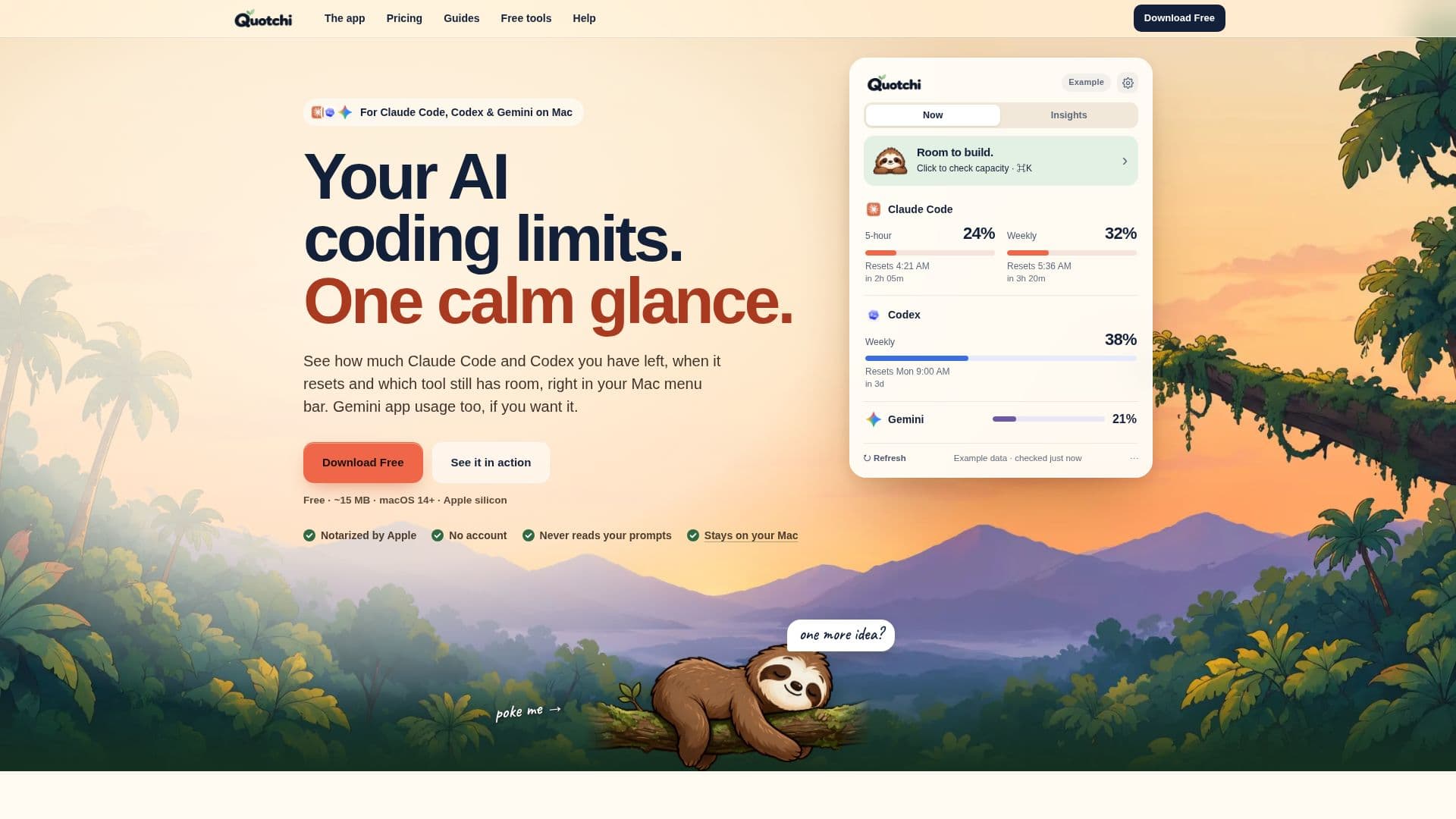
Quotchi is a dedicated Mac menu bar application designed to help developers and AI users effectively manage their usage limits for Claude Code, Codex, and optionally, the Gemini app. It provides real-time visibility into remaining usage, reset times, and identifies which tool still has capacity, all at a glance from the macOS menu bar.
Read More
The application is built for Apple silicon Macs (M1 or later) running macOS 14 or later, ensuring native performance and integration. It operates locally, meaning it never reads user prompts, transcripts, or requires a separate Quotchi account. Instead, it leverages the existing sign-ins of the connected AI tools, prioritizing user privacy and data security. Optional history and statistics features are stored directly on the user's Mac.
Key functionalities include visual indicators, such as a "sloth" icon with three moods, to quickly convey usage status (e.g., "Room to build," "Getting close," "Limit reached"). Users can customize the display with various looks like Sloth + %, Ring, Two tools, or Minimal, along with adjustable widget sizes. Quotchi also offers proactive alerts, notifying users before they hit limits and pinging them when a limit resets, eliminating the need to manually check usage dashboards or status commands.
For users managing multiple Claude Code sessions, Quotchi Pro enhances these capabilities by showing which sessions require attention or are paused due to limits, and when they can resume. Pro features also include a desktop sloth companion, local history and usage patterns, support for multiple accounts (read-only), deeper statistics, and customizable card themes. The Pro version is a one-time purchase for a lifetime license on two Macs, including all future updates, rather than a subscription.
Quotchi aims to provide a calm and efficient way to stay informed about AI coding limits, allowing users to focus on building rather than worrying about hitting their quotas. It offers a free tier with essential monitoring features and a Pro tier for advanced insights and management, ensuring a tailored experience for different user needs.
- CategoryProductivity
- Pricing ModelFreemium
- DeploymentRuns locally
- PlatformsmacOS
Quotchi's Core Features
Mac menu bar usage monitoring for Claude Code and Codex
Optional Gemini app usage tracking
Real-time usage limits and reset times display
Gentle alerts for approaching and reached limits
Notifications when limits reset
Visual indicators for usage status (e.g., sloth moods)
Customizable menu bar display styles and widget sizes
Local-first data handling: no prompt collection, no Quotchi account
Built for Apple silicon Macs (M1 or later) on macOS 14+
Built-in setup check for connected tools
One-time purchase for Pro lifetime license (not a subscription)
Pro: Monitor multiple Claude Code sessions and their status
Pro: Desktop sloth companion for quick status checks
Pro: Local history and usage statistics (optional)
Pro: Support for multiple accounts (read-only)
How to use Quotchi?
Download Quotchi: Obtain the application for your Apple silicon Mac (macOS 14+).
Install and Open: Open the downloaded file and launch Quotchi on your Mac.
Choose Tools: Select the AI coding tools you wish to monitor (Claude Code, Codex, optional Gemini).
Complete Setup: Follow on-screen instructions for any tool requiring setup, such as signing into Claude Code.
Monitor Usage: View Claude Code and Codex usage limits, reset times, and available capacity directly in your Mac menu bar.
Customize Display: Adjust menu bar styles, widget sizes, and alert thresholds in settings.
Upgrade to Pro (Optional): Purchase a lifetime license to unlock advanced features like multi-session monitoring and detailed history.
Quotchi's Use Cases
- AI Coding Limit Monitoring
- Proactive Usage Alerts
- Multi-Session Management
- Workload Planning
- Usage Pattern Analysis
- Privacy-Focused Monitoring