ToolPotion
AI Advisor
Submit a Tool (Free)

NotchNook Pro

AI AppsProductivityFreemium · macOS

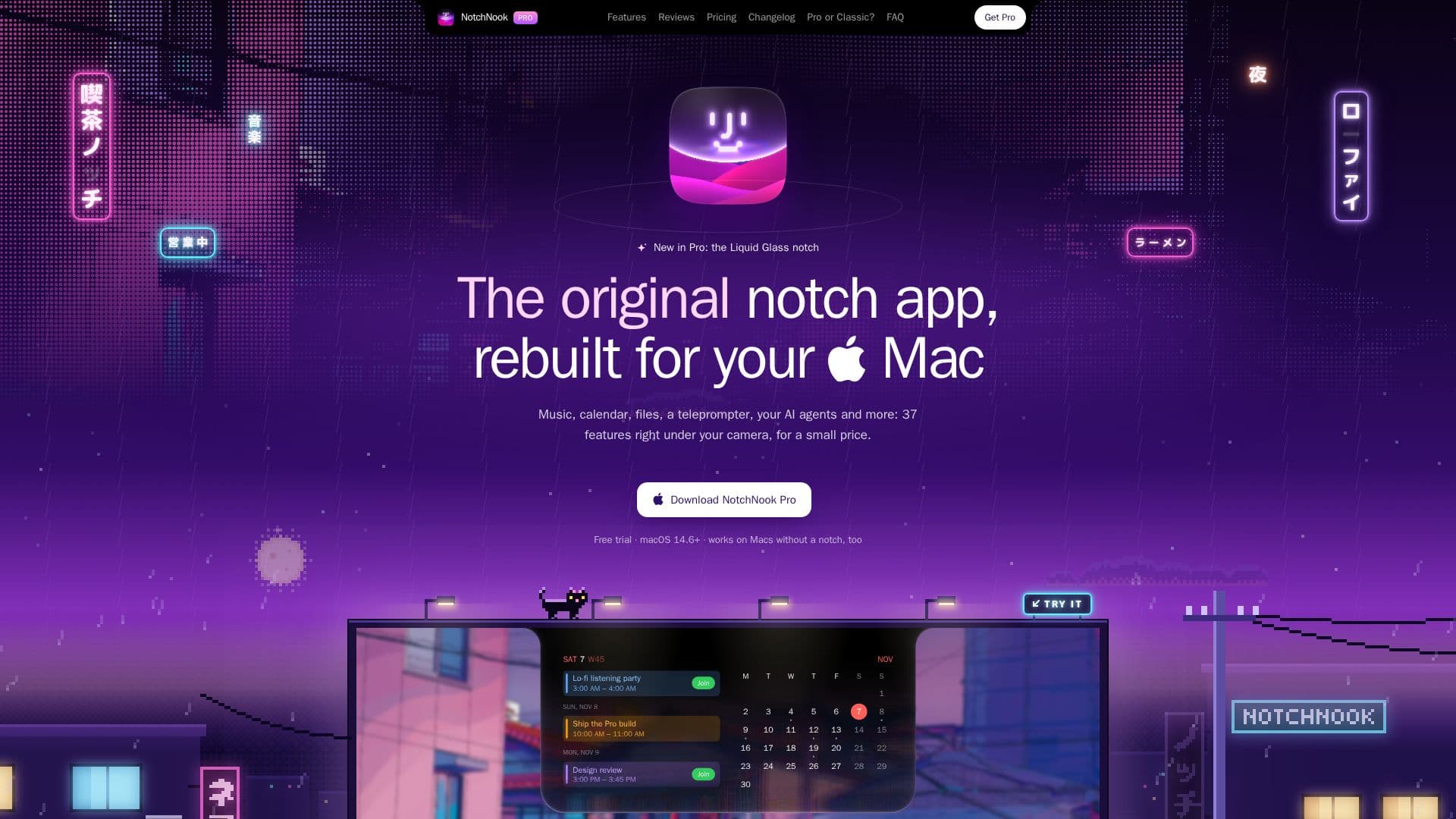
NotchNook Pro transforms your MacBook's notch into a versatile Dynamic Island, offering features like music controls with lyrics, a calendar, and a file tray with AirDrop. It also includes a teleprompter, terminal access, and Live Activities for AirPods and battery status. This app enhances productivity and convenience by centralizing essential tools directly within your Mac's notch area.

Visit Website
Share
NotchNook Pro screenshot

NotchNook Pro is a comprehensive application designed to transform your MacBook's notch into a highly functional Dynamic Island, bringing a suite of tools and information directly to your camera housing area. Rebuilt from the ground up, this Pro version expands upon the original NotchNook Classic, offering an enhanced user experience with 37 distinct features.

Read More

The application integrates seamlessly with macOS, providing quick access to essential functions. Users can control music playback with lyrics, view upcoming calendar events, and manage files using a dedicated Tray that supports AirDrop and file conversions. For those who frequently present or need quick access to text, a teleprompter is available, alongside a terminal for command-line tasks. Live Activities keep users informed about AirPods connectivity, battery levels, and other system statuses.

NotchNook Pro introduces a "Liquid Glass" notch aesthetic, though the classic black look remains an option. Key additions in the Pro version include Pocket and Clipboard functionalities, an expanded range of Live Activities, a file converter for various formats (MP4, PDF, TXT), song lyrics integration, Pomodoro and To-do timers, and the ability to approve actions for AI agents like Claude Code and Codex directly from the notch. It also features a camera mirror, quick notes, weather updates, and volume/brightness HUDs.

The tool is designed for Apple silicon Macs running macOS 14.6 or later. However, it also supports Macs without a physical notch, where a small handle at the top of the screen provides access to the Nook. Each display connected to the Mac can have its own Nook. Music app compatibility extends to Spotify, Apple Music, and any other app macOS recognizes as "Now Playing." Google Calendar events are supported through the Mac's native Calendar app.

NotchNook Pro prioritizes user privacy, requesting macOS permissions only for necessary features. User data such as notes, files, and camera content remain on the user's Mac. The application offers a 48-hour free trial for all features, requiring no credit card. Pricing includes options for a one-time lifetime license or a monthly subscription, both of which include updates. A 7-day full refund policy is available for direct Stripe purchases.

  • CategoryProductivity
  • Pricing ModelFreemium
  • DeploymentCloud
  • PlatformsmacOS

  • Dynamic Island functionality for MacBook notch

  • Music controls with lyrics for Spotify, Apple Music, and others

  • Calendar integration with upcoming events

  • File Tray with AirDrop and file conversion capabilities

  • Teleprompter for scripts

  • Terminal access

  • Live Activities for AirPods, battery, and more

  • Liquid Glass notch aesthetic (with classic black option)

  • Pocket and Clipboard history

  • Pomodoro Timer and To-do List

  • AI agent approval for Claude Code and Codex

  • Quick Notes

  • Weather updates

  • Volume and Brightness HUD

  • Works on Macs with and without a notch

  • Supports up to 2 Macs per license

  1. Download and Install: Download the NotchNook Pro file and drag it into your Applications folder.

  2. Launch Application: Open NotchNook Pro from your Applications folder and confirm macOS security prompts.

  3. Access the Nook: Move your pointer to the notch area (or small handle on notch-less Macs) to open the Nook.

  4. Control Music: Use the Nook to play, pause, skip tracks, and view lyrics for your active music app.

  5. Start Pomodoro: Select Focus or Break, set minutes with the ruler, and start the Pomodoro timer.

  6. Edit Workspace: Right-click the notch, select 'Edit Workspace', and drag widgets to customize your Nook.

  7. Manage Files: Drag files to the notch to keep them handy, AirDrop them, or convert their format.

  8. Activate License: Go to Settings → License, enter your purchase email and key to activate on up to two Macs.

  • Quick Music Control
  • Calendar Event Tracking
  • Efficient File Management
  • Presentation Assistance
  • Productivity Timers
  • AI Agent Interaction
  • System Monitoring
  • Quick Note Taking
  • Custom Workspace Creation

NotchNook Pro Reviews

Loading...

Popular AI Tools Like NotchNook Pro

Notchware

AI Apps

Notchware transforms your MacBook notch into a dynamic display for music controls, battery status, and AI agent alerts. Designed for macOS 14.6+, it offers a free version with…

Productivity
View Tool

AI Apps

Transforms your MacBook notch into a dynamic display for music controls, battery status, and AI agent alerts. Designed for macOS 14.6+, it offers a free version with…Notchware transforms your MacBook notch into a dynamic display for music controls, battery status, and AI agent alerts. Designed for macOS 14.6+, it offers a free version with…

Productivity
See the Top 250 AI Apps

Crowny

AI Apps

Crowny transforms your MacBook's notch into a command center, integrating music, timers, calendar, reminders, and AI agents like Claude Code, Codex, and Grok. It offers a one-time…

Productivity
View Tool

AI Apps

Transforms your MacBook's notch into a command center, integrating music, timers, calendar, reminders, and AI agents like Claude Code, Codex, and Grok. It offers a one-time…Crowny transforms your MacBook's notch into a command center, integrating music, timers, calendar, reminders, and AI agents like Claude Code, Codex, and Grok. It offers a one-time…

Productivity
See the Top 250 AI Apps

Getcta

AI Apps

Getcta is a macOS teleprompter that sits under the MacBook notch, following your voice as you read. It uses AI to help you write, tighten, and rehearse your script, ensuring your…

Productivity
View Tool

AI Apps

MacOS teleprompter that sits under the MacBook notch, following your voice as you read. It uses AI to help you write, tighten, and rehearse your script, ensuring your…Getcta is a macOS teleprompter that sits under the MacBook notch, following your voice as you read. It uses AI to help you write, tighten, and rehearse your script, ensuring your…

Productivity
See the Top 250 AI Apps

sideOS

AI Apps

sideOS is an AI assistant that integrates into your MacBook's notch, allowing you to control applications and perform tasks through voice commands. It operates offline, ensuring…

AI Personal Assistants

Ranked #240 in Productivity

View Tool

AI Apps

AI assistant that integrates into your MacBook's notch, allowing you to control applications and perform tasks through voice commands. It operates offline, ensuring…sideOS is an AI assistant that integrates into your MacBook's notch, allowing you to control applications and perform tasks through voice commands. It operates offline, ensuring…

AI Personal Assistants
Ranked #240 in Productivity

Halo

AI Apps

Halo is a Dynamic Island for macOS that enhances your Mac experience by providing notifications, dictation, AI agent status, and monitor control. It works on both notched and…

Workflow AutomationRetail & Consumer Goods
View Tool

AI Apps

Dynamic Island for macOS that enhances your Mac experience by providing notifications, dictation, AI agent status, and monitor control. It works on both notched and…Halo is a Dynamic Island for macOS that enhances your Mac experience by providing notifications, dictation, AI agent status, and monitor control. It works on both notched and…

Workflow AutomationRetail & Consumer Goods
See the Top 250 AI Apps

Quotchi

AI Apps

Quotchi is a Mac menu bar companion that monitors Claude Code, Codex, and optional Gemini app usage limits. It provides gentle alerts, reset times, and insights into which AI…

Productivity

Ranked #202 in Productivity

View Tool

AI Apps

Mac menu bar companion that monitors Claude Code, Codex, and optional Gemini app usage limits. It provides gentle alerts, reset times, and insights into which AI…Quotchi is a Mac menu bar companion that monitors Claude Code, Codex, and optional Gemini app usage limits. It provides gentle alerts, reset times, and insights into which AI…

Productivity
Ranked #202 in Productivity

Kern

AI Apps

Kern is a to-do app for iPhone and Mac that integrates with AI to streamline task management. It allows users to speak tasks, plan with Claude, and manage them seamlessly across…

Productivity
View Tool

AI Apps

To-do app for iPhone and Mac that integrates with AI to streamline task management. It allows users to speak tasks, plan with Claude, and manage them seamlessly across…Kern is a to-do app for iPhone and Mac that integrates with AI to streamline task management. It allows users to speak tasks, plan with Claude, and manage them seamlessly across…

Productivity
See the Top 250 AI Apps

PocketWebTools for Mac allows users to run AI models locally on Apple Silicon Macs, offering features like chat, transcription, photo upscaling, and video editing. Pay once for…

Productivity

Ranked #137 in Productivity

View Tool

Allows users to run AI models locally on Apple Silicon Macs, offering features like chat, transcription, photo upscaling, and video editing. Pay once for…PocketWebTools for Mac allows users to run AI models locally on Apple Silicon Macs, offering features like chat, transcription, photo upscaling, and video editing. Pay once for…

Productivity
Ranked #137 in Productivity
1 of 8