
ToolPotion
AI Advisor
Submit a Tool (Free)

RemixThatPhoto

RemixThatPhoto is an image-to-image AI editor offering six distinct modes to transform photos. Users can restyle images, remove objects, change backgrounds, swap clothes, enhance quality, or restore old photos. It provides a free tier for up to three standard edits daily without an account, making advanced photo manipulation accessible and straightforward for various creative needs.

Visit Website
Share
RemixThatPhoto screenshot

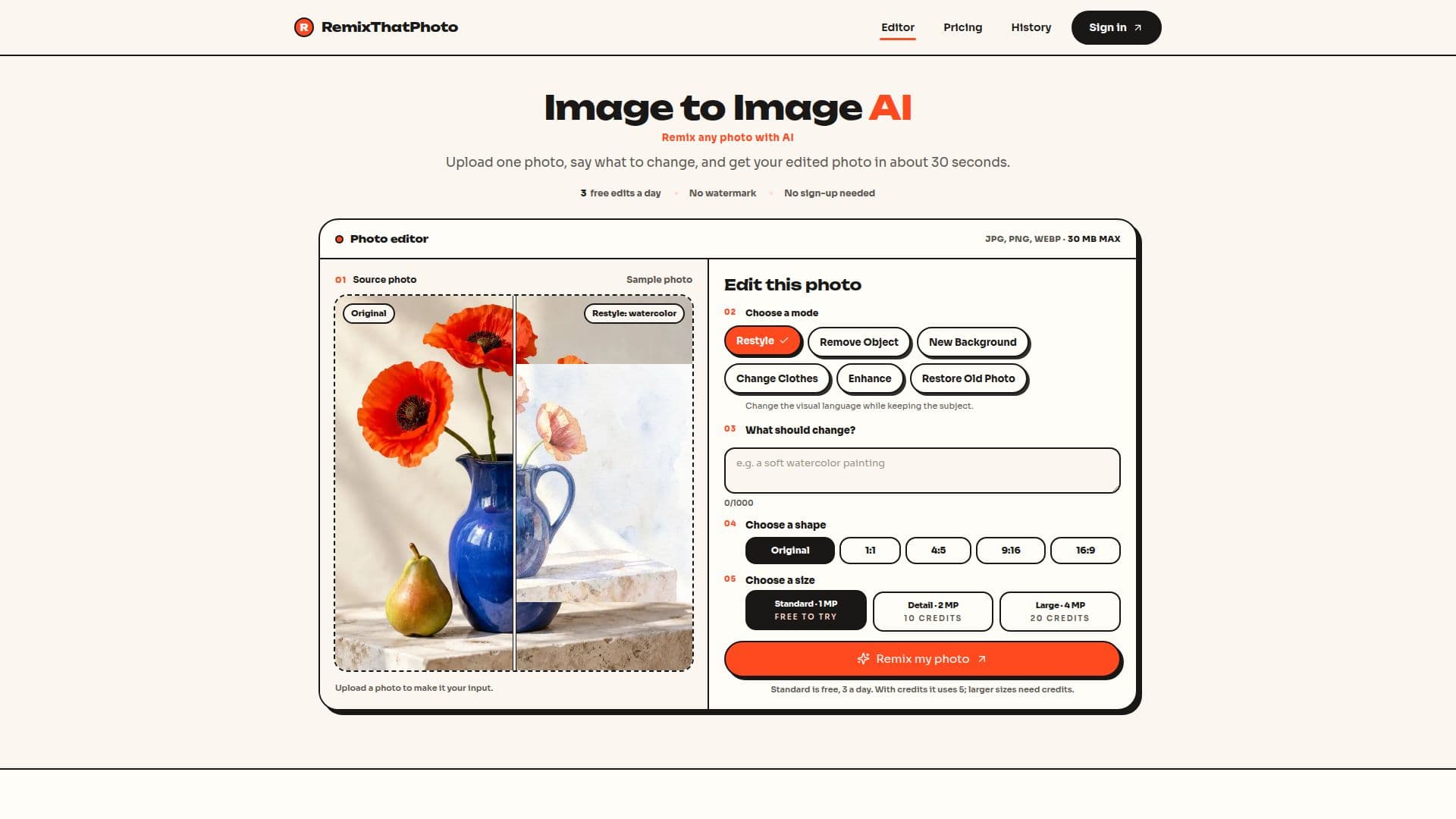
RemixThatPhoto is a specialized image-to-image AI editing workbench designed to transform existing photographs with precision and ease. Unlike text-to-image generators that invent pictures from scratch, RemixThatPhoto starts with a user-provided image, preserving the subject and layout while applying described changes. This approach ensures that the core elements of the original photo remain recognizable, offering a focused workflow for targeted edits.

Read More

The platform offers six distinct editing modes: Restyle, Remove Object, New Background, Change Clothes, Enhance, and Restore Old Photo. Users can upload JPG, PNG, or WebP photos up to 30 MB, select a mode, and describe the desired change in a short sentence. For instance, one can turn a photo into a watercolor painting, remove unwanted elements, place a subject in a new environment, or improve the clarity and color of an image. The Enhance and Restore Old Photo modes can even work without specific text directions.

Edits typically complete within 20 to 40 seconds, allowing users to quickly compare the remixed photo with the original before downloading. RemixThatPhoto provides a freemium model, allowing up to three successful Standard (1 MP) remixes per UTC day for free, with no watermark. For more edits or larger output sizes (Detail 2 MP, Large 4 MP), users can purchase credit packs or subscribe to monthly plans. Credit packs start at $9.90 for 500 credits and never expire, while subscriptions offer monthly credit allowances, with commercial use included in the Pro plan.

The tool is designed for ease of use, requiring no account for the free trial. Users only need to sign in for account history, larger sizes, or purchased credits. Safety checks are in place to refuse sexual or exploitative requests, ensuring a responsible editing environment. While it is not a broad manual editor like Photoshop, RemixThatPhoto excels in its focused, AI-driven image manipulation capabilities, catering to individuals and professionals seeking efficient and specific photo transformations.

  • CategoryAI Photo Editors
  • Pricing ModelFreemium
  • DeploymentCloud
  • PlatformsWeb

  • Image-to-image AI editing

  • Six distinct editing modes: Restyle, Remove Object, New Background, Change Clothes, Enhance, Restore Old Photo

  • Upload JPG, PNG, or WebP photos up to 30 MB

  • Describe changes with short text prompts

  • Compare remixed photo with original before download

  • Fast editing times (20-40 seconds typically)

  • Free tier for up to three Standard (1 MP) edits daily

  • No watermark on free or paid downloads

  • Credit packs available for more edits and larger sizes

  • Monthly subscription plans for regular users

  • Commercial use included with Pro plan

  • No account required for free trial

  • Automated safety checks for content

  • Supports Standard (1 MP), Detail (2 MP), and Large (4 MP) output sizes

  • Credits for failed or rejected edits are returned

  1. Upload Photo: Open the editor and upload one JPG, PNG, or WebP photo up to 30 MB.

  2. Choose Mode: Select one of the six editing modes: Restyle, Remove Object, New Background, Change Clothes, Enhance, or Restore Old Photo.

  3. Describe Change: Add a short sentence describing the desired change (e.g., "a soft watercolor painting"). Enhance and Restore Old Photo can work without a direction.

  4. Confirm & Remix: Tick the box confirming photo usage rights and press "Remix my photo."

  5. Review & Download: Compare the generated result with your original, then download it or try another direction.

  • Photo Restyling
  • Object Removal
  • Background Swapping
  • Clothing Changes
  • Image Enhancement
  • Old Photo Restoration
  • Removing People
  • Changing Hair Color

RemixThatPhoto Reviews

Loading...

Popular AI Tools Like RemixThatPhoto

AI Photo Editor Pro allows users to edit, enhance, and transform photos using natural-language prompts. It supports background changes, portrait edits, restoration, and image…

AI Photo Editors

Ranked #36 for Colorizing photos

View Tool

Allows users to edit, enhance, and transform photos using natural-language prompts. It supports background changes, portrait edits, restoration, and image…AI Photo Editor Pro allows users to edit, enhance, and transform photos using natural-language prompts. It supports background changes, portrait edits, restoration, and image…

AI Photo Editors
Ranked #36 for Colorizing photos

Editimg AI

AI Apps

An advanced online AI image editor and generator with 40+ tools for background removal, upscaling, style transfer, object removal, restoration, and text-to-image, powered by…

AI Photo Editors

Ranked #85 for Restoring old photos

View Tool

AI Apps

An advanced online AI image editor and generator with 40+ tools for background removal, upscaling, style transfer, object removal, restoration, and text-to-image, powered by…

AI Photo Editors
Ranked #85 for Restoring old photos

AI Picture Editor is a free online photo editor that uses AI to transform images with text prompts. Users can remove backgrounds and objects, restore old photos, enhance quality,…

AI Photo Editors

Ranked #36 in Background Removers

View Tool

Free online photo editor that uses AI to transform images with text prompts. Users can remove backgrounds and objects, restore old photos, enhance quality,…AI Picture Editor is a free online photo editor that uses AI to transform images with text prompts. Users can remove backgrounds and objects, restore old photos, enhance quality,…

AI Photo Editors
Ranked #36 in Background Removers

ImageMuse

AI Apps

ImageMuse is a free online AI photo editor that allows users to modify images by simply describing the desired changes. It offers tools to swap backgrounds, fix lighting, enhance,…

AI Photo Editors

Ranked #74 for Restoring old photos

View Tool

AI Apps

Free online AI photo editor that allows users to modify images by simply describing the desired changes. It offers tools to swap backgrounds, fix lighting, enhance,…ImageMuse is a free online AI photo editor that allows users to modify images by simply describing the desired changes. It offers tools to swap backgrounds, fix lighting, enhance,…

AI Photo Editors
Ranked #74 for Restoring old photos

AI Photo Edit is an online tool that allows users to modify photos using simple text instructions. It offers features like changing outfits, backgrounds, and hairstyles while…

AI Photo Editors
View Tool

Online tool that allows users to modify photos using simple text instructions. It offers features like changing outfits, backgrounds, and hairstyles while…AI Photo Edit is an online tool that allows users to modify photos using simple text instructions. It offers features like changing outfits, backgrounds, and hairstyles while…

AI Photo Editors
See the Top 250 AI Apps

A free online AI photo editor that transforms existing images from text prompts. It preserves the original structure and composition while restyling, reshaping, or editing, aimed…

AI Photo Editors

Ranked #55 for Restoring old photos

View Tool

TuneImage

AI Apps

TuneImage is an AI photo editor that transforms images based on text instructions. Users can upload a single photo, describe desired changes like new outfits, object recoloring,…

AI Photo Editors

Ranked #159 for Removing objects from photos

View Tool

AI Apps

AI photo editor that transforms images based on text instructions. Users can upload a single photo, describe desired changes like new outfits, object recoloring,…TuneImage is an AI photo editor that transforms images based on text instructions. Users can upload a single photo, describe desired changes like new outfits, object recoloring,…

AI Photo Editors
Ranked #159 for Removing objects from photos

AI Image Editor is an online tool that allows users to edit photos using simple text prompts. It offers features like image transformation, combination, and enhancement, providing…

AI Photo Editors

Ranked #91 for Removing objects from photos

View Tool

Online tool that allows users to edit photos using simple text prompts. It offers features like image transformation, combination, and enhancement, providing…AI Image Editor is an online tool that allows users to edit photos using simple text prompts. It offers features like image transformation, combination, and enhancement, providing…

AI Photo Editors
Ranked #91 for Removing objects from photos
1 of 8