
ToolPotion
AI Advisor
Submit a Tool (Free)

MomentSift

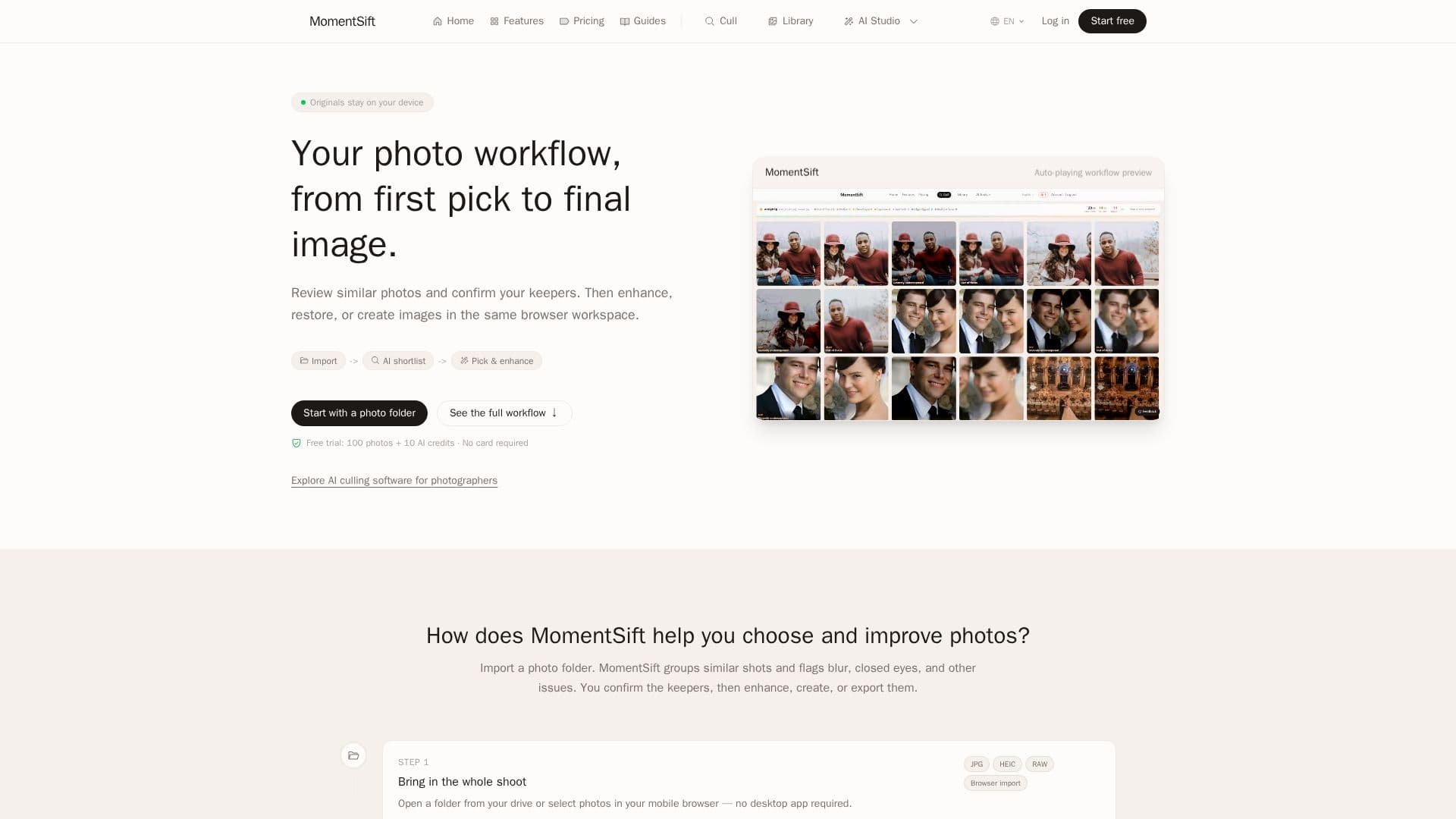
MomentSift is a browser-based photo management and editing tool that helps photographers and content creators sort large photo collections. It uses AI to group similar shots, flag issues like blur or closed eyes, and allows users to enhance, restore, or generate new images from text or reference photos. The platform supports various photo formats, including RAW, and offers local processing for privacy.

Visit Website
Share
MomentSift screenshot

MomentSift provides a comprehensive browser-based workspace for managing and enhancing photo collections. Designed for anyone with a large volume of photos, from travelers and vloggers to professional photographers and content creators, the platform streamlines the entire photo workflow from initial culling to final image delivery.

Read More

The core functionality revolves around AI-assisted photo culling. Users can import entire photo folders, and MomentSift automatically groups similar shots and identifies potential issues such as blur, closed eyes, and exposure problems. This initial screening helps users quickly identify obvious rejects and focus on their best shots. Crucially, the AI provides reasons and reference scores for its suggestions, but the user always makes the final decision on what to keep, ensuring no photos are deleted automatically.

Beyond culling, MomentSift offers a suite of AI-powered enhancement and creation tools. Users can upscale images by 4x, reduce noise, restore blurry or damaged faces in portraits, and naturally retouch skin tones. For creative tasks, the platform includes text-to-image generation, allowing users to create new images from descriptive prompts, and image-to-image capabilities to transform existing photos based on a reference. These cloud-based AI features process images securely, with results saved back to the user's local library.

Privacy is a key consideration; basic detection and culling run entirely in the browser, meaning original photos remain on the user's device and are never uploaded. Only compressed previews are uploaded for deeper AI analysis, and full images are uploaded for enhancement and generation features, with cloud copies typically deleted after seven days. The MomentSift library is stored locally in the browser, offering control over data.

The platform supports common formats like JPG, PNG, and HEIC, as well as a wide range of RAW formats from major camera brands. It is accessible on both desktop and mobile browsers, with desktop recommended for large batches and RAW files due to better memory and storage stability. MomentSift operates on a freemium model, offering a free allowance for culling and trial AI credits, with subscriptions and credit packs available for continued use, providing options for high-resolution, watermark-free downloads and priority processing.

  • CategoryAI Photo Editors
  • Pricing ModelFreemium
  • DeploymentCloud, Browser
  • PlatformsDesktop, Mobile

  • AI-assisted photo culling and organization

  • Local photo review and processing in browser

  • Cloud AI tools for enhancement and generation

  • Detection of blur, closed eyes, and exposure issues

  • Grouping of similar shots and scene clustering

  • Side-by-side photo comparison with keyboard shortcuts

  • AI Enhancement: Denoise & 4x Upscale

  • AI Enhancement: Face Restoration for portraits and old photos

  • AI Enhancement: Natural Portrait Retouching

  • AI Text-to-Image generation from prompts

  • AI Image-to-Image creation from reference photos

  • Support for JPG, PNG, HEIC, and various RAW formats (CR2, CR3, NEF, ARW, RAF, DNG, ORF, RW2)

  • Bulk export of original files to ZIP or local folder

  • Lightroom XMP rating sync for post-processing

  • Local storage of MomentSift library in browser

  1. Import Photos: Open a folder from your drive or select photos in your mobile browser.

  2. AI Screen & Organize: Let AI detect issues like blur, closed eyes, and exposure, and group photos by scene.

  3. Confirm Best Shots: Compare similar photos side-by-side and decide what to keep using keyboard shortcuts.

  4. Enhance or Create: Apply AI enhancements like upscaling, face restoration, or generate new images from text or reference photos.

  5. Deliver Final Set: Export your selected photos as a ZIP or to a local folder, with optional Lightroom XMP ratings.

  • Travel Photo Sorting
  • Portrait Session Review
  • Family Photo Organization
  • Pet Photo Selection
  • Wedding & Event Photography
  • Content Creation & Business
  • Sports Burst Selection
  • School Photo Culling
  • Large Photo Library Cleanup
  • Screenshot & Design Asset Review

MomentSift Reviews

Loading...

Popular AI Tools Like MomentSift

Aftershoot

AI Apps

Aftershoot is an AI-powered photo editing software that helps photographers cull, edit, and retouch images efficiently. It streamlines post-production workflows, allowing users to…

AI Photo Editors

Ranked #74 for Photographers

View Tool

AI Apps

AI-powered photo editing software that helps photographers cull, edit, and retouch images efficiently. It streamlines post-production workflows, allowing users to…Aftershoot is an AI-powered photo editing software that helps photographers cull, edit, and retouch images efficiently. It streamlines post-production workflows, allowing users to…

AI Photo Editors
Ranked #74 for Photographers

Clipdrop offers a suite of AI-powered tools to create and edit stunning visuals quickly. Features include background removal, object cleanup, image upscaling, and text-to-image…

AI Photo Editors

Ranked #169 in AI Apps

View Tool

Offers a suite of AI-powered tools to create and edit stunning visuals quickly. Features include background removal, object cleanup, image upscaling, and text-to-image…Clipdrop offers a suite of AI-powered tools to create and edit stunning visuals quickly. Features include background removal, object cleanup, image upscaling, and text-to-image…

FeaturedAI Photo Editors
Ranked #169 in AI Apps

Adobe Lightroom is an online photo editor that allows users to make nondestructive edits, apply sliders and filters, and manage photos efficiently. Integrated AI features help in…

AI Photo Editors

Ranked #2 for Removing objects from photos

View Tool

Online photo editor that allows users to make nondestructive edits, apply sliders and filters, and manage photos efficiently. Integrated AI features help in…Adobe Lightroom is an online photo editor that allows users to make nondestructive edits, apply sliders and filters, and manage photos efficiently. Integrated AI features help in…

AI Photo Editors
Ranked #2 for Removing objects from photos

Cleanup.pictures is a free online tool that uses AI to remove unwanted objects, people, text, and defects from any image. It offers a simple, intuitive interface for quick edits,…

AI Photo EditorsReal Estate & Construction

Ranked #168 in AI Apps

View Tool

Free online tool that uses AI to remove unwanted objects, people, text, and defects from any image. It offers a simple, intuitive interface for quick edits,…Cleanup.pictures is a free online tool that uses AI to remove unwanted objects, people, text, and defects from any image. It offers a simple, intuitive interface for quick edits,…

FeaturedAI Photo EditorsReal Estate & Construction
Ranked #168 in AI Apps

Narrative Edit is an AI-assisted photo culling and editing software designed for professional photographers. It streamlines the workflow by allowing users to quickly sort, assess,…

AI Photo Editors

Ranked #59 for Photographers

View Tool

AI-assisted photo culling and editing software designed for professional photographers. It streamlines the workflow by allowing users to quickly sort, assess,…Narrative Edit is an AI-assisted photo culling and editing software designed for professional photographers. It streamlines the workflow by allowing users to quickly sort, assess,…

AI Photo Editors
Ranked #59 for Photographers

FreeMaker

AI Apps

FreeMaker is a free online AI photo editor that allows users to remove objects, change backgrounds, restyle portraits, and enhance images with simple prompts. No sign up is…

AI Photo Editors

Ranked #81 for Restoring old photos

View Tool

AI Apps

Free online AI photo editor that allows users to remove objects, change backgrounds, restyle portraits, and enhance images with simple prompts. No sign up is…FreeMaker is a free online AI photo editor that allows users to remove objects, change backgrounds, restyle portraits, and enhance images with simple prompts. No sign up is…

AI Photo Editors
Ranked #81 for Restoring old photos

snapfiddle.ai is a simplistic image editor designed for desktop use. It allows users to remove and replace people and objects within photos, merge images through smart cropping,…

AI Photo Editors

Ranked #100 for Restoring old photos

View Tool

Simplistic image editor designed for desktop use. It allows users to remove and replace people and objects within photos, merge images through smart cropping,…snapfiddle.ai is a simplistic image editor designed for desktop use. It allows users to remove and replace people and objects within photos, merge images through smart cropping,…

AI Photo Editors
Ranked #100 for Restoring old photos

Cullit

AI Apps

Cullit is a lightweight photo culling application for Mac, designed to streamline the workflow for photographers. It uses on-device AI to identify key photo attributes like focus,…

Image Generation & Editing

Ranked #237 for Photographers

View Tool

AI Apps

Lightweight photo culling application for Mac, designed to streamline the workflow for photographers. It uses on-device AI to identify key photo attributes like focus,…Cullit is a lightweight photo culling application for Mac, designed to streamline the workflow for photographers. It uses on-device AI to identify key photo attributes like focus,…

Image Generation & Editing
Ranked #237 for Photographers
1 of 8