ToolPotion
AI Advisor
Submit a Tool (Free)

LayerSplit

LayerSplit transforms flat images into named, transparent layers, restoring hidden parts and filling backgrounds. It supports PNG, JPG, and WebP uploads, exporting layered PSDs, ZIPs, or individual PNGs. Ideal for designers, marketers, and shop owners, it enables easy editing and reuse of image elements. The tool offers a free trial, allowing users to split their first image without a credit card.

Visit Website
Share
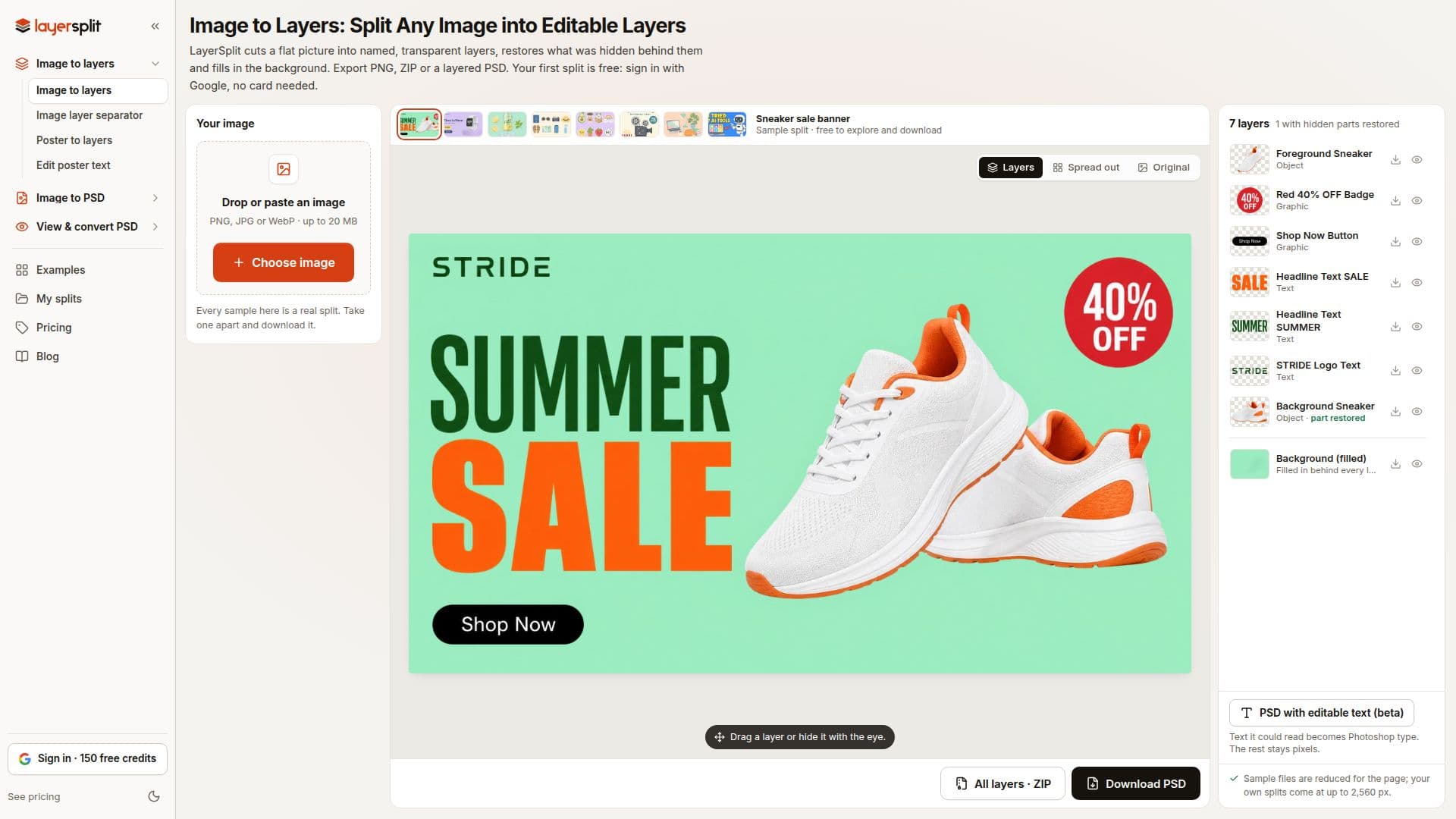
LayerSplit screenshot

LayerSplit is an innovative tool designed to convert any flat image into a stack of editable, transparent layers. It intelligently identifies and separates individual elements within an image, such as text blocks, objects, and graphics, assigning each its own named layer. A key feature is its ability to restore parts of objects that were hidden behind others, ensuring that when elements are moved or deleted, no holes or ghost outlines are left behind. The background is also automatically filled in, providing a clean canvas for further editing.

Read More

Users can upload PNG, JPG, or WebP files up to 20 MB, with output images scaled up to 2,560 pixels on the long side. Typically, a split yields 5 to 10 layers, with a maximum of 15, plus a free, filled background. Related items are grouped into single layers, but a "Every element" option allows for finer splitting. The process takes approximately 2 minutes for non-overlapping elements, extending to 5-10 minutes for images with significant overlap. Results are saved in the user's account, allowing them to leave the page during processing.

LayerSplit offers various export options, including individual transparent PNG files, a ZIP archive containing all layers and a `layers.json` file with metadata, or a layered PSD file. A beta feature provides a PSD with editable text, converting readable words into Photoshop type layers that can be retyped and restyled. This is particularly useful for localizing campaigns or updating text on banners and posters. The tool ensures that visible pixels are cut directly from the original image, preserving quality, while AI is used only to intelligently draw the hidden parts of objects and fill in backgrounds.

This tool is ideal for designers, marketers, and shop owners who frequently work with images lacking layered source files, such as stock graphics, client assets, competitor ads, AI-generated images, and screenshots. It excels with designed images featuring distinct elements like banners, posters, product shots, and social media posts. LayerSplit differentiates itself from simple background removers by preserving all elements and rebuilding the background, offering a comprehensive solution for image manipulation and reuse.

  • CategoryImage Generation & Editing
  • Pricing ModelFreemium
  • DeploymentCloud
  • PlatformsWeb

  • Split flat images into named, transparent layers

  • Restore hidden parts of objects behind others

  • Automatically fill in the background behind elements

  • Export layers as individual PNG files

  • Export all layers as a ZIP archive with metadata

  • Export as a layered PSD file compatible with Photoshop, Photopea, Affinity Photo

  • Beta feature: Layered PSD with editable text for readable words

  • Support for PNG, JPG, and WebP image uploads

  • Maximum upload size of 20 MB

  • Output resolution up to 2,560 px on the long side

  • Typically generates 5 to 10 layers, up to 15

  • Groups related items into single layers

  • Option to split finer with "Every element" setting

  • Private uploads and results, deleted after 30 days

  • Preview of elements found and credit cost before splitting

  • AI completes hidden parts; visible pixels are cut from original image

  • Front-to-back order of objects is automatically determined

  1. Upload Image: Add a PNG, JPG, or WebP picture to the tool.

  2. Review Elements: LayerSplit lists the elements it found, their names, and the split cost.

  3. Confirm Split: Confirm the split to begin processing the image.

  4. Download Layers: Once complete, download individual transparent PNGs, a ZIP of all layers, or a layered PSD.

  • Reuse Image Elements
  • Edit AI-Generated Images
  • Rebuild Lost Source Files
  • Localize Marketing Campaigns
  • Modify Poster Text
  • Create Layered PSDs from JPG/PNG
  • Separate Objects in Photos
  • Convert Canva/Figma Designs to PSD

LayerSplit Reviews

Loading...

Popular AI Tools Like LayerSplit

LayerGrab

AI Apps

LayerGrab is a tool that splits images into editable layers using AI. It allows users to export layers as PNG, ZIP, or PSD files, making it ideal for designers and marketers.

AI Photo Editors

Ranked #173 for Removing objects from photos

View Tool

AI Apps

Tool that splits images into editable layers using AI. It allows users to export layers as PNG, ZIP, or PSD files, making it ideal for designers and marketers.LayerGrab is a tool that splits images into editable layers using AI. It allows users to export layers as PNG, ZIP, or PSD files, making it ideal for designers and marketers.

AI Photo Editors
Ranked #173 for Removing objects from photos

Unmerge

AI Apps

Unmerge is an AI tool that transforms flat images into named, transparent layers, filling in hidden areas and exporting them as a layered PSD. It supports PNG, JPG, and WebP…

AI Photo Editors

Ranked #197 in AI Graphic Design Tools

View Tool

AI Apps

AI tool that transforms flat images into named, transparent layers, filling in hidden areas and exporting them as a layered PSD. It supports PNG, JPG, and WebP…Unmerge is an AI tool that transforms flat images into named, transparent layers, filling in hidden areas and exporting them as a layered PSD. It supports PNG, JPG, and WebP…

AI Photo Editors
Ranked #197 in AI Graphic Design Tools

IntoLayers

AI Apps

IntoLayers is an AI image to layers converter for designers and AI creators. It transforms flat PNG or JPEG images into editable layers, providing a rebuilt background and…

AI Graphic Design Tools

Ranked #148 in AI Graphic Design Tools

View Tool

AI Apps

AI image to layers converter for designers and AI creators. It transforms flat PNG or JPEG images into editable layers, providing a rebuilt background and…IntoLayers is an AI image to layers converter for designers and AI creators. It transforms flat PNG or JPEG images into editable layers, providing a rebuilt background and…

AI Graphic Design Tools
Ranked #148 in AI Graphic Design Tools

Magic Layers uses AI to separate flat PNG or JPEG images into individual, named, transparent layers. It extracts text, subjects, decorations, and backgrounds, providing them as…

AI Graphic Design Tools

Ranked #23 in Background Removers

View Tool

Uses AI to separate flat PNG or JPEG images into individual, named, transparent layers. It extracts text, subjects, decorations, and backgrounds, providing them as…Magic Layers uses AI to separate flat PNG or JPEG images into individual, named, transparent layers. It extracts text, subjects, decorations, and backgrounds, providing them as…

AI Graphic Design Tools
Ranked #23 in Background Removers

Image to Layers is an online tool that converts flat images into editable, semantic layers. It separates subjects, backgrounds, shadows, and objects, allowing users to refine…

AI Photo Editors

Ranked #104 in AI Graphic Design Tools

View Tool

Online tool that converts flat images into editable, semantic layers. It separates subjects, backgrounds, shadows, and objects, allowing users to refine…Image to Layers is an online tool that converts flat images into editable, semantic layers. It separates subjects, backgrounds, shadows, and objects, allowing users to refine…

AI Photo Editors
Ranked #104 in AI Graphic Design Tools

Image2Layer is an AI-powered tool that transforms flat images into editable layers. Upload JPG, PNG, or WebP files to separate them into up to 10 layers, including subjects,…

AI Photo EditorsMarketing & Creative Agencies

Ranked #44 in Background Removers

View Tool

AI-powered tool that transforms flat images into editable layers. Upload JPG, PNG, or WebP files to separate them into up to 10 layers, including subjects,…Image2Layer is an AI-powered tool that transforms flat images into editable layers. Upload JPG, PNG, or WebP files to separate them into up to 10 layers, including subjects,…

AI Photo EditorsMarketing & Creative Agencies
Ranked #44 in Background Removers

ImageLayered is an AI tool that decomposes images into editable transparent layers. It extracts subjects, text, objects, and backgrounds as individual RGBA layers, enabling easy…

AI Photo Editors

Ranked #100 for Removing objects from photos

View Tool

AI tool that decomposes images into editable transparent layers. It extracts subjects, text, objects, and backgrounds as individual RGBA layers, enabling easy…ImageLayered is an AI tool that decomposes images into editable transparent layers. It extracts subjects, text, objects, and backgrounds as individual RGBA layers, enabling easy…

AI Photo Editors
Ranked #100 for Removing objects from photos

EzLayers

AI Apps

EzLayers is a tool that separates flat images into editable layers using AI. It reconstructs occluded backgrounds and exports transparent PNG stacks and layered PSDs quickly,…

AI Photo Editors
View Tool

AI Apps

Tool that separates flat images into editable layers using AI. It reconstructs occluded backgrounds and exports transparent PNG stacks and layered PSDs quickly,…EzLayers is a tool that separates flat images into editable layers using AI. It reconstructs occluded backgrounds and exports transparent PNG stacks and layered PSDs quickly,…

AI Photo Editors
See the Top 250 AI Apps
1 of 8