ToolPotion
AI Advisor
Submit a Tool (Free)

IntoLayers

IntoLayers is an AI image to layers converter for designers and AI creators. It transforms flat PNG or JPEG images into editable layers, providing a rebuilt background and transparent layers for each element. Users can export results as a layered PSD, individual PNGs, or SVG, making complex image editing tasks more efficient. The tool is priced per layer, with a free trial available without an account.

Visit Website
Share
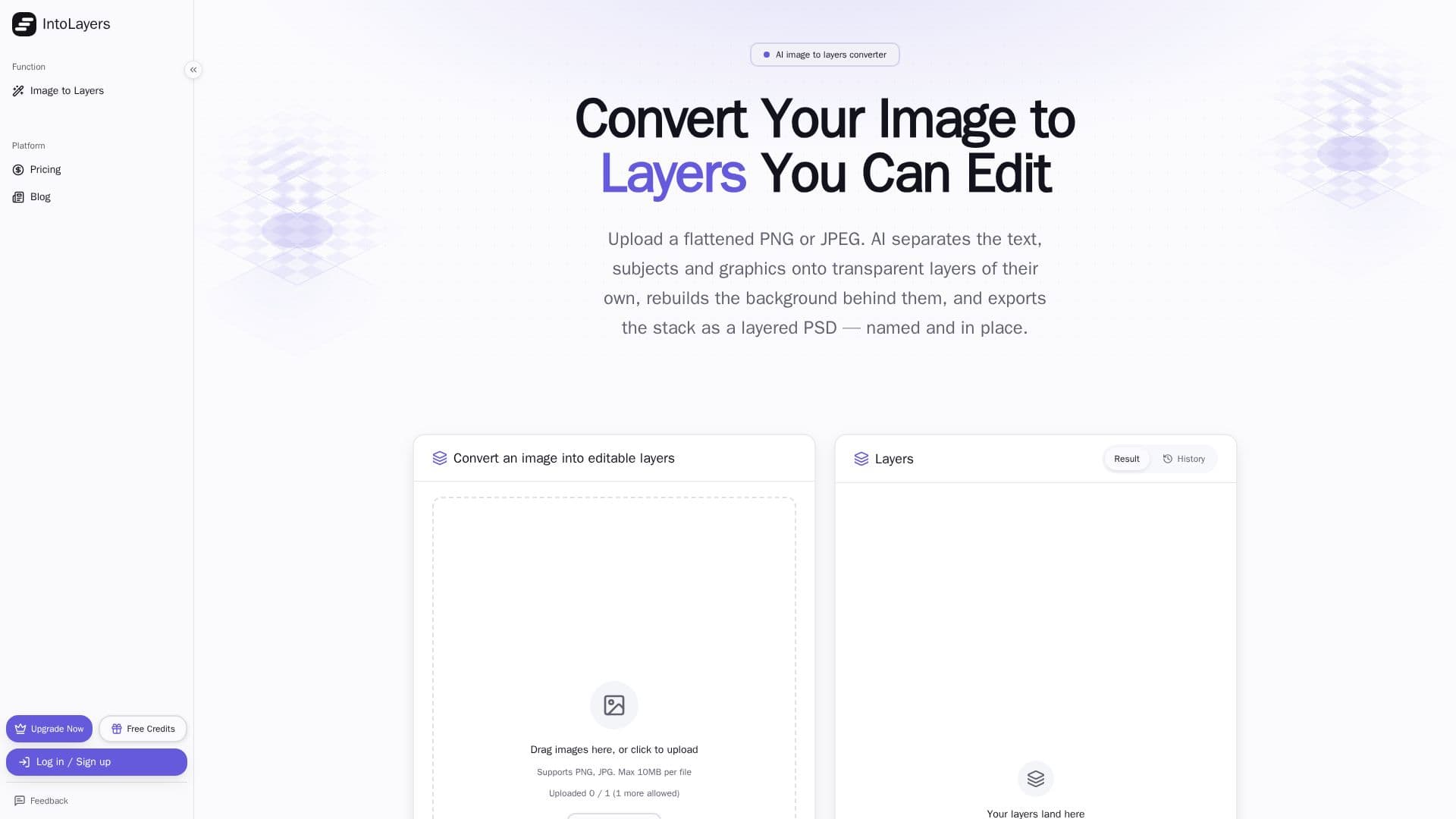
IntoLayers screenshot

IntoLayers is an AI-powered tool designed to convert flattened images, such as JPGs and PNGs, into editable layered files. It caters primarily to designers who receive flat files without original source documents and AI image creators who need to modify specific elements within their generated images. The process involves uploading a flat image, after which the AI separates the background, subjects, text blocks, and graphics into individual transparent layers.

Read More

The tool rebuilds the background, filling in the gaps where elements were removed, and places each separated element on its own transparent layer, named and in its original position. Users can choose the number of layers for the conversion, with options ranging from 2 to 9 layers, or an 'Auto' mode that lets the model decide. A key feature is the enlargement of small elements when splitting into three or more layers, ensuring that small text and intricate details remain sharp and editable. The output can be downloaded as a layered PSD file, a ZIP archive of individual transparent PNGs, or a layered SVG.

IntoLayers is designed to streamline workflows by eliminating the need for manual masking and rebuilding in traditional image editors. While it provides an editable approximation of the original image, it does not recover the original source file or its native layers. The generated PSD files are compatible with popular editing software like Photopea, GIMP, and Affinity Photo, while the transparent PNGs can be used in tools like Figma. Text layers are returned as raster images, meaning any text changes require retyping in an external editor.

Pricing is credit-based, charged per layer and output resolution. A freemium model allows users to perform their first 2-layer conversion at 1K resolution and download the result without needing an account. Upon sign-up, users receive 10 credits and 2 daily check-in credits (expiring after 30 days). Monthly plans start from $14.90, offering a set number of credits and higher output resolutions up to 2K. The tool emphasizes commercial use of the exported layers, provided the user holds the rights to the source image.

  • CategoryAI Graphic Design Tools
  • Pricing ModelFreemium
  • DeploymentCloud
  • PlatformsWeb

  • Convert JPG/PNG to editable layers

  • Rebuilt background with filled gaps

  • One transparent layer per element (subject, text, graphic)

  • Export as layered PSD

  • Export as individual transparent PNGs

  • Export as layered SVG

  • Layer count selection (2, 3, 5, 7, 9, or Auto)

  • Small elements enlarged for sharpness (3+ layers)

  • Layers retain position and stacking order

  • Named layers for easy identification

  • No account needed for first 2-layer run

  • Credit-based pricing per layer and resolution

  • Monthly subscription plans available

  • Commercial use of exported layers allowed

  1. Upload Image: Drag and drop or click to upload a flattened PNG or JPEG image (up to 10MB).

  2. Select Layer Count: Choose the desired number of layers (2, 3, 5, 7, 9, or Auto) or use the default.

  3. Convert Image: Click 'Convert' and wait approximately 45-82 seconds for the AI to process the image.

  4. Review & Download: Toggle layers on/off in the preview, then download individual transparent PNGs or the entire stack as a layered PSD or SVG.

  • Edit Client's Flat JPG
  • Modify AI-Generated Images
  • Prepare Characters for Animation
  • Update Marketing Banners
  • Rebuild Old Designs
  • Create Variations for Different Sizes
  • Isolate Product Shots
  • Enhance Motion Graphics Workflow
IntoLayers Reviews

Loading...

Popular AI Tools Like IntoLayers

LayerGrab

AI Apps

LayerGrab is a tool that splits images into editable layers using AI. It allows users to export layers as PNG, ZIP, or PSD files, making it ideal for designers and marketers.

AI Photo Editors
View Tool

AI Apps

Tool that splits images into editable layers using AI. It allows users to export layers as PNG, ZIP, or PSD files, making it ideal for designers and marketers.LayerGrab is a tool that splits images into editable layers using AI. It allows users to export layers as PNG, ZIP, or PSD files, making it ideal for designers and marketers.

AI Photo Editors
See the Top 250 AI Apps

Image2Layer is an AI-powered tool that transforms flat images into editable layers. Upload JPG, PNG, or WebP files to separate them into up to 10 layers, including subjects,…

AI Photo EditorsMarketing & Creative Agencies

Ranked #33 in Background Removers

View Tool

AI-powered tool that transforms flat images into editable layers. Upload JPG, PNG, or WebP files to separate them into up to 10 layers, including subjects,…Image2Layer is an AI-powered tool that transforms flat images into editable layers. Upload JPG, PNG, or WebP files to separate them into up to 10 layers, including subjects,…

AI Photo EditorsMarketing & Creative Agencies
Ranked #33 in Background Removers

EzLayers

AI Apps

EzLayers is a tool that separates flat images into editable layers using AI. It reconstructs occluded backgrounds and exports transparent PNG stacks and layered PSDs quickly,…

AI Photo Editors
View Tool

AI Apps

Tool that separates flat images into editable layers using AI. It reconstructs occluded backgrounds and exports transparent PNG stacks and layered PSDs quickly,…EzLayers is a tool that separates flat images into editable layers using AI. It reconstructs occluded backgrounds and exports transparent PNG stacks and layered PSDs quickly,…

AI Photo Editors
See the Top 250 AI Apps

ImageLayered is an AI tool that decomposes images into editable transparent layers. It extracts subjects, text, objects, and backgrounds as individual RGBA layers, enabling easy…

AI Photo Editors

Ranked #95 for Removing objects from photos

View Tool

AI tool that decomposes images into editable transparent layers. It extracts subjects, text, objects, and backgrounds as individual RGBA layers, enabling easy…ImageLayered is an AI tool that decomposes images into editable transparent layers. It extracts subjects, text, objects, and backgrounds as individual RGBA layers, enabling easy…

AI Photo Editors
Ranked #95 for Removing objects from photos

PhotoFresco is a free, browser-based image editor offering real layers, masks, brushes, and PSD import/export. It supports AI tools and runs on your device, providing a robust…

AI Photo Editors
View Tool

Free, browser-based image editor offering real layers, masks, brushes, and PSD import/export. It supports AI tools and runs on your device, providing a robust…PhotoFresco is a free, browser-based image editor offering real layers, masks, brushes, and PSD import/export. It supports AI tools and runs on your device, providing a robust…

AI Photo Editors
See the Top 250 AI Apps

Free AI Generator is an AI image platform built around AI Studio, a single canvas where you generate images from text, edit with words, remove or replace backgrounds, upscale to…

AI Image Generators
View Tool

AI image platform built around AI Studio, a single canvas where you generate images from text, edit with words, remove or replace backgrounds, upscale to…Free AI Generator is an AI image platform built around AI Studio, a single canvas where you generate images from text, edit with words, remove or replace backgrounds, upscale to…

AI Image Generators
See the Top 250 AI Apps

A free online AI photo editor that transforms existing images from text prompts. It preserves the original structure and composition while restyling, reshaping, or editing, aimed…

AI Photo Editors

Ranked #55 for Restoring old photos

View Tool

Diffusely AI is a Photoshop plugin that brings generative AI capabilities directly into your workflow. Create, edit, fill, and upscale images using text prompts without leaving…

AI Image GeneratorsMarketing & Creative Agencies

Ranked #214 for Designing social media graphics

View Tool

Photoshop plugin that brings generative AI capabilities directly into your workflow. Create, edit, fill, and upscale images using text prompts without leaving…Diffusely AI is a Photoshop plugin that brings generative AI capabilities directly into your workflow. Create, edit, fill, and upscale images using text prompts without leaving…

AI Image GeneratorsMarketing & Creative Agencies
Ranked #214 for Designing social media graphics
1 of 8