
ToolPotion
AI Advisor
Submit a Tool (Free)

AI Renamer

AI AppsAI Document & PDF Tools#134Freemium · macOS, Windows

AI Renamer is a Mac and Windows desktop app that automatically renames files based on their content using AI, with support for local models for fully offline, private renaming.

Visit Website
Share
AI Renamer screenshot

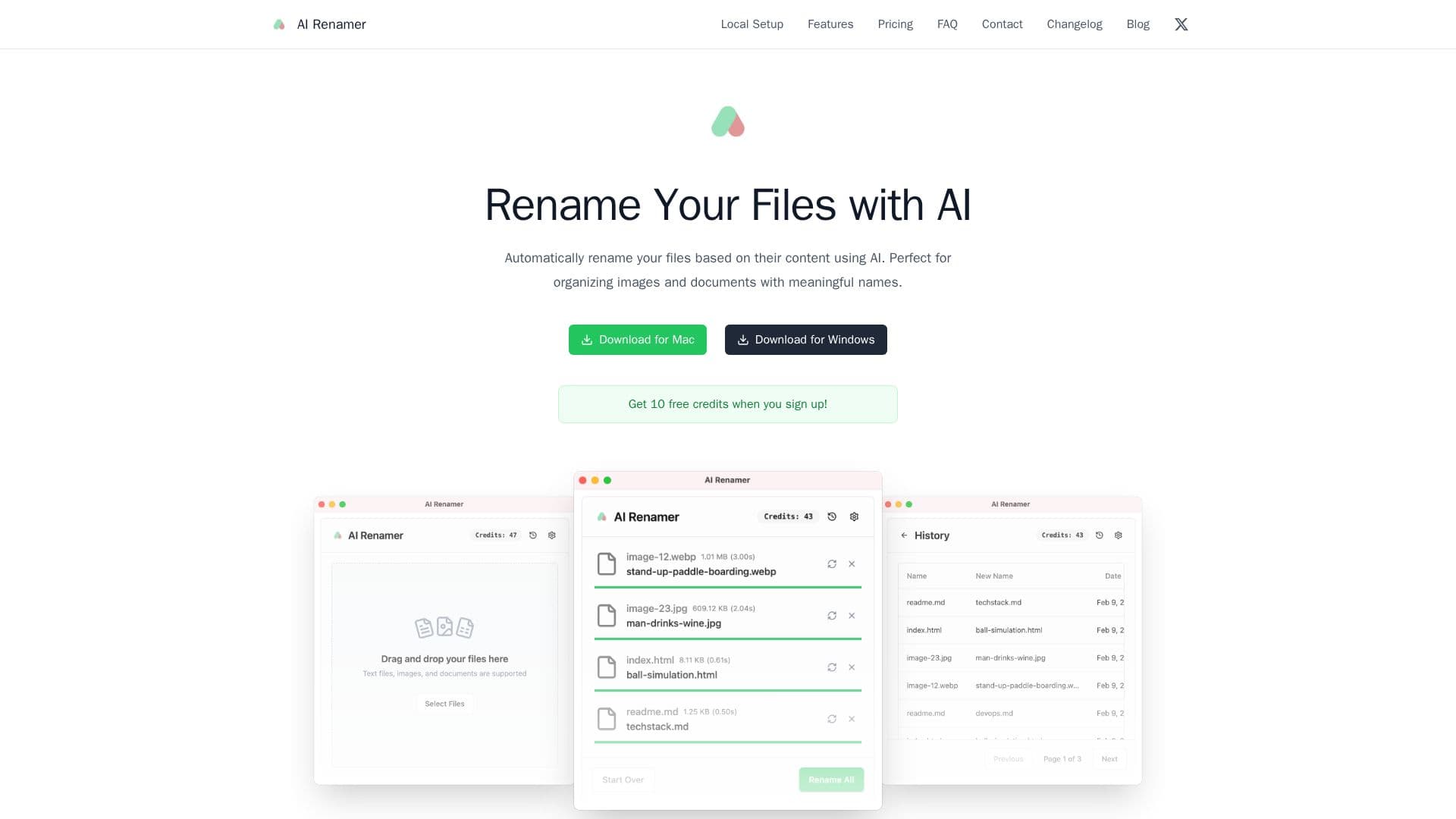
AI Renamer is a desktop application for Mac and Windows that automatically renames files based on their content using AI. It analyzes image content and EXIF data as well as document text to generate meaningful, descriptive filenames, making it useful for organizing screenshots, photos, and documents that would otherwise have random names.

Read More

The app supports batch processing with a drag-and-drop interface and lets you preview names before renaming. You can add custom instructions to guide the AI toward personalized naming patterns and custom formatting rules. It works with images such as JPG, PNG, GIF, and WEBP, and documents including PDF and text-based files.

AI Renamer supports both local and cloud AI models. In Local Mode, you connect your own models through Ollama or LM Studio to process files entirely offline for complete privacy, with a one-time purchase, unlimited renaming, and no file-size limit. In Cloud Mode, files are processed privately in the cloud on a pay-as-you-go credit basis (one credit per rename), using a curated selection of models, with credits that never expire.

  • CategoryAI Document & PDF Tools
  • Pricing ModelFreemium
  • DeploymentDesktop app
  • PlatformsmacOS, Windows

  • Automatic content-based file renaming with AI

  • Image content and EXIF detection plus document content analysis

  • Batch processing with a drag-and-drop interface and preview

  • Custom instructions for personalized naming patterns

  • Local model support via Ollama and LM Studio for offline use

  • Cloud mode with a curated selection of AI models

  • Support for images (JPG, PNG, GIF, WEBP) and documents (PDF, text)

  • Desktop apps for both macOS and Windows

  1. Install the app: Download AI Renamer for Mac or Windows.

  2. Choose a mode: Set up Local Mode with Ollama or LM Studio, or use Cloud Mode with credits.

  3. Add files: Drag and drop the images or documents you want to rename.

  4. Add instructions: Optionally set custom naming patterns and formatting rules.

  5. Preview and rename: Review the suggested names, then rename all files at once.

  • Screenshot organization
  • Photo naming
  • Document renaming
  • Private offline renaming
  • Desktop cleanup

AI Renamer Reviews

Loading...

Popular AI Tools Like AI Renamer

FileZen is an AI-powered tool designed to simplify file management by automatically classifying and renaming text files and images based on their content. It offers both local and…

AI Document & PDF Tools
View Tool

AI-powered tool designed to simplify file management by automatically classifying and renaming text files and images based on their content. It offers both local and…FileZen is an AI-powered tool designed to simplify file management by automatically classifying and renaming text files and images based on their content. It offers both local and…

AI Document & PDF Tools
See the Top 250 AI Apps

Renamer.ai

AI Apps

Renamer.ai is an AI file renamer that reads document and image content with OCR and vision to generate descriptive, searchable names, with Magic Folders automation for hands-off…

Productivity

Ranked #58 in Productivity

View Tool

AI Apps

AI file renamer that reads document and image content with OCR and vision to generate descriptive, searchable names, with Magic Folders automation for hands-off…Renamer.ai is an AI file renamer that reads document and image content with OCR and vision to generate descriptive, searchable names, with Magic Folders automation for hands-off…

Productivity
Ranked #58 in Productivity

Filently

AI Apps

Filently is an AI document-filing tool for Google Drive that reads new documents, renames them to your conventions, and files them into the right folders automatically, with zero…

AI Document & PDF Tools

Ranked #124 in AI Document & PDF Tools

View Tool

AI Apps

AI document-filing tool for Google Drive that reads new documents, renames them to your conventions, and files them into the right folders automatically, with zero…Filently is an AI document-filing tool for Google Drive that reads new documents, renames them to your conventions, and files them into the right folders automatically, with zero…

AI Document & PDF Tools
Ranked #124 in AI Document & PDF Tools

The Drive AI is an AI-powered document management system that automatically organizes, searches, and creates files using plain English. It integrates with your existing sources,…

AI Document & PDF Tools

Ranked #126 in AI Document & PDF Tools

View Tool

AI-powered document management system that automatically organizes, searches, and creates files using plain English. It integrates with your existing sources,…The Drive AI is an AI-powered document management system that automatically organizes, searches, and creates files using plain English. It integrates with your existing sources,…

AI Document & PDF Tools
Ranked #126 in AI Document & PDF Tools

nymos

AI Apps

Nymos is a Mac app that renames files in bulk using AI. It reads documents, invoices, photos, and PDFs to suggest clear, searchable names, ensuring your files are organized and…

Productivity
View Tool

AI Apps

Mac app that renames files in bulk using AI. It reads documents, invoices, photos, and PDFs to suggest clear, searchable names, ensuring your files are organized and…Nymos is a Mac app that renames files in bulk using AI. It reads documents, invoices, photos, and PDFs to suggest clear, searchable names, ensuring your files are organized and…

Productivity
See the Top 250 AI Apps

ImageSage

AI Apps

ImageSage is a private, local AI gallery for Windows that helps you find photos by content or text. It allows AI-driven renaming and file management without moving originals.

AI Photo Editors
View Tool

AI Apps

Private, local AI gallery for Windows that helps you find photos by content or text. It allows AI-driven renaming and file management without moving originals.ImageSage is a private, local AI gallery for Windows that helps you find photos by content or text. It allows AI-driven renaming and file management without moving originals.

AI Photo Editors
See the Top 250 AI Apps

Keep It Shot is a Mac application that uses AI to automatically generate descriptive names for your screenshots. It also creates a fast, private, offline search index, allowing…

Productivity

Ranked #60 in Productivity

View Tool

Mac application that uses AI to automatically generate descriptive names for your screenshots. It also creates a fast, private, offline search index, allowing…Keep It Shot is a Mac application that uses AI to automatically generate descriptive names for your screenshots. It also creates a fast, private, offline search index, allowing…

Productivity
Ranked #60 in Productivity

NudgeFile

AI Apps

NudgeFile is an AI file organizer and workflow automation tool available on Microsoft Store. It automatically organizes files, renames documents, detects duplicates, and…

Workflow Automation

Ranked #230 in Workflow Automation

View Tool

AI Apps

AI file organizer and workflow automation tool available on Microsoft Store. It automatically organizes files, renames documents, detects duplicates, and…NudgeFile is an AI file organizer and workflow automation tool available on Microsoft Store. It automatically organizes files, renames documents, detects duplicates, and…

Workflow Automation
Ranked #230 in Workflow Automation
1 of 8