
ToolPotion
AI Advisor
Submit a Tool (Free)

Shot.video

AI AppsAI Video Editors#92Freemium · Web-based

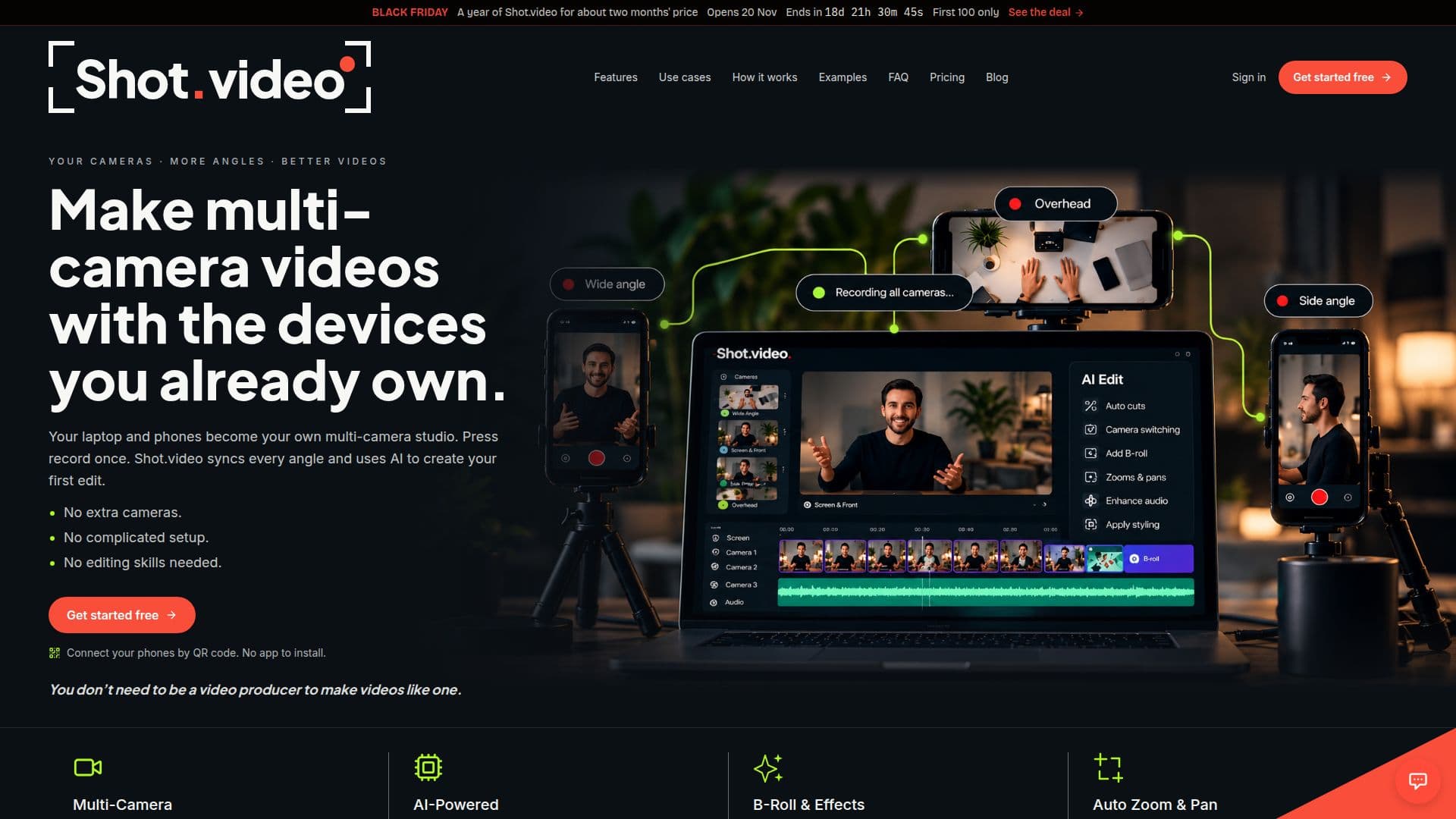
Shot.video transforms your laptop and phones into a multi-camera studio, enabling you to record synchronized footage from multiple angles. It uses AI to automatically create a first edit, including cuts, zooms, and B-roll suggestions. This browser-based tool requires no app installation or advanced editing skills, making multi-camera video production accessible for everyday content creators.

Visit Website
Share
Shot.video screenshot

Shot.video is a browser-based platform designed to simplify multi-camera video production using devices you already own, such as laptops and smartphones. It allows users to record simultaneously from their laptop camera, screen, and multiple connected phones, all synchronized with a single press of a record button. The core innovation lies in its AI-powered editing capabilities, which automatically generate a first edit of the footage.

Read More

The platform addresses the common frustrations of complex multi-camera setups and time-consuming editing. Users can connect additional phone cameras by simply scanning a QR code, eliminating the need for app installations or specialized equipment. Once recorded, Shot.video's AI takes over, cutting between different camera angles, adding dynamic screen zooms and pans, and suggesting relevant B-roll footage to enhance engagement. Every AI-generated choice remains fully editable, giving users complete control over the final product.

Shot.video is ideal for creating a variety of content, including product demos, online courses, tutorials, reviews, business updates, and even podcasts. It helps users produce professional-looking videos without requiring a film crew or advanced editing skills. The AI intelligently selects the best camera angle for each moment, zooms into critical areas of the screen, and proposes cutaway images or clips to break up long talking segments, all while maintaining the original audio track.

The platform offers a flexible pricing model, including a free plan that provides initial Video and B-roll Credits, allowing users to experience the full workflow. Paid monthly subscriptions and one-off credit packs are available for those requiring more extensive use. Video Credits are used for AI edits of synchronized footage, while B-roll Credits cover AI-generated images and clips. Manual edits, personal B-roll uploads, and downloads remain free across all plans.

Founded by Ian Naylor, Shot.video was developed to empower creators and businesses to make better videos without the traditional complexities of multi-camera production. It aims to bridge the gap between knowing what makes a video engaging and having the tools and time to execute it effectively, making high-quality video creation accessible to a broader audience.

  • CategoryAI Video Editors
  • Pricing ModelFreemium
  • DeploymentCloud
  • PlatformsWeb-based

  • Multi-camera recording with laptop and phones

  • Synchronized recording across all connected devices

  • AI-powered first edit generation

  • Automatic cutting between camera angles

  • AI-suggested B-roll and cutaway images/clips

  • Auto zoom and pan for screen recordings

  • Editable AI choices and suggestions

  • QR code connection for phones (no app needed)

  • Screen recording integration

  • Laptop camera recording integration

  • Microphone selection based on speaker proximity

  • Styling options for screen captures (clean, browser frame, 3D)

  • Free plan available with initial credits

  • Monthly subscription plans

  • One-off Video and B-roll Credit packs

  1. Connect Devices: Scan a QR code with your phone to add it as a camera, alongside your laptop camera and screen.

  2. Record Footage: Press record once to capture all connected cameras, your screen, and audio in sync.

  3. Generate First Edit: Let Shot.video's AI automatically cut between angles, add screen zooms, and suggest B-roll.

  4. Refine Video: Approve AI suggestions, then manually trim, crop, move, or change any shot as needed.

  5. Download & Share: Export your polished multi-camera video, ready for sharing.

  • Product Demos
  • Online Courses & Education
  • Tutorials & Walkthroughs
  • Reviews & Unboxings
  • Business & Team Updates
  • Podcasts

Shot.video Reviews

Loading...

Popular AI Tools Like Shot.video

Roll is an AI-powered video production studio that transforms smartphone footage into professional, studio-quality videos. It simplifies remote video calls, adds special effects,…

AI Video Editors

Ranked #58 for Enhancing video quality

View Tool

AI-powered video production studio that transforms smartphone footage into professional, studio-quality videos. It simplifies remote video calls, adds special effects,…Roll is an AI-powered video production studio that transforms smartphone footage into professional, studio-quality videos. It simplifies remote video calls, adds special effects,…

AI Video Editors
Ranked #58 for Enhancing video quality

Screentell

AI Apps

Screentell is a browser-based screen recorder and video editor that allows users to create studio-quality product demos, tutorials, and training videos without any installation.…

AI Video Editors

Ranked #164 in AI Video Editors

View Tool

AI Apps

Browser-based screen recorder and video editor that allows users to create studio-quality product demos, tutorials, and training videos without any installation.…Screentell is a browser-based screen recorder and video editor that allows users to create studio-quality product demos, tutorials, and training videos without any installation.…

AI Video Editors
Ranked #164 in AI Video Editors

Motionik

AI Apps

Motionik is a screen recorder and editor for Windows and macOS that combines recording, automatic cursor-tracking zoom, and editing in one tool to create polished product demos,…

AI Video Editors

Ranked #228 in AI Video Editors

View Tool

AI Apps

Screen recorder and editor for Windows and macOS that combines recording, automatic cursor-tracking zoom, and editing in one tool to create polished product demos,…Motionik is a screen recorder and editor for Windows and macOS that combines recording, automatic cursor-tracking zoom, and editing in one tool to create polished product demos,…

AI Video Editors
Ranked #228 in AI Video Editors

MoreFrame

AI Apps

MoreFrame is a screen recorder and video editor for Mac and Windows, enabling users to capture screens and a second window simultaneously. It offers a comprehensive timeline…

AI Video Editors

Ranked #64 for Enhancing video quality

View Tool

AI Apps

Screen recorder and video editor for Mac and Windows, enabling users to capture screens and a second window simultaneously. It offers a comprehensive timeline…MoreFrame is a screen recorder and video editor for Mac and Windows, enabling users to capture screens and a second window simultaneously. It offers a comprehensive timeline…

AI Video Editors
Ranked #64 for Enhancing video quality

Camtasia

AI Apps

Camtasia is TechSmith's desktop screen recorder and video editor for creating tutorials, training videos, and software demos, now with AI-powered features. It is built for…

AI Video EditorsEducation & E-learning
View Tool

AI Apps

TechSmith's desktop screen recorder and video editor for creating tutorials, training videos, and software demos, now with AI-powered features. It is built for…Camtasia is TechSmith's desktop screen recorder and video editor for creating tutorials, training videos, and software demos, now with AI-powered features. It is built for…

AI Video EditorsEducation & E-learning
See the Top 250 AI Apps

Boom

AI Apps

A Mac app for presenters and creators that combines live presentation, screen recording, and camera enhancement with dynamic layouts, cinematic zoom, and branded overlays, with no…

AI Video Editors
View Tool

AI Apps

A Mac app for presenters and creators that combines live presentation, screen recording, and camera enhancement with dynamic layouts, cinematic zoom, and branded overlays, with no…

AI Video Editors
See the Top 250 AI Apps

Detail

AI Apps

Detail is an award-winning iOS and macOS app for recording and editing talking videos and podcasts, with AI auto-editing, an AI Director, teleprompter, live green screen,…

AI Video EditorsMedia & Entertainment

Ranked #48 for Podcasters

View Tool

AI Apps

Award-winning iOS and macOS app for recording and editing talking videos and podcasts, with AI auto-editing, an AI Director, teleprompter, live green screen,…Detail is an award-winning iOS and macOS app for recording and editing talking videos and podcasts, with AI auto-editing, an AI Director, teleprompter, live green screen,…

AI Video EditorsMedia & Entertainment
Ranked #48 for Podcasters

Isolate.video is an AI product video editor that transforms raw screen recordings into polished product videos. It offers features like automatic motion zoom, AI-generated music,…

AI Video Editors

Ranked #196 in AI Video Editors

View Tool

AI product video editor that transforms raw screen recordings into polished product videos. It offers features like automatic motion zoom, AI-generated music,…Isolate.video is an AI product video editor that transforms raw screen recordings into polished product videos. It offers features like automatic motion zoom, AI-generated music,…

AI Video Editors
Ranked #196 in AI Video Editors
1 of 8