ToolPotion
AI Advisor
Submit a Tool (Free)

MySkills

AI AppsAI Document & PDF ToolsFreemium · Web (Desktop recommended for background remover)

MySkills offers a suite of browser-first tools designed for developers and professionals. It enables users to convert Markdown to PDF, extract text from PDFs into Markdown, remove image backgrounds, and convert proxy subscriptions to Clash configs. These tools prioritize local processing to ensure data privacy and provide clear, actionable outputs for various tasks.

Visit Website
Share
MySkills screenshot
MySkills screenshot

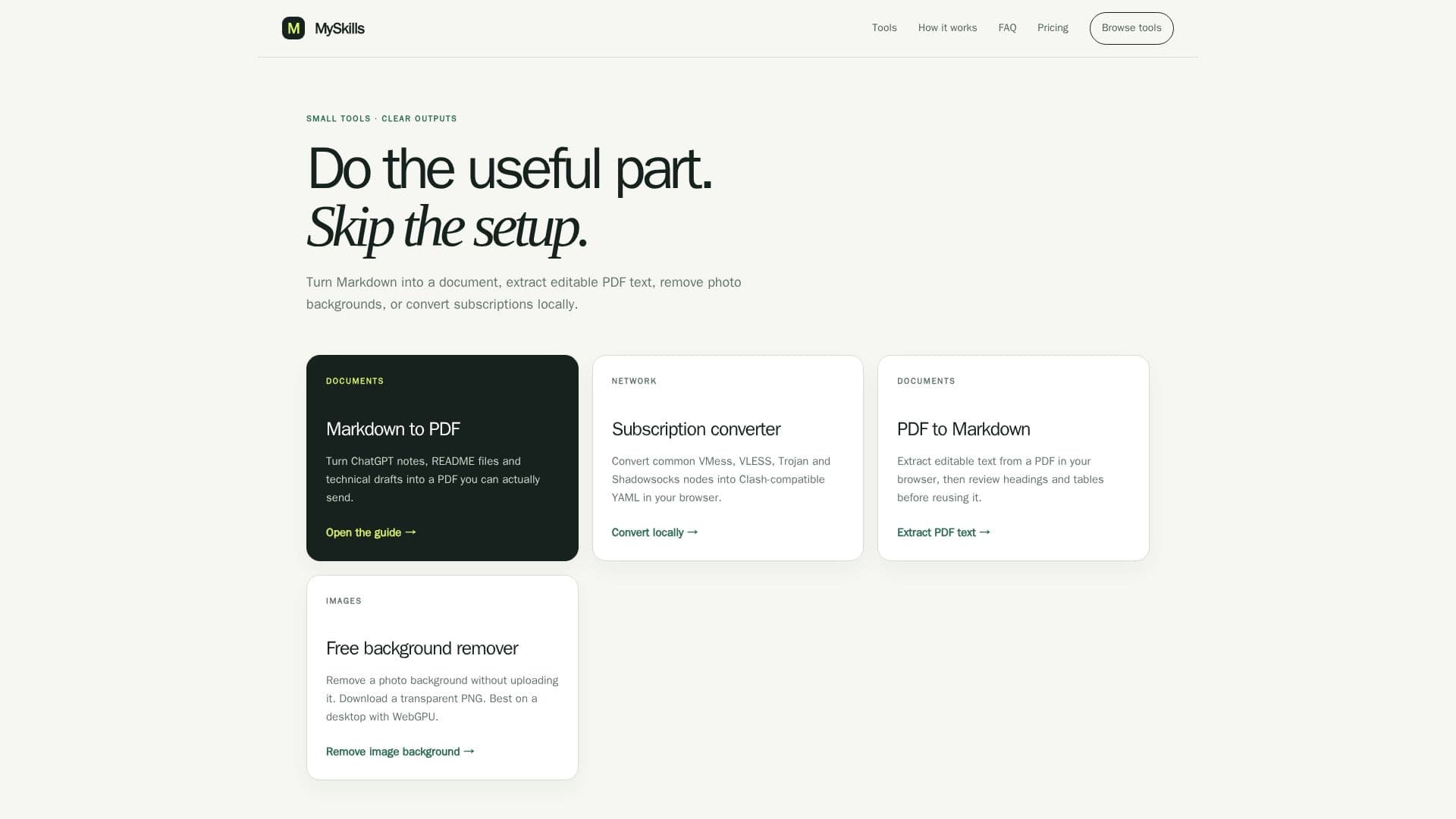
MySkills provides a collection of small, efficient, and browser-first tools aimed at simplifying common tasks for developers and other professionals. The platform emphasizes local processing, meaning that sensitive data like PDF content, proxy nodes, and images are handled directly within the user's browser, ensuring privacy and security without uploading information to external servers.

Read More

The suite includes several key functionalities. The Markdown to PDF converter allows users to transform notes, README files, and technical drafts into professional PDF documents. It offers a local preview, with an option for server-side PDF export for more complex rendering, clearly indicating when content leaves the browser. Complementing this, the PDF to Markdown tool extracts editable text from text-based PDFs directly in the browser, enabling users to review and reuse content, though it's noted that complex layouts like tables and multi-column pages may not be perfectly preserved.

For network-related tasks, MySkills features a subscription converter that transforms common VMess, VLESS, Trojan, and Shadowsocks node links into Clash-compatible YAML profiles. This conversion also occurs entirely within the browser, safeguarding user credentials. Additionally, an image background remover allows users to create transparent PNGs from photos without uploading the images, leveraging WebGPU for efficient local processing, ideally on desktop devices.

MySkills operates on a freemium model. Many tools are available for free with reasonable rate limits, such as daily PDF export limits. Users can unlock more exports by sharing the service or upgrade to a Pro plan for unlimited exports, no watermarks, and custom footers. A Lifetime Pro option is also available, which includes future API access. The platform does not require sign-in for basic use, but signing in provides additional daily server exports and referral bonuses. The browser's built-in print-to-PDF functionality is always free and unlimited, as it never touches MySkills' servers.

The tools are designed for specific, narrow jobs, providing clear outputs like files and readable configurations. This approach helps users perform useful parts of their work without extensive setup, respecting both their time and data privacy. While powerful, users are advised to review generated outputs, especially for network configurations and PDF extractions, to ensure they meet specific requirements before final use.

  • CategoryAI Document & PDF Tools
  • Pricing ModelFreemium
  • DeploymentBrowser-based
  • PlatformsWeb (Desktop recommended for background remover)

  • Markdown to PDF conversion

  • PDF to Markdown text extraction

  • Proxy subscription to Clash YAML conversion

  • Image background removal

  • Local browser processing for privacy

  • Free tier with daily limits

  • Pro plans for unlimited exports and features

  • No sign-in required for basic use

  • Browser print-to-PDF (always free and unlimited)

  • Support for VMess, VLESS, Trojan, Shadowsocks nodes

  • Transparent PNG output for background remover

  • Clear separation of local vs. server processing

  • Referral and social share bonuses for free exports

  • Custom footer and no watermark on Pro plans

  1. Select Tool: Choose the desired tool (e.g., Markdown to PDF, PDF to Markdown, Subscription Converter, Background Remover).

  2. Input Content: Paste Markdown text, select a PDF file, paste proxy subscription links, or choose an image file.

  3. Process Locally: The tool processes the content directly in your browser, ensuring data privacy.

  4. Review Output: Examine the generated PDF, Markdown text, Clash YAML, or transparent PNG preview.

  5. Export/Download: Save or download the processed output file to your device.

  6. Manage Limits: For PDF exports, use free daily limits, share to unlock more, or upgrade to a Pro plan.

  • Convert ChatGPT Notes to PDF
  • Extract PDF Text for Editing
  • Generate Clash Proxy Configs
  • Remove Image Backgrounds Locally
  • Prepare Technical Documentation
  • Repurpose Document Content
  • Secure Proxy Configuration
  • Create Marketing Visuals

MySkills Reviews

Loading...

Popular AI Tools Like MySkills

2markdown

AI Apps

2markdown is a browser-based Markdown converter and viewer with 37 tools for turning PDFs, Word docs, HTML, tables, and public web content into clean Markdown, aimed at writers,…

AI Document & PDF Tools

Ranked #91 for Extracting text from images

View Tool

AI Apps

Browser-based Markdown converter and viewer with 37 tools for turning PDFs, Word docs, HTML, tables, and public web content into clean Markdown, aimed at writers,…2markdown is a browser-based Markdown converter and viewer with 37 tools for turning PDFs, Word docs, HTML, tables, and public web content into clean Markdown, aimed at writers,…

AI Document & PDF Tools
Ranked #91 for Extracting text from images

PDFtoMD

AI Apps

PDFtoMD is a free online AI tool that converts any PDF, including scans, into clean, structured Markdown in seconds, preserving headings, lists, and paragraphs for editing and AI…

AI Document & PDF Tools

Ranked #229 in AI Document & PDF Tools

View Tool

AI Apps

Free online AI tool that converts any PDF, including scans, into clean, structured Markdown in seconds, preserving headings, lists, and paragraphs for editing and AI…PDFtoMD is a free online AI tool that converts any PDF, including scans, into clean, structured Markdown in seconds, preserving headings, lists, and paragraphs for editing and AI…

AI Document & PDF Tools
Ranked #229 in AI Document & PDF Tools

MarkAny Markdown Converter transforms various file types into Markdown and vice versa. It supports batch processing, automatic OCR for images, and provides an editable preview for…

AI Document & PDF Tools

Ranked #235 in AI Document & PDF Tools

View Tool

Transforms various file types into Markdown and vice versa. It supports batch processing, automatic OCR for images, and provides an editable preview for…MarkAny Markdown Converter transforms various file types into Markdown and vice versa. It supports batch processing, automatic OCR for images, and provides an editable preview for…

AI Document & PDF Tools
Ranked #235 in AI Document & PDF Tools

LightPDF

AI Apps

LightPDF is an AI-powered, cloud-based PDF toolkit to view, edit, convert, sign, annotate, merge, and manage PDF files. It serves students, educators, office professionals, and…

AI Document & PDF Tools

Ranked #22 for Extracting text from images

View Tool

AI Apps

AI-powered, cloud-based PDF toolkit to view, edit, convert, sign, annotate, merge, and manage PDF files. It serves students, educators, office professionals, and…LightPDF is an AI-powered, cloud-based PDF toolkit to view, edit, convert, sign, annotate, merge, and manage PDF files. It serves students, educators, office professionals, and…

AI Document & PDF Tools
Ranked #22 for Extracting text from images

MarkItDown

AI Apps

MarkItDown is a free online converter that turns PDF, Word, PowerPoint, Excel, HTML, images, and more into clean, structured Markdown optimized for AI workflows, LLM prompts, and…

AI Document & PDF Tools

Ranked #30 for Extracting text from images

View Tool

AI Apps

Free online converter that turns PDF, Word, PowerPoint, Excel, HTML, images, and more into clean, structured Markdown optimized for AI workflows, LLM prompts, and…MarkItDown is a free online converter that turns PDF, Word, PowerPoint, Excel, HTML, images, and more into clean, structured Markdown optimized for AI workflows, LLM prompts, and…

AI Document & PDF Tools
Ranked #30 for Extracting text from images

PDF Converter is an online tool to convert files to and from PDF and edit PDFs, with 20+ tools for converting, merging, splitting, compressing, watermarking, and OCR, usable on…

AI Document & PDF Tools
View Tool

Online tool to convert files to and from PDF and edit PDFs, with 20+ tools for converting, merging, splitting, compressing, watermarking, and OCR, usable on…PDF Converter is an online tool to convert files to and from PDF and edit PDFs, with 20+ tools for converting, merging, splitting, compressing, watermarking, and OCR, usable on…

AI Document & PDF Tools
See the Top 250 AI Apps

Wondershare PDFelement is an intuitive PDF editor that allows users to create, convert, edit, protect, and sign PDF documents across desktop, mobile, and web platforms. It…

AI Document & PDF Tools

Ranked #17 for Chatting with PDF documents

View Tool

Intuitive PDF editor that allows users to create, convert, edit, protect, and sign PDF documents across desktop, mobile, and web platforms. It…Wondershare PDFelement is an intuitive PDF editor that allows users to create, convert, edit, protect, and sign PDF documents across desktop, mobile, and web platforms. It…

AI Document & PDF Tools
Ranked #17 for Chatting with PDF documents

pdf.net

AI Apps

pdf.net is an all-in-one online PDF editor that lets you sign, edit, annotate, merge, split, compress, convert, and protect documents, with AI features to chat with, summarize,…

AI Document & PDF Tools
View Tool

AI Apps

All-in-one online PDF editor that lets you sign, edit, annotate, merge, split, compress, convert, and protect documents, with AI features to chat with, summarize,…pdf.net is an all-in-one online PDF editor that lets you sign, edit, annotate, merge, split, compress, convert, and protect documents, with AI features to chat with, summarize,…

AI Document & PDF Tools
See the Top 250 AI Apps
1 of 8