
ToolPotion
AI Advisor
Submit a Tool (Free)

HyproAI

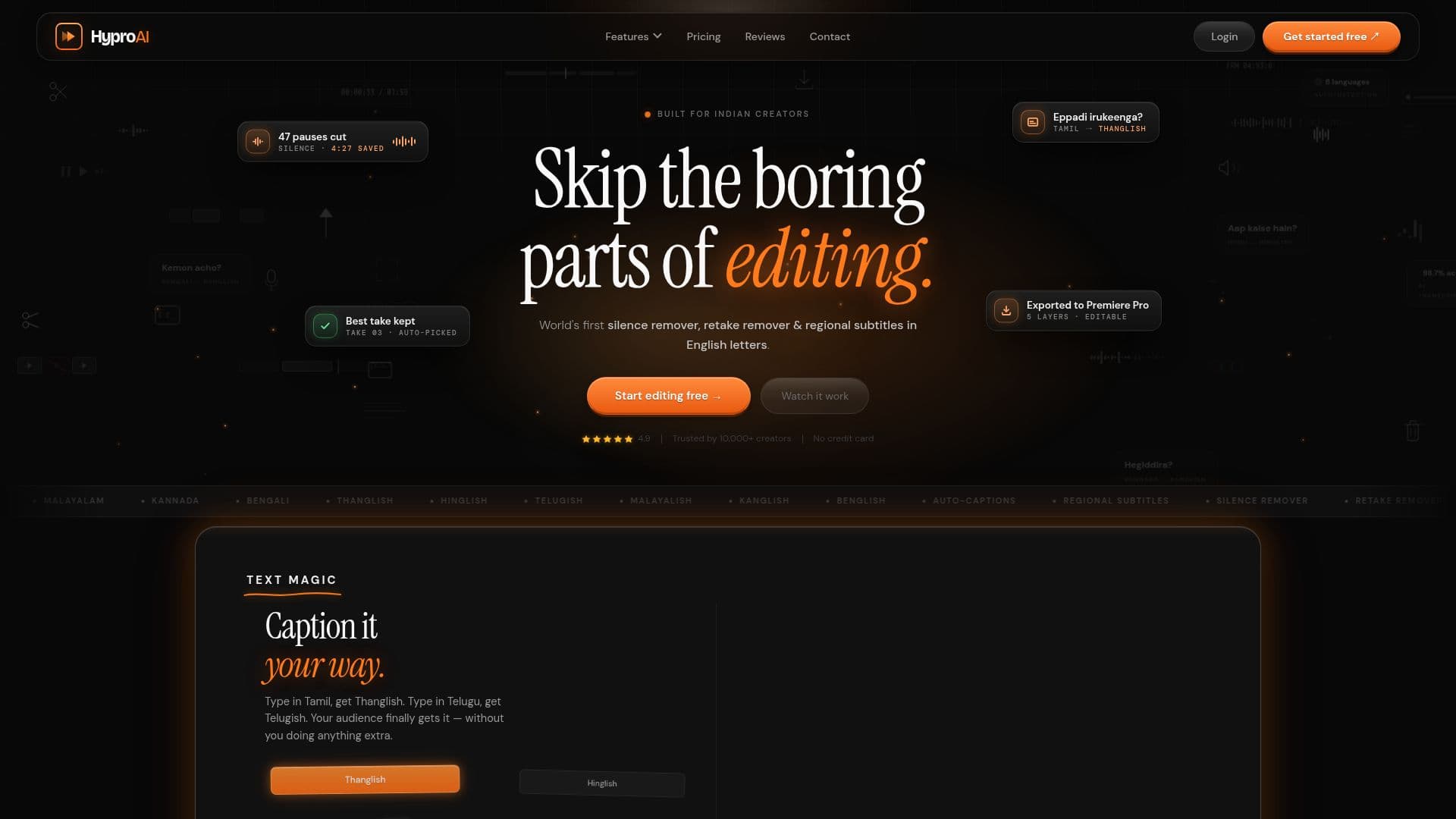
HyproAI is a browser-based AI video editor designed for Indian creators, offering features like automatic silence and retake removal. It generates regional language captions such as Thanglish and Hinglish, and enhances audio. Users can export projects to professional editing software like Premiere Pro and DaVinci Resolve, making video production faster and more accessible.

Visit Website
Share
HyproAI screenshot
HyproAI screenshot

HyproAI is an innovative, browser-based AI video editing platform specifically developed to address the unique needs of Indian creators. It streamlines the video production workflow by automating several time-consuming editing tasks, allowing creators to focus on content rather than manual adjustments. The platform runs entirely in the browser, eliminating the need for any software installations or downloads, and is compatible with Chrome, Safari, and Firefox.

Read More

One of HyproAI's core functionalities is its ability to automatically remove dead air and filler pauses, ensuring videos flow smoothly and professionally. The Silence Remover feature intelligently cuts out "uh," "um," and other awkward pauses. Complementing this, the Retake Remover detects instances where a sentence was spoken multiple times and automatically selects the cleanest, most articulate version, making it seem as if the creator rehearsed extensively.

A standout feature for Indian creators is the platform's advanced regional language captioning. HyproAI supports English, Tamil, Telugu, Hindi, Malayalam, Kannada, and Bengali, generating word-level timestamps with high accuracy. It uniquely handles colloquial slang, regional accents, and code-switching, producing regional subtitles in English letters, such as Thanglish (Tamil), Hinglish (Hindi), Telugish (Telugu), Kanglish (Kannada), Malayalish (Malayalam), and Benglish (Bengali). This capability significantly enhances accessibility for diverse Indian audiences.

Beyond these core features, HyproAI includes audio enhancement and offers twelve built-in caption styles, including animated options, that are timed to words and ready to be applied without any design work or plugins. Finished projects can be exported as layered timelines to popular professional editing software like Adobe Premiere Pro, After Effects, Final Cut Pro, and DaVinci Resolve. This ensures that video, b-roll, music, voice, and captions are preserved as separate editable tracks, providing flexibility for professional editors.

HyproAI operates on a freemium model, offering a free tier with zero watermarks on exports. Paid plans are available, starting from ₹89, with transparent pricing and no hidden charges at checkout. The platform is continuously optimizing for mobile use, but currently recommends desktop browsers for the best editing experience. HyproAI is operated by HYPROAI PRIVATE LIMITED, an Indian company incorporated in Tamil Nadu.

  • CategoryAI Video Editors
  • Pricing ModelFreemium
  • DeploymentCloud
  • PlatformsWeb Browser

  • Automatic Silence Removal: Eliminates dead air, "uh," "um," and awkward pauses.

  • Retake Removal: Detects and keeps the cleanest version of repeated sentences.

  • Regional Language Captions: Generates Thanglish, Hinglish, Telugish, Kanglish, Malayalish, Benglish subtitles.

  • Multi-language Support: Captions available for English, Tamil, Telugu, Hindi, Malayalam, Kannada, Bengali.

  • Word-Level Timestamps: Highly accurate captions with handling for slang, accents, and code-switching.

  • Audio Enhancement: Improves microphone audio quality.

  • Browser-Based Editing: Runs entirely in Chrome, Safari, and Firefox without installation.

  • No Watermarks: Exports are watermark-free on all plans, including the free tier.

  • Export to Professional Software: Exports layered timelines to Premiere Pro, DaVinci Resolve, After Effects, Final Cut Pro.

  • Editable Tracks: Preserves video, b-roll, music, voice, and captions as separate editable tracks upon export.

  • Built-in Caption Styles: Twelve animated and timed caption styles included.

  • Free Tier Available: Start editing without cost, upgrade when ready.

  • Cancel Anytime: No lock-ins or fees, cancel subscriptions from account settings.

  1. Upload Video: Access HyproAI in your browser and upload your raw video footage.

  2. Automate Editing: Utilize Silence Remover and Retake Remover to automatically clean up pauses and select best takes.

  3. Generate Captions: Choose your desired Indian language (e.g., Tamil, Hindi) to generate regional captions like Thanglish or Hinglish.

  4. Customize Captions: Select from twelve built-in caption styles to match your video's aesthetic.

  5. Review and Refine: Make any necessary manual adjustments to the edited video and captions.

  6. Export Project: Export your finished video as a layered timeline to Adobe Premiere Pro, DaVinci Resolve, or other professional software.

  • Content Creation for Indian Audiences
  • Efficient Video Editing
  • Professional Video Production
  • Educational Content Creation
  • Social Media Video Production
  • Podcast to Video Conversion
  • Multi-Language Accessibility

HyproAI Reviews

Loading...

Popular AI Tools Like HyproAI

AutoEdit

AI Apps

AutoEdit is an AI-powered video editing plugin for Adobe Premiere Pro. It automates the initial editing process by removing silences, filler words, and bad takes, allowing…

AI Video Editors

Ranked #110 in AI Video Editors

View Tool

AI Apps

AI-powered video editing plugin for Adobe Premiere Pro. It automates the initial editing process by removing silences, filler words, and bad takes, allowing…AutoEdit is an AI-powered video editing plugin for Adobe Premiere Pro. It automates the initial editing process by removing silences, filler words, and bad takes, allowing…

AI Video Editors
Ranked #110 in AI Video Editors

Smartrazor uses AI to automate video editing for YouTube creators. It removes mistakes, pauses, and bad takes, then adds effects like animated captions and engaging zoom…

AI Video Editors

Ranked #172 in AI Video Editors

View Tool

Uses AI to automate video editing for YouTube creators. It removes mistakes, pauses, and bad takes, then adds effects like animated captions and engaging zoom…Smartrazor uses AI to automate video editing for YouTube creators. It removes mistakes, pauses, and bad takes, then adds effects like animated captions and engaging zoom…

AI Video Editors
Ranked #172 in AI Video Editors

Wondershare Filmora is a comprehensive video editing software for desktop and mobile. It offers intuitive tools, AI-powered features, and creative effects to help users create…

AI Video Editors

Ranked #4 for Enhancing video quality

View Tool

Comprehensive video editing software for desktop and mobile. It offers intuitive tools, AI-powered features, and creative effects to help users create…Wondershare Filmora is a comprehensive video editing software for desktop and mobile. It offers intuitive tools, AI-powered features, and creative effects to help users create…

FeaturedAI Video Editors
Ranked #4 for Enhancing video quality

AutoCut is an AI video editing plugin for Premiere Pro and DaVinci Resolve that automates repetitive tasks. It instantly removes silences, adds captions, applies auto-zooms, and…

AI Video EditorsMarketing & Creative Agencies

Ranked #53 in AI Video Editors

View Tool

AI video editing plugin for Premiere Pro and DaVinci Resolve that automates repetitive tasks. It instantly removes silences, adds captions, applies auto-zooms, and…AutoCut is an AI video editing plugin for Premiere Pro and DaVinci Resolve that automates repetitive tasks. It instantly removes silences, adds captions, applies auto-zooms, and…

AI Video EditorsMarketing & Creative Agencies
Ranked #53 in AI Video Editors

ReelsCut

AI Apps

ReelsCut is an AI talking-head video editor designed to streamline the creation of vertical video content. It automatically cuts retakes and pauses, adds captions, cleans up…

AI Video Editors

Ranked #116 in AI Short Video Makers

View Tool

AI Apps

AI talking-head video editor designed to streamline the creation of vertical video content. It automatically cuts retakes and pauses, adds captions, cleans up…ReelsCut is an AI talking-head video editor designed to streamline the creation of vertical video content. It automatically cuts retakes and pauses, adds captions, cleans up…

AI Video Editors
Ranked #116 in AI Short Video Makers

Gling is an AI video editing software designed for YouTube creators. It automatically cuts out bad takes, silences, filler words, and background noise, optimizing your workflow.…

AI Video EditorsMedia & Entertainment

Ranked #29 for Repurposing content

View Tool

AI video editing software designed for YouTube creators. It automatically cuts out bad takes, silences, filler words, and background noise, optimizing your workflow.…Gling is an AI video editing software designed for YouTube creators. It automatically cuts out bad takes, silences, filler words, and background noise, optimizing your workflow.…

FeaturedAI Video EditorsMedia & Entertainment
Ranked #29 for Repurposing content

Stanley Studio is a browser-based video editor that transforms raw clips into polished videos with a single prompt. It offers features like caption styling, music timing, and…

AI Video EditorsMedia & Entertainment

Ranked #58 in AI Short Video Makers

View Tool

Browser-based video editor that transforms raw clips into polished videos with a single prompt. It offers features like caption styling, music timing, and…Stanley Studio is a browser-based video editor that transforms raw clips into polished videos with a single prompt. It offers features like caption styling, music timing, and…

AI Video EditorsMedia & Entertainment
Ranked #58 in AI Short Video Makers

Clipchamp

AI Apps

Create videos with royalty-free music and stock footage, use video templates, and export in up to 4K video resolution. Get started in-browser or download the Windows app for easy…

AI Video Editors

Ranked #16 for Removing background noise

View Tool

AI Apps

Create videos with royalty-free music and stock footage, use video templates, and export in up to 4K video resolution. Get started in-browser or download the Windows app for easy…

AI Video Editors
Ranked #16 for Removing background noise
1 of 8