ToolPotion
AI Advisor
Submit a Tool (Free)

AI DevKit

AI DevKit is an open-source command-line interface (CLI) that acts as a control plane for managing multiple AI coding agents. It provides a unified console, shared memory, and a single configuration for agents like Claude Code, Cursor, and Codex. This tool helps developers orchestrate their AI coding agents as a cohesive team, enhancing workflow efficiency and consistency across various tools.

Visit Website
Share
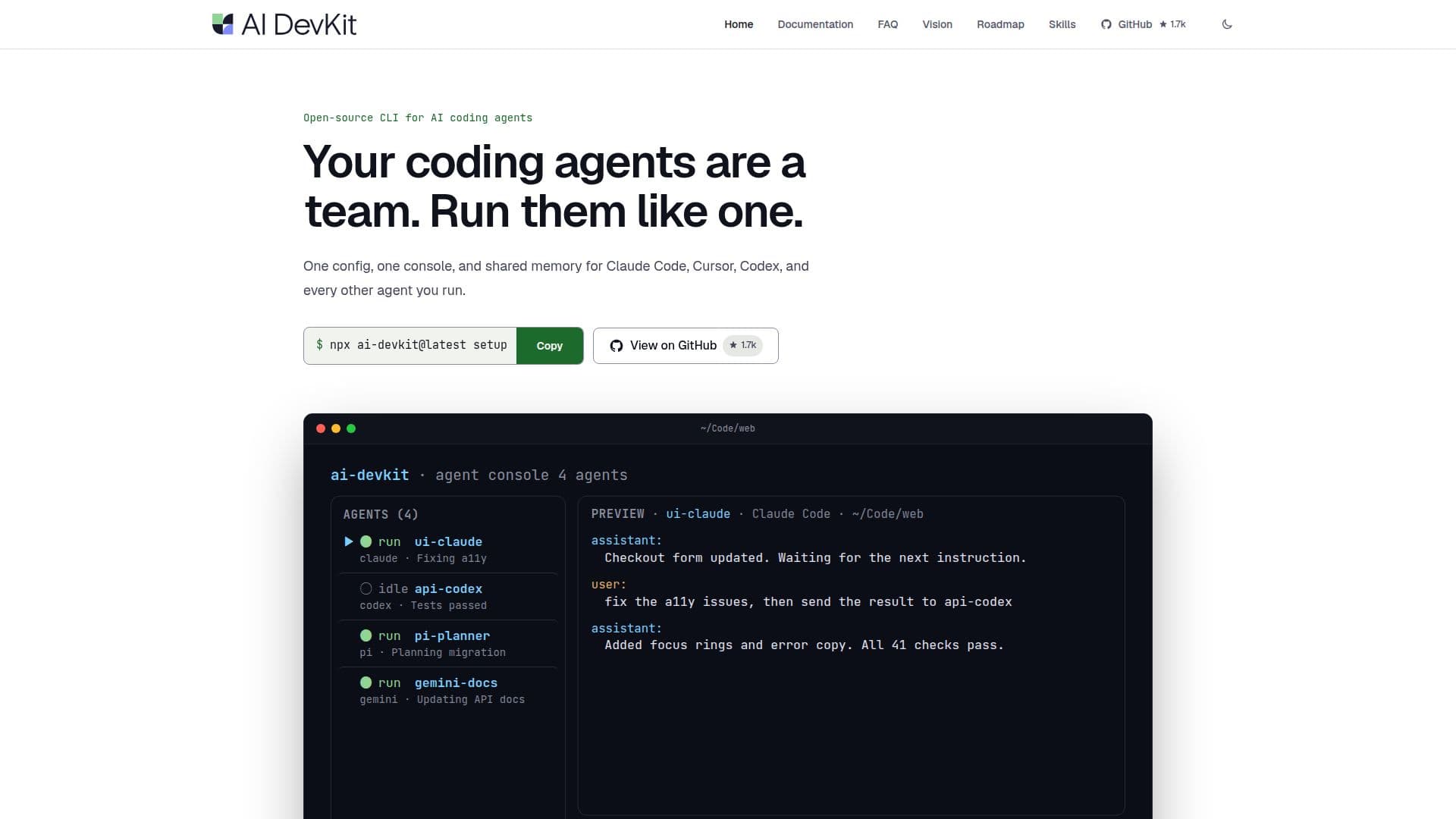
AI DevKit screenshot

AI DevKit serves as a control plane designed to unify and streamline the operation of multiple AI coding agents. It addresses the common challenge of managing disparate agents, each with its own configuration, console, and memory, by providing a single, coherent system. This open-source CLI tool allows developers to run their AI coding agents as a coordinated team, fostering shared context and consistent workflows.

Read More

The core functionality of AI DevKit revolves around centralizing agent management. It offers a single console for all coding sessions, eliminating the need for multiple terminal tabs. Agents can share a common configuration, which is then installed to each, ensuring uniformity in their setup and behavior. A key feature is its shared memory layer, allowing agents to access and search past decisions and context, preventing information loss across sessions and reducing repetitive prompting. This local-first memory system works without relying on cloud services, maintaining data privacy and reducing prompt bloat.

AI DevKit integrates with a variety of popular AI coding agents, including Claude Code, Cursor, Codex, Gemini CLI, opencode, Antigravity, Junie, Cline, Devin, Grok CLI, Muse Code, and GitHub Copilot. It sits above these tools, enhancing their capabilities without replacing them. The platform also supports the creation and sharing of workflow skills, enabling agents to learn and apply standardized development processes. This includes features for planning before code, verifying completion with evidence like test results, and integrating code review into the agent workflow.

Installation is straightforward, requiring Node.js 22 or newer. Users perform a one-time `setup` command per machine to detect installed agents, add workflow skills, and connect shared memory. A `init` command is then run per project to write configuration files and install project-specific skills. AI DevKit is free and licensed under Apache-2.0, making it an accessible solution for individual developers and teams looking to standardize their AI-assisted development practices. It aims to make operating multiple AI coding agents feel coherent, ensuring they adhere to project standards and styles.

  • CategoryAI Coding Assistants
  • Pricing ModelFree
  • DeploymentRuns locally
  • PlatformsCLI (Node.js)

  • Unified Control Plane for AI Coding Agents

  • Single Console for All Agent Sessions

  • Shared Configuration Across Agents

  • Local-First Persistent Memory System

  • Integration with Multiple AI Coding Agents (e.g., Claude Code, Cursor, Codex)

  • Workflow Skills Registry for Standardized Processes

  • Agent Communication Path Management

  • Verification Workflows for Task Completion

  • Open-Source CLI Tool

  • Apache-2.0 Licensed

  • Supports Node.js 22+

  • Project-Local Configuration Files

  • Troubleshooting Guides for Agent Integrations

  • Programmatic Agent Call Support

  • Context Engineering Tools

  1. Install Node.js: Ensure Node.js 22 or newer is installed on your machine.

  2. Set up AI DevKit: Run `npx ai-devkit@latest setup` once per machine to detect agents, add workflow skills, and connect shared memory.

  3. Initialize a project: Navigate to your project directory and run `npx ai-devkit@latest init` to create project configuration and install skills.

  4. Add agents: Edit the configuration file to add and manage your AI coding agents.

  5. Define workflows: Utilize the skills registry to teach agents standardized development workflows.

  6. Operate agents: Use the unified console to interact with and orchestrate your coding agents.

  7. Manage memory: Leverage the shared memory system for persistent context across agent sessions.

  8. Verify work: Implement verification workflows to ensure agent-generated code meets standards before completion.

  • Multi-Agent Code Development
  • Standardized Agent Workflows
  • Persistent Context Management
  • Unified Agent Configuration
  • Code Review Integration
  • Spec-Driven Development
  • Debugging with AI Agents
  • Reducing Repeated Prompting

AI DevKit Reviews

Loading...

Popular AI Tools Like AI DevKit

SwarmPane

AI Apps

SwarmPane is a desktop workspace designed for AI coding agents, allowing users to run multiple CLIs like Claude Code and Codex side-by-side in real terminals. It integrates…

AI Coding Assistants

Ranked #169 for Refactoring code

View Tool

AI Apps

Desktop workspace designed for AI coding agents, allowing users to run multiple CLIs like Claude Code and Codex side-by-side in real terminals. It integrates…SwarmPane is a desktop workspace designed for AI coding agents, allowing users to run multiple CLIs like Claude Code and Codex side-by-side in real terminals. It integrates…

AI Coding Assistants
Ranked #169 for Refactoring code

Codara Studio is a comprehensive desktop console for AI coding agents, integrating file exploration, editing, live agent terminals, git graph, and run orchestration. It supports…

AI Coding Assistants

Ranked #226 for Explaining code

View Tool

Comprehensive desktop console for AI coding agents, integrating file exploration, editing, live agent terminals, git graph, and run orchestration. It supports…Codara Studio is a comprehensive desktop console for AI coding agents, integrating file exploration, editing, live agent terminals, git graph, and run orchestration. It supports…

AI Coding Assistants
Ranked #226 for Explaining code

Thrum

AI Apps

Thrum coordinates AI coding agents, managing tasks, reviewing output, and handling merges with integrated build and test steps. It enables agents to communicate across different…

AI Coding Assistants

Ranked #168 for Refactoring code

View Tool

AI Apps

Coordinates AI coding agents, managing tasks, reviewing output, and handling merges with integrated build and test steps. It enables agents to communicate across different…Thrum coordinates AI coding agents, managing tasks, reviewing output, and handling merges with integrated build and test steps. It enables agents to communicate across different…

AI Coding Assistants
Ranked #168 for Refactoring code

Orca

AI Apps

A free, open-source Agent Development Environment that runs Claude Code, Codex, Gemini, and other CLI coding agents in parallel across isolated git worktrees.

AI Coding Assistants

Ranked #33 for DevOps Engineers

View Tool

AI Apps

A free, open-source Agent Development Environment that runs Claude Code, Codex, Gemini, and other CLI coding agents in parallel across isolated git worktrees.

AI Coding Assistants
Ranked #33 for DevOps Engineers

Symvibe

AI Apps

Symvibe is a native macOS application designed for developers and teams to manage multiple AI coding agents like Claude Code, Codex, and Gemini CLI on a single visual board. It…

AI Coding Assistants

Ranked #234 for Explaining code

View Tool

AI Apps

Native macOS application designed for developers and teams to manage multiple AI coding agents like Claude Code, Codex, and Gemini CLI on a single visual board. It…Symvibe is a native macOS application designed for developers and teams to manage multiple AI coding agents like Claude Code, Codex, and Gemini CLI on a single visual board. It…

AI Coding Assistants
Ranked #234 for Explaining code

Foxpit

AI Apps

Foxpit is a desktop application that orchestrates multiple AI coding agents like Claude Code, Codex, OpenCode, and Antigravity. It allows them to work as a unified team with…

AI Coding Assistants

Ranked #221 for Explaining code

View Tool

AI Apps

Desktop application that orchestrates multiple AI coding agents like Claude Code, Codex, OpenCode, and Antigravity. It allows them to work as a unified team with…Foxpit is a desktop application that orchestrates multiple AI coding agents like Claude Code, Codex, OpenCode, and Antigravity. It allows them to work as a unified team with…

AI Coding Assistants
Ranked #221 for Explaining code

devpit

AI Apps

devpit is a desktop application designed for managing coding agents. It offers a terminal per project, a board for task management, and an orchestrator across projects. Compatible…

AI Coding Assistants
View Tool

AI Apps

Desktop application designed for managing coding agents. It offers a terminal per project, a board for task management, and an orchestrator across projects. Compatible…devpit is a desktop application designed for managing coding agents. It offers a terminal per project, a board for task management, and an orchestrator across projects. Compatible…

AI Coding Assistants
See the Top 250 AI Apps

Visual Studio Code is a free, open source AI code editor for agent-first development, letting developers build with AI agents that plan, code, and debug, and manage multi-agent…

AI Coding Assistants
View Tool

Free, open source AI code editor for agent-first development, letting developers build with AI agents that plan, code, and debug, and manage multi-agent…Visual Studio Code is a free, open source AI code editor for agent-first development, letting developers build with AI agents that plan, code, and debug, and manage multi-agent…

AI Coding Assistants
See the Top 250 AI Apps
1 of 8