ToolPotion
AI Advisor
Submit a Tool (Free)

Foxpit

AI AppsAI Coding AssistantsExplaining code#226Freemium · Windows, macOS, Linux

Foxpit is a desktop application that orchestrates multiple AI coding agents like Claude Code, Codex, OpenCode, and Antigravity. It allows them to work as a unified team with shared memory, a task board, and automatic resume capabilities. Developers can visualize agent activity in a 3D office, delegate tasks, and manage usage limits efficiently across various projects.

Visit Website
Share
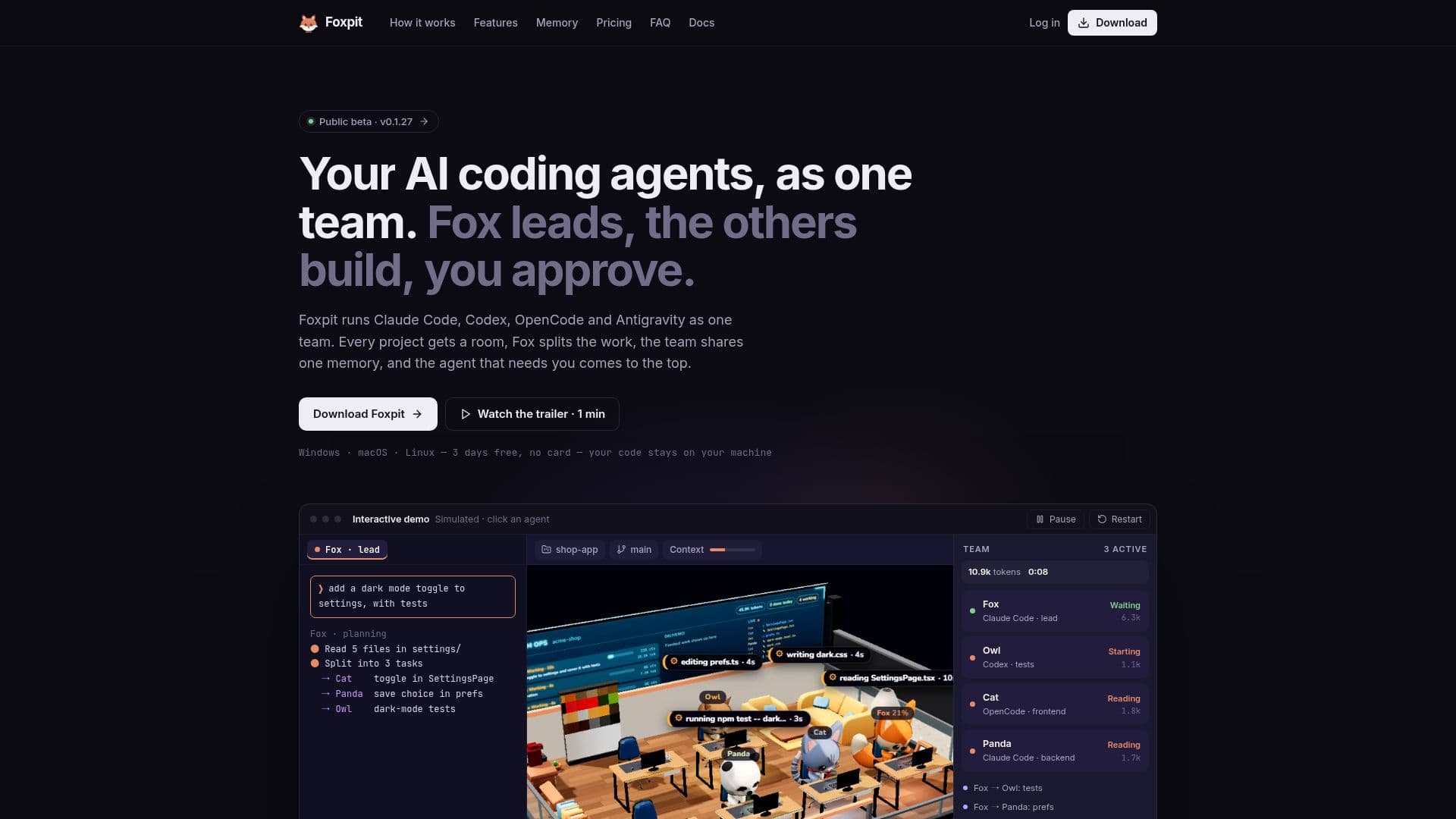
Foxpit screenshot
Foxpit screenshot

Foxpit is a desktop application designed to orchestrate multiple AI coding agents, enabling them to work collaboratively as a single team. It supports popular agents such as Claude Code, OpenAI Codex CLI, OpenCode, and Antigravity, allowing developers to integrate their existing AI accounts. The application provides a visual cockpit, featuring a 3D isometric office where each agent is represented by a mascot at a desk, offering a live view of their status—whether they are working, stuck, or awaiting approval.

Read More

At its core, Foxpit facilitates delegation, with a lead agent (Fox) responsible for splitting a primary goal into smaller, manageable tasks. These tasks are then assigned to teammates, each of whom can utilize a different agent and model, including more cost-effective or free options. This intelligent delegation helps conserve token quotas on flagship models by offloading routine edits, research, and tests to cheaper alternatives. The platform also includes a shared memory system, Beyin, which stores notes in markdown format within the project's `.foxpit/memory` directory, ensuring all agents have access to past decisions and open threads.

Key features include a task board for managing delegated work, a terminal grid for viewing up to four agents side-by-side, and optional Git worktrees per agent to prevent file collisions during parallel development. Foxpit also addresses usage limits by allowing the lead agent to pause work when a quota is reached and automatically resume after the reset. Users receive approval alerts via system notifications, enabling quick intervention when an agent requires confirmation for commands or file edits. The application is built with privacy in mind, ensuring that code, prompts, and terminal output remain on the user's local machine, with agent events communicating only over `127.0.0.1`.

Foxpit runs on Windows 10 and 11, macOS on Apple Silicon, and Linux (AppImage). It offers a 3-day free trial without requiring a credit card. After the trial, pricing is $5 for the first month, followed by $12 per month. The built-in Foxpit engine supports various providers via API keys or local servers like Ollama and LM Studio, expanding compatibility beyond the directly integrated CLIs. The application updates automatically, keeping both Foxpit and connected agent CLIs current.

  • CategoryAI Coding Assistants
  • Pricing ModelFreemium
  • DeploymentDesktop App
  • PlatformsWindows, macOS, Linux

  • AI Coding Agent Orchestration

  • Multi-Agent Team Collaboration

  • Shared Memory (Beyin)

  • Task Board for Goal Management

  • Automatic Usage Limit Resumption

  • Live 3D Office Visualization

  • Terminal Grid for Parallel Agents

  • Optional Git Worktrees per Agent

  • Approval Alerts with System Notifications

  • Delegation to Cheaper Models for Quota Saving

  • Local-First Privacy (Code Stays On Machine)

  • Built-in Foxpit Engine for Any Provider

  • Automatic Updates for App and Agent CLIs

  • Paste Screenshots into Terminals/Chats

  • Token Budgets per Agent, Project, or Day

  1. Install Foxpit: Download and install the application for Windows, macOS, or Linux.

  2. Sign In: Create an account using Google, GitHub, or email to start your 3-day free trial.

  3. Connect Agents: Foxpit automatically detects and connects supported agents like Claude Code, Codex, OpenCode, and Antigravity.

  4. Choose Lead Agent: Select your strongest agent and model to act as the lead for planning and delegation.

  5. Start a Project: Pick an existing code folder or create a new one to begin a project.

  6. Build Your Team: Assign mascots, specialties, agents, and models to your team members.

  7. Delegate Tasks: Provide a goal to the lead agent, which will split it into tasks and delegate to the team.

  8. Monitor & Approve: Observe agent progress in the 3D office and approve commands via notifications.

  • Parallel Code Development
  • Automated Task Delegation
  • Cost-Optimized AI Coding
  • Live Agent Monitoring
  • Project Memory Sharing
  • Efficient Code Review
  • Managing Usage Limits
  • Multi-Project Management
  • Secure Local Development

Foxpit Reviews

Loading...

Popular AI Tools Like Foxpit

Codara Studio is a comprehensive desktop console for AI coding agents, integrating file exploration, editing, live agent terminals, git graph, and run orchestration. It supports…

AI Coding Assistants

Ranked #230 for Explaining code

View Tool

Comprehensive desktop console for AI coding agents, integrating file exploration, editing, live agent terminals, git graph, and run orchestration. It supports…Codara Studio is a comprehensive desktop console for AI coding agents, integrating file exploration, editing, live agent terminals, git graph, and run orchestration. It supports…

AI Coding Assistants
Ranked #230 for Explaining code

SKI

AI Apps

SKI is a voice-first coding harness for Mac that allows developers to interact with multiple AI coding agents simultaneously. It orchestrates agents like Claude Code, Codex,…

AI Coding Assistants

Ranked #250 for Explaining code

View Tool

AI Apps

Voice-first coding harness for Mac that allows developers to interact with multiple AI coding agents simultaneously. It orchestrates agents like Claude Code, Codex,…SKI is a voice-first coding harness for Mac that allows developers to interact with multiple AI coding agents simultaneously. It orchestrates agents like Claude Code, Codex,…

AI Coding Assistants
Ranked #250 for Explaining code

SwarmPane

AI Apps

SwarmPane is a desktop workspace designed for AI coding agents, allowing users to run multiple CLIs like Claude Code and Codex side-by-side in real terminals. It integrates…

AI Coding Assistants

Ranked #168 for Refactoring code

View Tool

AI Apps

Desktop workspace designed for AI coding agents, allowing users to run multiple CLIs like Claude Code and Codex side-by-side in real terminals. It integrates…SwarmPane is a desktop workspace designed for AI coding agents, allowing users to run multiple CLIs like Claude Code and Codex side-by-side in real terminals. It integrates…

AI Coding Assistants
Ranked #168 for Refactoring code

Coterie

AI Apps

Coterie is a Windows application that orchestrates AI coding tasks using multiple agents. It integrates Claude Code, Codex, and other AI coding CLIs to plan, build, and review…

AI Coding Assistants

Ranked #245 in AI Code Review & Testing

View Tool

AI Apps

Windows application that orchestrates AI coding tasks using multiple agents. It integrates Claude Code, Codex, and other AI coding CLIs to plan, build, and review…Coterie is a Windows application that orchestrates AI coding tasks using multiple agents. It integrates Claude Code, Codex, and other AI coding CLIs to plan, build, and review…

AI Coding Assistants
Ranked #245 in AI Code Review & Testing

OpenMeld

AI Apps

OpenMeld is an open human-agents collaboration system designed to help teams, cloud agents, and local agents work together seamlessly. It enables sharing context, parallel work,…

AI Agent Builders

Ranked #147 for Project Managers

View Tool

AI Apps

Open human-agents collaboration system designed to help teams, cloud agents, and local agents work together seamlessly. It enables sharing context, parallel work,…OpenMeld is an open human-agents collaboration system designed to help teams, cloud agents, and local agents work together seamlessly. It enables sharing context, parallel work,…

AI Agent Builders
Ranked #147 for Project Managers

Styx

AI Apps

Styx is a free, open-source desktop app that integrates Claude Code, Codex, Gemini, and Cursor agents into one platform. It allows developers to manage multiple projects and…

AI Coding Assistants
View Tool

AI Apps

Free, open-source desktop app that integrates Claude Code, Codex, Gemini, and Cursor agents into one platform. It allows developers to manage multiple projects and…Styx is a free, open-source desktop app that integrates Claude Code, Codex, Gemini, and Cursor agents into one platform. It allows developers to manage multiple projects and…

AI Coding Assistants
See the Top 250 AI Apps

agentmash

AI Apps

agentmash is a desktop application designed to coordinate AI coding agents across development teams. It enables agents like Claude Code, Codex, and Cursor to work collaboratively…

AI Coding Assistants
View Tool

AI Apps

Desktop application designed to coordinate AI coding agents across development teams. It enables agents like Claude Code, Codex, and Cursor to work collaboratively…agentmash is a desktop application designed to coordinate AI coding agents across development teams. It enables agents like Claude Code, Codex, and Cursor to work collaboratively…

AI Coding Assistants
See the Top 250 AI Apps

CodeAgentSwarm is an Agentic Development Environment (ADE) that allows users to run and supervise multiple AI coding agents in parallel. It supports various agents like Claude…

AI Agent Builders

Ranked #120 for Explaining code

View Tool

Agentic Development Environment (ADE) that allows users to run and supervise multiple AI coding agents in parallel. It supports various agents like Claude…CodeAgentSwarm is an Agentic Development Environment (ADE) that allows users to run and supervise multiple AI coding agents in parallel. It supports various agents like Claude…

AI Agent Builders
Ranked #120 for Explaining code
1 of 8