ToolPotion
AI Advisor
Submit a Tool (Free)

trix

AI AppsAI Coding AssistantsNot specified · Linux, macOS

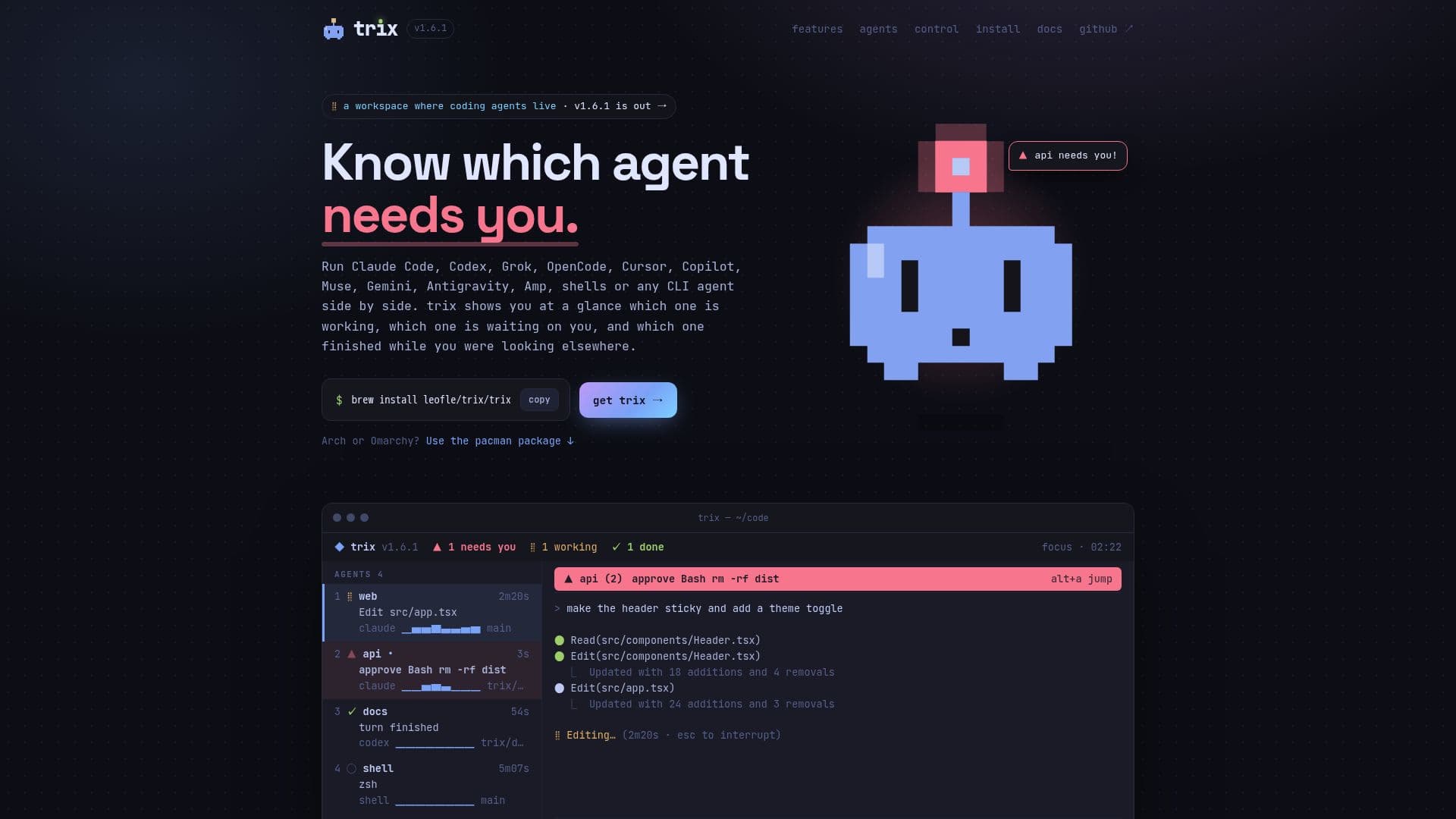
trix is a terminal workspace designed for coding agents, offering a unified view of their activity. It allows users to monitor which agents are actively working, require attention, or have completed tasks in the background. The platform provides real-time notifications and quick navigation to agents needing interaction, enhancing productivity for developers working with multiple AI coding assistants.

Visit Website
Share
trix screenshot
trix screenshot

trix provides a dedicated terminal workspace for managing various coding agents, including Claude Code, Codex, Grok, OpenCode, Cursor, GitHub Copilot CLI, Muse Code, Gemini CLI, Antigravity, and Amp. It addresses the limitations of traditional terminal multiplexers like tmux and zellij by building its functionality around the specific states and needs of each agent.

Read More

The core functionality of trix revolves around agent communication. Agents report their status directly to trix, indicating when a prompt is sent, a tool is run, user input is required, or a task is finished. This direct reporting mechanism ensures accurate status updates without relying on screen scraping or modifying agent configurations.

Key features include robust notification systems: a red bar appears over the active pane, accompanied by a desktop notification and a bell sound when an agent is waiting for user input. A distinct chime alerts users when a background task completes. Navigation is streamlined with keyboard shortcuts; for instance, Alt+A instantly jumps to the agent that has been waiting the longest, or to finished work if no agent requires immediate attention. Alt+G provides a side-by-side view of all agents, with those needing attention highlighted in red.

trix integrates worktrees, allowing each agent to operate within its own Git worktree on a separate branch. This prevents file conflicts when multiple agents are running concurrently. Agents also run in a background server, meaning they continue working even if the terminal window is closed. In case of a crash or reboot, conversations are automatically resumed.

Additional capabilities include searching across all agents, sending a single prompt to multiple agents, a context gauge, customizable layouts, named sessions, and 23 themes. trix initiates each agent, providing necessary resources without altering existing agent configurations. If an agent is not installed, trix facilitates its installation upon first use. The platform also supports agents running other agents, allowing for complex, multi-agent workflows, while always requiring explicit user permission for prompts.

  • CategoryAI Coding Assistants
  • Pricing ModelNot specified
  • DeploymentCloud
  • PlatformsLinux, macOS

  • Terminal workspace for coding agents

  • Supports Claude Code, Codex, Grok, OpenCode, Cursor, GitHub Copilot CLI, Muse Code, Gemini CLI, Antigravity, Amp

  • Real-time agent status monitoring

  • Desktop notifications for agent attention

  • Audio alerts for task completion

  • Quick navigation to waiting agents (Alt+A)

  • Side-by-side agent view (Alt+G)

  • Built-in Git worktrees for agents

  • Background server for continuous agent operation

  • Conversation resumption after crashes/reboots

  • Search across all agents

  • One prompt to many agents

  • Context gauge for agents

  • Customizable layouts

  • Named sessions

  • 23 themes

  • Agent installation on first use

  • Agents can run other agents

  1. Install trix: Run on Linux or macOS using brew or pacman, or follow other installation methods.

  2. Configure terminal: On Mac, set your terminal's Option key to send Alt for trix shortcuts.

  3. Start an agent: Launch an agent within trix; it will install if not already present.

  4. Monitor agents: Use Alt+G to see all agents, or Alt+A to jump to the one needing attention.

  5. Interact with agents: Respond to agent prompts and manage their tasks within the trix workspace.

  6. Run in background: Close the terminal window; agents will continue working in the background server.

  • Managing Multiple Coding Agents
  • Parallel Development with Agents
  • Background Code Generation
  • Efficient Agent Interaction
  • Streamlined Agent Workflow
  • Codebase Exploration and Search

trix Reviews

Loading...

Popular AI Tools Like trix

Farol

AI Apps

Farol is a free, open-source macOS terminal app designed for AI coding agents. It allows users to run Claude Code and Codex in parallel, each within its own git worktree,…

AI Coding Assistants
View Tool

AI Apps

Free, open-source macOS terminal app designed for AI coding agents. It allows users to run Claude Code and Codex in parallel, each within its own git worktree,…Farol is a free, open-source macOS terminal app designed for AI coding agents. It allows users to run Claude Code and Codex in parallel, each within its own git worktree,…

AI Coding Assistants
See the Top 250 AI Apps

CodeAgentSwarm is an Agentic Development Environment (ADE) that allows users to run and supervise multiple AI coding agents in parallel. It supports various agents like Claude…

AI Agent Builders

Ranked #121 for Explaining code

View Tool

Agentic Development Environment (ADE) that allows users to run and supervise multiple AI coding agents in parallel. It supports various agents like Claude…CodeAgentSwarm is an Agentic Development Environment (ADE) that allows users to run and supervise multiple AI coding agents in parallel. It supports various agents like Claude…

AI Agent Builders
Ranked #121 for Explaining code

Orca

AI Apps

A free, open-source Agent Development Environment that runs Claude Code, Codex, Gemini, and other CLI coding agents in parallel across isolated git worktrees.

AI Coding Assistants

Ranked #33 for DevOps Engineers

View Tool

AI Apps

A free, open-source Agent Development Environment that runs Claude Code, Codex, Gemini, and other CLI coding agents in parallel across isolated git worktrees.

AI Coding Assistants
Ranked #33 for DevOps Engineers

SwarmPane

AI Apps

SwarmPane is a desktop workspace designed for AI coding agents, allowing users to run multiple CLIs like Claude Code and Codex side-by-side in real terminals. It integrates…

AI Coding Assistants

Ranked #155 in Coding & Development

View Tool

AI Apps

Desktop workspace designed for AI coding agents, allowing users to run multiple CLIs like Claude Code and Codex side-by-side in real terminals. It integrates…SwarmPane is a desktop workspace designed for AI coding agents, allowing users to run multiple CLIs like Claude Code and Codex side-by-side in real terminals. It integrates…

AI Coding Assistants
Ranked #155 in Coding & Development

MacOS terminal designed for AI coding agents like Claude Code and Codex. It organizes projects into gems, allows parallel sessions in separate worktrees, and provides…crystl is a macOS terminal designed for AI coding agents like Claude Code and Codex. It organizes projects into gems, allows parallel sessions in separate worktrees, and provides…

AI Coding Assistants
Ranked #142 in AI Coding Assistants

Codara Studio is a comprehensive desktop console for AI coding agents, integrating file exploration, editing, live agent terminals, git graph, and run orchestration. It supports…

AI Coding Assistants

Ranked #227 for Explaining code

View Tool

Comprehensive desktop console for AI coding agents, integrating file exploration, editing, live agent terminals, git graph, and run orchestration. It supports…Codara Studio is a comprehensive desktop console for AI coding agents, integrating file exploration, editing, live agent terminals, git graph, and run orchestration. It supports…

AI Coding Assistants
Ranked #227 for Explaining code

Muster

AI Apps

Muster is a free, open-source Mac menu bar app designed for Claude Code, Codex, and Cursor sessions. It notifies you when an AI agent needs attention, allows you to approve or…

AI Coding Assistants
View Tool

AI Apps

Free, open-source Mac menu bar app designed for Claude Code, Codex, and Cursor sessions. It notifies you when an AI agent needs attention, allows you to approve or…Muster is a free, open-source Mac menu bar app designed for Claude Code, Codex, and Cursor sessions. It notifies you when an AI agent needs attention, allows you to approve or…

AI Coding Assistants
See the Top 250 AI Apps

Foxpit

AI Apps

Foxpit is a desktop application that orchestrates multiple AI coding agents like Claude Code, Codex, OpenCode, and Antigravity. It allows them to work as a unified team with…

AI Coding Assistants

Ranked #222 for Explaining code

View Tool

AI Apps

Desktop application that orchestrates multiple AI coding agents like Claude Code, Codex, OpenCode, and Antigravity. It allows them to work as a unified team with…Foxpit is a desktop application that orchestrates multiple AI coding agents like Claude Code, Codex, OpenCode, and Antigravity. It allows them to work as a unified team with…

AI Coding Assistants
Ranked #222 for Explaining code
1 of 8