
ToolPotion
AI Advisor
Submit a Tool (Free)

Text Photo AI

AI AppsAI Photo EditorsFreemium · Web Browser, Mobile Browser

Text Photo AI is an online editor for adding captions to images for free, or using AI to replace and remove existing text. It operates directly in your browser, eliminating the need for app downloads. Users can customize fonts, colors, and placement for new captions, or leverage AI for more complex edits like updating product images or correcting typos on signs.

Visit Website
Share
Text Photo AI screenshot

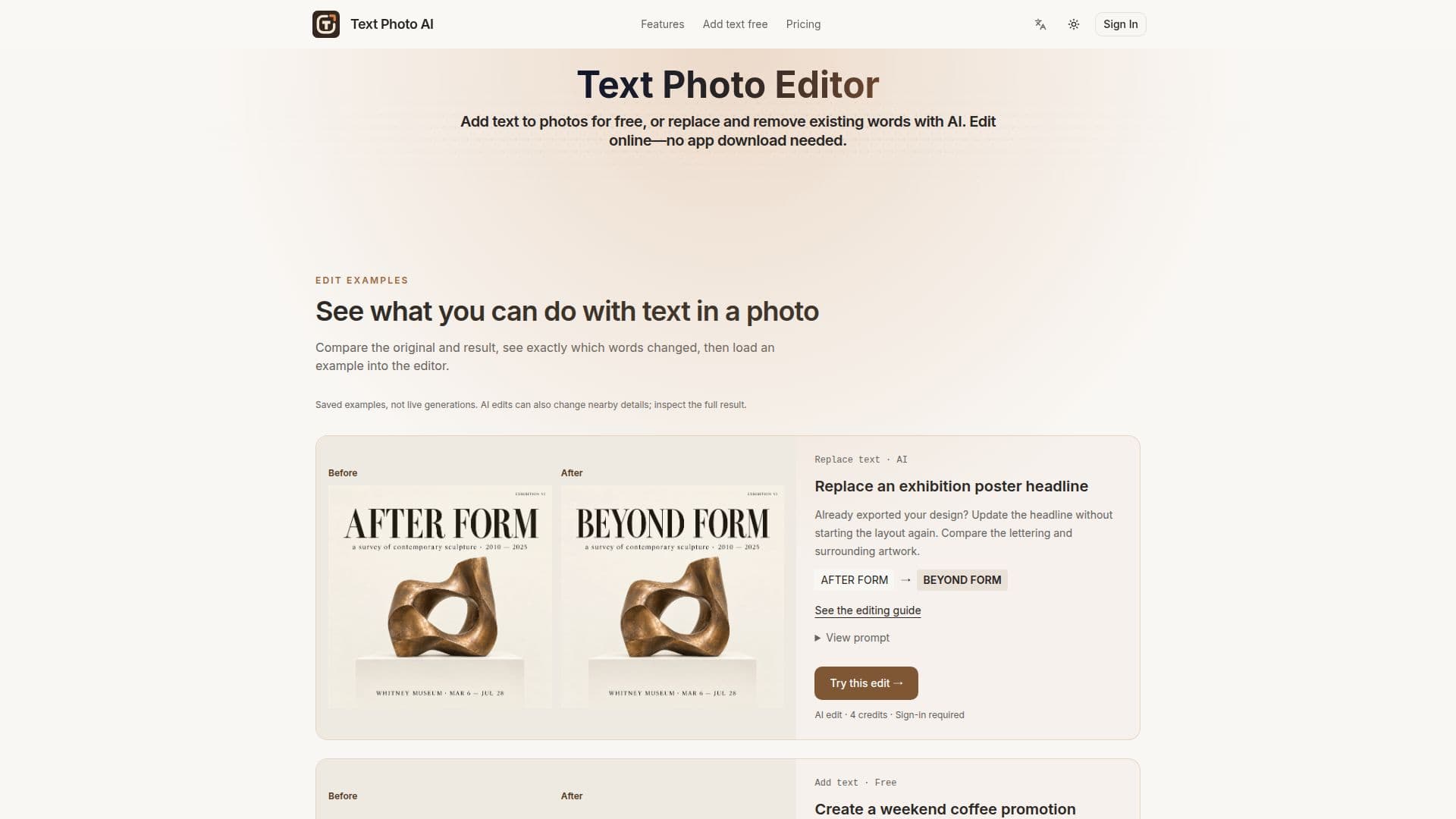
Text Photo AI provides a versatile online photo editor that allows users to manipulate text within images. The platform offers two primary modes: adding new captions for free, and using AI to replace or remove existing words. The free caption mode enables users to type new text, drag it into position, and customize its font, size, and color, with instant preview and free PNG download, all without requiring a sign-up or account. This process runs locally in the user's browser, ensuring privacy for the uploaded photo.

Read More

For more advanced text manipulation, Text Photo AI utilizes AI capabilities to replace or remove existing words in images. This feature is ideal for updating product images, correcting typos on posters or menus, or translating signs. Users need to sign in and use credits for these AI-powered edits. The AI attempts to match the appearance of existing fonts and backgrounds, though exact preservation is not guaranteed, and users are advised to review results carefully before publishing. Examples include changing a poster headline, updating a bakery sign, or correcting a misspelled dish name on a menu.

Credit packs are available for occasional use, while subscriptions offer a lower cost per edit for regular users. Each AI generation on the homepage typically uses 4 credits. Pack credits do not expire, but trial credits last 7 days and subscription credits refresh monthly without rolling over. The platform supports JPG or PNG uploads up to 10 MB and is accessible on mobile browsers without an app. While free caption editing keeps photos local, AI edits require uploading the image for processing. Users are encouraged to download results promptly as the editor is not permanent image storage.

  • CategoryAI Photo Editors
  • Pricing ModelFreemium
  • DeploymentCloud
  • PlatformsWeb Browser, Mobile Browser

  • Add Text to Photos: Place new captions over images with customizable font, size, and color.

  • Free Caption Editing: Add text and download as PNG without sign-up or credits.

  • AI Text Replacement: Change existing words in images while attempting to match original font and background.

  • AI Text Removal: Erase existing words from images and reconstruct the background.

  • Online Browser Editor: Edit photos directly in your web browser, no app download required.

  • Mobile Browser Support: Access and use the editor on mobile devices.

  • Image Uploads: Supports JPG and PNG files up to 10 MB.

  • Credit Packs: Purchase one-time credit packs for AI edits with no expiration.

  • Subscription Plans: Monthly subscriptions available for regular AI text editing.

  • Credit Refund Policy: Credits are returned for explicitly failed or canceled AI tasks.

  • Local Processing for Captions: Free caption edits keep photos in the browser, not uploaded.

  • AI Edit Examples: View before-and-after examples of text replacement and removal.

  • Font Matching Attempt: AI tries to match existing font appearance for replacements.

  • Multi-Text-Box Layouts: Supports complex caption arrangements with independent styling.

  • Email Support: Contact [email protected] for assistance.

  1. Upload Image: Upload a JPG or PNG photo up to 10 MB, or select a prepared example.

  2. Choose Text Task: Select 'Add text' for free captions or 'Replace/Remove text' for AI edits.

  3. Edit Text: For captions, type, drag, and style text. For AI edits, specify original and new text.

  4. Review & Adjust: Preview captions instantly. For AI, review credit cost and sign in.

  5. Download Image: Export free captions as PNG. Review AI results before downloading.

  • Add Captions to Photos
  • Update Exhibition Posters
  • Create Coffee Promotions
  • Remove Outdated Promotions
  • Correct Typos on Menus
  • Update Bakery Signs
  • Translate Storefront Signs
  • Edit Screenshot Labels
  • Revise Book Cover Titles
  • Modify Event Poster Dates

Text Photo AI Reviews

Loading...

Popular AI Tools Like Text Photo AI

Edit Image Text is an online AI tool that allows users to modify existing text within images, photos, screenshots, JPGs, PNGs, and WebP files. It enables replacement of words…

AI Photo Editors
View Tool

Online AI tool that allows users to modify existing text within images, photos, screenshots, JPGs, PNGs, and WebP files. It enables replacement of words…Edit Image Text is an online AI tool that allows users to modify existing text within images, photos, screenshots, JPGs, PNGs, and WebP files. It enables replacement of words…

AI Photo Editors
See the Top 250 AI Apps

Pictext

AI Apps

Pictext is an AI image text editor that allows users to replace or remove text in images while maintaining the original style and layout. It is free to try and operates entirely…

AI Photo Editors

Ranked #199 for Removing objects from photos

View Tool

AI Apps

AI image text editor that allows users to replace or remove text in images while maintaining the original style and layout. It is free to try and operates entirely…Pictext is an AI image text editor that allows users to replace or remove text in images while maintaining the original style and layout. It is free to try and operates entirely…

AI Photo Editors
Ranked #199 for Removing objects from photos

ImageTextEditor allows users to edit, add, remove, extract, and translate text within images online. It offers a browser-based workflow, enabling users to upload images, modify…

AI Photo Editors
View Tool

Allows users to edit, add, remove, extract, and translate text within images online. It offers a browser-based workflow, enabling users to upload images, modify…ImageTextEditor allows users to edit, add, remove, extract, and translate text within images online. It offers a browser-based workflow, enabling users to upload images, modify…

AI Photo Editors
See the Top 250 AI Apps

Change Text in Image is an AI photo text editor designed for replacing wording in existing images like photos, screenshots, posters, and ads. Users select the text area, input…

AI Photo Editors
View Tool

AI photo text editor designed for replacing wording in existing images like photos, screenshots, posters, and ads. Users select the text area, input…Change Text in Image is an AI photo text editor designed for replacing wording in existing images like photos, screenshots, posters, and ads. Users select the text area, input…

AI Photo Editors
See the Top 250 AI Apps

EditTextInImage is an AI tool that allows users to change text in images without design skills. Upload an image, specify the original and replacement text, and generate edits…

AI Photo Editors
View Tool

AI tool that allows users to change text in images without design skills. Upload an image, specify the original and replacement text, and generate edits…EditTextInImage is an AI tool that allows users to change text in images without design skills. Upload an image, specify the original and replacement text, and generate edits…

AI Photo Editors
See the Top 250 AI Apps

AI Picture Editor is a free online photo editor that uses AI to transform images with text prompts. Users can remove backgrounds and objects, restore old photos, enhance quality,…

AI Photo Editors

Ranked #35 in Background Removers

View Tool

Free online photo editor that uses AI to transform images with text prompts. Users can remove backgrounds and objects, restore old photos, enhance quality,…AI Picture Editor is a free online photo editor that uses AI to transform images with text prompts. Users can remove backgrounds and objects, restore old photos, enhance quality,…

AI Photo Editors
Ranked #35 in Background Removers

Retypit

AI Apps

Retypit is an online AI tool that allows users to edit text within images while preserving the original font, color, and style. It enables quick modifications to screenshots,…

AI Photo Editors
View Tool

AI Apps

Online AI tool that allows users to edit text within images while preserving the original font, color, and style. It enables quick modifications to screenshots,…Retypit is an online AI tool that allows users to edit text within images while preserving the original font, color, and style. It enables quick modifications to screenshots,…

AI Photo Editors
See the Top 250 AI Apps

Make It Say is an online tool that allows users to edit text within any image, photo, or screenshot while preserving the original font, color, and angle. It redraws only the…

AI Photo Editors

Ranked #37 for Extracting text from images

View Tool

Online tool that allows users to edit text within any image, photo, or screenshot while preserving the original font, color, and angle. It redraws only the…Make It Say is an online tool that allows users to edit text within any image, photo, or screenshot while preserving the original font, color, and angle. It redraws only the…

AI Photo Editors
Ranked #37 for Extracting text from images
1 of 8