ToolPotion
AI Advisor
Submit a Tool (Free)

styleLatex

styleLatex is a free online LaTeX converter that transforms PDF, image, handwriting, and Word files into editable LaTeX source code. It compiles and repairs each page, ensuring the output is clean and ready for use. The platform also offers conversion from LaTeX to Word, Markdown, HTML, and Typst, alongside various free tools for academic writing.

Visit Website
Share
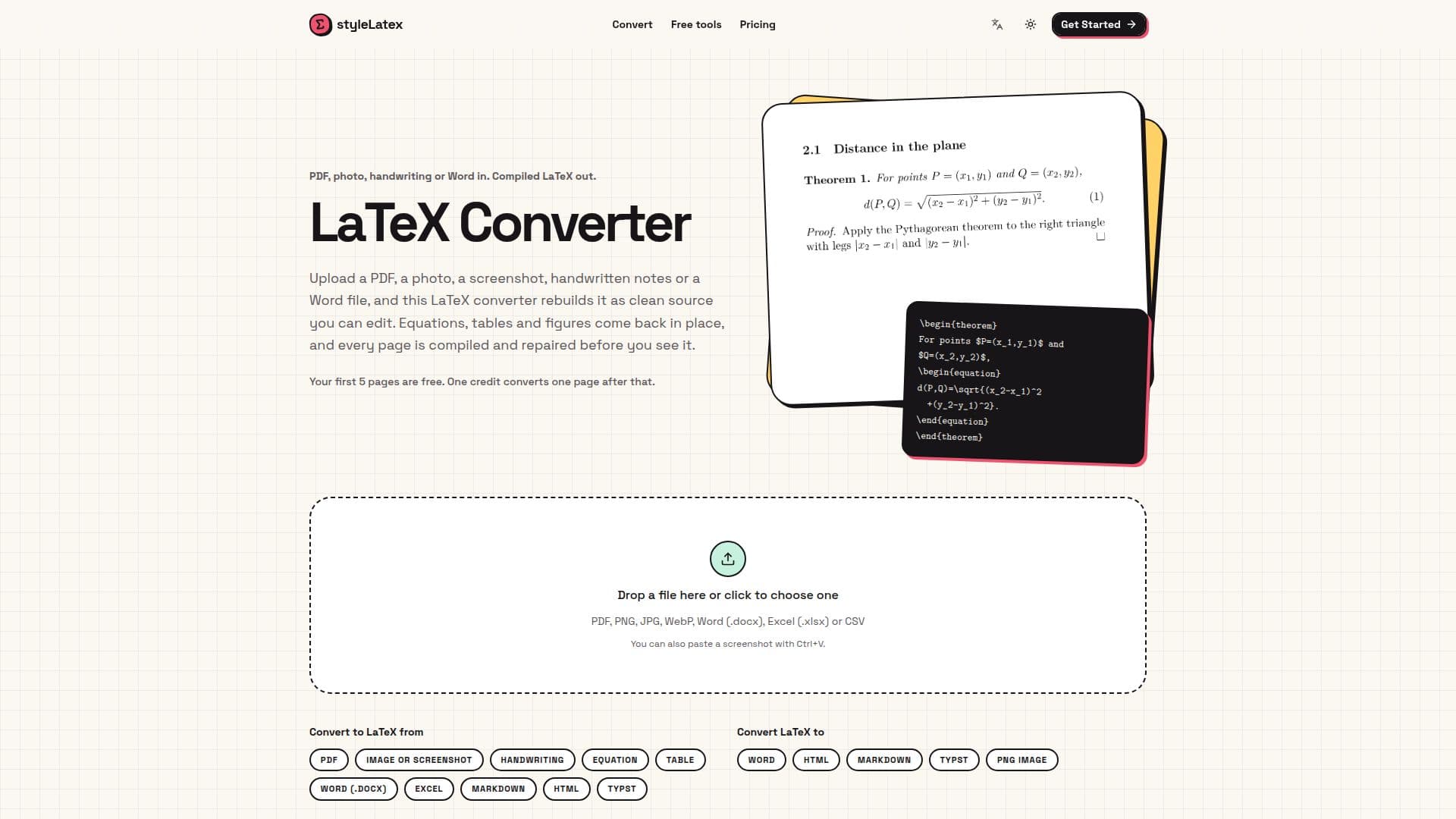
styleLatex screenshot

styleLatex provides a comprehensive suite of tools for converting various document formats to and from LaTeX. Its primary function is to convert non-LaTeX files such as PDFs, images (including photos and screenshots), handwritten notes, and Word documents into compilable LaTeX source. The process involves a vision model reading each page, writing the LaTeX code, and then using XeLaTeX to compile it. The model performs up to two repair rounds to fix any compilation errors, ensuring the generated LaTeX is clean and functional. Anything the model cannot read with certainty is marked as `[unreadable]`.

Read More

Beyond converting to LaTeX, styleLatex also facilitates conversions from LaTeX to other formats like Word (.docx), Markdown, HTML, and Typst. The LaTeX to Word converter, powered by Pandoc, preserves headings, lists, tables, citations, and converts equations into native Word equations. For images, the platform can convert a LaTeX equation into a PNG, SVG, or JPG image. Additionally, it offers specialized tools for converting Excel tables to LaTeX, generating LaTeX matrices, and creating academic CV templates.

The platform offers a freemium model. Many tools, such as Excel to LaTeX, Markdown to LaTeX, HTML to LaTeX, and Typst to LaTeX, are completely free and do not require an account. LaTeX to Word conversion is free after signing in. However, converting PDFs, photos, handwriting, and Word files consumes credits, with one credit per page or per 6,000-character part of a Word file. Free accounts can convert up to 5 pages at a time, Starter plans up to 10, and Pro plans up to 20. Uploaded files are not stored; page images and documents are held in memory only while a job runs and are deleted afterward, though the generated LaTeX is saved to your history for future access.

styleLatex is designed for students, researchers, academics, and anyone working with LaTeX documents who needs to convert between formats efficiently. It addresses common pain points like retyping complex equations and tables, ensuring that figures are cropped out and bundled with the .tex file. The service emphasizes accuracy, especially for clean printed pages, and provides clear indicators for unreadable sections in handwritten notes. It also includes a variety of citation and BibTeX management tools, as well as utilities for word counting, character counting, reading time calculation, and statistical analysis.

  • CategoryAI Document & PDF Tools
  • Pricing ModelFreemium
  • DeploymentCloud
  • PlatformsWeb

  • PDF to LaTeX Conversion

  • Image to LaTeX Conversion (photos, screenshots)

  • Handwriting to LaTeX Conversion

  • Word (.docx) to LaTeX Conversion

  • LaTeX to Word (.docx) Conversion with editable equations

  • LaTeX to Markdown Conversion

  • LaTeX to HTML Conversion

  • LaTeX to Typst Conversion

  • Excel/CSV to LaTeX Table Conversion

  • LaTeX Equation to PNG/SVG/JPG Image Conversion

  • LaTeX Table Generator

  • LaTeX Matrix Generator

  • DOI to BibTeX Converter

  • RIS to BibTeX Converter

  • BibTeX Cleaner

  • Academic CV Template Generator

  1. Upload File: Drop a PDF, image, or Word file into the converter, or paste a screenshot.

  2. Select Pages: For PDFs, tick the specific pages you want to convert; Word files are read and split automatically.

  3. Convert and Review: Start the conversion, then check the generated LaTeX source alongside a PDF preview, editing as needed.

  4. Download Output: Export the source as a .tex file, download the compiled PDF, save a Word copy, or grab a .zip with cropped figures.

  • Academic Paper Writing
  • Converting Handwritten Notes
  • Creating Presentations
  • Journal Submissions
  • Migrating Documents
  • Generating Publication Lists
  • Building Course Syllabi
  • Converting Spreadsheets to Tables
  • Editing Complex Equations
  • Collaborative Document Editing

styleLatex Reviews

Loading...

Popular AI Tools Like styleLatex

An online converter that turns PDF files into clean, editable DOCX documents in the browser, supporting both text-based and scanned PDFs, with free conversions up to 10MB and…

AI Document & PDF Tools
View Tool

Mathpix

AI Apps

Mathpix is AI-powered document conversion and OCR technology that turns images and PDFs, including math, chemistry, handwriting, and tables, into LaTeX, DOCX, Markdown, Excel, and…

AI Document & PDF ToolsEducation & E-learning

Ranked #214 in AI Apps

View Tool

AI Apps

AI-powered document conversion and OCR technology that turns images and PDFs, including math, chemistry, handwriting, and tables, into LaTeX, DOCX, Markdown, Excel, and…Mathpix is AI-powered document conversion and OCR technology that turns images and PDFs, including math, chemistry, handwriting, and tables, into LaTeX, DOCX, Markdown, Excel, and…

AI Document & PDF ToolsEducation & E-learning
Ranked #214 in AI Apps

imagetotext.me is a free online OCR tool that extracts editable, searchable text from images and PDFs, supporting bulk conversion, handwriting, and math, with no signup required.

AI Document & PDF Tools

Ranked #52 for Extracting text from images

View Tool

Free online OCR tool that extracts editable, searchable text from images and PDFs, supporting bulk conversion, handwriting, and math, with no signup required.imagetotext.me is a free online OCR tool that extracts editable, searchable text from images and PDFs, supporting bulk conversion, handwriting, and math, with no signup required.

AI Document & PDF Tools
Ranked #52 for Extracting text from images

PDFtoMD

AI Apps

PDFtoMD is a free online AI tool that converts any PDF, including scans, into clean, structured Markdown in seconds, preserving headings, lists, and paragraphs for editing and AI…

AI Document & PDF Tools
View Tool

AI Apps

Free online AI tool that converts any PDF, including scans, into clean, structured Markdown in seconds, preserving headings, lists, and paragraphs for editing and AI…PDFtoMD is a free online AI tool that converts any PDF, including scans, into clean, structured Markdown in seconds, preserving headings, lists, and paragraphs for editing and AI…

AI Document & PDF Tools
See the Top 250 AI Apps

2markdown

AI Apps

2markdown is a browser-based Markdown converter and viewer with 37 tools for turning PDFs, Word docs, HTML, tables, and public web content into clean Markdown, aimed at writers,…

AI Document & PDF Tools

Ranked #204 in AI Document & PDF Tools

View Tool

AI Apps

Browser-based Markdown converter and viewer with 37 tools for turning PDFs, Word docs, HTML, tables, and public web content into clean Markdown, aimed at writers,…2markdown is a browser-based Markdown converter and viewer with 37 tools for turning PDFs, Word docs, HTML, tables, and public web content into clean Markdown, aimed at writers,…

AI Document & PDF Tools
Ranked #204 in AI Document & PDF Tools

MarkAny Markdown Converter transforms various file types into Markdown and vice versa. It supports batch processing, automatic OCR for images, and provides an editable preview for…

AI Document & PDF Tools
View Tool

Transforms various file types into Markdown and vice versa. It supports batch processing, automatic OCR for images, and provides an editable preview for…MarkAny Markdown Converter transforms various file types into Markdown and vice versa. It supports batch processing, automatic OCR for images, and provides an editable preview for…

AI Document & PDF Tools
See the Top 250 AI Apps

Image to Text Converter is a free online tool that uses OCR technology to extract text from images, photos, and scanned documents. It supports multiple formats and languages,…

AI Document & PDF Tools

Ranked #71 for Extracting text from images

View Tool

Free online tool that uses OCR technology to extract text from images, photos, and scanned documents. It supports multiple formats and languages,…Image to Text Converter is a free online tool that uses OCR technology to extract text from images, photos, and scanned documents. It supports multiple formats and languages,…

AI Document & PDF Tools
Ranked #71 for Extracting text from images

AnyDoc to MD allows users to convert various document formats, including Word and PDF, into clean Markdown. It supports batch processing and OCR, making it ideal for AI workflows…

AI Document & PDF Tools

Ranked #224 in AI Document & PDF Tools

View Tool

AnyDoc to MD allows users to convert various document formats, including Word and PDF, into clean Markdown. It supports batch processing and OCR, making it ideal for AI workflows…

AI Document & PDF Tools
Ranked #224 in AI Document & PDF Tools
1 of 8