
ToolPotion
AI Advisor
Submit a Tool (Free)

InkScan

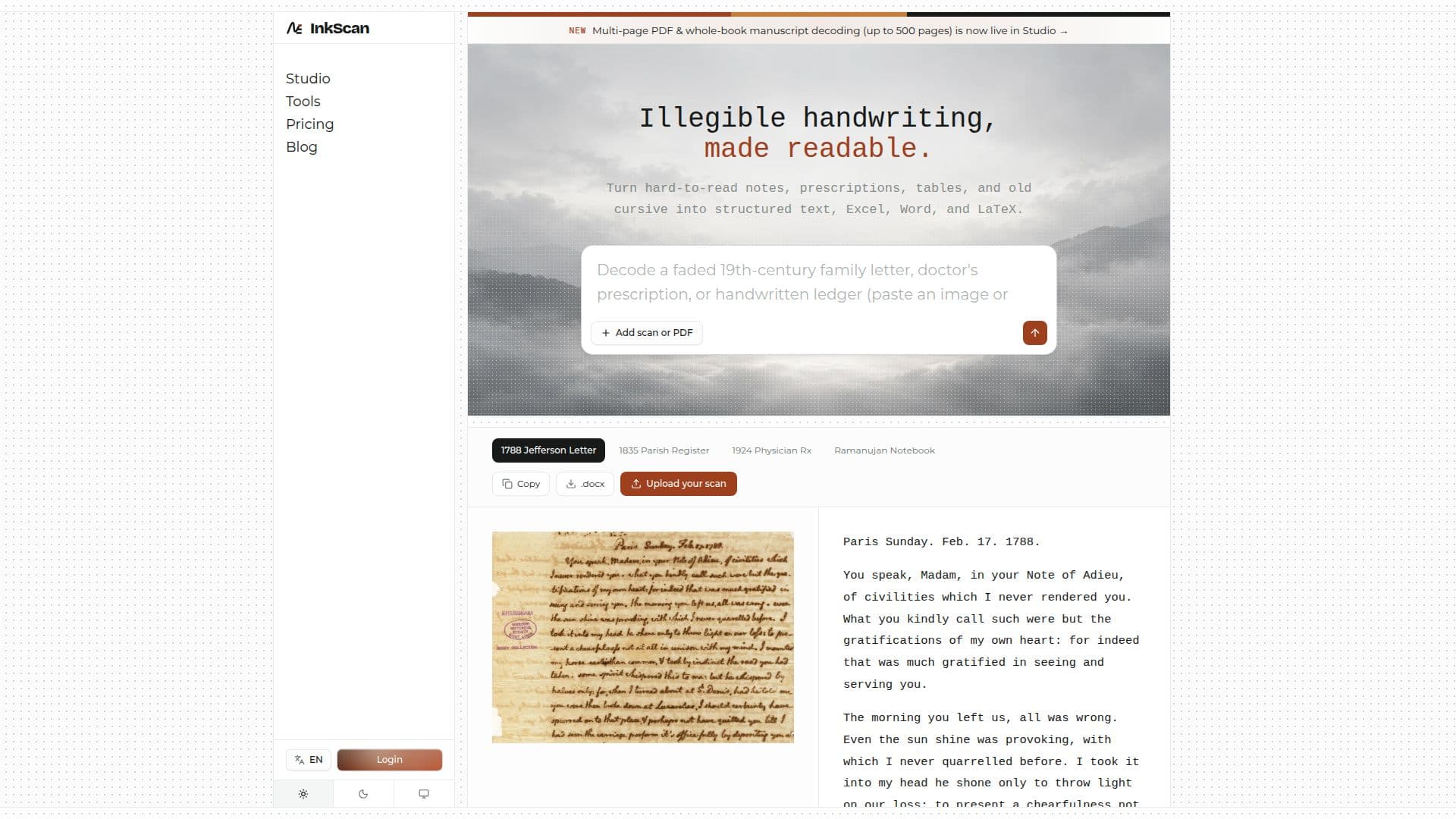
InkScan transforms hard-to-read handwritten notes, prescriptions, tables, equations, and old cursive into structured, editable digital files. It supports output formats like text, Excel, Word, and LaTeX. Users can review and confirm uncertain words before export. The service offers two free scans daily, with additional pages available for one-time purchase without subscription.

Visit Website
Share
InkScan screenshot
InkScan screenshot

InkScan is a versatile tool designed to convert various forms of handwriting into structured and editable digital formats. It addresses the challenge of illegible notes, medical prescriptions, complex tables, mathematical equations, and historical cursive documents by transforming them into usable text, Excel spreadsheets, Word documents, or LaTeX notation.

Read More

The platform offers several specialized conversion options. The Handwriting to Text feature extracts notes, journal pages, and whiteboard content into editable text. For medical professionals or individuals managing prescriptions, the Prescription Reader transcribes difficult medical handwriting into a structured medication card, emphasizing the need for careful review and confirmation of every medicine and dose. The Handwriting to Excel function is ideal for converting handwritten tables, intake sheets, and ledgers into downloadable .xlsx or .csv files. Similarly, Handwriting to Word converts notes, essays, and meeting pages into editable Word documents.

InkScan also includes an Old Cursive Reader, which transcribes old letters and archive pages, presenting a modern rewrite alongside the original for easy comparison. For academic and scientific users, the Math to LaTeX feature converts handwritten equations and derivations into copy-ready LaTeX notation, streamlining the process of creating technical documents.

A key aspect of InkScan's design is its emphasis on accuracy and user verification. Outputs remain editable, allowing users to review and correct names, numbers, and uncertain words before copying or exporting. The system specifically marks uncertain words in archive outputs, prompting users to give them a second look rather than silently filling in potential gaps. This commitment to accuracy is particularly critical for sensitive data like prescriptions, where results are provided as transcription aids and not as medical advice, requiring user confirmation.

InkScan operates on a flexible pricing model. Users receive two free scans every day without needing an account. For those requiring more extensive use, one-time page packs are available for purchase, with credits that never expire and no subscription required. This pay-as-you-go approach includes packs of 100, 500, or 2,500 pages, catering to various needs from one-off batches to large archival projects. The service accepts major credit and debit cards via Stripe, ensuring secure payment processing.

  • CategoryAI Document & PDF Tools
  • Pricing ModelFreemium
  • DeploymentCloud
  • PlatformsWeb

  • Handwriting to Text Conversion

  • Prescription Reader for Medical Handwriting

  • Handwriting to Excel for Tables and Ledgers

  • Handwriting to Word for Notes and Essays

  • Old Cursive Reader with Modern Rewrite

  • Math to LaTeX Conversion for Equations

  • Editable Outputs for Review

  • Uncertain Word Marking

  • Prescription Confirmation Requirement

  • Two Free Scans Daily

  • One-Time Page Packs (No Subscription)

  • Credits Never Expire

  • Multi-page PDF, Word (.docx) & Excel (.xlsx) support

  • Partner chat and 3x ink magnifier (Researcher Pack)

  • Whole-book PDF parsing (Researcher Pack)

  1. Upload Document: Start by uploading your handwritten page, note, or document.

  2. Choose Output Format: Select the desired output format, such as Text, Excel, Word, or LaTeX.

  3. Review Transcription: Examine the transcribed output, paying attention to marked uncertain words.

  4. Confirm Details: For prescriptions, confirm all medicine names and doses.

  5. Edit and Refine: Make any necessary edits or refinements to the digital text.

  6. Download or Export: Download the final document in your chosen format or export it for use.

  • Digitizing Handwritten Notes
  • Transcribing Medical Prescriptions
  • Converting Handwritten Tables to Excel
  • Digitizing Old Cursive Documents
  • Converting Math to LaTeX
  • Creating Editable Word Documents
  • Archiving Historical Records
  • Researching Family Archives

InkScan Reviews

Loading...

Popular AI Tools Like InkScan

Pen to Print converts handwritten notes, scans, and PDFs into editable text using advanced OCR technology. It handles cursive and messy handwriting, preserving layout and…

AI Document & PDF ToolsEducation & E-learning

Ranked #26 for Extracting text from images

View Tool

Converts handwritten notes, scans, and PDFs into editable text using advanced OCR technology. It handles cursive and messy handwriting, preserving layout and…Pen to Print converts handwritten notes, scans, and PDFs into editable text using advanced OCR technology. It handles cursive and messy handwriting, preserving layout and…

AI Document & PDF ToolsEducation & E-learning
Ranked #26 for Extracting text from images

PDNob PDF Editor is an AI-powered tool for editing, converting, and annotating PDFs. It offers OCR technology for accurate text extraction and conversion to Word or Excel formats,…

AI Document & PDF Tools

Ranked #88 in AI Document & PDF Tools

View Tool

AI-powered tool for editing, converting, and annotating PDFs. It offers OCR technology for accurate text extraction and conversion to Word or Excel formats,…PDNob PDF Editor is an AI-powered tool for editing, converting, and annotating PDFs. It offers OCR technology for accurate text extraction and conversion to Word or Excel formats,…

AI Document & PDF Tools
Ranked #88 in AI Document & PDF Tools

Mathpix

AI Apps

Mathpix is AI-powered document conversion and OCR technology that turns images and PDFs, including math, chemistry, handwriting, and tables, into LaTeX, DOCX, Markdown, Excel, and…

AI Document & PDF ToolsEducation & E-learning

Ranked #215 in AI Apps

View Tool

AI Apps

AI-powered document conversion and OCR technology that turns images and PDFs, including math, chemistry, handwriting, and tables, into LaTeX, DOCX, Markdown, Excel, and…Mathpix is AI-powered document conversion and OCR technology that turns images and PDFs, including math, chemistry, handwriting, and tables, into LaTeX, DOCX, Markdown, Excel, and…

AI Document & PDF ToolsEducation & E-learning
Ranked #215 in AI Apps

This AI tool removes handwriting from images, PDFs, and scanned documents. It preserves printed text, fixes distortions, and auto-crops edges. Available as a web app and mobile…

AI Document & PDF Tools

Ranked #132 in AI Document & PDF Tools

View Tool

An online converter that turns PDF files into clean, editable DOCX documents in the browser, supporting both text-based and scanned PDFs, with free conversions up to 10MB and…

AI Document & PDF Tools
View Tool

styleLatex

AI Apps

styleLatex is a free online LaTeX converter that transforms PDF, image, handwriting, and Word files into editable LaTeX source code. It compiles and repairs each page, ensuring…

AI Document & PDF ToolsEducation & E-learning

Ranked #218 in AI Document & PDF Tools

View Tool

AI Apps

Free online LaTeX converter that transforms PDF, image, handwriting, and Word files into editable LaTeX source code. It compiles and repairs each page, ensuring…styleLatex is a free online LaTeX converter that transforms PDF, image, handwriting, and Word files into editable LaTeX source code. It compiles and repairs each page, ensuring…

AI Document & PDF ToolsEducation & E-learning
Ranked #218 in AI Document & PDF Tools

imagetotext.me is a free online OCR tool that extracts editable, searchable text from images and PDFs, supporting bulk conversion, handwriting, and math, with no signup required.

AI Document & PDF Tools

Ranked #52 for Extracting text from images

View Tool

Free online OCR tool that extracts editable, searchable text from images and PDFs, supporting bulk conversion, handwriting, and math, with no signup required.imagetotext.me is a free online OCR tool that extracts editable, searchable text from images and PDFs, supporting bulk conversion, handwriting, and math, with no signup required.

AI Document & PDF Tools
Ranked #52 for Extracting text from images

Convertio OCR is an online tool that converts scanned documents into editable formats like Word, PDF, Excel, and Text. It supports multiple languages and file formats, offering a…

AI Document & PDF Tools
View Tool

Online tool that converts scanned documents into editable formats like Word, PDF, Excel, and Text. It supports multiple languages and file formats, offering a…Convertio OCR is an online tool that converts scanned documents into editable formats like Word, PDF, Excel, and Text. It supports multiple languages and file formats, offering a…

AI Document & PDF Tools
See the Top 250 AI Apps
1 of 8