Description
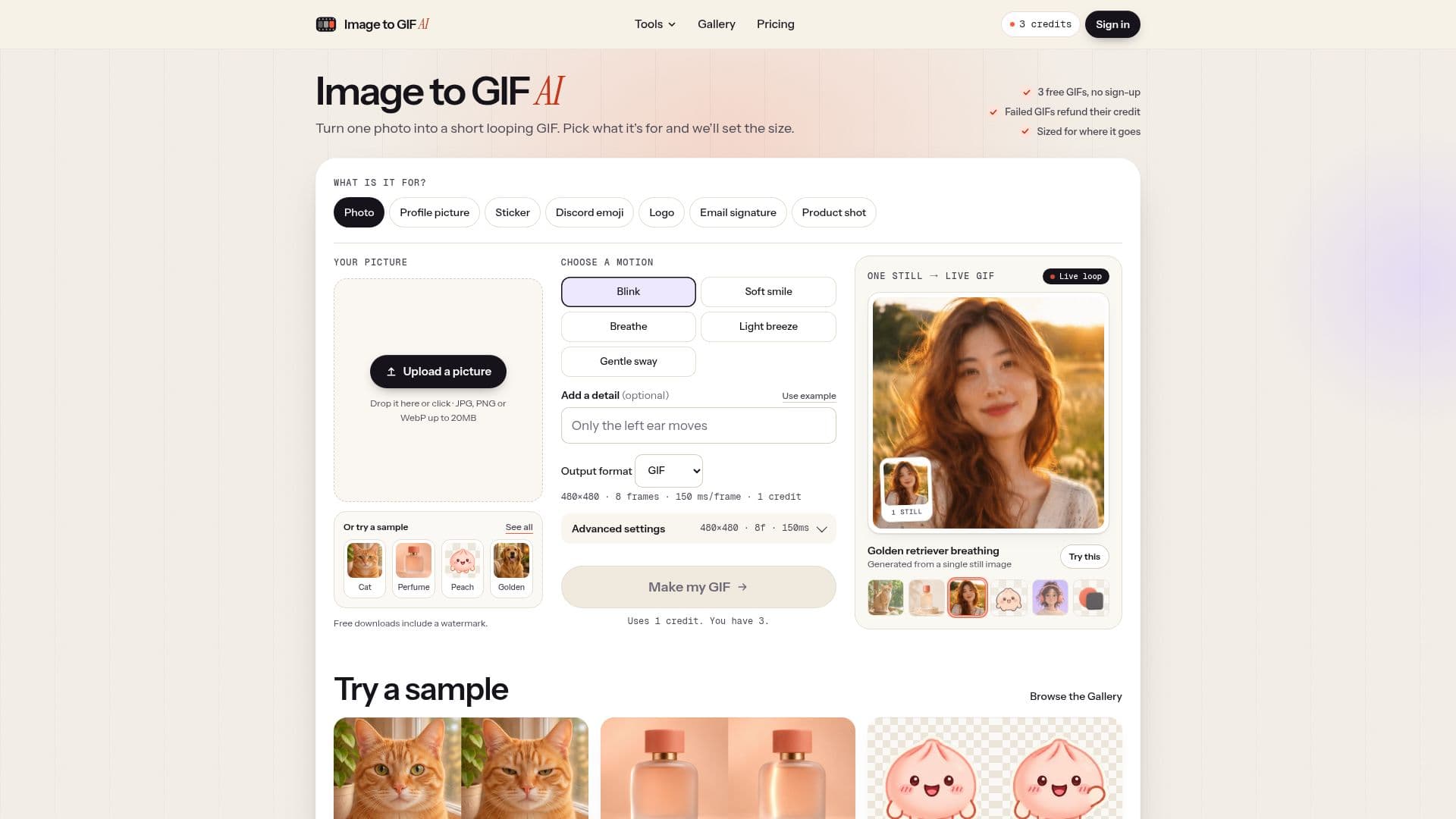
Image to GIF AI is a specialized tool designed to convert a single still image into a short, looping GIF. Unlike traditional GIF makers that require multiple frames, this platform utilizes an image model to draw the missing frames from one uploaded picture, maintaining the subject's position while introducing subtle changes like a blink or a gentle sway. This process eliminates the need for complex timelines or layer panels, simplifying GIF creation to three main decisions: the intended use of the GIF, the desired motion, and whether the initial result is satisfactory.
Read More
The tool supports JPG, PNG, and WebP uploads up to 20 MB, automatically scaling down larger images in the browser before upload. It offers seven predefined 'scenes'—such as Photo, Profile Picture, Sticker, Discord Emoji, Logo, Product Shot, and Email Signature—each with specific output specifications for size, frame time, background, and formats. This ensures the generated GIF is pre-sized and formatted to fit platform limits, removing the need for manual adjustments or looking up platform requirements.
Users can try the service with three free GIF generations without needing an account, and an additional five are granted upon signing up. Free GIFs include a small corner watermark, are rendered at standard quality, and are capped at 512px for larger scenes. Paid plans and credit packs remove the watermark, unlock full size and 'Fine' quality options, and allow for larger output sizes up to 960x960 pixels. The platform also allows users to adjust the GIF speed after generation without using additional credits.
Image to GIF AI is ideal for creating animated stickers, moving profile pictures, dynamic logos, Discord emojis, and small email banners. It is particularly effective with pictures featuring a clear subject on a plain background, sharp faces, or flat logos. However, it is not suited for long animations, lip-syncing, video-to-GIF conversion, or slideshows from multiple images. The service uses OpenAI's image models to produce frames, with original uploads deleted within 24 hours and results kept private unless shared by the user. Content moderation is in place to prevent inappropriate uploads.
- CategoryAI Image Generators
- Pricing ModelFreemium
- DeploymentCloud
- PlatformsWeb
Image to GIF AI's Core Features
Convert single image to looping GIF
Supports JPG, PNG, and WebP uploads up to 20 MB
Automatic image scaling for large files
Pre-sized outputs for various platforms (e.g., Discord, WhatsApp)
Multiple motion options (blink, sway, turn, etc.)
Adjust GIF speed after generation without extra credit
Three free generations without account, five more with sign-up
Watermark removal with paid plans or credit packs
Standard and Fine quality options
Output sizes tailored for specific use cases (e.g., 128x128 for Discord emoji)
Transparent background option for stickers and logos
Credit refund for failed or blocked GIF generations
Private results, deleted within 24 hours for originals
Advanced settings for frame count (2-16 frames)
Supports GIF, WebP, and MP4 output formats
How to use Image to GIF AI?
Upload Picture: Drag and drop a JPG, PNG, or WebP image up to 20 MB. Crop the scene if needed.
Choose Scene & Motion: Select the intended use for the GIF (e.g., 'Sticker') and pick a motion from the available options. Add a short note to steer the generation.
Preview & Adjust: Watch the generated GIF loop. Use the slider to change the frame speed without consuming additional credits.
Download GIF: Download the final looping GIF, sized and formatted for your chosen use.
Image to GIF AI's Use Cases
- Animated Stickers
- Moving Profile Pictures
- Dynamic Logos
- Discord Emojis
- Email Signatures
- Product Shots
- Pet & Portrait Animation
- Social Media Content