ToolPotion
AI Advisor
Submit a Tool (Free)

Hammock

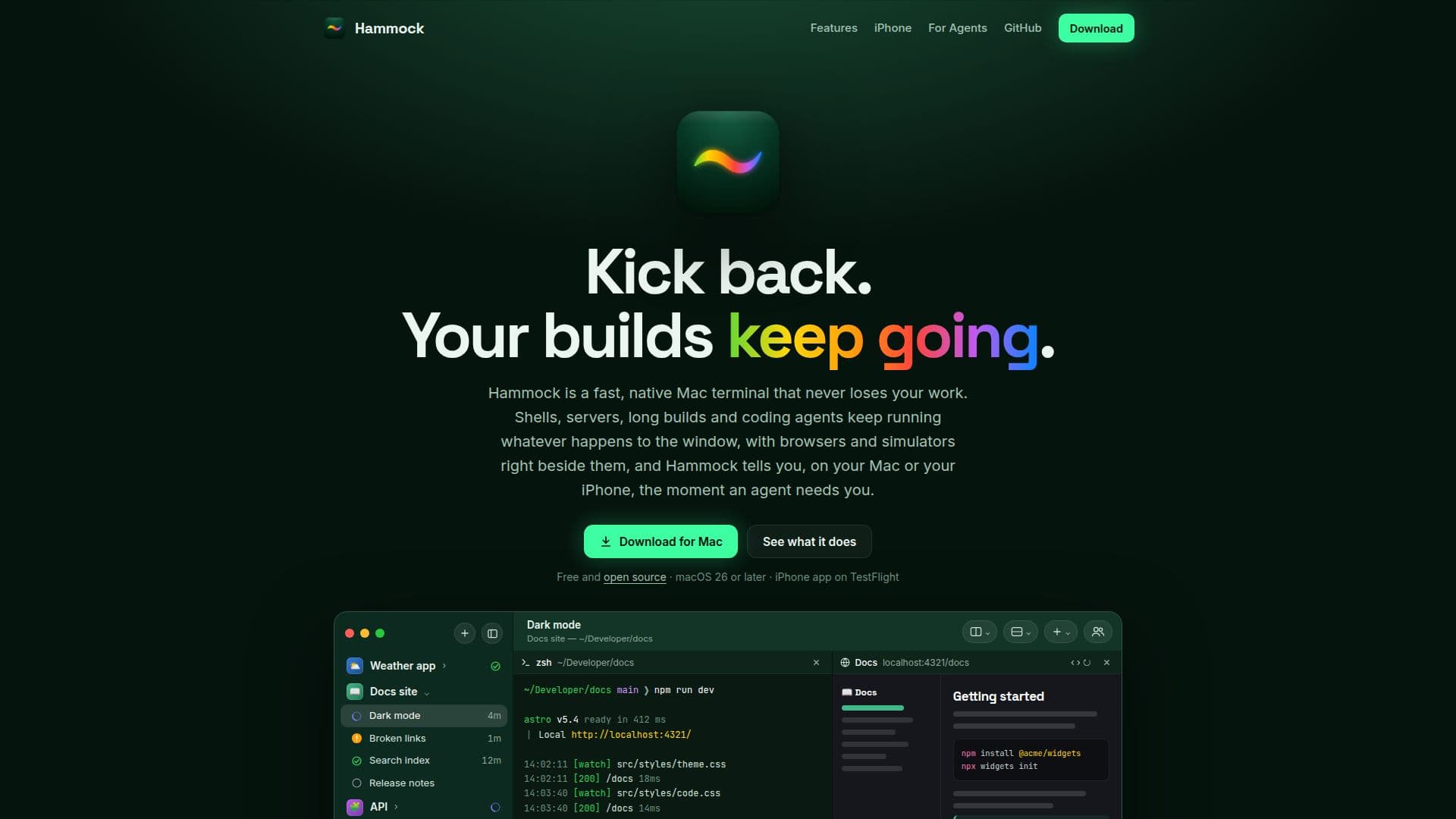
Hammock is a fast, native Mac terminal designed to enhance productivity for developers and coding agents. It ensures work is never lost, even after crashes or restarts, by keeping shells and servers running. The application integrates browser and simulator panes alongside terminal shells, and provides real-time notifications to Mac and iPhone users when a coding agent requires attention, enabling seamless workflow management.

Visit Website
Share
Hammock screenshot
Hammock screenshot

Hammock is a robust, native Mac terminal application engineered for speed and reliability, ensuring that users never lose their work. Built with `libghostty`, it offers a quick and faithful terminal experience, supporting true color, ligatures, and advanced keyboard and graphics protocols like Kitty. A core feature is its resilience: every pane operates in its own process, meaning shells, servers, and long builds continue uninterrupted even if the window is closed, the app quits, updates, or crashes. Upon restart, all Groups and tabs are restored to their previous state.

Read More

The application goes beyond a traditional terminal by integrating real Chromium browser panes, iOS Simulators, and live log viewers directly alongside terminal shells. These additional panes maintain the same layout and persistent running state as the terminals, providing a comprehensive workspace. Users can customize their environment extensively through a command palette, changeable shortcuts, and compatibility with Ghostty themes and fonts, with settings stored in a simple text file.

Hammock extends its utility to mobile devices with a companion iPhone app. This allows users to monitor builds, jump into any pane, and type with essential controls like Esc, Ctrl, and arrow keys, all from their iPhone. This mobile integration is particularly useful for managing coding agents, providing instant notifications when an agent needs attention, finishes a task, or encounters an issue. Notifications can be answered directly from the lock screen, allowing users to approve or deny actions remotely.

For developers working with coding agents like Claude Code or Codex, Hammock acts as an agent cockpit. It provides a clear overview of agent statuses across all Groups, indicating which agents are active, waiting for input, or completed. Agents can leverage Hammock's capabilities to open panes, start development servers, check web pages, and interact with applications in simulators, all within a watched environment. Agent actions are scoped to their respective Groups and require user permission for external interactions, with all activities logged for audit.

Further enhancing its functionality, Hammock includes scheduled tasks for automating agent runs or commands, and supports linked Macs, allowing users to access and manage Groups across multiple devices. A unique "Share a Group" feature enables collaborative work, inviting others to watch or drive a live Group with controlled permissions. Security is addressed with Hammock Key, an SSH key stored in the Mac’s Secure Enclave, requiring Touch ID or iPhone Face ID for approval. The application is free and open source, licensed under MIT, encouraging community contributions.

  • CategoryAI DevOps & Cloud Tools
  • Pricing ModelFree
  • DeploymentCloud
  • PlatformsmacOS, iOS

  • Native Mac Terminal: Fast and reliable terminal experience built with libghostty.

  • Work Persistence: Panes run in separate processes, preventing work loss on crashes or restarts.

  • Groups, Tabs, and Splits: Organize projects with customizable layouts and floating panes.

  • Integrated Panes: Chromium browser, iOS Simulator, and live log viewers alongside shells.

  • Customization Options: Command palette, changeable shortcuts, Ghostty theme and font support.

  • iPhone Companion App: Monitor terminals, type, and receive agent notifications on iPhone.

  • Agent Cockpit: Overview of coding agent statuses (working, waiting, finished) across Groups.

  • Agent Notifications: Real-time alerts on Mac or iPhone when agents need attention.

  • Agent Workspace: Agents can open panes, run dev servers, check pages, and test apps.

  • Scheduled Tasks: Automate agent runs or commands at specific times.

  • Linked Macs: Access and use Groups from other Macs on the current device.

  • Share a Group: Invite others to watch or drive a live Group with permission control.

  • Hammock Key: SSH key stored in Mac's Secure Enclave, approved with Touch ID/Face ID.

  • Open Source: Free and MIT licensed, allowing code review and community contributions.

  • Command Line Interface (CLI): Full TUI available for SSH access and app functionality.

  1. Download and Install: Obtain Hammock from the official website and install it on your Mac.

  2. Create Your First Group: Open the application and set up a new Group for your project.

  3. Configure Panes: Add terminal shells, browser panes, or simulators to your Group.

  4. Customize Settings: Adjust shortcuts, themes, and fonts via the command palette or settings file.

  5. Link iPhone (Optional): Install the Hammock iPhone app to monitor and interact with your terminals remotely.

  6. Integrate Coding Agents (Optional): Configure Claude Code, Codex, or other agents to run within Hammock panes.

  7. Monitor Agents: Use the agent cockpit to track agent activity and respond to notifications.

  8. Automate Tasks: Set up scheduled tasks for agents or commands to run automatically.

  • Software Development
  • Agent Monitoring
  • Remote Development
  • Collaborative Coding
  • Automated Tasks
  • Multi-Mac Workflow
  • Secure SSH Access

Hammock Reviews

Loading...

Popular AI Tools Like Hammock

nodeterm

AI Apps

nodeterm is a node-based terminal manager for macOS and Linux, transforming terminals and coding agents into live nodes on an infinite canvas. It allows users to organize work…

AI DevOps & Cloud Tools

Ranked #242 in AI DevOps & Cloud Tools

View Tool

AI Apps

Node-based terminal manager for macOS and Linux, transforming terminals and coding agents into live nodes on an infinite canvas. It allows users to organize work…nodeterm is a node-based terminal manager for macOS and Linux, transforming terminals and coding agents into live nodes on an infinite canvas. It allows users to organize work…

AI DevOps & Cloud Tools
Ranked #242 in AI DevOps & Cloud Tools

AgentHub

AI Apps

AgentHub is a native macOS app designed for monitoring Claude Code and Codex CLI sessions, managing worktrees, and using embedded simulators. It enhances productivity by allowing…

AI DevOps & Cloud Tools
View Tool

AI Apps

Native macOS app designed for monitoring Claude Code and Codex CLI sessions, managing worktrees, and using embedded simulators. It enhances productivity by allowing…AgentHub is a native macOS app designed for monitoring Claude Code and Codex CLI sessions, managing worktrees, and using embedded simulators. It enhances productivity by allowing…

AI DevOps & Cloud Tools
See the Top 250 AI Apps

Farol

AI Apps

Farol is a free, open-source macOS terminal app designed for AI coding agents. It allows users to run Claude Code and Codex in parallel, each within its own git worktree,…

AI Coding Assistants
View Tool

AI Apps

Free, open-source macOS terminal app designed for AI coding agents. It allows users to run Claude Code and Codex in parallel, each within its own git worktree,…Farol is a free, open-source macOS terminal app designed for AI coding agents. It allows users to run Claude Code and Codex in parallel, each within its own git worktree,…

AI Coding Assistants
See the Top 250 AI Apps

CtrlOps

AI Apps

CtrlOps is a local-first desktop app designed for managing Linux servers. It offers an AI-assisted terminal, real-time monitoring, SSH access, and more, all without cloud…

AI DevOps & Cloud Tools

Ranked #167 in Coding & Development

View Tool

AI Apps

Local-first desktop app designed for managing Linux servers. It offers an AI-assisted terminal, real-time monitoring, SSH access, and more, all without cloud…CtrlOps is a local-first desktop app designed for managing Linux servers. It offers an AI-assisted terminal, real-time monitoring, SSH access, and more, all without cloud…

AI DevOps & Cloud Tools
Ranked #167 in Coding & Development

Offstage Cloud provides real macOS sandboxes on Apple silicon for AI agents and CI workflows. Users can create and manage these sandboxes via an API, running builds, tests with…

AI DevOps & Cloud Tools

Ranked #130 for CTOs

View Tool

Provides real macOS sandboxes on Apple silicon for AI agents and CI workflows. Users can create and manage these sandboxes via an API, running builds, tests with…Offstage Cloud provides real macOS sandboxes on Apple silicon for AI agents and CI workflows. Users can create and manage these sandboxes via an API, running builds, tests with…

AI DevOps & Cloud Tools
Ranked #130 for CTOs

Terminay

AI Apps

Terminay is a desktop terminal workspace designed for projects and coding agents, offering features like split panes, file management tools, and macro automation. It provides…

AI DevOps & Cloud Tools
View Tool

AI Apps

Desktop terminal workspace designed for projects and coding agents, offering features like split panes, file management tools, and macro automation. It provides…Terminay is a desktop terminal workspace designed for projects and coding agents, offering features like split panes, file management tools, and macro automation. It provides…

AI DevOps & Cloud Tools
See the Top 250 AI Apps

Evlat

AI Apps

Evlat is a macOS tool that docks a status strip on your screen, showing which AI coding session needs your attention. It integrates with Claude Code, Codex, and Antigravity,…

AI Coding Assistants
View Tool

AI Apps

MacOS tool that docks a status strip on your screen, showing which AI coding session needs your attention. It integrates with Claude Code, Codex, and Antigravity,…Evlat is a macOS tool that docks a status strip on your screen, showing which AI coding session needs your attention. It integrates with Claude Code, Codex, and Antigravity,…

AI Coding Assistants
See the Top 250 AI Apps

BOSS Console is a compact operating system designed for always-on agents. It allows users to create and manage agents with real tools, including a browser, terminal, and plugins,…

AI Agent Builders

Ranked #165 in Automation & Agents

View Tool

Compact operating system designed for always-on agents. It allows users to create and manage agents with real tools, including a browser, terminal, and plugins,…BOSS Console is a compact operating system designed for always-on agents. It allows users to create and manage agents with real tools, including a browser, terminal, and plugins,…

AI Agent Builders
Ranked #165 in Automation & Agents
1 of 8