Description
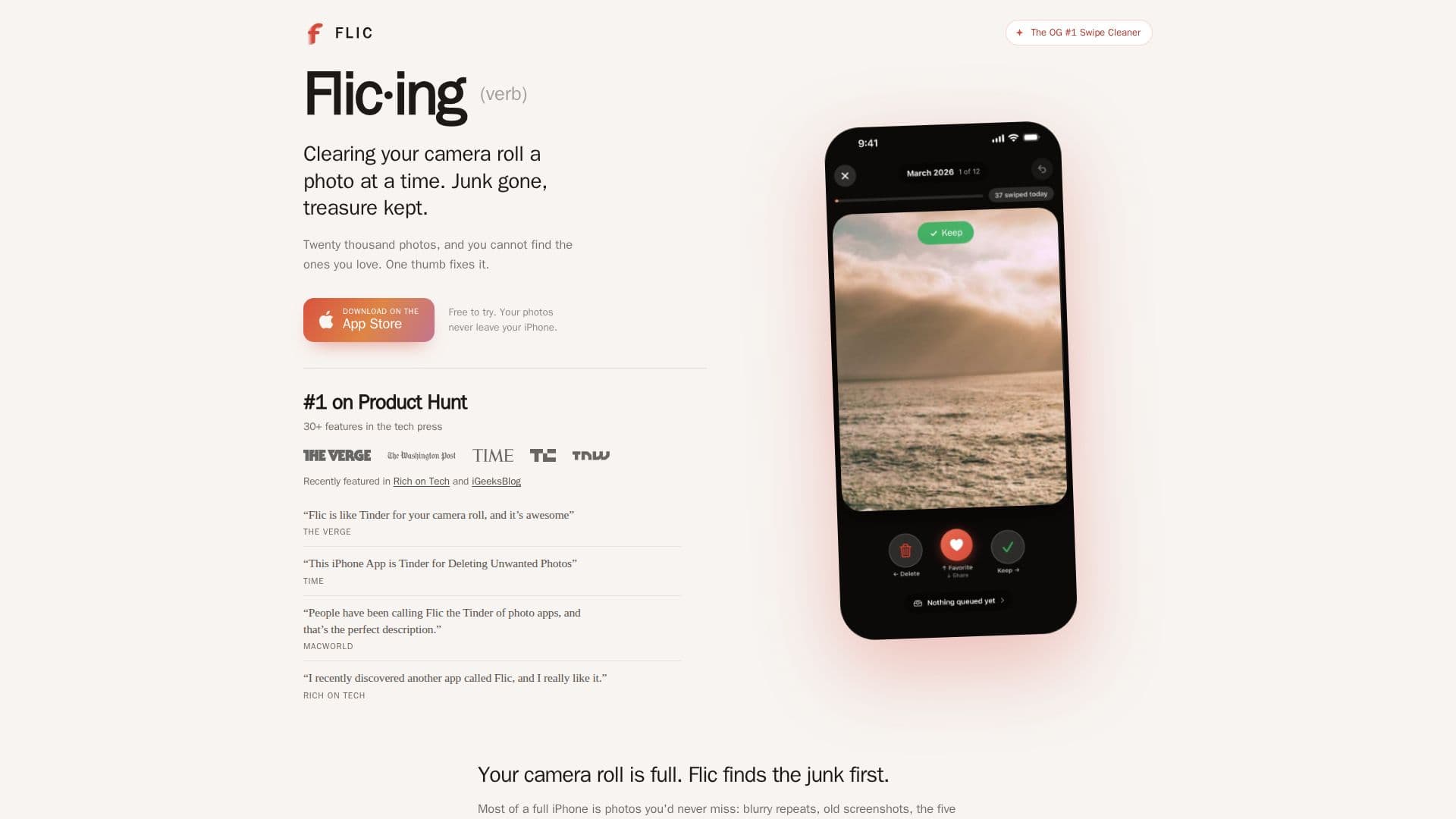
Flic is an innovative mobile application that streamlines the process of organizing and cleaning your iPhone's camera roll. Billed as the original swipe cleaner, it now incorporates on-device AI to enhance its functionality, making photo management faster and more intuitive. The app operates without requiring an account, displaying no ads, and avoiding weekly subscription plans, focusing purely on user privacy and efficiency.
Read More
The core functionality of Flic revolves around a simple swipe interface: users swipe left to add a photo to a delete pile and swipe right to keep it. A crucial safety feature is that no photos are permanently removed until the user explicitly confirms the deletion, allowing for quick decision-making without the fear of losing cherished memories. This process, termed "Flic·ing," helps users clear out unwanted junk while preserving valuable treasures.
Flic's AI is designed to analyze photos directly on the user's iPhone, ensuring privacy as no images are uploaded to external servers. This on-device analysis allows the app to intelligently identify and prioritize photos that users are most likely to want to delete, such as blurry duplicates, multiple attempts of the same shot, or old screenshots. By presenting these "likely junk" photos first, Flic significantly reduces the time and effort required to clean a cluttered camera roll.
Beyond simple deletion, Flic offers a "Need space?" feature, enabling users to set a target amount of storage they wish to reclaim (e.g., 5 GB). The app then curates a selection of photos to help achieve that goal, with every deletion still requiring user approval. It also highlights "Your Best 25," resurfacing great photos that might have been overlooked and allowing users to favorite them with a single tap, continuously learning user preferences with every interaction.
Available on the App Store since 2014, Flic has been featured in publications like Rich on Tech and iGeeksBlog. It offers various pricing models, including Free, Monthly, Annual, and Lifetime Plans, providing flexibility for different user needs. The app's commitment to privacy, combined with its smart AI capabilities and user-friendly interface, makes it a powerful tool for anyone looking to manage their digital photo collection more effectively.
- CategoryAI Photo Editors
- Pricing ModelFreemium
- DeploymentMobile app
- PlatformsiOS
Flic: AI Swipe Photo Cleaner's Core Features
Swipe-based photo cleaning interface (left to delete, right to keep)
On-device AI analysis for privacy (photos never leave iPhone)
AI identifies and prioritizes "likely junk" photos first
"Need space?" feature to target specific storage reclamation goals
User confirmation required before any photos are permanently deleted
"Your Best 25" feature to rediscover and favorite overlooked photos
AI learns user preferences with every swipe (keep, delete, favorite)
Groups similar and blurry photos for easier management
No account required for use
No ads within the application
No weekly subscription plans
Free to try with various paid plans available
Scans entire camera roll before user interaction
Quick wins: identifies screenshots and large videos for fast space recovery
How to use Flic: AI Swipe Photo Cleaner?
Download Flic: Install the Flic app from the App Store onto your iPhone.
Open Flic: Launch the app, and it will automatically scan your camera roll on your device.
Review Photos: The home screen will display photos ranked worst first, or based on your space-saving goals.
Swipe to Clean: Swipe left to add photos to your delete pile or swipe right to keep them.
Confirm Deletion: Review your delete pile and confirm the batch deletion to free up space.
Discover Favorites: Check "Your Best 25" daily to find and favorite great photos you might have missed.
Flic: AI Swipe Photo Cleaner's Use Cases
- Free Up Storage Space
- Organize Camera Roll
- Identify Duplicate Photos
- Rediscover Hidden Gems
- Privacy-Focused Photo Cleaning