
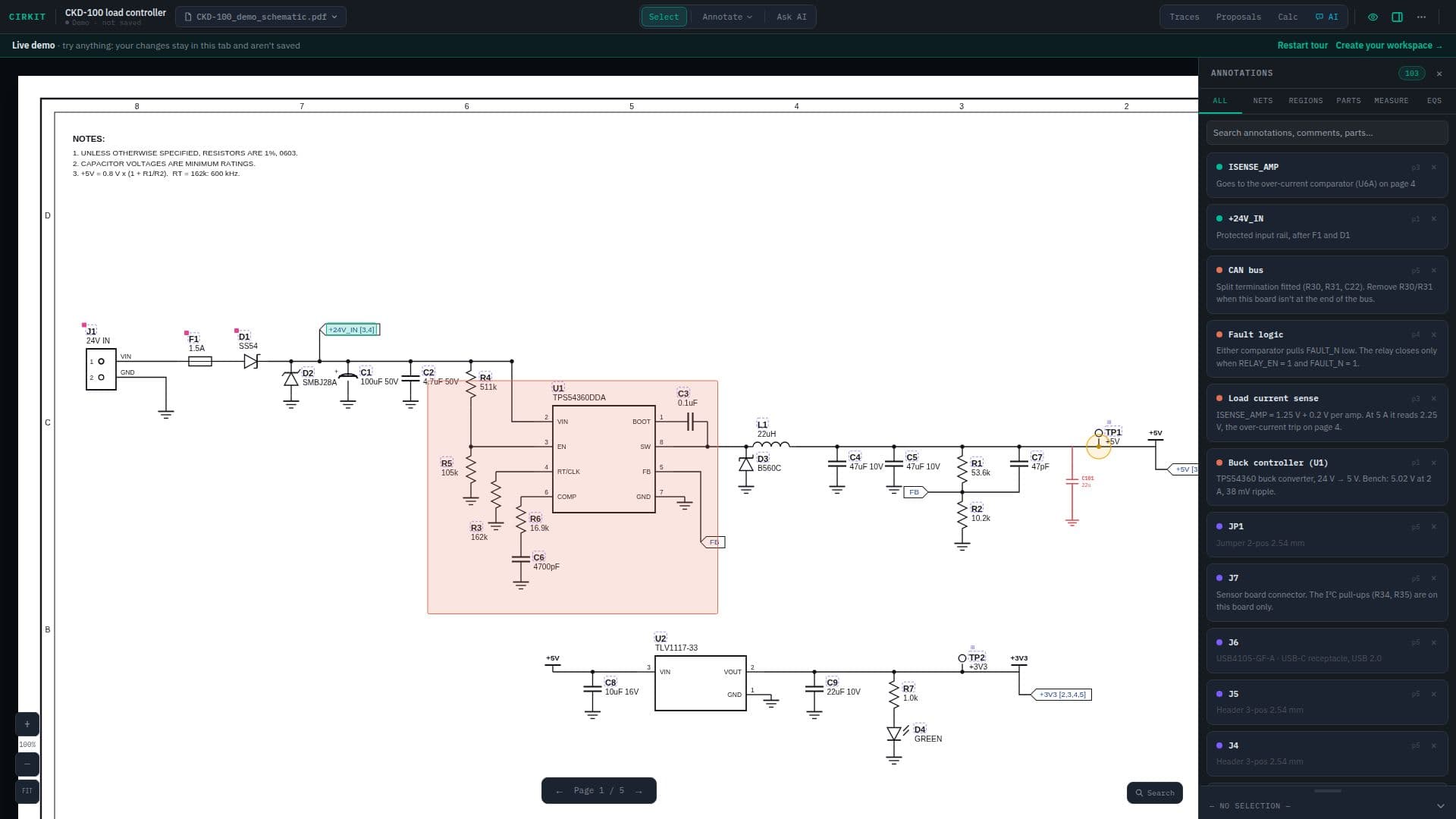
Description
Cirkit provides a comprehensive shared workspace designed specifically for hardware teams, converting static schematic PDFs into dynamic, collaborative environments. The platform allows users to upload multi-page and multi-board schematic PDFs along with their Bill of Materials (BOMs), creating a central hub for design and debug activities.
Read More
Key functionalities include advanced annotation capabilities, enabling users to pin notes, photos, measurements, equations, and trace maps directly onto specific parts of the schematic. All annotations are searchable, ensuring that critical information, such as past fixes or design decisions, is easily retrievable. Users can also sketch proposed changes, including parts, wires, and ICs, directly over the PDF, facilitating team comments before any CAD files are modified. These marked-up PDFs can then be exported for design reviews.
Cirkit integrates BOM management by matching spreadsheet or PDF BOMs to designators on the schematic. This allows users to hover over a part to view its Manufacturer Part Number (MPN), value, and package, or jump directly to its BOM row or datasheet. The platform also offers a datasheet lookup feature, searching DigiKey and Mouser, allowing users to attach datasheets to parts with a single click.
A standout feature is the AI assistant, which can read the page, the BOM, and team notes. Users can box an area on the schematic and ask the AI specific questions about that part of the circuit, or have it read text from scanned drawings. The AI provides answers grounded in the page content, boxed area, BOM, and notes, and can explain calculation steps upon request.
Furthermore, Cirkit supports live equations that pull values directly from BOM parts, updating results as inputs change. It understands engineering units and prefixes and includes a calculator with step-by-step working. For digital logic, it offers a Digital mode for writing equations with standard notation and generates truth tables for equations with up to six inputs. The platform also allows teams to record and play back signal paths across multiple pages and boards, aiding in onboarding and design walkthroughs. Debug threads can be automatically converted into issues, with dated summaries of problems and attempted solutions, streamlining the debugging process. Cirkit is currently in early access.
- CategoryAI Document & PDF Tools
- Pricing ModelEarly Access
- DeploymentCloud
- PlatformsWeb
Cirkit's Core Features
Convert schematic PDFs into interactive workspaces
Upload multi-page and multi-board schematic PDFs and BOMs
Pin notes, photos, measurements, equations, and trace maps to parts
Searchable annotations across all board notes and equations
Sketch proposed design changes directly on schematics
Export marked-up PDFs for design reviews
Import spreadsheet and PDF BOMs with automatic part matching
Highlight part numbers for instant datasheet lookup (DigiKey, Mouser)
Attach datasheets to parts for team access
AI assistant reads schematics, BOMs, and team notes
Box areas to ask AI specific questions about circuits
Live equations that pull values from BOM parts
Digital mode for gate logic, comparators, and truth tables
Record and play back signal paths across pages and boards
Automatic issue creation from debug email threads
Role-based access control (Owners, Admins, Editors, Viewers)
Private project copies that stay in sync with originals
Share view-only links without requiring accounts
How to use Cirkit?
Upload Schematics: Drop in schematic PDFs and your Bill of Materials (BOM) to create a new project.
Annotate Designs: Pin notes, photos, measurements, equations, and trace maps directly onto schematic parts.
Propose Changes: Sketch proposed design modifications over the PDF and gather team comments before updating CAD files.
Manage BOMs: Import your BOM to automatically link part data, view MPNs, values, and datasheets.
Ask the AI: Box an area on the schematic and ask the AI assistant questions about that specific circuit section, BOM, or notes.
Collaborate: Invite team members with specific roles or share view-only links for external review.
Track Issues: Use the email bot to turn debug threads into project issues, or create them manually with dated histories.
Cirkit's Use Cases
- Bring-up and Debug
- Design Reviews
- Onboarding New Hires
- Supplier & Customer Support
- Knowledge Management
- BOM Management
- Proposed Changes