Description
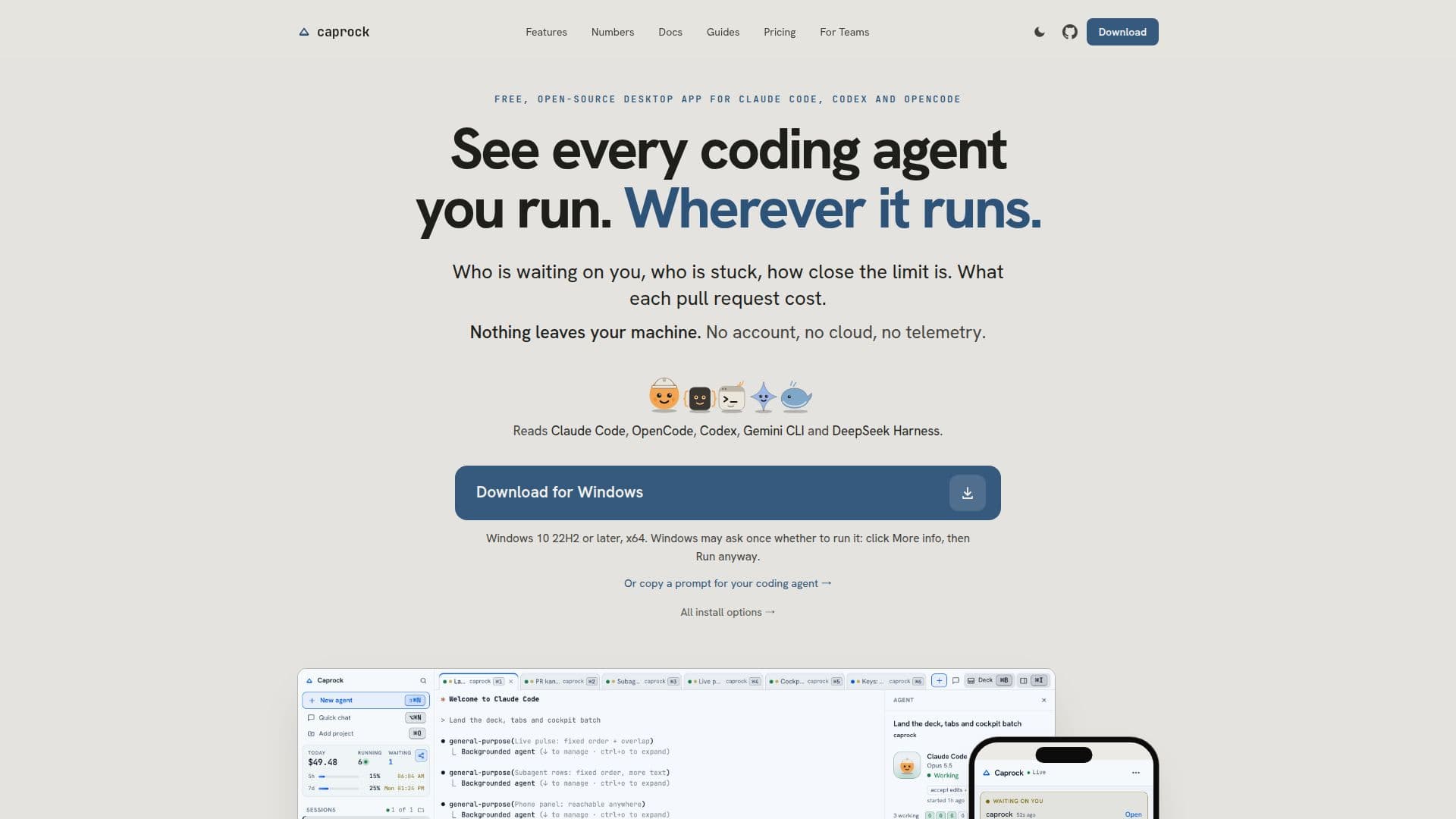
Caprock is a free and open-source desktop application designed for macOS, Windows, and Linux that serves as a comprehensive ledger for all your coding agents. It supports various agents such as Claude Code, Codex, OpenCode, and Gemini CLI, including sessions initiated in your own terminal. The application provides detailed insights into agent activity, showing which agents are active, waiting on user input, or stuck in a loop. It also monitors how close each plan is to its usage limits and calculates the cost associated with each pull request, all processed directly on your machine without data leaving it by default.
Read More
The application records every session on your machine, regardless of whether Caprock initiated it. It prices each turn at list price as it's written and links it to the relevant repository, pull request, CI run, and release. Users can run agents within Caprock's terminal tabs and split panes, or continue using their preferred terminal; the ledger remains consistent. The desktop app includes a background service (daemon) that records sessions. A paired phone can access Caprock via a browser through an end-to-end encrypted relay, allowing users to view sessions as chats, reconnect automatically, and even control sessions, answer prompts, clone projects, and start agents.
Caprock integrates seamlessly with existing workflows, requiring no changes to how users run `claude` in their own terminals. It adds a small hook to `~/.claude/settings.json` (which is backed up and can be uninstalled) to read Claude Code's existing transcripts. It can import transcripts already on disk, which Claude Code typically keeps for 30 days, and then continues to record new sessions even after Claude Code deletes the original files. Data is stored locally in a SQLite file, and there is no account or telemetry by default. Users can opt-in to features like update checks, GitHub integration for cloning and opening pull requests, Telegram notifications for weekly reports and phone alerts, and Gemini API key usage.
For teams, Caprock offers an Enterprise version that runs in your VPC or on a server you control, providing a flat price rather than per-person or a share of AI spend. This version allows laptops to send usage figures to the server, while prompts, code, and tool output remain on the laptop. Caprock also includes a task runner feature, an opt-in way to run unattended tasks. Users define tasks with commands like tests, type checks, and lint. Each task runs in its own git worktree, and Caprock verifies command passes before marking a task as complete. It never merges into user branches and its sessions skip permission prompts, making it suitable for independent tasks.
- CategoryAI Coding Assistants
- Pricing ModelFreemium
- DeploymentDesktop App, Self-hosted (Teams)
- PlatformsmacOS, Windows, Linux
Caprock's Core Features
Ledger for coding agents (Claude Code, Codex, OpenCode, Gemini CLI)
Tracks agent status: waiting, stuck, limits
Calculates cost per pull request and repository
Cross-platform desktop app (macOS, Windows, Linux)
Local data storage (SQLite) by default
No account or telemetry by default
Imports historical agent transcripts
Records new sessions persistently
Terminal tabs with split panes for agent sessions
Phone pairing for remote session viewing and control
Opt-in task runner for unattended tasks
Monitors Claude and Codex plan limits live
Identifies stuck sessions with alerts
Open-source and free for solo use (Community Edition)
Premium features: auto-pause, Telegram integration, custom agents
How to use Caprock?
Download and Install: Get the Caprock desktop app for macOS, Windows, or Linux from the website or via `brew install --cask dspv/tap/caprock-app`.
Integrate Agents: Caprock automatically reads transcripts from agents like Claude Code; for other agents, run them within Caprock's terminal tabs or continue using your own terminal.
Monitor Sessions: View live sessions, agent status (waiting, stuck), plan limits, and costs per repository and pull request within the app's dashboard.
Pair Phone (Optional): Scan a QR code to pair your phone, accessing Caprock in its browser for remote session viewing and control via an end-to-end encrypted relay.
Configure Network Features (Optional): Enable update checks, GitHub integration, Telegram alerts, or Gemini API key usage in settings if desired.
Run Unattended Tasks (Optional): Define tasks with `done_criteria` (tests, lint) to run automatically in separate git worktrees, with Caprock verifying command passes.
Caprock's Use Cases
- Coding Agent Monitoring
- Cost Analysis for Development
- Session Management & History
- Plan Limit Tracking
- Stuck Session Detection
- Remote Session Control
- Automated Task Execution
- Team-wide Agent Oversight