Description
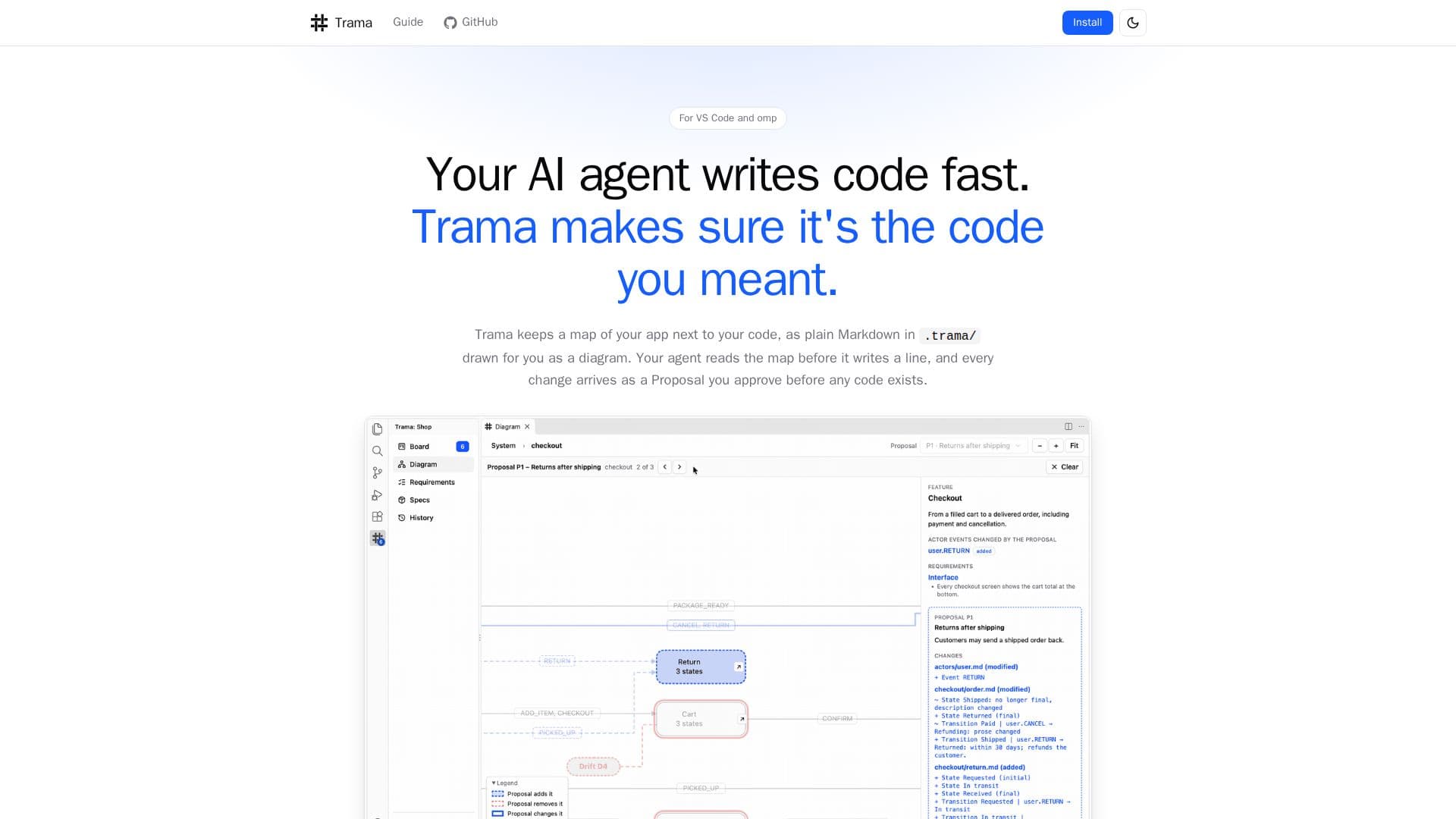
Trama is a powerful VS Code extension designed to streamline the development workflow when working with AI agents. It acts as a crucial intermediary, ensuring that the code generated by AI agents aligns perfectly with the developer's vision. The core functionality revolves around maintaining a dynamic map of your application, stored as plain Markdown files within a `.trama/` directory next to your code. This map is visually represented as a diagram, which the AI agent reads before writing any new code.
Read More
When an AI agent proposes changes, Trama presents them as 'Proposals.' These Proposals are detailed outlines of the intended modifications, drawn on the application map, and include every decision and assumption made by the agent. Developers must explicitly approve these Proposals before any actual code is generated, giving them complete control over the development process. This approval mechanism prevents unintended or incorrect code from being introduced into the project.
The workflow with Trama is structured in five clear steps: First, developers describe a desired change in plain language, similar to how they would explain it to a colleague. This request is then placed on the 'Board' for the agent. Second, the agent may ask clarifying questions, presenting recommendations for the developer to choose from or allowing for custom input. Third, the developer reviews and approves the Proposal, which includes the visual change on the map and all underlying decisions. Nothing is built until this approval is given.
Fourth, once approved, the agent executes the 'Tasks' to build the approved changes, which developers can monitor on the Board. Finally, Trama addresses 'Drifts' – discrepancies that arise when the code and the application map diverge. When a Drift is detected, Trama flags it, allowing the developer to either fix the code to match the map or update the map to reflect the new code, ensuring consistency and accuracy. Trama supports various workflows, including designing new changes, reviewing proposals, reworking with feedback, running tasks, scanning the system for discrepancies, and resolving or unifying drifts. It also offers solo and manager modes for different team setups, integrating with GitHub CLI for PR checks and team management.
- CategoryAI Coding Assistants
- Pricing ModelNot specified
- DeploymentCloud
- PlatformsVS Code
Trama's Core Features
Application mapping in Markdown
AI agent change proposals
Visual diagram generation
Proposal approval workflow
Task execution monitoring
Drift detection and resolution
Question-answering for AI agents
Feedback integration for rework
Model-code comparison scans
Support for VS Code
GitHub CLI integration for PR checks
Solo and Manager modes for team collaboration
Away notifications for agent status
Customizable extension settings
How to use Trama?
Install Trama: Install the Trama extension from the VS Code Marketplace or a .vsix file.
Set up omp: Install the omp agent, log in to a model provider, and select the models Trama will use.
Integrate with project: Use the Get Started wizard to import an existing project or start a new one from scratch.
Describe changes: Articulate desired changes in plain language, which the AI agent will process.
Review proposals: Examine the AI agent's proposed changes on the diagram and requirements, then approve or reject.
Run tasks: Allow the agent to build approved changes, monitoring progress on the Board.
Resolve drifts: Address discrepancies between the code and the application map by fixing code or updating the map.
Trama's Use Cases
- AI Agent Code Management
- Application Map Maintenance
- Code-Model Synchronization
- Guided AI Development
- Team Development Workflow
- New Project Scaffolding
- Existing Project Modeling