
Description
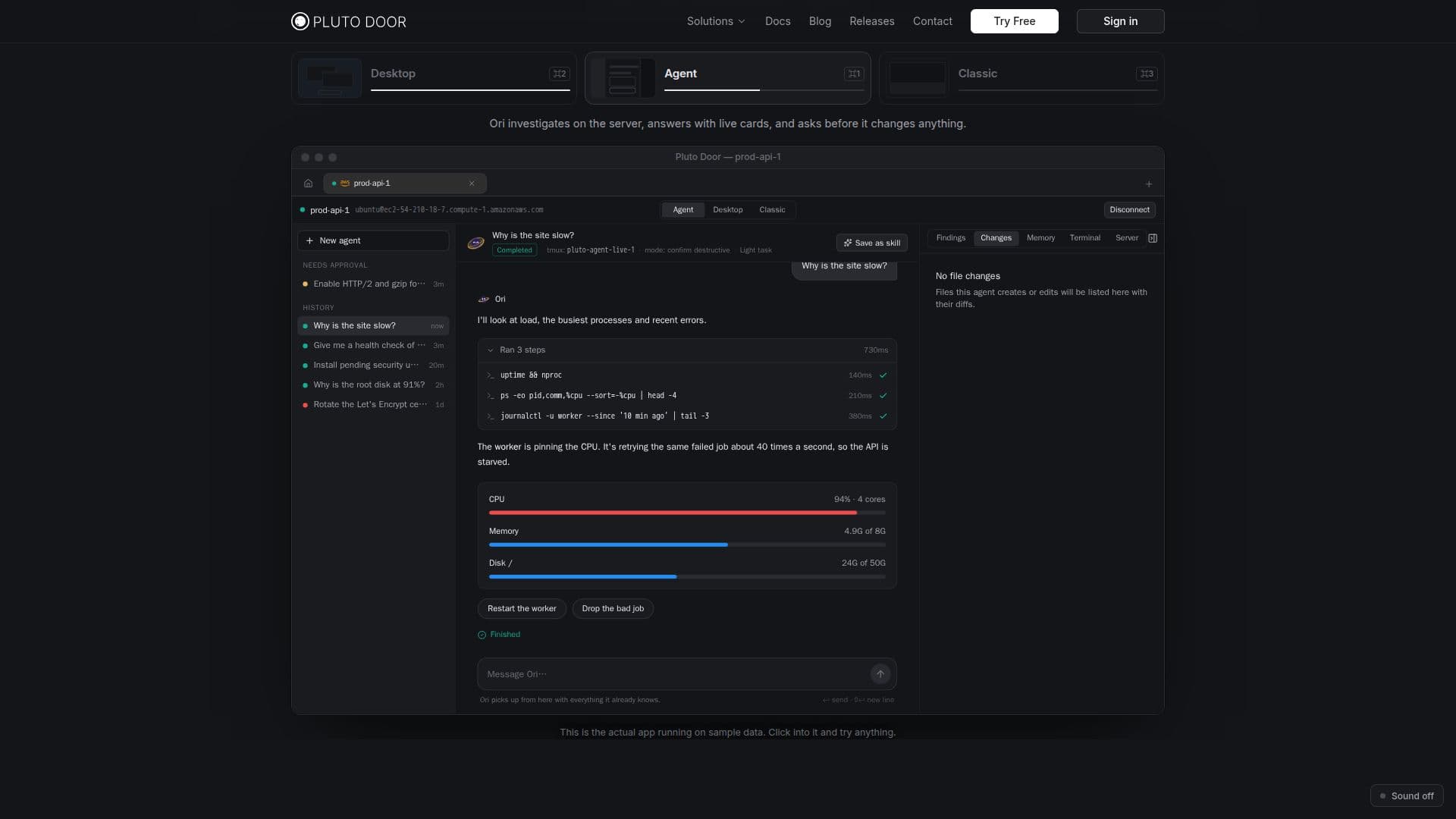
Pluto Door is a comprehensive SSH client specifically designed for macOS, offering a robust suite of tools for server management. At its core is Ori, an AI agent that intelligently investigates and resolves server issues. Ori operates with user oversight, requiring approval before implementing any changes, and provides an undo function for file modifications, ensuring control and safety.
Read More
The client also introduces Pluto XOS, a unique desktop environment for each server. This virtual desktop includes essential applications such as a terminal, SFTP file browser, code editor with syntax highlighting for over 100 languages, and tools for managing activity, logs, services, and network settings. Users can also access the Hangar app store within Pluto XOS to install and update software using the server's native package manager.
Pluto Door supports scheduled checks, allowing Ori to monitor server health, disk space, backups, and certificates, delivering macOS notifications for any issues. It integrates with major cloud providers like AWS, Google Cloud, and Azure, enabling users to query cloud accounts in plain language to understand resource usage and costs.
Security and privacy are paramount, with Pluto Door adopting a local-first approach. All SSH keys, passwords, and connection details are encrypted and stored in the macOS Keychain, never leaving the user's Mac. Ori uses the user's own Claude (Anthropic) or OpenAI API key, connecting directly to the AI provider without passing prompts or responses through Pluto Door's servers. This ensures that sensitive data remains private and under the user's control.
Pluto Door is available for macOS 12 Monterey and later, supporting both Apple Silicon and Intel processors. It offers a 14-day free trial, followed by subscription options or a lifetime purchase. The tool is ideal for DevOps teams, backend developers, agencies, cloud teams, and homelabbers seeking an efficient, secure, and AI-assisted solution for server management.
- CategoryAI DevOps & Cloud Tools
- Pricing ModelFreemium
- DeploymentRuns locally
- PlatformsmacOS
Pluto Door's Core Features
SSH Client for Mac
Ori AI Server Agent
Pluto XOS Desktop for Servers
Terminal with GPU-accelerated rendering
SFTP File Browser with drag-and-drop
Code Editor with 100+ language syntax highlighting
Scheduled Server Checks with macOS notifications
Cloud Account Integration (AWS, Google Cloud, Azure)
Bring Your Own Claude or OpenAI Key
SSH Key Management
Connection History and Favorites
100% Local-First Security with macOS Keychain
AI Plan Approval and Undo Functionality
Approval Gates for Server Changes
Secret Masking in Command Output
How to use Pluto Door?
Download and Install: Download the .dmg file from plutodoor.com and drag Pluto Door into your Applications folder.
Sign In: Open Pluto Door and sign in with Apple or Google to start your 14-day free trial.
Add a Server: On the Servers page, add a new server by entering the host, port, username, and choosing between password or SSH key authentication.
Connect and Choose View: Open the server and select your preferred view: Agent (for Ori AI), Desktop (for Pluto XOS), or Classic (terminal and file browser).
Configure AI Key: Go to Settings > AI Provider and paste your Anthropic (Claude) or OpenAI API key.
Use Ori AI Agent: In Agent view, describe a task in plain words; Ori will investigate, propose changes, and await your approval.
Manage Servers with Pluto XOS: Explore the desktop environment with apps like Files, Activity, Logs, and Hangar for software management.
Set Up Scheduled Checks: Use the Schedules or Calendar app in Pluto XOS to configure Ori for automated server or cloud account checks.
Pluto Door's Use Cases
- DevOps & SRE Incident Investigation
- Backend Server Debugging & Deployment
- Solo Founder Server Management
- Agency & Freelancer Client Server Workflow
- Cloud Resource Query & Management
- Homelab & Student Linux Learning
- Automated Server Health Checks
- Secure Remote Code Editing