ToolPotion
AI Advisor
Submit a Tool (Free)

PixText

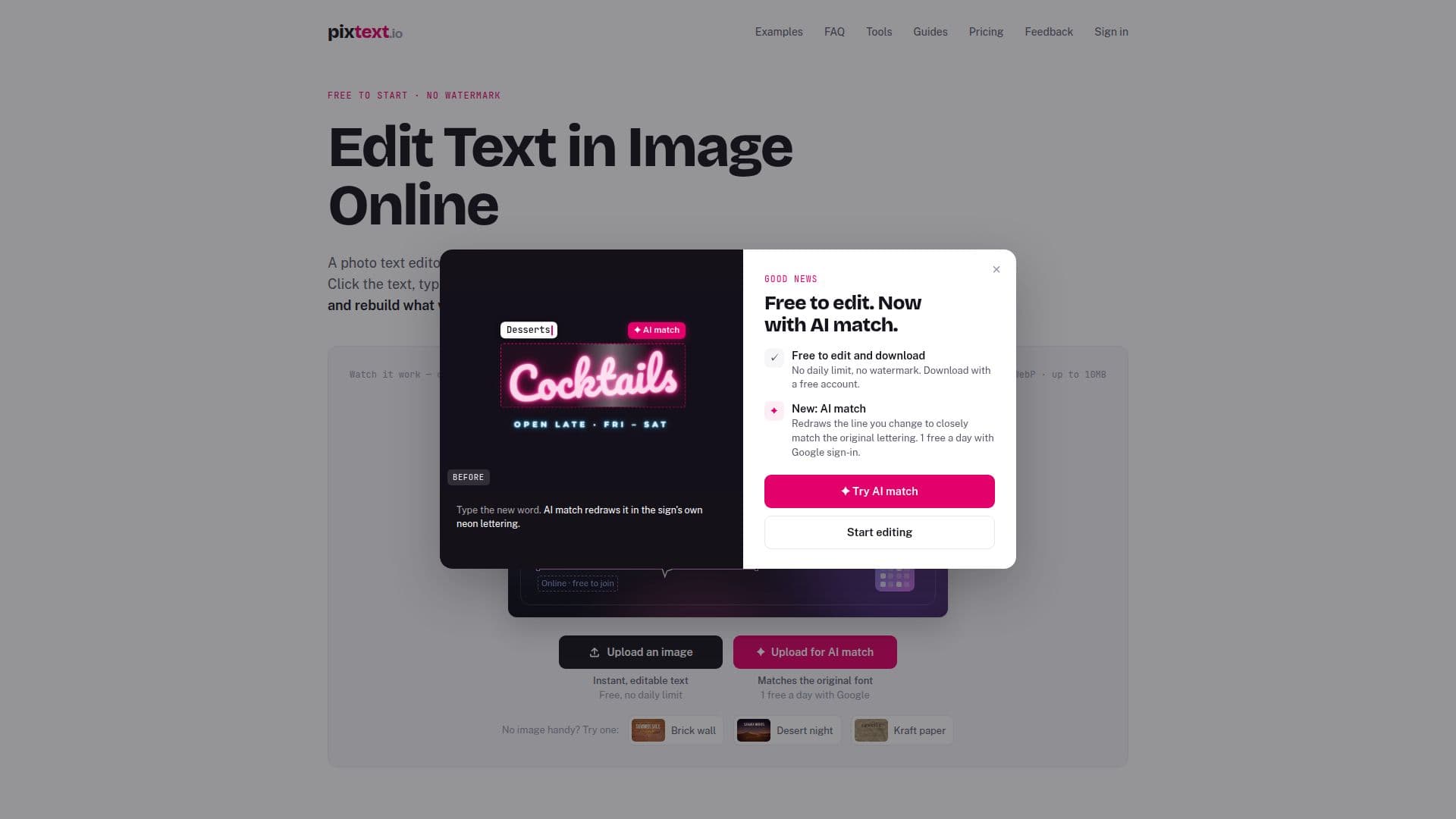
PixText is a free online photo text editor that allows users to change or remove text directly within images. It rebuilds the background behind the edited text, ensuring a clean result without watermarks. The tool supports various image formats and offers an AI match feature to closely replicate original lettering styles, making it ideal for quick edits without complex software.

Visit Website
Share
PixText screenshot
PixText screenshot

PixText is an intuitive online photo text editor designed to simplify the process of modifying or removing text from images. Unlike traditional editors that layer new text over existing content, PixText intelligently erases the original words and reconstructs the background, providing a seamless and natural-looking edit. This capability makes it particularly useful for tasks such as correcting typos in screenshots, updating dates on event posters, or changing prices on product photos without needing the original design files or advanced software like Photoshop.

Read More

The platform operates entirely in a web browser, making it accessible on both desktop and mobile devices. Users can upload JPG, PNG, or WebP images up to 10 MB. The editing process is straightforward: simply click on the text you wish to change, type in the new words, and PixText handles the rest, matching the position, size, and color. For more advanced needs, an "AI match" feature is available, which attempts to redraw the new text in the image's original lettering style, even for unique fonts not found in standard lists. While an exact match isn't guaranteed, it aims for a very close approximation.

PixText offers a free tier that includes unlimited editing and downloads without watermarks. A free account is required for downloads, and signing in with Google provides one free AI match per day. For users requiring more AI matches, one-time payment packs are available, with no subscriptions or expiration dates. The tool also includes a manual brush for erasing watermarks, logos, or any remaining traces on simple backgrounds, and a TEXT tool for adding entirely new lines of text to images.

Privacy is a key consideration; images are processed in memory and are not stored, with editing sessions cleared within 24 hours. For AI match, only the immediate area around the edited line is sent to the AI provider, and small previews are kept for up to 72 hours for quality checks, never for training AI models. PixText works best on text placed over flat colors, soft gradients, or simple photographic backgrounds, delivering clean results for screenshots, posters, banners, and captions. While it supports Latin-script languages and Chinese for detection, replacement text can be typed in any language.

  • CategoryAI Photo Editors
  • Pricing ModelFreemium
  • DeploymentCloud
  • PlatformsWeb (Desktop & Mobile)

  • Edit existing text in images

  • Remove text from images

  • AI rebuilds background behind edited text

  • No watermark on downloaded images

  • Free to use for editing and downloads

  • AI match for original font style replication

  • Supports JPG, PNG, and WebP image formats

  • Upload images up to 10 MB

  • Manual brush tool for erasing elements

  • Add new text to photos

  • Works in browser on desktop and phone

  • Privacy-focused: images processed in memory

  • One free AI match per day with Google sign-in

  • One-time payment packs for additional AI matches

  • Detection for Latin-script languages and Chinese

  1. Upload Image: Drop a screenshot, poster, or product photo into the editor.

  2. Click and Type: Select any detected text block and type your new words.

  3. Adjust Text: Position, size, and color are matched automatically, or you can adjust them.

  4. Use AI Match (Optional): Sign in with Google for one free daily AI match to redraw text in the image's original style.

  5. Export: Download the edited image as a sharp PNG file.

  • Edit Screenshots
  • Update Posters & Banners
  • Modify Product Photos
  • Edit Memes & Captions
  • Remove Image Text
  • Add New Text to Images
  • Translate Text in Images

PixText Reviews

Loading...

Popular AI Tools Like PixText

Pictext

AI Apps

Pictext is an AI image text editor that allows users to replace or remove text in images while maintaining the original style and layout. It is free to try and operates entirely…

AI Photo Editors

Ranked #183 for Removing objects from photos

View Tool

AI Apps

AI image text editor that allows users to replace or remove text in images while maintaining the original style and layout. It is free to try and operates entirely…Pictext is an AI image text editor that allows users to replace or remove text in images while maintaining the original style and layout. It is free to try and operates entirely…

AI Photo Editors
Ranked #183 for Removing objects from photos

Edit Image Text is an online AI tool that allows users to modify existing text within images, photos, screenshots, JPGs, PNGs, and WebP files. It enables replacement of words…

AI Photo Editors
View Tool

Online AI tool that allows users to modify existing text within images, photos, screenshots, JPGs, PNGs, and WebP files. It enables replacement of words…Edit Image Text is an online AI tool that allows users to modify existing text within images, photos, screenshots, JPGs, PNGs, and WebP files. It enables replacement of words…

AI Photo Editors
See the Top 250 AI Apps

Change Text in Image is an AI photo text editor designed for replacing wording in existing images like photos, screenshots, posters, and ads. Users select the text area, input…

AI Photo Editors
View Tool

AI photo text editor designed for replacing wording in existing images like photos, screenshots, posters, and ads. Users select the text area, input…Change Text in Image is an AI photo text editor designed for replacing wording in existing images like photos, screenshots, posters, and ads. Users select the text area, input…

AI Photo Editors
See the Top 250 AI Apps

PhoText

AI Apps

PhoText (Tugaigai) is an online AI tool for editing text inside images. It lets you change, add, or remove words in a picture with one click, automatically matching the original…

AI Photo Editors
View Tool

AI Apps

Online AI tool for editing text inside images. It lets you change, add, or remove words in a picture with one click, automatically matching the original…PhoText (Tugaigai) is an online AI tool for editing text inside images. It lets you change, add, or remove words in a picture with one click, automatically matching the original…

AI Photo Editors
See the Top 250 AI Apps

AI Picture Editor is a free online photo editor that uses AI to transform images with text prompts. Users can remove backgrounds and objects, restore old photos, enhance quality,…

AI Photo Editors

Ranked #36 in Background Removers

View Tool

Free online photo editor that uses AI to transform images with text prompts. Users can remove backgrounds and objects, restore old photos, enhance quality,…AI Picture Editor is a free online photo editor that uses AI to transform images with text prompts. Users can remove backgrounds and objects, restore old photos, enhance quality,…

AI Photo Editors
Ranked #36 in Background Removers

EditTextInImage is an AI tool that allows users to change text in images without design skills. Upload an image, specify the original and replacement text, and generate edits…

AI Photo Editors
View Tool

AI tool that allows users to change text in images without design skills. Upload an image, specify the original and replacement text, and generate edits…EditTextInImage is an AI tool that allows users to change text in images without design skills. Upload an image, specify the original and replacement text, and generate edits…

AI Photo Editors
See the Top 250 AI Apps

Imagelier

AI Apps

Imagelier is an online AI image text editor that allows users to edit and replace text in images such as screenshots, posters, and menus. It offers a free tier with limited edits…

AI Photo Editors

Ranked #87 for Extracting text from images

View Tool

AI Apps

Online AI image text editor that allows users to edit and replace text in images such as screenshots, posters, and menus. It offers a free tier with limited edits…Imagelier is an online AI image text editor that allows users to edit and replace text in images such as screenshots, posters, and menus. It offers a free tier with limited edits…

AI Photo Editors
Ranked #87 for Extracting text from images

PixPurge is an AI-powered tool that removes text, watermarks, captions, and date stamps from images online. It offers free monthly credits and requires no installation, making it…

AI Photo EditorsRetail & Consumer Goods
View Tool

AI-powered tool that removes text, watermarks, captions, and date stamps from images online. It offers free monthly credits and requires no installation, making it…PixPurge is an AI-powered tool that removes text, watermarks, captions, and date stamps from images online. It offers free monthly credits and requires no installation, making it…

AI Photo EditorsRetail & Consumer Goods
See the Top 250 AI Apps
1 of 8