
Description
Pippa is a powerful and free AI assistant designed specifically for macOS, aiming to simplify everyday digital tasks and paperwork. It operates entirely on your Mac, ensuring privacy by not requiring an account or relying on external servers for its core AI functions. This local processing capability means your data remains on your device, with optional online AI services like ChatGPT available only if explicitly enabled.
Read More
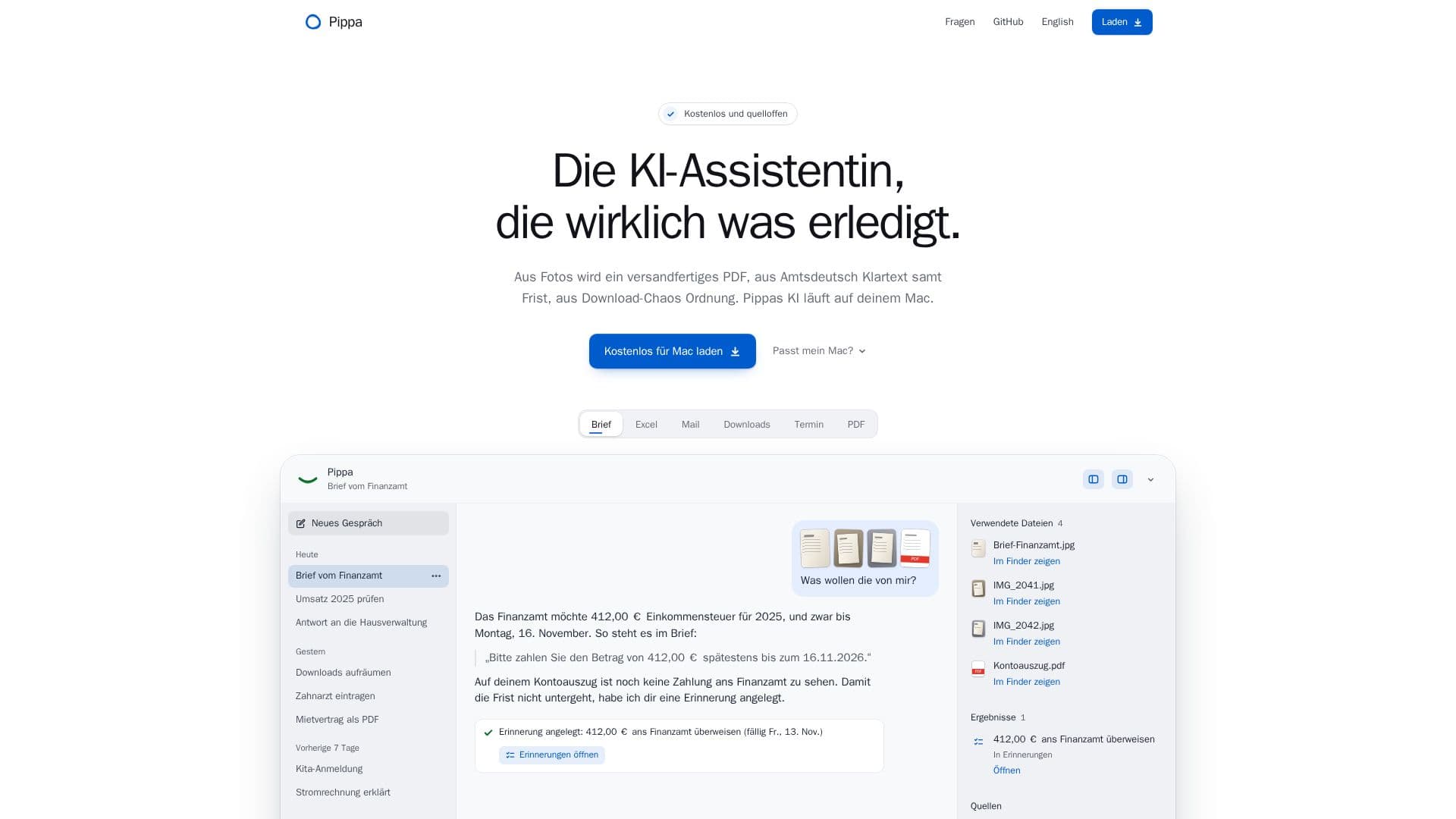
The application excels at transforming various forms of input into organized and actionable outputs. For instance, it can convert multiple photos and scans into a single, print-ready PDF, allowing users to specify the order and size. Beyond simple conversions, Pippa can analyze official documents or complex texts, extracting key information such as payment amounts and deadlines, and presenting them in clear, understandable language. This feature is particularly useful for managing bills, notices, and other administrative correspondence.
Integration with the macOS ecosystem is a core strength of Pippa. It works seamlessly with native applications like Mail, Calendar, Reminders, Finder, and Excel. This allows Pippa to automatically create email drafts, add deadlines to your calendar, set reminders, locate files, and even calculate sums in spreadsheets. Users maintain full control over Pippa's access to their folders, calendar, or photos, with macOS prompting for permissions before any access is granted. For file organization, Pippa first presents a plan, and changes can be undone if needed.
Pippa is open-source under the MIT license, with its code available on GitHub, fostering transparency and community contributions. It is compatible with Macs featuring Apple Silicon (M1 or newer) and macOS 15 or later. While the app itself is under 100 MB, its local AI model requires approximately 5.4 GB of storage and 16 GB of RAM, which Pippa downloads only after user approval. If a compatible AI model is already present from other sources like oMLX, LM Studio, or Hugging Face, Pippa intelligently utilizes it to avoid redundant downloads. For Macs with less RAM or users preferring cloud-based solutions, Pippa can be configured to use online AI services with a ChatGPT account or a custom API key. The tool is continuously updated, with new versions automatically checked and downloaded from GitHub.
- CategoryAI Personal Assistants
- Pricing ModelFree
- DeploymentLocal (Mac)
- PlatformsmacOS (Apple Silicon M1+)
Pippa's Core Features
Local AI Processing on Mac
No Account Required
Free and Open Source (MIT License)
Photo to PDF Conversion
Document Text Clarification and Summary
Deadline and Appointment Extraction
Integration with macOS Apps (Mail, Calendar, Reminders, Finder, Excel)
File Organization and Management
Optional Online AI Integration (ChatGPT, Anthropic, OpenAI, OpenRouter, OpenCode, xAI)
Privacy-Focused Data Handling
Automatic Updates
Supports Apple Silicon Macs (M1 or newer)
Uses existing AI models (oMLX, LM Studio, Hugging Face cache)
Reversible File Actions
Web Search Integration (DuckDuckGo)
How to use Pippa?
Download Pippa: Get the Pippa.dmg file from the official website and drag the app to your Applications folder.
Launch Pippa: Open the application on your Mac.
Process Photos/PDFs: Drag photos or PDFs onto Pippa, then click "Ein PDF" to convert them into a single PDF.
Download AI Model (Optional): If needed for advanced features like document understanding, approve the download of Pippa's local AI model (approx. 5.4 GB).
Use with Files: Drag files onto Pippa or activate it with ⌃⌥ Space to get results like clarified text or organized documents.
Integrate with Mac Apps: Allow macOS permissions for Pippa to interact with your Calendar, Reminders, Mail, and other apps.
Configure Online AI (Optional): In settings, connect to an online AI provider (e.g., ChatGPT) with your account or API key to enable cloud-based AI features.
Manage Files: Request Pippa to organize your files; review the proposed plan before confirming, and use the undo function if needed.
Pippa's Use Cases
- Document Processing
- Task Management
- File Organization
- Email Draft Generation
- Information Extraction
- Privacy-Focused Assistance
- Paperwork Automation