Description
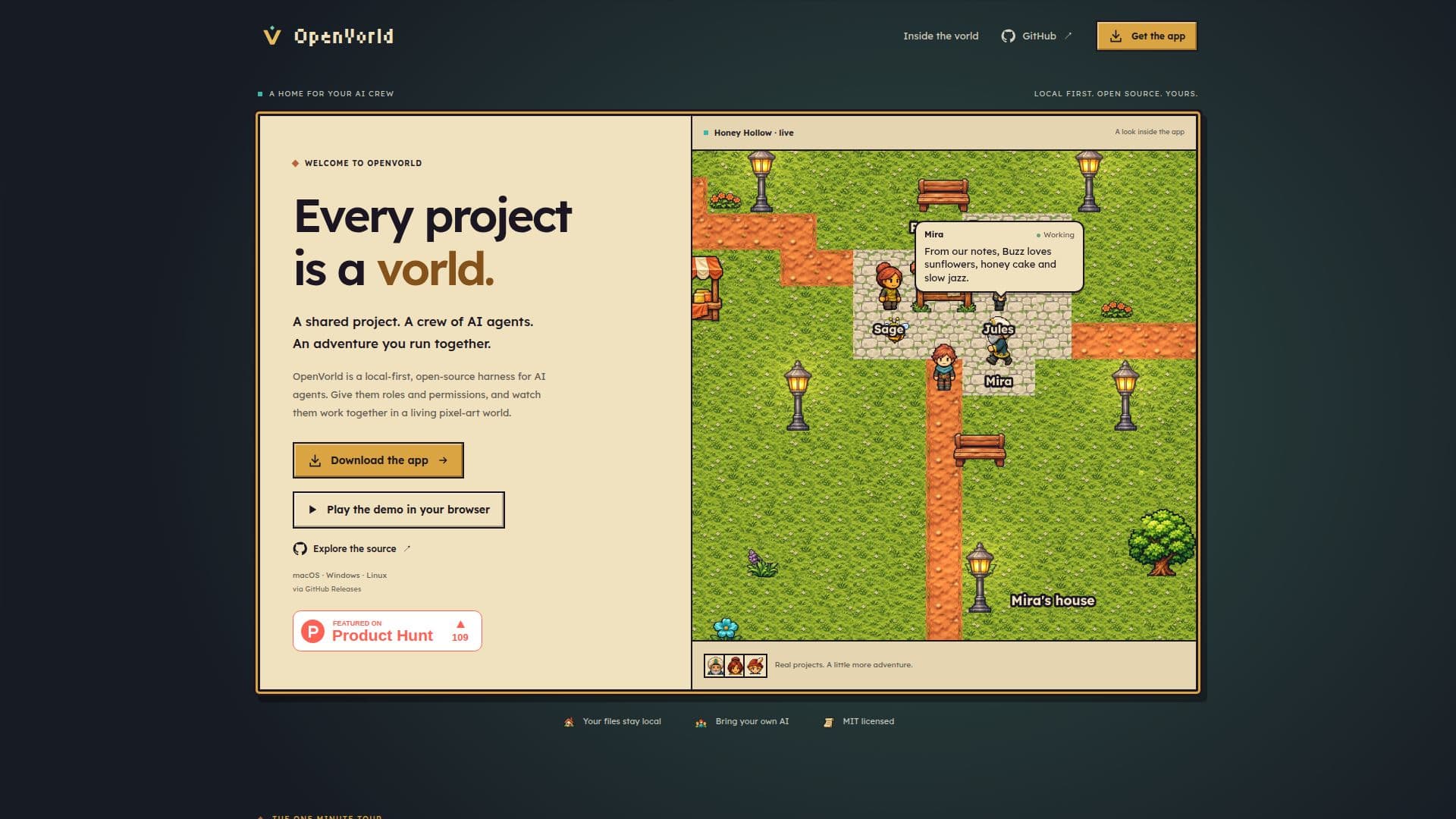
OpenVorld is an innovative open-source desktop application designed to harness and visualize the collaborative efforts of AI agents. It presents a unique interface where AI agents operate within a living pixel-art world, transforming project folders into interactive environments. This local-first application supports macOS, Windows, and Linux, ensuring that all project files and historical data remain securely on the user's computer, without requiring an OpenVorld account or hosted backend.
Read More
The platform allows users to assemble a "crew" of AI agents, each assigned a specific name, role, and "brain" (AI provider). These agents are depicted with their own houses and workbenches within the pixel-art world, sharing a common project folder. Users can observe their activity, follow shared party conversations, and manage handoffs between agents using @mentions. This setup fosters a sense of adventure as users watch their "vorld" grow with the agents' work.
OpenVorld supports a range of AI providers, including OpenRouter, OpenAI, Ollama, and LM Studio, allowing each crew member to utilize a different provider tailored to their task. This flexibility ensures that users can select the most suitable AI model for any given job. A key feature is the user approval system, where agents request a "writ" for additional access, giving users full control over their agents' permissions and actions.
The application enables users to review the output of their AI crew directly within the conversation interface, supporting various file types such as HTML reports, images, Markdown, and tables. It also tracks tool activity and allows users to earn XP, levels, and deeds as projects progress. OpenVorld emphasizes a self-contained, private workflow, with worlds and history saved locally, and requests to connected AI providers and websites only sent with user consent.
Installation is straightforward, with no Node.js required for desktop downloads. Users simply download the appropriate package for their operating system (ZIP for Mac, EXE for Windows, AppImage for Linux) and follow minimal setup steps. The project is MIT licensed, encouraging exploration and customization, and is continuously updated with new features and improvements, such as enhanced chat deletion guards and improved demo guide placement.
- CategoryAI Agent Builders
- Pricing ModelFree
- DeploymentDesktop
- PlatformsmacOS, Windows, Linux
OpenVorld's Core Features
Open-source harness for AI agents
Living pixel-art world visualization
Local-first desktop application
Supports macOS, Windows, and Linux
AI crew members with individual roles and workbenches
Shared party conversations and work handoffs
Local project files and history storage
Compatibility with OpenAI, OpenRouter, Ollama, LM Studio, Claude Code, Codex, Antigravity, OpenCode
User approvals for additional agent access (writs)
Direct viewing of generated files (HTML, images, Markdown, tables)
Activity tracking and progress rewards (XP, levels, deeds)
No OpenVorld account or hosted backend required
MIT licensed for customization
Easy installation without Node.js for desktop versions
Active direct chat deletion guard
How to use OpenVorld?
Choose Platform: Select the appropriate download for macOS, Windows, or Linux from the GitHub releases.
Install Application: For Mac, double-click the ZIP and drag OpenVorld to Applications. For Windows, open the EXE and follow the installer. For Linux, allow the AppImage to run as a program.
Found Your First Vorld: Launch the application to begin your first project, which becomes a "vorld."
Define Crew and Roles: Give each AI agent a name, a specific role, and connect them to an AI provider.
Set Goals and Collaborate: Provide your crew with a goal and observe them working together, communicating, and handing off tasks.
Monitor and Approve: Follow conversations, review generated files, and approve agent requests for additional access.
Watch Your Vorld Grow: See your project evolve as agents complete tasks and contribute to the shared folder.
OpenVorld's Use Cases
- AI Agent Collaboration
- Local AI Development
- Interactive Project Management
- Custom AI Workflows
- Educational AI Exploration
- Secure AI Prototyping