ToolPotion
AI Advisor
Submit a Tool (Free)

OneLLM Office

OneLLM Office is an AI assistant for Mac, Windows, and Ubuntu, designed to streamline everyday work. It helps users create reports, spreadsheets, and presentations by turning tasks into usable files. The tool supports both local and online AI models, ensuring conversation history remains private on the user's device, and offers mobile continuity for tasks on iPhone and iPad.

Visit Website
Share
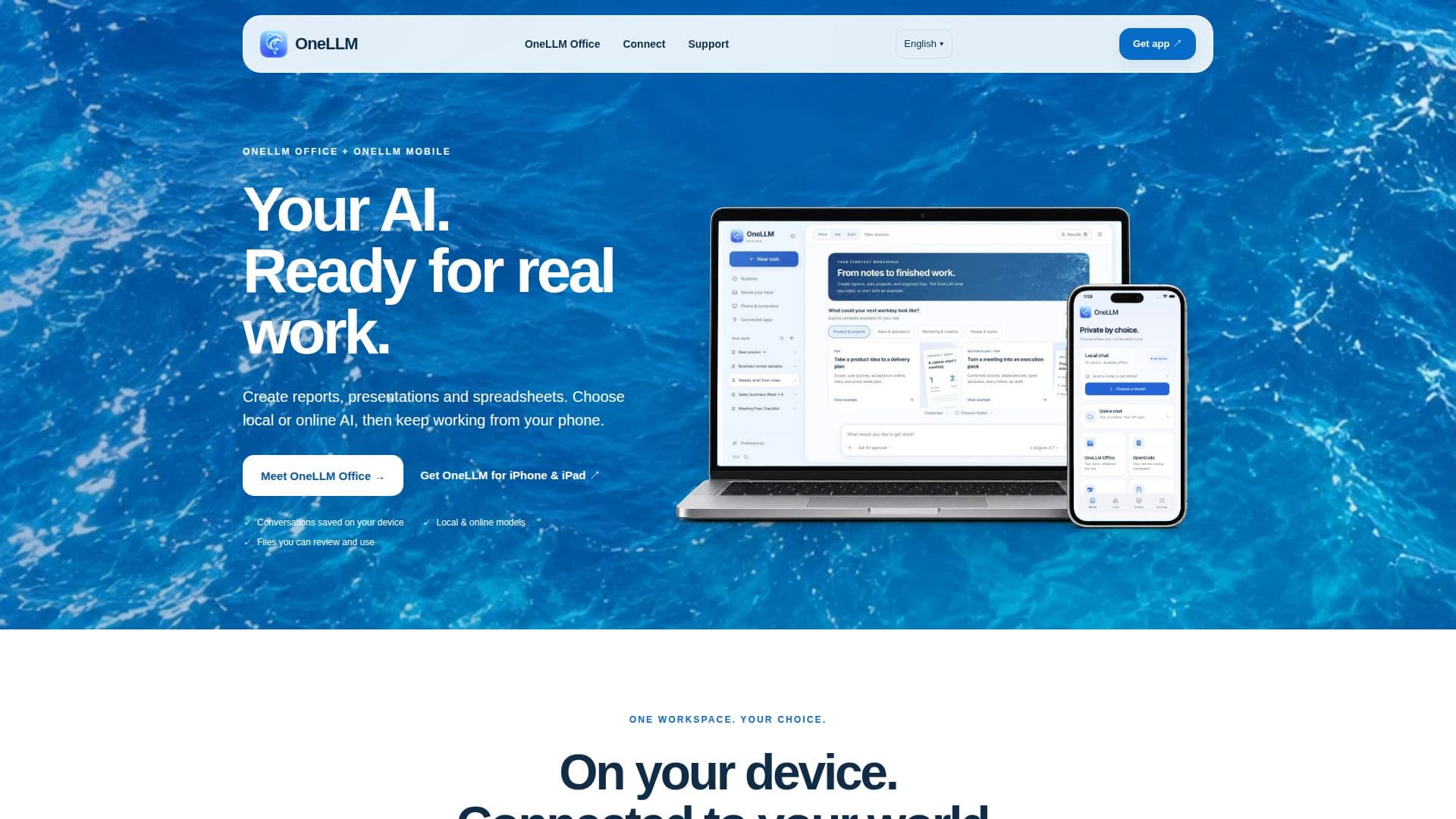
OneLLM Office screenshot

OneLLM Office is a versatile AI assistant engineered to enhance productivity for users on Mac, Windows, and Ubuntu. It simplifies complex tasks by generating reports, spreadsheets, presentations, and plans, transforming user requests into actionable files ready for review and use. The platform offers the flexibility to choose between running compatible local AI models directly on the user's computer or utilizing online AI models, providing a tailored experience based on privacy and connectivity needs.

Read More

A key feature of OneLLM Office is its commitment to privacy, ensuring that all conversation history remains securely stored on the user's device. This local data retention is particularly beneficial for sensitive work, allowing users to maintain control over their information. For those opting for local AI, OneLLM Office supports running powerful models, such as a 35-billion-parameter model with expert streaming, which can be downloaded once and then used offline. This capability is ideal for working without an internet connection and for ensuring maximum data privacy.

The tool also integrates seamlessly with mobile devices through OneLLM for iPhone and iPad, allowing users to start tasks on their computer and continue them on the go. This cross-device functionality extends to connecting with other agents like OpenCode and DS Harness, enabling users to manage sessions, choose models, browse files, review changes, and respond to agents directly from their phone. This ensures a continuous workflow, whether in the office or away.

OneLLM Office focuses on reducing friction in the workflow. It displays images directly within chat, allows users to preview and remove attachments with ease, and supports English voice input with offline transcription for natural interaction. Users can select local AI for private tasks or choose from leading online models, all while keeping their work within a single, unified workspace. The platform also provides guides for setting up mobile AI agents, understanding local AI, and connecting to various services, making it accessible for a wide range of users looking to leverage AI for practical work applications.

  • CategoryAI Writing Assistants
  • DeploymentLocal, Cloud
  • PlatformsMac, Windows, Ubuntu, iPhone, iPad

  • Create reports, presentations, and spreadsheets

  • Choose between local and online AI models

  • Conversation history saved on device

  • Files are reviewable and usable

  • Mobile continuity for tasks on iPhone and iPad

  • Supports running 35-billion-parameter local models

  • Offline chat capability for local models

  • Private on-device inference

  • Shared chat and model library

  • Connects to OpenCode and DS Harness

  • English voice input with offline transcription

  • Images appear directly in chat

  • Preview and remove attachments

  • Unified workspace for all tasks

  • Supports smaller text and vision models

  1. Install OneLLM Office: Download and install the application on your Mac, Windows, or Ubuntu computer.

  2. Choose AI Model: Select between a local AI model for private, offline work or an online AI model for broader capabilities.

  3. Start a Task: Initiate a new task, such as creating a report, presentation, or spreadsheet, within the OneLLM Office workspace.

  4. Interact with AI: Use natural language or voice input to communicate your requirements to the AI assistant.

  5. Review and Refine: Review the generated files and make any necessary adjustments or provide further instructions to the AI.

  6. Continue on Mobile: Connect your iPhone or iPad to continue tasks, review approvals, and collect finished files remotely.

  7. Manage Local Models: Open the model library, download a supported model, and select it for offline conversations.

  • Report Generation
  • Presentation Creation
  • Spreadsheet Development
  • Project Planning
  • Offline Work
  • Mobile Task Continuity
  • Private Document Creation
  • Coding Agent Interaction
  • Voice Input for Tasks

OneLLM Office Reviews

Loading...

Popular AI Tools Like OneLLM Office

AnythingLLM is a free, private AI assistant that runs entirely on your own device. It lets you chat with documents, transcribe meetings, and build AI agents locally with no…

AI Knowledge Management

Ranked #219 in AI Apps

View Tool

Free, private AI assistant that runs entirely on your own device. It lets you chat with documents, transcribe meetings, and build AI agents locally with no…AnythingLLM is a free, private AI assistant that runs entirely on your own device. It lets you chat with documents, transcribe meetings, and build AI agents locally with no…

AI Knowledge Management
Ranked #219 in AI Apps

Smart Jelly is a private personal AI for Mac that integrates chat, dictation, voice, meeting notes, documents, and agents into one application. It builds a unified memory of your…

AI Personal Assistants

Ranked #79 in AI Privacy Tools

View Tool

Private personal AI for Mac that integrates chat, dictation, voice, meeting notes, documents, and agents into one application. It builds a unified memory of your…Smart Jelly is a private personal AI for Mac that integrates chat, dictation, voice, meeting notes, documents, and agents into one application. It builds a unified memory of your…

AI Personal Assistants
Ranked #79 in AI Privacy Tools

Gerty

AI Apps

Gerty is a private AI assistant for Mac that runs locally on Apple silicon. It offers chat, document management, and voice assistance without cloud dependency, ensuring privacy.…

AI Personal Assistants

Ranked #78 in AI Privacy Tools

View Tool

AI Apps

Private AI assistant for Mac that runs locally on Apple silicon. It offers chat, document management, and voice assistance without cloud dependency, ensuring privacy.…Gerty is a private AI assistant for Mac that runs locally on Apple silicon. It offers chat, document management, and voice assistance without cloud dependency, ensuring privacy.…

AI Personal Assistants
Ranked #78 in AI Privacy Tools

AirJelly

AI Apps

AirJelly is a proactive AI desktop companion that monitors your workflow, captures tasks, and provides insights across apps like Slack, Zoom, and Google Docs. It offers a free…

AI Personal Assistants

Ranked #75 in AI Note-Taking Apps

View Tool

AI Apps

Proactive AI desktop companion that monitors your workflow, captures tasks, and provides insights across apps like Slack, Zoom, and Google Docs. It offers a free…AirJelly is a proactive AI desktop companion that monitors your workflow, captures tasks, and provides insights across apps like Slack, Zoom, and Google Docs. It offers a free…

AI Personal Assistants
Ranked #75 in AI Note-Taking Apps

Loomy

AI Apps

Loomy is a desktop AI assistant by iFLYTEK, designed to simplify tasks such as content creation, remote work, schedule management, and file organization. It integrates with…

AI Personal Assistants

Ranked #3 in AI Scheduling Tools

View Tool

AI Apps

Desktop AI assistant by iFLYTEK, designed to simplify tasks such as content creation, remote work, schedule management, and file organization. It integrates with…Loomy is a desktop AI assistant by iFLYTEK, designed to simplify tasks such as content creation, remote work, schedule management, and file organization. It integrates with…

AI Personal Assistants
Ranked #3 in AI Scheduling Tools

Ottermind

AI Apps

Ottermind is an AI agent workspace designed for real work. It connects tools, retains project context, and delivers editable results across web, desktop, and mobile platforms,…

AI Personal Assistants

Ranked #62 in AI Personal Assistants

View Tool

AI Apps

AI agent workspace designed for real work. It connects tools, retains project context, and delivers editable results across web, desktop, and mobile platforms,…Ottermind is an AI agent workspace designed for real work. It connects tools, retains project context, and delivers editable results across web, desktop, and mobile platforms,…

AI Personal Assistants
Ranked #62 in AI Personal Assistants

Tokeny

AI Apps

Tokeny is a desktop AI assistant for Windows and macOS that delivers finished files, such as slide decks, spreadsheets, and reports, instead of just chatting. It connects to…

AI Personal Assistants
View Tool

AI Apps

Desktop AI assistant for Windows and macOS that delivers finished files, such as slide decks, spreadsheets, and reports, instead of just chatting. It connects to…Tokeny is a desktop AI assistant for Windows and macOS that delivers finished files, such as slide decks, spreadsheets, and reports, instead of just chatting. It connects to…

AI Personal Assistants
See the Top 250 AI Apps

Helyx

AI Apps

Helyx is an invite-only beta AI assistant that connects to your trusted AI models and existing tools. It allows users to start with a simple chat, then expands to perform actions…

AI Personal Assistants

Ranked #94 in AI Email Assistants

View Tool

AI Apps

Invite-only beta AI assistant that connects to your trusted AI models and existing tools. It allows users to start with a simple chat, then expands to perform actions…Helyx is an invite-only beta AI assistant that connects to your trusted AI models and existing tools. It allows users to start with a simple chat, then expands to perform actions…

AI Personal Assistants
Ranked #94 in AI Email Assistants
1 of 8