
Description
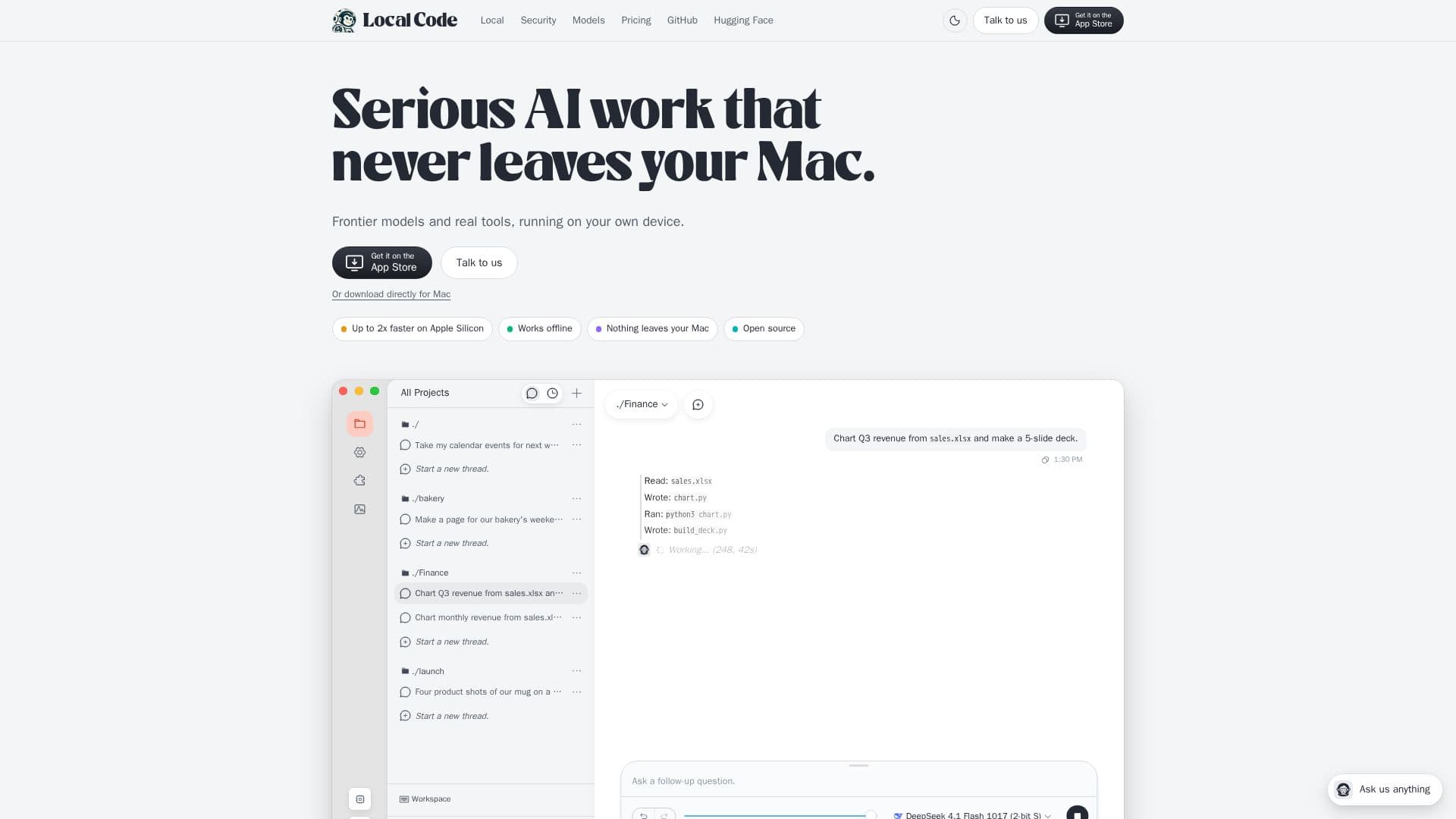
Local Code offers a private AI agent experience specifically for Apple Silicon Macs, allowing users to perform advanced AI tasks without their data ever leaving their device. This focus on privacy and local execution means that all frontier models and tools run directly on the user's Mac, ensuring sensitive information remains secure and within their control. The application is optimized for Apple Silicon, delivering up to twice the speed compared to other setups, and operates fully offline, providing flexibility and independence from internet connectivity.
Read More
The platform is built with security as a core principle, operating within Apple's sandbox environment. This design restricts the agent's access, allowing it to use only shared folders, run Python, Node.js, and shell scripts, while preventing it from reading the entire disk, launching other applications, or using cloud services unless explicitly chosen by the user. Its fully open-source nature allows users to inspect the code on GitHub, verifying its security claims and operational transparency.
Local Code supports various models, sized to fit the user's Mac specifications. It offers recommended configurations, including 4-bit models entirely in memory, and larger models that utilize 32 GB in memory while streaming the rest from the SSD. This SSD streaming capability enables larger models to run efficiently even on Macs with smaller memory capacities. For users who require broader model access, Local Code also provides the option to integrate with cloud compute services, supporting 32 models from providers like ChatGPT, Claude, OpenRouter, and other OpenAI-compatible services, using the user's own API keys without markup.
The agent comes with built-in skills and offers detailed control over its operation, including reasoning effort, thinking budget (up to 65,536 tokens), search provider, work attitude, and memory management. It also displays performance metrics such as prompt processing and token generation speeds. Users can manage model folders, permitted folders, and grant specific permissions for accessing messages, mail, photos, calendar, notes, browser tabs, and running processes, ensuring granular control over its capabilities.
Local Code follows a flexible pricing model. The core application is free to use on the user's hardware. For those opting to use hosted models via cloud compute, top-ups are available starting from $9.99, with no subscription required. Team solutions are also offered, providing custom skills, setup assistance, and on-premise deployment options. The tool is designed for Mac, iPad, and iPhone, making it a versatile solution for private AI agent capabilities across Apple devices.
- CategoryAI Coding Assistants
- Pricing ModelFreemium
- DeploymentOn-device
- PlatformsMac, iPad, iPhone
Local Code: Private AI Agent for Mac's Core Features
Private AI agent for Apple Silicon
Runs frontier models and real tools locally
Operates entirely offline
Up to 2x faster performance on Apple Silicon
Data never leaves your Mac
Open-source for transparency and verification
Sandboxed security within Apple's ecosystem
Supports Python, Node.js, and shell script execution
SSD streaming for large models on smaller Macs
Optional integration with cloud models (ChatGPT, Claude, OpenRouter)
Configurable reasoning effort and thinking budget
Granular permission control for system access (calendar, mail, photos)
Free on-device usage
Cloud credit top-ups for hosted models
Team solutions with custom skills and on-premise options
How to use Local Code: Private AI Agent for Mac?
Download and Install: Obtain the Local Code application directly for your Mac.
Launch Application: Open Local Code on your Apple Silicon device.
Configure Permissions: Grant necessary permissions for folders and system access (e.g., Calendar, Mail) as required for your tasks.
Choose Model: Select a local model sized to your Mac or configure cloud model access with your API keys.
Start a New Thread: Initiate a new conversation or task within the application.
Input Commands: Provide natural language commands or queries for the AI agent to process.
Review Output: Observe the agent's actions and generated results directly on your device.
Local Code: Private AI Agent for Mac's Use Cases
- Calendar Event Summaries
- Menu Page Creation
- Financial Data Analysis
- Revenue Anomaly Detection
- Product Shot Generation
- Local Code Development
- Private Document Processing
- Offline AI Work