
ToolPotion
AI Advisor
Submit a Tool (Free)

Kombai Gallery

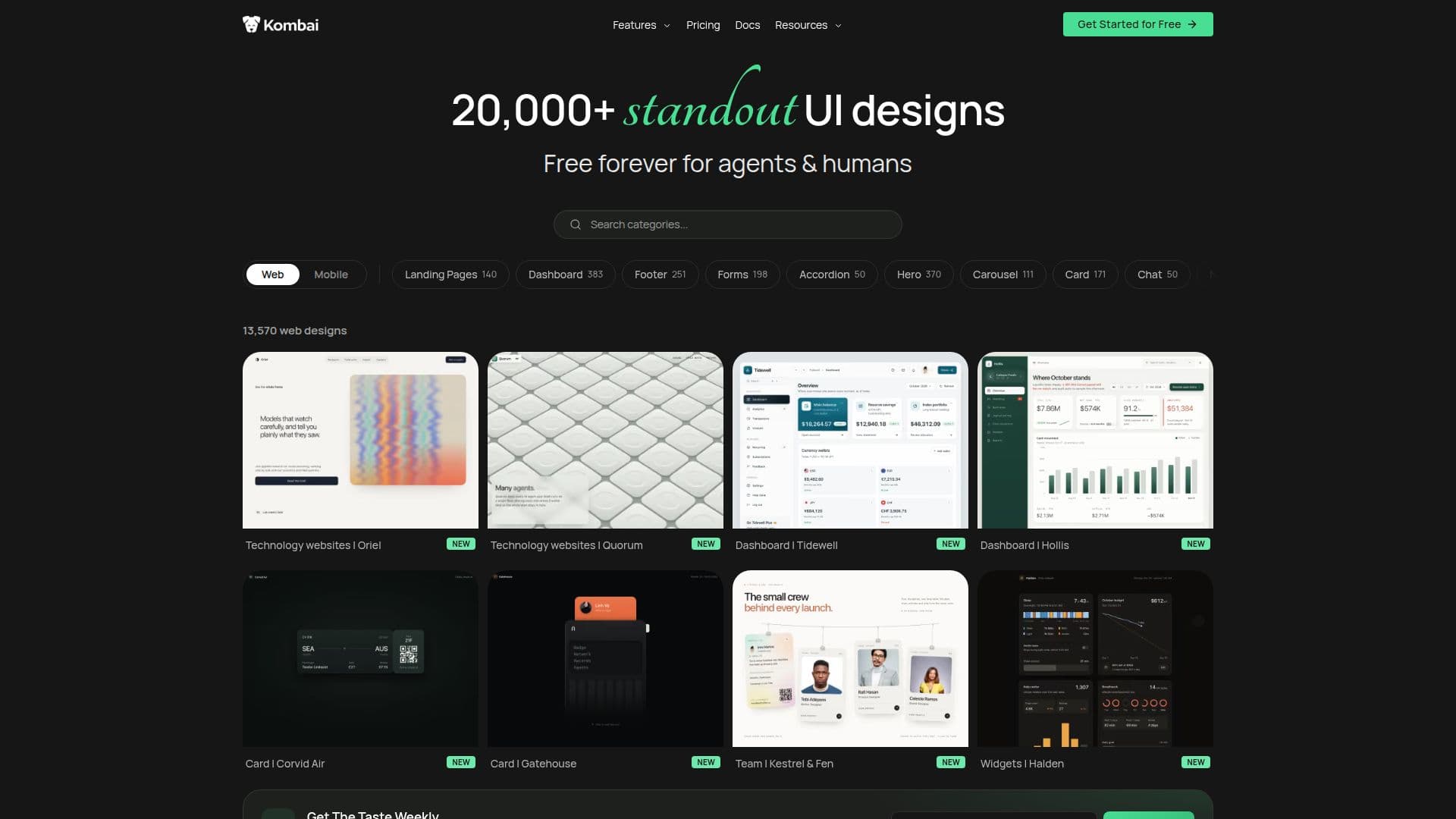
Kombai Gallery is a free inspiration library offering over 20,000 curated web and mobile UI designs. It allows users to browse, preview, and utilize these designs as starting points for projects. The platform supports both human designers and AI coding agents, providing practical UI references and pre-filled prompts for seamless integration into development workflows.

Visit Website
Share
Kombai Gallery screenshot

Kombai Gallery serves as a comprehensive and perpetually free inspiration library, housing more than 20,000 curated UI designs for both web and mobile applications. It caters to a diverse audience, including human designers, developers, founders, and AI coding agents, by providing a rich resource of practical UI examples that can be directly built upon.

Read More

Users can explore a vast collection of interfaces, including complete web interfaces, landing pages, product screens, sections, components, animations, and design systems across numerous categories. For mobile, the gallery offers complete screens, common product flows, sections, components, and UI patterns across a wide range of app categories. The primary goal is to help users find tasteful and relevant references for the exact interfaces they intend to build.

Kombai Gallery distinguishes itself from traditional UI inspiration libraries by going beyond mere discovery. It enables users to preview designs live and then use them as visual context for various AI coding agents like Kombai, Claude Code, Codex, or Cursor. When a design is copied, the platform provides a pre-filled prompt that can be directly pasted into an agent's chatbox, streamlining the design-to-code workflow.

The library is regularly updated with new UIs, ensuring a fresh and expanding collection of pages, components, patterns, animations, and design systems. If a specific UI cannot be found, users can request relevant references, which are typically added within 48 to 72 hours. This commitment to continuous expansion and user support enhances its utility as a dynamic resource.

While Kombai Gallery is free to browse and use, the broader Kombai ecosystem offers paid plans for its AI Design Engineer tool, which allows users to design and code websites and product UIs. These plans, including Free, Pro, Team, and Enterprise, provide varying credit limits, rollover options, and features such as shared credit pools, centralized billing, and dedicated support, catering to individual builders, small teams, and large organizations.

  • CategoryAI UI & UX Design Tools
  • Pricing ModelFreemium
  • DeploymentCloud
  • PlatformsWeb

  • 20,000+ curated web and mobile UI designs

  • Forever free access to the inspiration library

  • Live preview of UI examples

  • Use designs as starting points for projects

  • Compatibility with AI coding agents (e.g., Kombai, Claude Code, Codex, Cursor)

  • Pre-filled prompts for AI agent integration

  • Regular addition of new UIs, components, and design systems

  • Categorized browsing and search by platform and category

  • Support for complete interfaces, landing pages, product screens, and components

  • Support for mobile screens, product flows, sections, and UI patterns

  • Email support for specific UI reference requests

  • Designed for designers, developers, founders, and AI agents

  • Free plan for Kombai AI Design Engineer with monthly credits

  • Paid plans for Kombai AI Design Engineer with higher credit limits and team features

  • SOC2 compliance and no AI training on user data for paid plans

  1. Browse Designs: Explore the gallery by platform (web or mobile) and category to find UI inspirations.

  2. Preview UIs: Open individual examples to preview them live and examine their details.

  3. Select a Design: Choose a UI design that fits your project's needs or serves as a reference.

  4. Utilize with AI Agent: Copy the design to get a pre-filled prompt, then paste it into your preferred AI coding agent's chatbox.

  5. Build or Remix: Use the design as a visual context to build, modify, or remix your product's interface.

  • UI Design Inspiration
  • Frontend Development Reference
  • AI Agent Visual Context
  • Design System Application
  • Web Capture and Remix
  • Design to Code Conversion
  • UI Pattern Exploration
  • Rapid Design Iteration

Kombai Gallery Reviews

Loading...

Popular AI Tools Like Kombai Gallery

DesignCode UI offers a comprehensive design system with hundreds of Figma and Framer UI components and templates. Meticulously organized with variables, variants, and adaptive…

AI UI & UX Design Tools
View Tool

Offers a comprehensive design system with hundreds of Figma and Framer UI components and templates. Meticulously organized with variables, variants, and adaptive…DesignCode UI offers a comprehensive design system with hundreds of Figma and Framer UI components and templates. Meticulously organized with variables, variants, and adaptive…

AI UI & UX Design Tools
See the Top 250 AI Apps

Uizard

AI Apps

Uizard is an AI-powered UI/UX design tool that turns text prompts, screenshots, and hand-drawn sketches into editable mockups and multi-screen prototypes, built to be as easy to…

AI UI & UX Design Tools

Ranked #6 in AI UI & UX Design Tools

View Tool

AI Apps

AI-powered UI/UX design tool that turns text prompts, screenshots, and hand-drawn sketches into editable mockups and multi-screen prototypes, built to be as easy to…Uizard is an AI-powered UI/UX design tool that turns text prompts, screenshots, and hand-drawn sketches into editable mockups and multi-screen prototypes, built to be as easy to…

FeaturedAI UI & UX Design Tools
Ranked #6 in AI UI & UX Design Tools

Frame0

AI Apps

Frame0 is a cross-platform, offline-first wireframing tool that creates hand-drawn style wireframes and prototypes for modern apps, with a rich component library, an AI agent, and…

AI UI & UX Design Tools

Ranked #42 in AI UI & UX Design Tools

View Tool

AI Apps

Cross-platform, offline-first wireframing tool that creates hand-drawn style wireframes and prototypes for modern apps, with a rich component library, an AI agent, and…Frame0 is a cross-platform, offline-first wireframing tool that creates hand-drawn style wireframes and prototypes for modern apps, with a rich component library, an AI agent, and…

AI UI & UX Design Tools
Ranked #42 in AI UI & UX Design Tools

UX Pilot

AI Apps

UX Pilot is an AI-powered UX/UI design platform that turns ideas, sketches, or PRDs into wireframes, high-fidelity screens, complete user flows, and production-ready code, with…

AI UI & UX Design ToolsMarketing & Creative Agencies

Ranked #9 in AI UI & UX Design Tools

View Tool

AI Apps

AI-powered UX/UI design platform that turns ideas, sketches, or PRDs into wireframes, high-fidelity screens, complete user flows, and production-ready code, with…UX Pilot is an AI-powered UX/UI design platform that turns ideas, sketches, or PRDs into wireframes, high-fidelity screens, complete user flows, and production-ready code, with…

FeaturedAI UI & UX Design ToolsMarketing & Creative Agencies
Ranked #9 in AI UI & UX Design Tools

AIDesigner

AI Apps

AIDesigner is an AI-powered design platform that transforms simple prompts into high-quality website UI, mobile app screens, logos, brand kits, images, and marketing graphics. It…

AI UI & UX Design ToolsMarketing & Creative Agencies

Ranked #40 in AI UI & UX Design Tools

View Tool

AI Apps

AI-powered design platform that transforms simple prompts into high-quality website UI, mobile app screens, logos, brand kits, images, and marketing graphics. It…AIDesigner is an AI-powered design platform that transforms simple prompts into high-quality website UI, mobile app screens, logos, brand kits, images, and marketing graphics. It…

AI UI & UX Design ToolsMarketing & Creative Agencies
Ranked #40 in AI UI & UX Design Tools

Flowstep

AI Apps

Flowstep is an AI design tool that generates production-ready UI from text prompts on an infinite canvas. Iterate via chat, copy to Figma, export React code, or connect an IDE via…

AI UI & UX Design Tools

Ranked #24 in AI UI & UX Design Tools

View Tool

AI Apps

AI design tool that generates production-ready UI from text prompts on an infinite canvas. Iterate via chat, copy to Figma, export React code, or connect an IDE via…Flowstep is an AI design tool that generates production-ready UI from text prompts on an infinite canvas. Iterate via chat, copy to Figma, export React code, or connect an IDE via…

FeaturedAI UI & UX Design Tools
Ranked #24 in AI UI & UX Design Tools

Graphical

AI Apps

Graphical is a tool for creating visual themes, customizing components, and building interfaces with coding agents. It offers a complete design language, including colors,…

AI UI & UX Design Tools

Ranked #131 for UX Designers

View Tool

AI Apps

Tool for creating visual themes, customizing components, and building interfaces with coding agents. It offers a complete design language, including colors,…Graphical is a tool for creating visual themes, customizing components, and building interfaces with coding agents. It offers a complete design language, including colors,…

AI UI & UX Design Tools
Ranked #131 for UX Designers

Components AI is an open-source design tool enabling creatives to build custom generative design systems without code. Create responsive components, pages, and sites, style them…

AI UI & UX Design Tools

Ranked #98 for UX Designers

View Tool

Open-source design tool enabling creatives to build custom generative design systems without code. Create responsive components, pages, and sites, style them…Components AI is an open-source design tool enabling creatives to build custom generative design systems without code. Create responsive components, pages, and sites, style them…

AI UI & UX Design Tools
Ranked #98 for UX Designers
1 of 8