
ToolPotion
AI Advisor
Submit a Tool (Free)

Kokonut UI

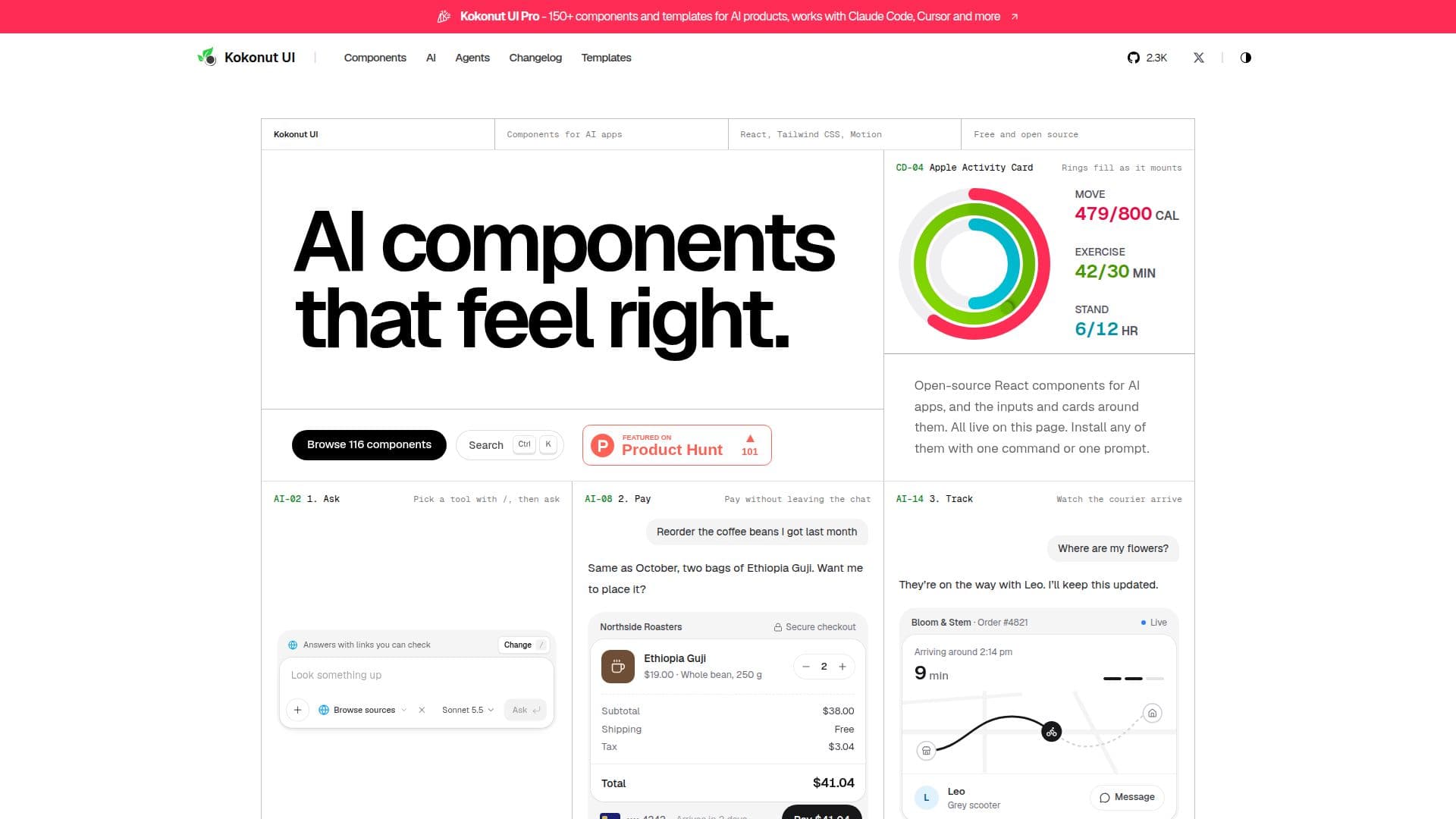
Kokonut UI is a free, open-source library offering React components specifically designed for AI applications. Built with Tailwind CSS, Motion, and shadcn/ui, these components can be installed with a single command or prompt. It provides a comprehensive collection of UI elements, from AI chat inputs to text effects, enabling developers to create intuitive and interactive AI experiences.

Visit Website
Share
Kokonut UI screenshot

Kokonut UI is a comprehensive, free, and open-source library of React components tailored for building AI applications. It leverages popular modern web development tools such as Tailwind CSS for styling, Motion for animations, and shadcn/ui for foundational UI primitives. The library aims to provide developers with ready-to-use, interactive components that enhance the user experience of AI products.

Read More

The library is divided into several categories, including dedicated AI components, general UI components, backgrounds, cards, navigation, inputs, media, feedback, texts, and buttons. The AI components cover essential elements for AI interactions, such as AI Input Selectors, AI Input Search, AI State Loading, AI Tool Calls, AI Checkout, AI Order Status, AI Autocomplete, and AI Model Selectors. These components are designed to handle common AI product interactions like tool calls in replies, autocomplete suggestions, and model selection interfaces.

Beyond AI-specific elements, Kokonut UI also offers a wide array of standard UI components like Detent Dials, Slide to Confirm buttons, Wheel Pickers, and Liquid Gauges, which can be used to build the surrounding screens and interfaces of AI applications. Each component is designed to be easily installed as a single file directly into a developer's repository, giving them full ownership and control over the source code.

Installation is streamlined through the shadcn/ui registry, allowing components and their dependencies to be added with a single command using the shadcn CLI. For an even more integrated workflow, Kokonut UI supports AI agents like Claude Code, Cursor, VS Code, and Codex, which can find and install components based on natural language prompts. This agent-first approach simplifies the development process, enabling developers to quickly integrate complex UI elements into their projects.

Kokonut UI also offers a Pro version, which includes an expanded catalog of over 150 components, 20+ categories, and 6 website templates. The Pro version is a paid, one-time purchase that grants lifetime access to all current and future releases, along with email support. It extends the component offerings to include agent runs, tool approvals, evals, composers, and full app screens, catering to teams building more advanced AI products. Both the free and Pro versions emphasize developer ownership of the source code and compatibility with React and Next.js projects.

  • CategoryAI UI & UX Design Tools
  • Pricing ModelFreemium
  • DeploymentCloud
  • PlatformsWeb

  • Free and Open-Source React Components

  • Built with Tailwind CSS, Motion, and shadcn/ui

  • AI-Specific Components (e.g., AI Input Search, AI Tool Calls, AI Model Selector)

  • General UI Components (e.g., Inputs, Cards, Buttons, Navigation)

  • One-Command Installation via shadcn CLI

  • AI Agent Integration for Component Installation (Claude Code, Cursor, VS Code, Codex)

  • Source Code Ownership for Installed Components

  • Live Demos for All Components

  • Comprehensive Component Categories (AI, Backgrounds, Cards, Inputs, etc.)

  • Supports React and Next.js Projects

  • Kokonut UI Pro: 150+ Components, 20+ Categories, 6 Templates (Paid)

  • Kokonut UI Pro: Lifetime Access with One-Time Payment

  • Kokonut UI Pro: Team Licenses Available

  • Kokonut UI Pro: Agent-First UI Components for AI Products

  1. Add Registry: Create a components.json file in your project and add the @kokonutui namespace to configure the shadcn CLI.

  2. Install Utilities: Ensure Tailwind CSS v4 is set up and add the cn helper for component styling.

  3. Add Component: Use the shadcn CLI with `npx shadcn@latest add @kokonutui/<component-name>` to install a specific component and its dependencies.

  4. Use Component: Import and use the installed component in your React or Next.js project like any other component.

  5. Integrate AI Agent (Optional): Connect your editor to the shadcn MCP server and add a rules file to enable AI agents to find and install components via prompts.

  • Building AI Chat Interfaces
  • Creating AI Tool Call UIs
  • Developing AI Order Status Displays
  • Designing AI Checkout Flows
  • Implementing AI Model Selection
  • Visualizing AI Agent States
  • Enhancing React Applications
  • Rapid Prototyping AI Products
  • Customizing UI Elements
  • Building Agent-First UI

Kokonut UI Reviews

Loading...

Popular AI Tools Like Kokonut UI

Graphical

AI Apps

Graphical is a tool for creating visual themes, customizing components, and building interfaces with coding agents. It offers a complete design language, including colors,…

AI UI & UX Design Tools

Ranked #77 in AI UI & UX Design Tools

View Tool

AI Apps

Tool for creating visual themes, customizing components, and building interfaces with coding agents. It offers a complete design language, including colors,…Graphical is a tool for creating visual themes, customizing components, and building interfaces with coding agents. It offers a complete design language, including colors,…

AI UI & UX Design Tools
Ranked #77 in AI UI & UX Design Tools

kickstartDS is an open-source UI toolkit and starter kit for design systems. It offers a comprehensive component and pattern library, enabling efficient creation of consistent,…

AI UI & UX Design Tools
View Tool

Open-source UI toolkit and starter kit for design systems. It offers a comprehensive component and pattern library, enabling efficient creation of consistent,…kickstartDS is an open-source UI toolkit and starter kit for design systems. It offers a comprehensive component and pattern library, enabling efficient creation of consistent,…

AI UI & UX Design Tools
See the Top 250 AI Apps

Chai UI

AI Apps

Chai UI is a design system tailored for AI model interactions. It offers intelligent components built on Material Design 3, styled by your design tokens, and compatible with…

AI UI & UX Design Tools

Ranked #99 in AI UI & UX Design Tools

View Tool

AI Apps

Design system tailored for AI model interactions. It offers intelligent components built on Material Design 3, styled by your design tokens, and compatible with…Chai UI is a design system tailored for AI model interactions. It offers intelligent components built on Material Design 3, styled by your design tokens, and compatible with…

AI UI & UX Design Tools
Ranked #99 in AI UI & UX Design Tools

Kombai Gallery is a free inspiration library offering over 20,000 curated web and mobile UI designs. It allows users to browse, preview, and utilize these designs as starting…

AI UI & UX Design Tools

Ranked #45 in AI UI & UX Design Tools

View Tool

Free inspiration library offering over 20,000 curated web and mobile UI designs. It allows users to browse, preview, and utilize these designs as starting…Kombai Gallery is a free inspiration library offering over 20,000 curated web and mobile UI designs. It allows users to browse, preview, and utilize these designs as starting…

AI UI & UX Design Tools
Ranked #45 in AI UI & UX Design Tools

Tailwind Builder is an AI-powered visual tool for creating Tailwind CSS websites and UIs. It offers AI generation from prompts, a vast template library, and a drag-and-drop…

AI UI & UX Design Tools

Ranked #56 in AI UI & UX Design Tools

View Tool

AI-powered visual tool for creating Tailwind CSS websites and UIs. It offers AI generation from prompts, a vast template library, and a drag-and-drop…Tailwind Builder is an AI-powered visual tool for creating Tailwind CSS websites and UIs. It offers AI generation from prompts, a vast template library, and a drag-and-drop…

AI UI & UX Design Tools
Ranked #56 in AI UI & UX Design Tools

Cosmic Design offers a comprehensive front-end UI solution tailored for the AI era. It includes a UI protocol, parsing and rendering SDK, and a UI component library, facilitating…

AI UI & UX Design Tools

Ranked #36 in AI UI & UX Design Tools

View Tool

Offers a comprehensive front-end UI solution tailored for the AI era. It includes a UI protocol, parsing and rendering SDK, and a UI component library, facilitating…Cosmic Design offers a comprehensive front-end UI solution tailored for the AI era. It includes a UI protocol, parsing and rendering SDK, and a UI component library, facilitating…

AI UI & UX Design Tools
Ranked #36 in AI UI & UX Design Tools

Frame0

AI Apps

Frame0 is a cross-platform, offline-first wireframing tool that creates hand-drawn style wireframes and prototypes for modern apps, with a rich component library, an AI agent, and…

AI UI & UX Design Tools

Ranked #40 in AI UI & UX Design Tools

View Tool

AI Apps

Cross-platform, offline-first wireframing tool that creates hand-drawn style wireframes and prototypes for modern apps, with a rich component library, an AI agent, and…Frame0 is a cross-platform, offline-first wireframing tool that creates hand-drawn style wireframes and prototypes for modern apps, with a rich component library, an AI agent, and…

AI UI & UX Design Tools
Ranked #40 in AI UI & UX Design Tools

LanguageGUI is an open-source Figma UI Kit and design system designed to give Large Language Models (LLMs) the flexibility to format text outputs into richer graphical user…

AI UI & UX Design Tools
View Tool

Open-source Figma UI Kit and design system designed to give Large Language Models (LLMs) the flexibility to format text outputs into richer graphical user…LanguageGUI is an open-source Figma UI Kit and design system designed to give Large Language Models (LLMs) the flexibility to format text outputs into richer graphical user…

AI UI & UX Design Tools
See the Top 250 AI Apps
1 of 8