Description
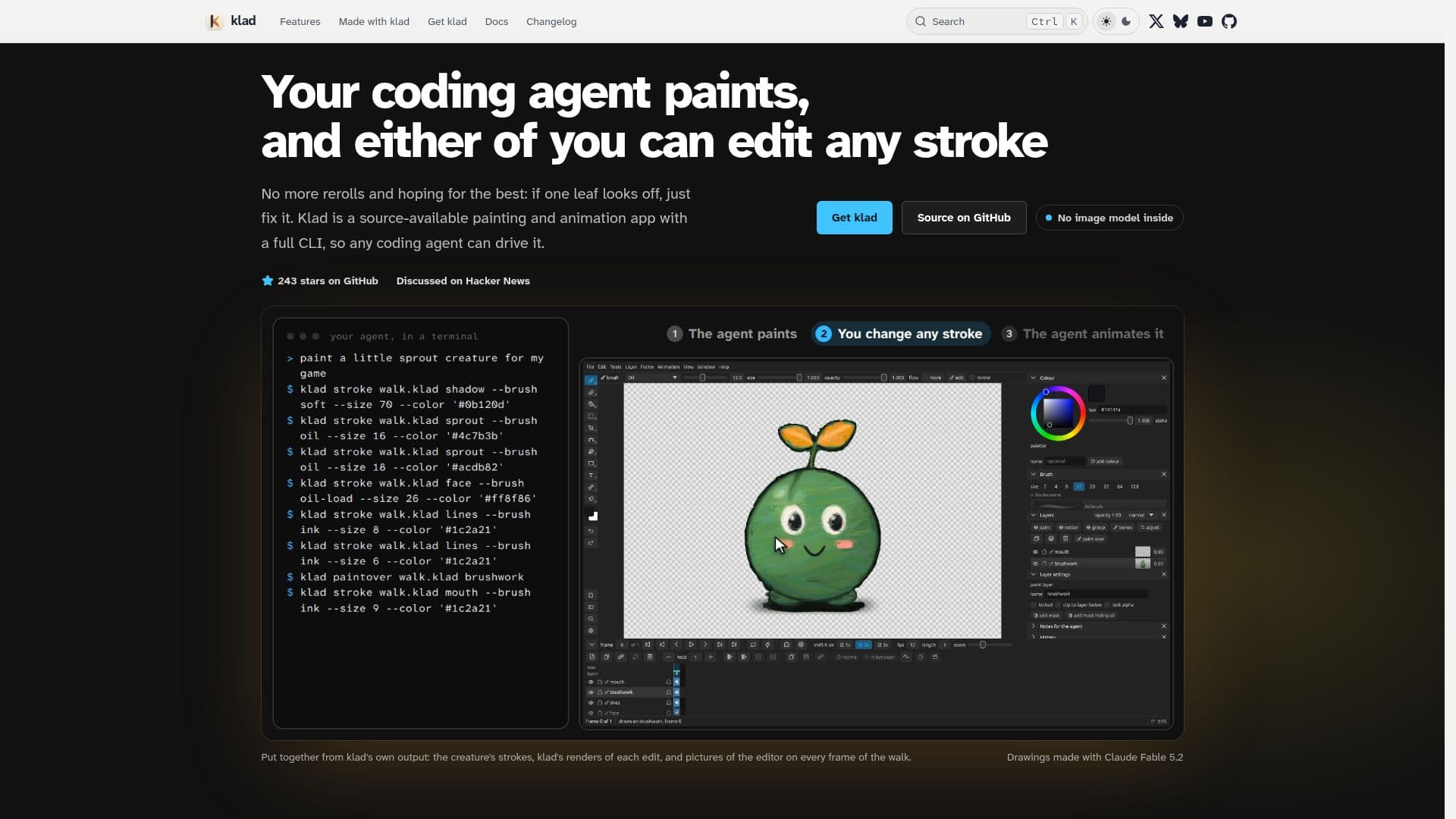
klad is a unique 2D painting and animation application designed to integrate seamlessly with coding agents, offering a novel approach to digital art creation. Unlike traditional image generators that produce static pixels, klad allows agents to paint stroke by stroke, with each stroke retaining its path, pressure, brush, and color. This ensures that every element, including smudges and wet paint effects, remains fully editable long after it's created, eliminating the need for constant rerolls and enabling precise, non-destructive alterations.
Read More
The application features a comprehensive command-line interface (CLI), making it accessible for coding agents such as Claude Code or Codex to drive the painting process. Users can instruct their agents in plain language, and the strokes appear in the editor almost instantly. The collaborative workflow allows users to point to specific areas on the canvas with notes or selections, which the agent can interpret. Furthermore, users can take over and repaint any part of the drawing by hand, with the agent's subsequent passes starting from the user's modified version. This blend of agent-driven and manual editing fosters a highly flexible and iterative creative process.
Beyond agent interaction, klad functions as a full-fledged painting and animation app for manual use. It includes 23 brushes, layers, a timeline with onion skinning, and bones for rigging characters. It supports creating game assets like props, characters, and clips that can be directly exported to Godot as sprite frames. The application also handles vectors and type, making it suitable for posters, covers, and cards with real, editable text, gradients, and shapes. For pixel art enthusiasts, klad offers a dedicated pixel layer that maintains sharp pixels at any zoom level, supports palette changes, and helps identify stray pixels or banding.
For developers, klad treats drawings as data, stored as a folder of plain files that can be managed with Git. This means edits to different layers can merge, and a commit history shows precisely what changed. Every action in the editor has a corresponding klad command, allowing scripts or agents to work on the same drawing files. The file format is openly documented under the MIT license, enabling app and engine developers to read and write klad drawings within their own tools. klad is free to build from source for personal use and for companies earning under 500,000 euros annually, with paid builds offering signed installers and one-click setup for desktop agents.
- CategoryAI Graphic Design Tools
- Pricing ModelFreemium
- DeploymentSelf-hosted
- PlatformsWindows, macOS, Linux
klad's Core Features
Agent-driven painting via command line
Editable strokes with path, pressure, brush, and color retention
Non-destructive editing, including smudges and wet paint
Manual painting and animation tools
23 customizable brushes
Layers and timeline with onion skin
Bones for character rigging
Vector and type tools for illustrations
Dedicated pixel art layer with palette control
Export to Godot as sprite frames, rigs, and scenes
Drawing files stored as plain files for Git integration
Command-line interface for all editor actions
Openly documented file format under MIT license
Collaborative workflow between user and agent
No image generator or LLM model inside
How to use klad?
Install klad: Build the application from source for free, or join the waitlist for paid, pre-built installers.
Instruct your agent: Tell your coding agent (e.g., Claude Code, Codex) in plain words what you want to draw.
Review and refine: See the agent's strokes appear in the editor and provide feedback by pinning notes or selecting areas.
Take manual control: Repaint or adjust any stroke by hand, whether created by you or the agent.
Animate and export: Use the timeline, onion skin, and bones to animate characters, then export assets directly to game engines like Godot.
Manage with Git: Store your drawings as plain files in Git to track changes, merge edits, and collaborate on projects.
klad's Use Cases
- Agent-Assisted Digital Painting
- Game Asset Creation
- Pixel Art Production
- Vector Illustration
- 2D Animation
- Collaborative Art Projects
- Non-Destructive Editing
- Custom Art Generation
- Educational Art Tool