Description
IMALI Commander is a robust solution designed to facilitate safe and controlled file access for various AI assistants. It addresses the critical need for secure data interaction, allowing AI tools to operate effectively without compromising data integrity or privacy. The platform offers distinct editions tailored to different user requirements and AI assistant types.
Read More
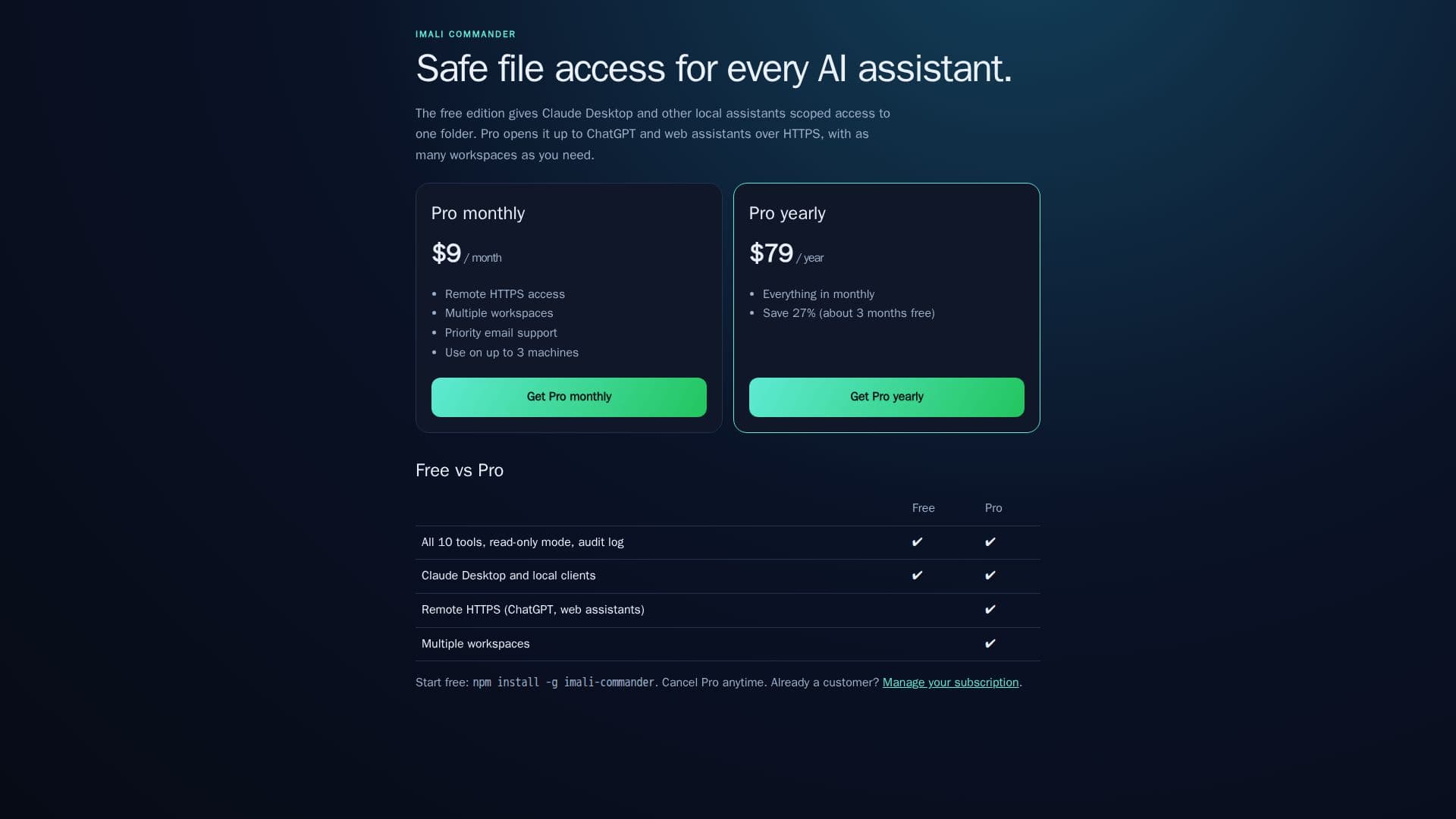
The free edition of IMALI Commander is specifically engineered for local AI clients, such as Claude Desktop. This version grants scoped access to a single designated folder, ensuring that local assistants can retrieve necessary files while maintaining a controlled environment. This is ideal for users who primarily work with AI tools installed directly on their machines and require a straightforward, secure method for file interaction.
For users who leverage web-based AI assistants like ChatGPT, the Pro edition of IMALI Commander provides enhanced capabilities. The Pro version extends access over HTTPS, enabling remote AI tools to securely connect and interact with your files. A key feature of the Pro edition is the support for multiple workspaces, which allows users to organize and manage different sets of files for various AI projects or assistants. This flexibility is crucial for professionals and teams working on diverse AI applications.
Both the Free and Pro editions include access to all 10 tools offered by IMALI Commander, along with a read-only mode for added data protection and an audit log for tracking file access and activity. The Pro edition further distinguishes itself with priority email support, ensuring that users receive timely assistance for any issues or queries. Additionally, the Pro license can be used on up to three machines, providing versatility for individuals who work across multiple devices.
IMALI Commander emphasizes ease of use and flexibility. Users can start with the free version by installing it via npm, and Pro subscriptions can be managed and canceled at any time. This approach makes IMALI Commander an accessible and scalable solution for integrating secure file access into AI workflows, catering to both individual developers and professional teams.
- CategoryAI Knowledge Management
- Pricing ModelFreemium
- DeploymentLocal (npm)
- PlatformsWeb
IMALI Commander's Core Features
Safe file access for AI assistants
Supports Claude Desktop and other local AI clients
Remote HTTPS access for ChatGPT and web assistants
Multiple workspaces for organizing files
Priority email support for Pro users
Use on up to 3 machines with Pro license
Includes all 10 tools in both Free and Pro editions
Read-only mode for enhanced security
Audit log for tracking file access
Free edition available for local use
Pro monthly and yearly subscription options
Cancel Pro subscription anytime
Easy installation via npm
How to use IMALI Commander?
Install IMALI Commander: Run `npm install -g imali-commander` to set up the tool.
Configure Free Edition: Grant scoped access to one folder for local AI assistants like Claude Desktop.
Upgrade to Pro: Subscribe to Pro monthly or yearly for remote HTTPS access and advanced features.
Set Up Workspaces: Create multiple workspaces to organize files for different web AI assistants.
Connect AI Assistants: Link your AI tools (e.g., ChatGPT) to IMALI Commander for secure file interaction.
Manage Subscriptions: Access your account to manage or cancel your Pro subscription at any time.
IMALI Commander's Use Cases
- Secure AI File Access
- Local AI Integration
- Web AI Data Connection
- Multiple Project Management
- Data Audit and Compliance
- Cross-Device AI Workflows