
ToolPotion
AI Advisor
Submit a Tool (Free)

Voyager

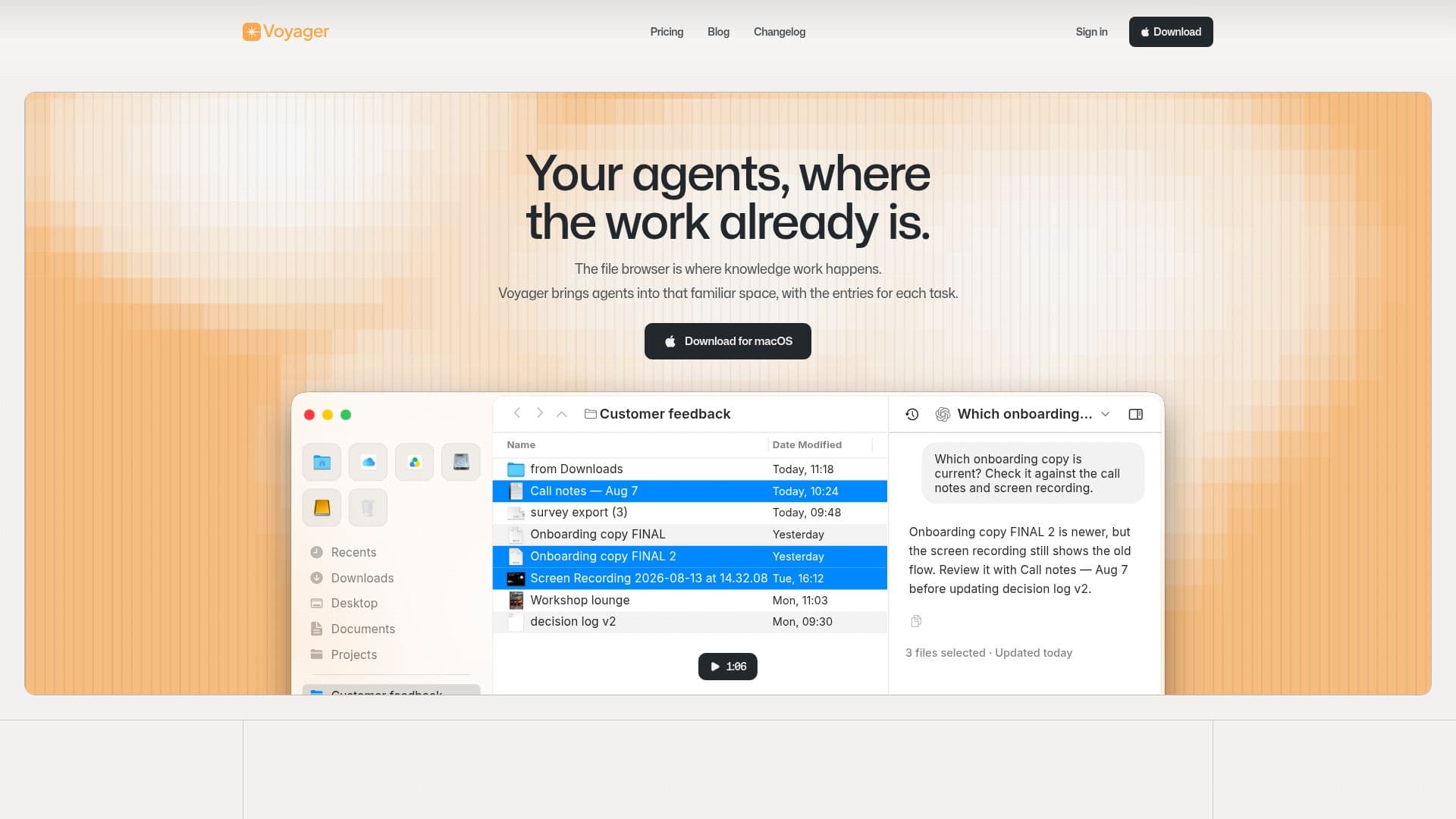
Voyager is a macOS file manager that integrates AI agents directly into your workflow. It allows users to browse files, compose and save searches, and chat with AI agents using selected file context. This tool enhances knowledge work by bringing AI capabilities into a familiar file browser interface, supporting existing AI subscriptions and maintaining data privacy on your Mac.

Visit Website
Share
Voyager screenshot
Voyager screenshot

Voyager is a macOS application designed to enhance knowledge work by integrating AI agents directly into a familiar file management environment. It functions as a file browser, allowing users to manage folders and files in a layout similar to what they already know. The core innovation lies in its ability to bring AI agents into this space, enabling users to interact with AI using the context of their local files.

Read More

The application supports essential file management features, including browsing files, composing and saving complex searches that can be reopened at any time, and keeping multiple work items open in tabs for easy switching, pinning, and restoring. A key capability is the "Chatting with agents" feature, which allows users to engage with AI agents that are pre-informed by the selected files, streamlining tasks that require contextual understanding of documents.

Voyager operates on macOS 26 or later and does not require a dedicated Voyager account for its core file management features. An account is only necessary for specific account-related actions or purchases. Importantly, Voyager connects with existing AI services and agent harnesses that users already subscribe to, meaning users pay their AI subscription costs directly to those providers. This design emphasizes user choice and data privacy, as files remain on the user's Mac, and no cloud upload is required for core functionality. The platform explicitly states no data sales or ad profiling.

Voyager offers a tiered pricing model: a Free version for basic file management and AI agent use, a Plus tier at $7/month (or a one-time $200 for early adopters) which adds external app connections and S3-compatible storage mounting, and a Pro tier at $14/month for more external app connections and cloud storage/sync. It is designed to work alongside Finder, allowing users to continue using their preferred file system while benefiting from Voyager's enhanced features.

  • CategoryAI Document & PDF Tools
  • Pricing ModelFreemium
  • DeploymentDesktop app
  • PlatformsmacOS

  • macOS File Browser: Manage files and folders in a familiar interface.

  • AI Agent Integration: Chat with AI agents using selected file context.

  • Saved Searches: Compose and reopen complex searches with combined rules.

  • Tabbed Browsing: Keep multiple work items open in switchable, pinnable, and restorable tabs.

  • Local File Processing: Works natively with files on your Mac, no cloud upload required.

  • Bring Your Own AI: Connects with existing AI service subscriptions.

  • Data Privacy: No data sales or ad profiling; personal information is not used for advertising.

  • Finder Compatibility: Can be used alongside macOS Finder.

  • Free Tier Available: Basic file management and AI agent features without cost.

  • External App Connections: Connect to other applications (Plus and Pro tiers).

  • S3-Compatible Storage Mounting: Access cloud storage (Plus and Pro tiers).

  • Cloud Storage & Sync: Store and synchronize work in the cloud (Pro tier).

  1. Install Voyager: Download and install the Voyager application on macOS 26 or later.

  2. Browse Files: Navigate your Mac's file system using Voyager's familiar interface.

  3. Compose Searches: Create and save custom searches to quickly find specific files.

  4. Connect AI Agents: Link your existing AI service subscriptions to Voyager.

  5. Chat with Agents: Select files and initiate a chat with an AI agent for contextual assistance.

  6. Manage Tabs: Utilize tabs to keep multiple tasks and file views organized and accessible.

  • Contextual AI Assistance
  • Enhanced File Management
  • Knowledge Work Acceleration
  • Secure AI Interaction
  • Streamlined Research
  • Multi-Tasking with Files

From Voyager

Voyager Reviews

Loading...

Popular AI Tools Like Voyager

The Drive AI is an AI-powered document management system that automatically organizes, searches, and creates files using plain English. It integrates with your existing sources,…

AI Document & PDF Tools

Ranked #109 in AI Document & PDF Tools

View Tool

AI-powered document management system that automatically organizes, searches, and creates files using plain English. It integrates with your existing sources,…The Drive AI is an AI-powered document management system that automatically organizes, searches, and creates files using plain English. It integrates with your existing sources,…

AI Document & PDF Tools
Ranked #109 in AI Document & PDF Tools

ChattyDocs is an AI assistant that lets you converse with your documents, PDFs, files, and websites. Upload content, set dataset properties, and get AI-generated replies with…

AI Document & PDF Tools

Ranked #205 in AI Document & PDF Tools

View Tool

AI assistant that lets you converse with your documents, PDFs, files, and websites. Upload content, set dataset properties, and get AI-generated replies with…ChattyDocs is an AI assistant that lets you converse with your documents, PDFs, files, and websites. Upload content, set dataset properties, and get AI-generated replies with…

AI Document & PDF Tools
Ranked #205 in AI Document & PDF Tools

AI Drive

AI Apps

AI Drive is a secure AI document workspace that lets professionals chat with, search, summarize, and extract data from large document collections. It is built for legal,…

AI Document & PDF ToolsEducation & E-learning

Ranked #25 for Chatting with PDF documents

View Tool

AI Apps

Secure AI document workspace that lets professionals chat with, search, summarize, and extract data from large document collections. It is built for legal,…AI Drive is a secure AI document workspace that lets professionals chat with, search, summarize, and extract data from large document collections. It is built for legal,…

AI Document & PDF ToolsEducation & E-learning
Ranked #25 for Chatting with PDF documents

elDoc is an all-in-one GenAI platform for document processing, offering AI chat, agents, workflow automation, and secure file management. It transforms unstructured data into…

AI Document & PDF ToolsFinance & Banking

Ranked #83 for Chatting with PDF documents

View Tool

FilePower AI is an intelligent document assistant designed for PDFs, PPTs, and Docs. It offers advanced chat capabilities to answer questions, summarize content, and translate…

AI Document & PDF Tools

Ranked #91 for Chatting with PDF documents

View Tool

Intelligent document assistant designed for PDFs, PPTs, and Docs. It offers advanced chat capabilities to answer questions, summarize content, and translate…FilePower AI is an intelligent document assistant designed for PDFs, PPTs, and Docs. It offers advanced chat capabilities to answer questions, summarize content, and translate…

AI Document & PDF Tools
Ranked #91 for Chatting with PDF documents

DocumentCloud is a comprehensive platform for managing primary source documents, widely used by newsrooms globally. It allows users to upload, analyze, and embed documents,…

AI Document & PDF ToolsPublishing & Journalism
View Tool

Comprehensive platform for managing primary source documents, widely used by newsrooms globally. It allows users to upload, analyze, and embed documents,…DocumentCloud is a comprehensive platform for managing primary source documents, widely used by newsrooms globally. It allows users to upload, analyze, and embed documents,…

AI Document & PDF ToolsPublishing & Journalism
See the Top 250 AI Apps

Humata AI

AI Apps

Humata is an AI agent that transforms your documents into an intelligent knowledge base. It enables instant analysis, insights, and answers by allowing you to ask questions across…

AI Document & PDF Tools

Ranked #10 in AI Summarizers

View Tool

AI Apps

AI agent that transforms your documents into an intelligent knowledge base. It enables instant analysis, insights, and answers by allowing you to ask questions across…Humata is an AI agent that transforms your documents into an intelligent knowledge base. It enables instant analysis, insights, and answers by allowing you to ask questions across…

FeaturedAI Document & PDF Tools
Ranked #10 in AI Summarizers

ChatDOC

AI Apps

ChatDOC allows you to interact with PDF documents using AI. Upload your files to ask questions, get summaries, and extract key information instantly. It supports various file…

AI Document & PDF Tools

Ranked #77 for Teachers

View Tool

AI Apps

Allows you to interact with PDF documents using AI. Upload your files to ask questions, get summaries, and extract key information instantly. It supports various file…ChatDOC allows you to interact with PDF documents using AI. Upload your files to ask questions, get summaries, and extract key information instantly. It supports various file…

FeaturedAI Document & PDF Tools
Ranked #77 for Teachers
1 of 8