Description
ChattyDocs empowers users to interact with their data through an intuitive AI assistant. The platform allows you to upload various file types, including PDFs and text files, directly from your device. Alternatively, you can provide a website link, and ChattyDocs will automatically download and parse the content to create a searchable dataset.
Read More
Users have full control over their datasets, with the ability to add or delete documents at any time. The indexing process happens in the background, ensuring you don't waste time waiting for data to be processed. ChattyDocs also provides usage tracking, allowing you to monitor data consumption against your subscription quota.
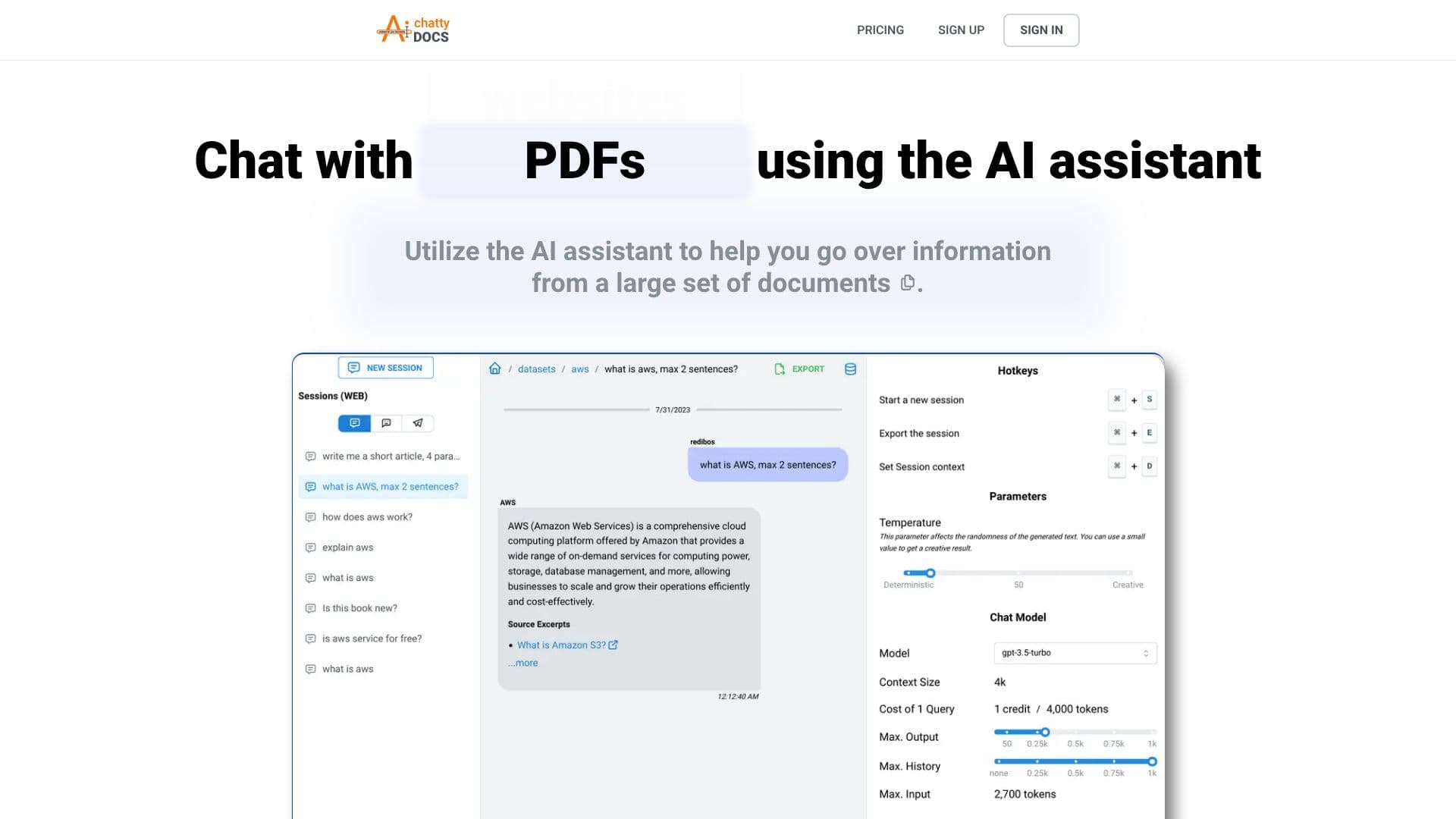
Customization is a key aspect of ChattyDocs. You can select different chat models and adjust context sizes to suit your needs. The AI's creativity can be fine-tuned using a temperature setting, allowing for more deterministic or imaginative responses. System prompts enable you to define the AI's personality, behavior, and response language.
Sharing your knowledge is made simple with the ability to create public datasets that can be shared via a link, fostering collaboration among ChattyDocs users. When you query your dataset, responses are accompanied by relevant sources, including document names and page numbers for uploaded files, or direct links for websites.
ChattyDocs supports persistent chat sessions, allowing you to continue conversations where you left off. You can also provide a chat context that is included in every query, enhancing the AI's understanding. Preview chat sessions across different sources, including embedded web sources and Telegram, on desktop and mobile devices.
The platform is designed for individuals and teams looking to extract insights from large volumes of information efficiently. Whether you are a researcher, student, or business professional, ChattyDocs offers a powerful way to engage with your documents and data.
- CategoryAI Document & PDF Tools
- Pricing ModelFreemium
- DeploymentCloud
- PlatformsDesktop, Mobile, Telegram
ChattyDocs AI Assistant's Core Features
Upload files from device (PDF, text)
Upload data from website links
Add or delete documents from datasets anytime
Background data indexing
Usage tracking for files and websites
Select chat models and context sizes
Control AI creativity with temperature setting
Define AI personality and behavior with system prompts
Share datasets publicly via link
Responses include relevant sources (document name, page number, URL)
Export all questions and answers
Utilize multiple persisted chat sessions
Provide chat context for queries
Preview chat sessions on desktop, mobile, and Telegram
How to use ChattyDocs AI Assistant?
Prepare Dataset: Upload files or website links.
Set Properties: Choose chat model, context size, and AI personality.
Chat with Data: Ask questions and receive AI-generated answers with sources.
Manage Sessions: Utilize persisted chat sessions and provide context.
Share Knowledge: Create and share public datasets.
Export Data: Export your chat history and answers.
ChattyDocs AI Assistant's Use Cases
- Document Analysis
- Website Data Extraction
- Knowledge Management
- Research Assistance
- Content Summarization
- Collaborative Knowledge Sharing