ToolPotion
AI Advisor
Submit a Tool (Free)

SecureMind

SecureMind is an open-source, privacy-aware AI workspace designed for managing models, knowledge, memory, cost, and sensitive data risk. It allows users to run AI models on their own computers or in their AWS accounts, providing flexibility and control over data. The platform supports various AI providers and offers features for team collaboration and cost management.

Visit Website
Share
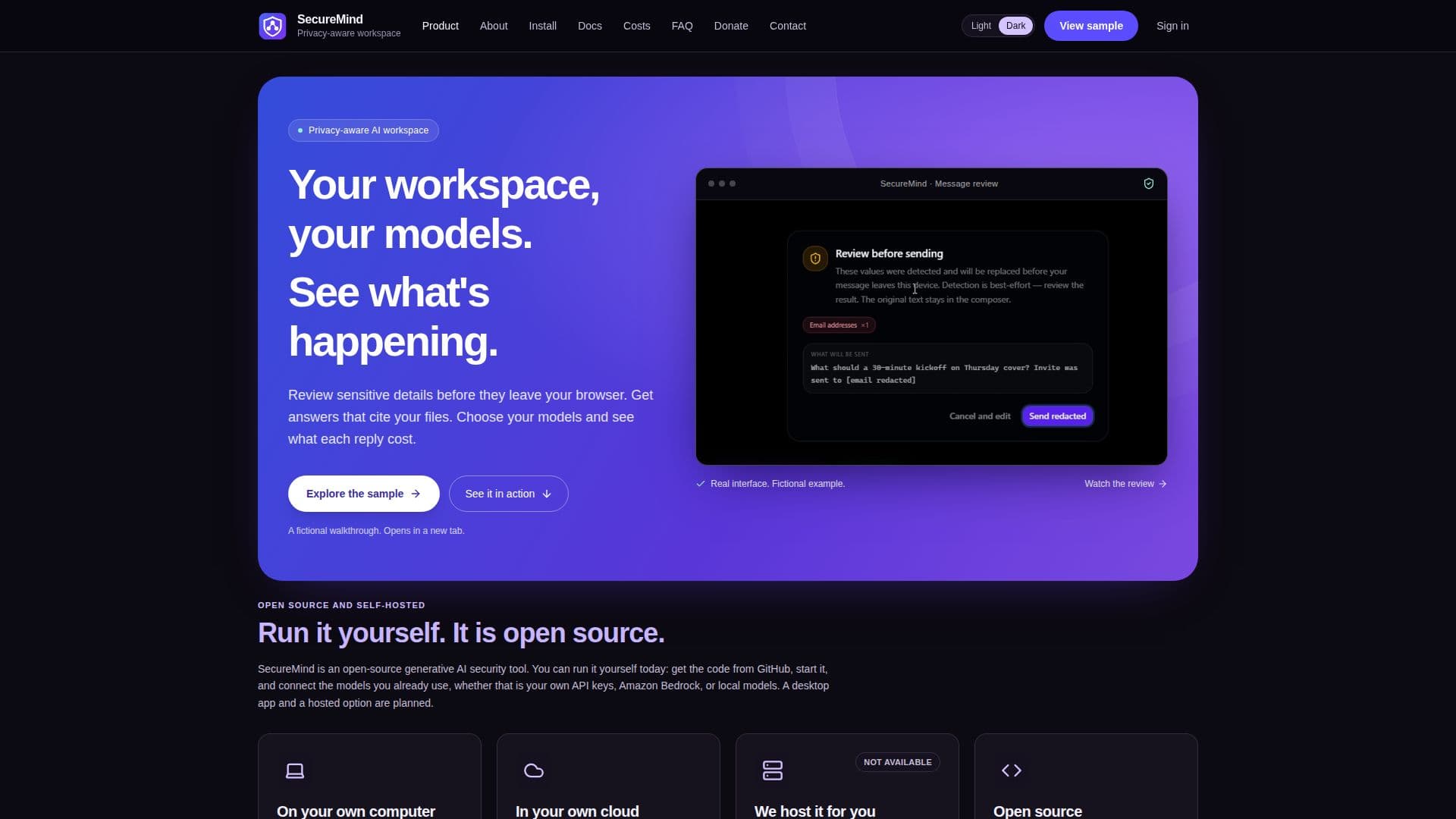
SecureMind screenshot

SecureMind offers a privacy-aware AI workspace that empowers users to manage their AI models, knowledge bases, memory, operational costs, and sensitive data risks. This open-source tool provides significant flexibility, allowing deployment on a user's own computer via Docker or within their AWS account. This self-hosting capability ensures that users maintain full control over their data and AI operations, addressing privacy concerns by keeping sensitive information within their controlled environments.

Read More

The platform is designed to be highly adaptable, supporting integration with various AI model providers such as Anthropic, OpenAI, Gemini, Groq, Grok (xAI), and Amazon Bedrock. Users can also leverage local models through Ollama, providing options for different performance and cost requirements. SecureMind is free to use under the Apache 2.0 license, with users paying their chosen model providers directly for usage, and AWS for infrastructure if hosted in the cloud. This model emphasizes transparency in costs and avoids vendor lock-in.

Key capabilities include sensitive data detection and redaction, ensuring that private information is not inadvertently sent to AI models. Chat messages are checked in the browser, and attached files are processed to replace sensitive values before storage or submission. The system also features robust knowledge management, allowing users to add various file types like plain text, Markdown, code, JSON, CSV, PDFs, Word documents, Excel spreadsheets, and images. Images are processed by vision-capable models to extract text, enhancing the knowledge base.

For teams, SecureMind supports multiple users with distinct roles: Owner, Admins, and Members. Admins can manage users, models, API keys, and set monthly cost caps, while Members can chat and use the knowledge base. The platform provides detailed cost estimates for each AI reply and a comprehensive cost view, helping teams monitor and control spending. Deployment options include a quick Docker setup for local use and an AWS deployment for broader accessibility and team collaboration, with planned desktop apps and a hosted service for future availability.

  • CategoryAI Knowledge Management
  • Pricing ModelFree and Open Source
  • DeploymentSelf-Hosted (Docker, AWS)
  • PlatformsWeb

  • Privacy-aware AI workspace

  • Sensitive data detection and redaction

  • Self-hosting on Docker or AWS

  • Open-source under Apache 2.0 license

  • Support for multiple AI model providers (Anthropic, OpenAI, Gemini, Groq, Grok, Amazon Bedrock, Ollama)

  • Knowledge management with diverse file type support (text, Markdown, code, JSON, CSV, PDF, DOCX, XLSX, PNG, JPEG, WebP, GIF)

  • Cost management and estimation per reply

  • Team collaboration with Owner, Admin, and Member roles

  • Monthly cost caps per user

  • Encrypted API key storage

  • Model selection based on message tiering

  • Optional two-step sign-in for AWS installs

  • Adaptable screen layouts for various device widths

  • GitHub Actions integration for AWS deployment

  • Local models for Docker installs

  1. Get the Code: Clone the SecureMind repository from GitHub to your local machine.

  2. Start SecureMind (Docker): Use `docker compose up --build` to build the app, database, sign-in, and local models.

  3. Open SecureMind: Access the application in your browser at `http://localhost:3000`.

  4. Create Owner Account: Enter an email, password, and the one-time setup code (found in Docker logs or Terraform output for AWS) to create the first Owner account.

  5. Connect a Model: Sign in, go to Settings → Models, and paste an API key from a supported provider (Groq, Anthropic, OpenAI, Gemini, Grok) or connect Amazon Bedrock.

  6. Run First Build (AWS): For AWS deployments, start the first build via AWS Amplify console or CLI after configuring resources with Terraform.

  7. Sign In and Chat: Once a model is connected, send your first chat message to begin using SecureMind.

  • Secure AI Chat
  • Knowledge Base Creation
  • Team Collaboration
  • Cost Monitoring & Control
  • Private AI Deployment
  • Sensitive Data Handling
  • AI Model Management
  • Document Analysis

SecureMind Reviews

Loading...

Popular AI Tools Like SecureMind

Jan offers an open-source alternative to ChatGPT, allowing users to run AI models locally or connect to cloud-based services like GPT and Claude. It emphasizes privacy and user…

AI Chatbots

Ranked #30 in AI Chatbots

View Tool

Offers an open-source alternative to ChatGPT, allowing users to run AI models locally or connect to cloud-based services like GPT and Claude. It emphasizes privacy and user…Jan offers an open-source alternative to ChatGPT, allowing users to run AI models locally or connect to cloud-based services like GPT and Claude. It emphasizes privacy and user…

FeaturedAI Chatbots
Ranked #30 in AI Chatbots

Bolt

AI Apps

Bolt is a desktop AI assistant that ensures data privacy by keeping your data on your device and masking secrets before they reach any cloud model. It is available for free on…

AI Personal Assistants

Ranked #82 in AI Privacy Tools

View Tool

AI Apps

Desktop AI assistant that ensures data privacy by keeping your data on your device and masking secrets before they reach any cloud model. It is available for free on…Bolt is a desktop AI assistant that ensures data privacy by keeping your data on your device and masking secrets before they reach any cloud model. It is available for free on…

AI Personal Assistants
Ranked #82 in AI Privacy Tools

Prem

AI Apps

Prem offers sovereign, private, and personalized AI solutions. It enables secure access to frontier AI models with verifiable end-to-end encryption, ensuring data privacy and…

AI Privacy ToolsHealthcare & Life Sciences

Ranked #20 in AI Privacy Tools

View Tool

AI Apps

Offers sovereign, private, and personalized AI solutions. It enables secure access to frontier AI models with verifiable end-to-end encryption, ensuring data privacy and…Prem offers sovereign, private, and personalized AI solutions. It enables secure access to frontier AI models with verifiable end-to-end encryption, ensuring data privacy and…

AI Privacy ToolsHealthcare & Life Sciences
Ranked #20 in AI Privacy Tools

PrivOS

AI Apps

PrivOS is an AI Operating System designed for enterprises, enabling seamless collaboration between teams and AI agents. It offers self-hosted or private cloud deployment,…

AI Project Management

Ranked #134 in AI Project Management

View Tool

AI Apps

AI Operating System designed for enterprises, enabling seamless collaboration between teams and AI agents. It offers self-hosted or private cloud deployment,…PrivOS is an AI Operating System designed for enterprises, enabling seamless collaboration between teams and AI agents. It offers self-hosted or private cloud deployment,…

AI Project Management
Ranked #134 in AI Project Management

AnyModelBot is an open-source, locally runnable AI assistant that operates on your personal computer or server. It acts as an alternative to cloud-based AI agents, keeping your…

AI Personal Assistants

Ranked #191 in AI Chatbots

View Tool

Open-source, locally runnable AI assistant that operates on your personal computer or server. It acts as an alternative to cloud-based AI agents, keeping your…AnyModelBot is an open-source, locally runnable AI assistant that operates on your personal computer or server. It acts as an alternative to cloud-based AI agents, keeping your…

AI Personal Assistants
Ranked #191 in AI Chatbots

EZ-AI provides a secure, private AI environment for organizations, powered by Google Vertex AI. It enables tailored AI model training with your data, seamless integration into…

Machine Learning Platforms
View Tool

Provides a secure, private AI environment for organizations, powered by Google Vertex AI. It enables tailored AI model training with your data, seamless integration into…EZ-AI provides a secure, private AI environment for organizations, powered by Google Vertex AI. It enables tailored AI model training with your data, seamless integration into…

Machine Learning Platforms
See the Top 250 AI Apps

OpenBot

AI Apps

OpenBot is a free desktop application that allows users to run AI agents on their own computer. It supports various AI models like ChatGPT, Claude, Gemini, and Grok, and keeps all…

AI Agent Builders

Ranked #50 in AI Privacy Tools

View Tool

AI Apps

Free desktop application that allows users to run AI agents on their own computer. It supports various AI models like ChatGPT, Claude, Gemini, and Grok, and keeps all…OpenBot is a free desktop application that allows users to run AI agents on their own computer. It supports various AI models like ChatGPT, Claude, Gemini, and Grok, and keeps all…

AI Agent Builders
Ranked #50 in AI Privacy Tools

UsageGuard

AI Apps

UsageGuard is an enterprise-ready AI development observability platform. It provides a unified API for accessing multiple AI models, offering built-in safeguards, moderation, cost…

MLOps & Model Deployment

Ranked #196 in MLOps & Model Deployment

View Tool

AI Apps

Enterprise-ready AI development observability platform. It provides a unified API for accessing multiple AI models, offering built-in safeguards, moderation, cost…UsageGuard is an enterprise-ready AI development observability platform. It provides a unified API for accessing multiple AI models, offering built-in safeguards, moderation, cost…

MLOps & Model Deployment
Ranked #196 in MLOps & Model Deployment
1 of 8