
ToolPotion
AI Advisor
Submit a Tool (Free)

Genjutsu

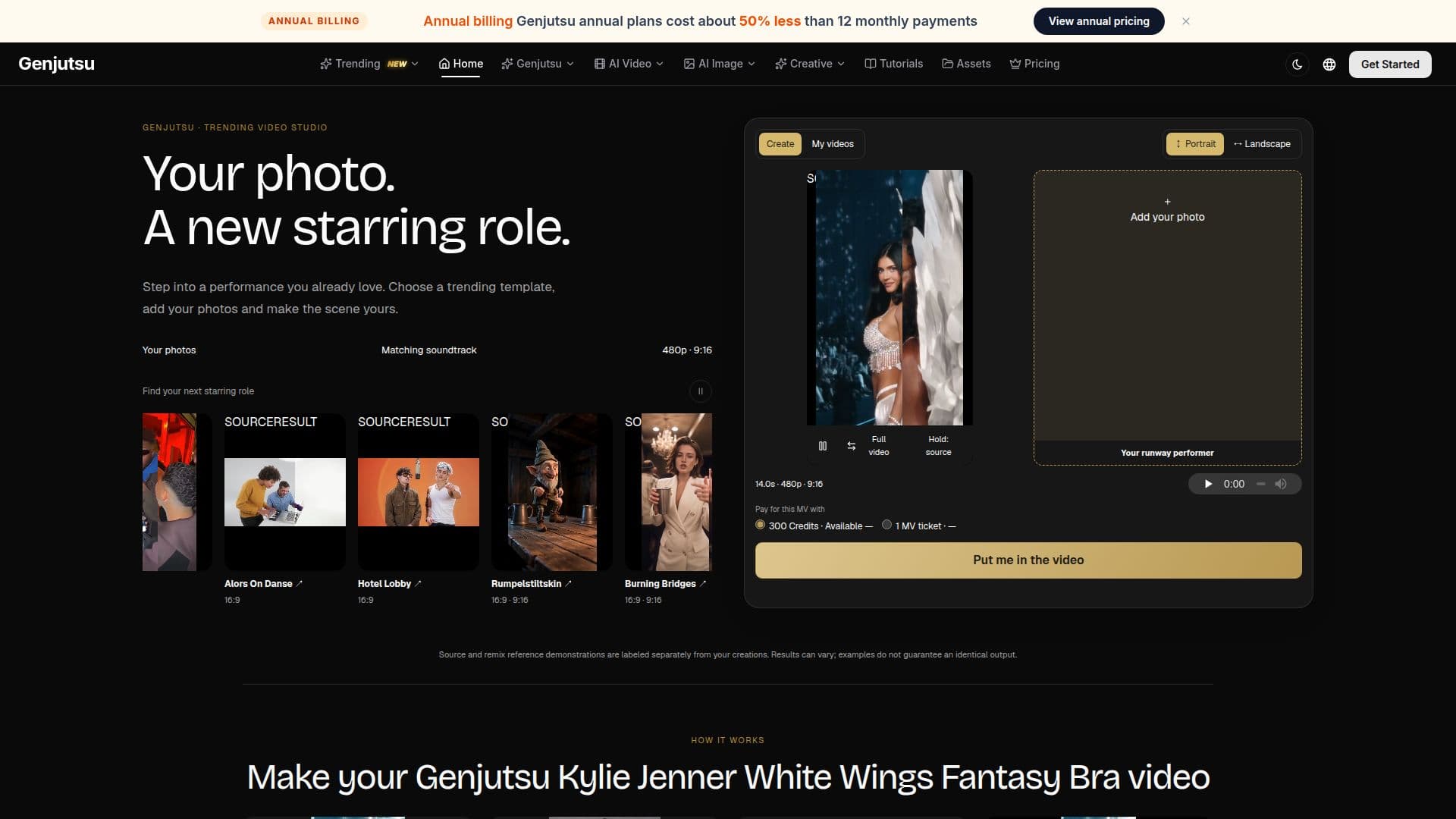
Genjutsu is a web-based AI video studio specializing in motion transfer and template remixes. Users can start with a performance template, such as runway walks or dances, then add their own reference photos to recast the scene with new characters, outfits, or subjects. The platform guides the process from source selection to final video comparison and download.

Visit Website
Share
Genjutsu screenshot
Genjutsu screenshot

Genjutsu is an AI video studio that enables users to create new video versions by transferring motion from existing templates to their own reference images. The platform focuses on motion transfer, object swap, and restyling, allowing for character, outfit, and scene replacement while preserving the original motion and camera work.

Read More

The workflow begins with selecting a trending video template, which can range from runway walks and dance performances to music moments and object shots. Users then upload their own reference photos, ensuring one clear image for each selected role. For vehicle templates, an object reference is used. The studio supports various output resolutions including 480p, 720p, and 1080p, with source-guided durations up to 30 seconds.

Genjutsu offers three primary models: Motion Transfer, Object Swap, and Restyle. Motion Transfer reinterprets a performance with new characters and environments. Object Swap targets specific elements like characters, outfits, or products within the original shot. Restyle applies a selected visual style to the entire video, with optional character images. Users can also provide prompts up to 10,000 characters for precise changes, although all models accept an empty prompt.

The platform operates on a freemium model, where browsing and preparing inputs are free. Video generation costs are based on credits, with a complete MV template video costing 300 Credits. Pricing for Motion Transfer and Object Swap is quoted by source duration and resolution, while Restyle uses a conservative budget of twice that rate plus 100 credits per character image. If generation fails, the original reservation is returned.

Genjutsu also provides specialized tools like the AI Product Video Generator and AI Product Photo Generator. The AI Product Video Generator, using the MiniMax H3 Max Turbo model, helps animate real product references with restrained motion, lighting, and optional ending frames, ideal for short product scenes. The AI Product Photo Generator, utilizing GPT Image 2, assists in building focused product galleries for SKU listings and e-commerce catalogs, allowing users to plan square cards, different views, and emphasize specific details from real product references. These tools ensure consistency in product imagery across various catalog needs.

  • CategoryVideo Generation & Editing
  • Pricing ModelFreemium
  • DeploymentCloud
  • PlatformsWeb

  • AI Video Motion Transfer

  • Object, Character, and Outfit Replacement

  • Video Restyling with Visual Styles

  • Multiple Output Resolutions (480p, 720p, 1080p)

  • Source-Guided Video Duration (up to 30 seconds)

  • Reusable Source Video and Image Workflows

  • AI Product Video Generation (MiniMax H3 Max Turbo)

  • AI Product Photo Generation for SKU Galleries (GPT Image 2)

  • E-commerce Product Photo Catalog Generation

  • Credit-based Generation System

  • Freemium Access for Browsing and Input Preparation

  • Prompt-based Video and Image Customization

  • Refunds for Failed Generations

  • Comparison of Source and Remix Examples

  1. Select a Template: Choose from trending video templates like runway, dance, music, or object shots.

  2. Add References: Upload one clear image for each selected role or object in the template.

  3. Choose Format and Create: Select an available output format and resolution (480p, 720p, 1080p), then submit for generation.

  4. Review and Download: Compare the new result with the source video, then save and share your creation.

  5. Generate Product Videos: Upload a product image, describe a focused movement, and generate a short product scene.

  6. Build Product Photo Galleries: Upload a product view, plan the desired angle, and create a focused product photograph for SKU galleries.

  • Recasting Video Performances
  • Object Replacement in Videos
  • Video Style Transfer
  • Product Video Creation
  • SKU Gallery Photography
  • E-commerce Catalog Imagery
  • Visualizing Product Concepts
  • Creative Content Remixing

From Genjutsu

Part of Genjutsu AI Video Editor.

Genjutsu Reviews

Loading...

Popular AI Tools Like Genjutsu

Genjutsu AI allows users to restyle videos by transferring motion into new scenes, styles, or objects without altering the original subject. Upload a clip, write a prompt, and…

AI Video Generators
View Tool

Allows users to restyle videos by transferring motion into new scenes, styles, or objects without altering the original subject. Upload a clip, write a prompt, and…Genjutsu AI allows users to restyle videos by transferring motion into new scenes, styles, or objects without altering the original subject. Upload a clip, write a prompt, and…

AI Video Generators
See the Top 250 AI Apps

Genjutsu AI is a video-to-video generator that allows users to recreate viral videos using their own photos. It employs the Higgsfield Genjutsu model, offering motion transfer and…

AI Video Generators

Ranked #17 for Swapping faces in photos

View Tool

Video-to-video generator that allows users to recreate viral videos using their own photos. It employs the Higgsfield Genjutsu model, offering motion transfer and…Genjutsu AI is a video-to-video generator that allows users to recreate viral videos using their own photos. It employs the Higgsfield Genjutsu model, offering motion transfer and…

AI Video Generators
Ranked #17 for Swapping faces in photos

Motion Transfer AI animates character photos using reference videos. Users can select motion templates, adjust settings, and preview results. The tool supports various models and…

AI Animation Tools

Ranked #71 in AI Animation Tools

View Tool

Animates character photos using reference videos. Users can select motion templates, adjust settings, and preview results. The tool supports various models and…Motion Transfer AI animates character photos using reference videos. Users can select motion templates, adjust settings, and preview results. The tool supports various models and…

AI Animation Tools
Ranked #71 in AI Animation Tools

Genjutsu AI Video allows creators to transform a single filmed clip into multiple variants without reshooting. It maintains the original motion while enabling changes in set,…

AI Video Editors
View Tool

Allows creators to transform a single filmed clip into multiple variants without reshooting. It maintains the original motion while enabling changes in set,…Genjutsu AI Video allows creators to transform a single filmed clip into multiple variants without reshooting. It maintains the original motion while enabling changes in set,…

AI Video Editors
See the Top 250 AI Apps

Genjutsu AI Video Editor allows users to transform video clips by swapping characters, outfits, or scenes while maintaining camera motion. It offers a Pro mode using Higgsfield AI…

AI Video Editors
View Tool

Allows users to transform video clips by swapping characters, outfits, or scenes while maintaining camera motion. It offers a Pro mode using Higgsfield AI…Genjutsu AI Video Editor allows users to transform video clips by swapping characters, outfits, or scenes while maintaining camera motion. It offers a Pro mode using Higgsfield AI…

AI Video Editors
See the Top 250 AI Apps

Video Swap

AI Apps

Video Swap is an all-in-one online AI video studio for face swapping, character replacement, AI motion control, and video style transfer. It helps creators, marketers, and teams…

AI Video EditorsMarketing & Creative Agencies

Ranked #24 for Swapping faces in photos

View Tool

AI Apps

All-in-one online AI video studio for face swapping, character replacement, AI motion control, and video style transfer. It helps creators, marketers, and teams…Video Swap is an all-in-one online AI video studio for face swapping, character replacement, AI motion control, and video style transfer. It helps creators, marketers, and teams…

AI Video EditorsMarketing & Creative Agencies
Ranked #24 for Swapping faces in photos

Reference to Video is an AI tool that generates videos from image, video, and audio references. It allows users to control characters, products, motion, camera direction, style,…

AI Video GeneratorsMarketing & Creative Agencies
View Tool

AI tool that generates videos from image, video, and audio references. It allows users to control characters, products, motion, camera direction, style,…Reference to Video is an AI tool that generates videos from image, video, and audio references. It allows users to control characters, products, motion, camera direction, style,…

AI Video GeneratorsMarketing & Creative Agencies
See the Top 250 AI Apps

AI Dance Generator allows users to create dance videos by combining photos with motion references. Upload a photo, select a dance template or use your own video, and generate a…

AI Video Generators
View Tool

Allows users to create dance videos by combining photos with motion references. Upload a photo, select a dance template or use your own video, and generate a…AI Dance Generator allows users to create dance videos by combining photos with motion references. Upload a photo, select a dance template or use your own video, and generate a…

AI Video Generators
See the Top 250 AI Apps
1 of 8